


🚀 Step into the future of VR — no wires, no hassle, just pure immersion!
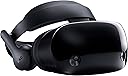
The Samsung HMD Odyssey is a Windows Mixed Reality headset featuring premium AKG headphones with 360° spatial sound, dual wireless controllers, and high-resolution OLED displays (1440x1600 per eye) at 90Hz. It boasts an integrated noise-cancelling microphone array and requires no external sensors, enabling quick, hassle-free setup. Designed for professionals and gamers seeking immersive VR with seamless portability and crystal-clear communication.
| ASIN | B078K2S122 |
| Additional Features | Microphone Included |
| Age Range Description | Adult |
| Battery Average Life | 15 Hours |
| Battery Capacity | 15 Hours |
| Best Sellers Rank | #96,779 in Video Games ( See Top 100 in Video Games ) #1,893 in PC Game Headsets |
| Brand | Samsung |
| Built-In Media | Controller; HMD Odyssey; cable |
| Color | Clear |
| Compatible Devices | Notebook Odyssey |
| Connectivity Technology | Wireless |
| Connector Type | wireless |
| Controller Type | Windows |
| Customer Reviews | 4.0 out of 5 stars 269 Reviews |
| Display Resolution Maximum | 1440x1600 per eye |
| Display Type | OLED/AMOLED |
| Field Of View | 360 Degrees |
| Global Trade Identification Number | 00887276246826 |
| Included Components | Controller; HMD Odyssey; cable |
| Item Weight | 1.42 Pounds |
| Manufacturer | Samsung HI |
| Model Number | XE800ZAA-HC1US |
| Operating System | Windows |
| Platform | Windows, Windows 10 |
| Refresh Rate | 90 |
| Screen Size | 3.5 Inches |
| Sensor Technology | Gyroscope, Accelerometer |
| Special Feature | Microphone Included |
| Specific Uses For Product | Microphone |
| UPC | 887276246826 |
J**G
This has replaced my Oculus Rift.
There are a lot of little differences between this device and its two primary competitors, the Vive and the Rift; but there’s one feature that makes this device SO much better than either of those: the quickness and ease of setup. Even if every other component was merely equal or slightly worse, this would still be my preferred device because the ease with which you can just start playing is so much higher that within two weeks I had already put more hours into this set than I did with the two years I owned the Rift. * NO EXTERNAL ANYTHING. No lighthouses, no camera sensors, nothing you have to take with you and set up before you can plug yourself in (except the computer obviously!). The internal cameras register your environment amazingly well, even in a room with just a single lamp in the middle of the night. That means that if you are going to be most frequently using your device in a general living space where cables strewn about and black cameras/boxes in the corners would be unsightly and/or inconvenient to set up and take down each time, this is the perfect alternative. And for taking your VR experiences on the go, there is simply no contest. I really can’t emphasize enough how important this one difference in implementation is for my ability to use and enjoy VR. Oculus and Valve are going to have to play catchup in this regard. Alright, on to the other stuff: Comfort: largely subjective, but I prefer this over my Rift. While the Rift technically is lighter, this device distributes the majority of the weight onto the stiff crown component which means that most of the weight is across your head while the faceplate itself puts on much less pressure. The Rift largely stays put by being squeezed against your face which can get uncomfortable and can make it more wobbly (since all of the weight is at the front). Also, the padding on this is much softer than the foam on the Rift, which means that it’s better able to be fully flush against your face. But people have varied opinions on this overall. (Side note: since it’s fake leather instead of foam, it doesn’t absorb liquid, which means that it’s easy to use an alcohol-free antibacterial wipe on it after each play through to keep it clean unlike the Rift and Vive which will suck up the sweat. Eww.) Screens/lenses: it has a higher resolution than the Rift and Vive (it’s equal to the Vive Pro), and that’s critical for some games with small text (Elite: Dangerous benefits hugely). People say it has a higher “sweet spot” (the range of clarity from the center of the lens) but I can’t strongly tell. Also, people say it has fewer “god rays” than the Rift, but I have noticed an equally strong “reverse god rays” which takes the lights from the fringe and diffuses it toward the center which can be equally annoying. It has a hardware-adjustable IPD setting (inter-pupillary distance, basically how spread apart your eyes are), and that elevates it above the rest of the Windows Mixed Devices family (the Rift and Vive both have it too). Audio: it has built-in headphones which once again makes it easy to just get in and play. They’re not amazing, I wish the bass were stronger, but I’m definitely satisfied. The Rift has this too, the Vive does not (without buying the separate deluxe head strap), and none of the other Windows Mixed Devices do either. Controllers: this is the one significant downside. There is no getting around the fact that the Rift’s controllers reign supreme in pretty much every way over every other VR device. These are larger, less ergonomic, and have a limited tracking range comparatively. THAT SAID, I do find them quite comfortable to use, the tracking (which disappears about the same place as your vision does) has rarely affected my ability to enjoy my experience in any meaningful way, and the inclusion of both a trackpad and a joystick allows easier interoperability with Vive or Rift optimized games and is really just great to use. They could definitely be better, but unless you know what you’re missing out on and are really looking for the flaws, you’ll be satisfied. Buying this device was a risk for me, but I took it because I was frustrated by how much the Rift was gathering dust because my inability to give it a designated and permanent play space meant that the hassle of setting up the cameras each time I wanted to play was just not worth it. That problem is completely gone now, and I can go from “I want to play” to “I’m playing!” In under 30 seconds with no setup whatsoever. That is absolutely critical and makes this hands-down the best VR device available today. I’m so glad I tried this out, and I strongly recommend giving it a go yourself!
S**Y
Great for sim racing!
I have tried Oculus Rift, Pimax and now this. For simulator racing this is the new headset for me. I have been using Oculus for around 6 months now and wanted something with less screen door effect. The Pimax was my first choice since it was 4k. I waited months for that to arrive and was over it in 10 min. The ghost effect with the Pimax is horrid. It's beyond usable at all and would make me so sick. Of course it's a lot clearer in one small area. It also doesn't have a very large sweet spot at all. The Oculus Rift has a huge screen door effect. That is minimized to some degree with super sampling. Also the contrast is somewhat dull. When I heard the new HTC Vive Pro was using the Samsung monitors I had to read more about this HMD headset. From everything I read and heard this was a good headset with not much to do for setup. My son has also been going crazy lately over virtual reality games and I thought this would be worth a try to maybe place on the simulator rig. That way he would be able to play with the Oculus and I would have something of my own to use as well. I thought I would give this a try and not disappointed at all. With Amazon you are able to return things fairly easy so I thought I would give it a shot. The packaging is not best looking like Oculus, but much better than the Pimax. You get a decent looking box with things well enough protected to keep them safe. It's not as well packaged as Oculus, and feels like less thought went into that portion. That is okay though but with the idea of it being more portable you would think they would do something better. Either way you buy it for the experience. It took me a few minutes to set it up. Windows sees it right away and you have to have Bluetooth for the controllers to work. That was the only part that took a bit because I had to enable Bluetooth first. Then the controllers getting synced up was the most time spent setting it up. The button is at the bottom of the battery tray which the directions didn't really stand out on where that was at first. It's funny when they don't write something but give you a large picture and your lost... Either way after that I had to download one program from steam (windows mixed reality) and it was ready to go. My first impression was about the contrast. It's so much more than Oculus ever was. It's like going from something that has a gray gradient over it to clarity. This could be from the screen door or the monitors themselves. Either way its a huge difference in contrast and no real screen door to be seen. The game I mostly play is Project Cars 2 and it was so much more clear. Setting this up also cleared out my graphic settings. Everything was set back to low and it was still more clear than anything I have seen in Oculus. The only down side to this is that I see more jittering, sort of like ghosting but its jumpy. I don't know if that's frames dropping or something else. I have played with super sampling and graphic settings from low to high and it always seems to be about the same amount. The real irony is that loading the performance tools it looks like the cpu is the bottleneck and not my card. I didn't see my card ever go into the red which seems odd. I set the super sampling up to 1.4 and it seemed to smooth out which is the opposite of what I would expect. Either way I also tried Assetto Corsa and it was so clear and smooth. It was more smooth than Project Cars 2. I have not played this for the room experience so I can't say that I would like the controllers or not. I can't say what it will play and won't of Oculus games either. It seems steam has a way to get games to run but who knows from game to game if you will have the support you would get with Oculus and HTC. If you are looking for the best seated experience however this might be it for sim racing. Just for reference I have a 1080 ti graphic card, 16 gigs of ram, i7 7700 cpu and running a samsung 960 evo ssd. I was thinking of loading project cars 2 onto the ssd and see if that helps for the jumpiness. I have it minimized now but would like it a little smoother.
P**T
Best Value in VR today (from a Vive developer)
CONCLUSION: The Odyssey isn't perfect, but it is the best value in virtual reality today. The Vive Pro likely will become the technical leader in fixed rooms, but hard to say it'll be worth the wait or premium pricing. The Odyssey may just become my primary headset. PROS: • Resolution improvement is significant, but perhaps less than a major improvement • Screen-door effect is roughly cut in half • Field of view is slightly better than the Vive • Sweet spot (e.g. sharp visual area) is significantly larger, I'd say a major improvement • God rays, halos & rings are significantly reduced, but still somewhat present • More comfortable than stock Vive, roughly similar to the Vive with the Deluxe Audio Strap • Much easier to physically setup: No basestations, no breakout box, no AC adapter... • Leather-like surface doesn't absorb sweat & is easier to clean • Controllers are more ergonomic than the Vive wands, likely almost matching the Oculus Touch • Portability: you can easily use a Samsung Odyssey in a new area, even outside • If Vive is room scale, the Odyssey is world-scale, since there is area limitations with inside-out tracking • Headtracking is virtually flawless. No noticeable difference between the Odyssey & Vive • AA Controller batteries: super easy to throw a new set of batteries in when needed. No worries of battery degradation over time. CONS: • Controller tracking has its limitations. Personally, after trying it out myself, I think the talk of it being a "dealbreaker" are overblown. There definitely is a wide cone infront of your headset where the controllers are tracked very well, but once they get outside of that cone for more than ~2 seconds -- positional tracking is lost. It does take some adjustment, but not a significant amount... it is kind of like the screen-door effect: if you focus on it, you'll notice it, but it is relatively easy to disregard. I haven't noticed any lag & overall, it is a solid good (but a con compared to the Vive). I noticed the angle you have the headset mounted on your head can impact the cone infront of you. • Software. I noticed far more bugs & oddities trying to get Windows Mixed Reality setup, like controllers not showing up in SteamVR, drivers not first installing etc. I was able to get past all of these issues to get things working reliably, but it didn't work out of the box immediately. Also, some updates like haptic feedback are tied to the Windows OS & require getting Insider builds, which is a total pain. Fortunately, haptic feedback is working in Insider builds & will be included in the next Windows 10 update (due in about a month). • Cord length: this one is EASILY FIXED, though! You just need to buy 10 foot extension HDMI & USB 3.0 extension cables. The cord length then becomes a non-issue. • Bluetooth requirement: make damn sure you have a bluetooth radio or dongle. You need it to connect the controllers to your computer, and a USB dongle does NOT come in the box. • Weight: the Odyssey is slightly heavier, but I don't think much more than the Vive with the Deluxe Audio Strap. My kindergartner played with it quite a bit, and when asked if it felt heavy, said "no." I'm sure a lighter headset would feel better for long periods, though. He didn't have any trouble with controller tracking, either (with no special instructions). • Headphone positioning: they sound fine, but getting them properly positioned on your ear is a bit tricky & ultimately might be a little off. You can't take them off & there is no audio jack. LONGER CONCLUSION: At its discounted price, the Odyssey is a great value. Yes, Lighthouse & the Vive do provide excellent tracking, but it comes at a premium that is hard to justify with all the other "pros" of the Odyssey. We know VR adoption is very price sensitive (e.g. Oculus making gains), so I suspect the cheaper Windows Mixed Reality solutions that don't need additional tracking basestations or cameras will continue to grow. Developers would be wise to make sure their titles are compatible with these types of headsets, even if they choose to stick with the Vive & Lighthouse.
W**S
This is a good first effort Windows Mixed Reality (WMR), it needs some improvements before it is equal to the Rift or Vive
GOOD: Increased Resolution over all other similarly priced HMDs. Tightening band for fit. Slightly larger area for glasses than Rift, but still not enough for larger glasses. Microsoft/Windows integration Headphones No need for separate sensors for tracking The best all-around WMR device available. BAD: Sensor tracking is limited to a 90 degree arc in front of you. Putting your hands below your chest, or past your ears will cause signal to be lost and tracking to go bananas. I really can't stress how bad the tracking is. Being new to VR I didn't think it would matter that much, but yes it does. Increased resolution isn't that big of a deal. In fact, I had to keep putting on the lower res headsets then this one to spot any differences. The increase is not a "holy cow" type increase, it's more of a "meh, I think I can see a difference?" Headphones are not removal through standard tools. Windows Mixed Reality storefront is abysmal at the time or writing. 90% is tech demos that last 5 minutes, and the good stuff they do have on there is already offered on the Rift and Vive for cheaper. No real exclusives at all that make the headsets stand out. Nose flaps cut off breathing to the nose. I have an average size nose and can not breath through my nose with the headset on. The only work-around is to flip the flaps up after putting headset, which defeats the purpose of the flaps. EATS Batteries! No kidding, after 5 hours, the headset goes through 2 double A (AA) batteries per controller, so that's 4 AA batteries every 4 to 5 hours. The Rift controllers for an example, use 1 AA battery per control and the batteries last me 2 or 3 days (30 hours of use!) MIXED FEELINGS: Allows Windows apps to interfere with your experience. This may a good or bad thing depending. If you have an appointment you need to know about, it popping up in the device is a good thing. But a driver update for something else or a news headline would be aggravating. You have to download Windows "Fast Track release of Windows 10 and buggy beta releases to get all the benefits of the device, and for those not technologically inclined, this may present a big problem System is more geared for "general" users: If you are a very casual gamer who wants to use VR more for watching movies, social apps, or educational type programs, this HMD is better for you. However, if you are more into gaming purposes, I still think the Rift or Vive is much better suited. Not that it's very important, but the packaging was much cheaper quality than the Rift. Basically foam and paper. THOUGHTS: I returned my unit, as I purchased this and a Rift at the same time, and after testing both for a week, the Rift was a clear winner between the two, and I just had too many issues with this headset. I'll check these out a year or so from now and see what they have done with the tech, as I think they are going in the right direction, but it's just not ready for prime time. But like i said, if you are set on a Windows Mixed Reality headset, get this one, The Samsung, over any of the other brands of WMR devices because it has a higher resolution. Good Luck with whatever you choose!
J**G
Tracking doesn't work at acceptable levels.
Virtual reality is a great concept, but the technology just isn't where it needs to be in order to provide a good, consistent experience. If you're curious about watching the Olympics in VR, see the content section of this review. Let me start by explaining my past experience with VR. I've owned an Oculus Rift for close to two years. When I first tried VR I was blown away and excited to see what was done with the technology. When the novelty wore off it was obvious there was more potential of what could be done with the tech or what the tech could deliver than actualization of that potential. Now the Rift sits in my closet unused and as I look at the Oculus Store and check for news about upcoming developments it seems that hardly any progress is being made to fix the problems that the tech currently has. HTC, makers of the Vive, are not doing well and recently merged their VR management into what little is left of their smartphone department. Valve has as much interest in propping up the Vive as they do in making Half Life 3. Oculus and Windows seem convinced that the issue is affordability and, therefore, are looking to make or sponsor cheaper headsets. But the real problems are screen quality within the headsets, comfort of the headsets, being wired to a computer, tracking, and video-capture technology. Given the current state of the technology, VR needs to be put back in the oven to cook for another 10 years until it's where it needs to be. The new set of Windows Mixed Reality headsets, including the Samsung Hmd Odyssey, fail to make significant progress in any of these areas and in several ways feel like a step backwards from the Oculus and Vive, released roughly two years ago. Display Quality - The screen quality of the Samsung Odyssey is slightly better than the Oculus Rift on paper, but is hardly noticable in use. A lot of text is still hard to read. Controllers/Tracking - Tracking is more convenient and clever in theory (no cameras to set up), but significantly worse in practice. The tracking is very poor in the dark. Even in the light the tracking is worse than Oculus. I tried to play some games with my nephew, him using the Oculus and me using the Odyssey. Rec Room was unplayable for me. BAM was unplayable for me. Fruit Ninja was barley playable. Coming from the Oculus Touch standard, the tracking of the controllers is so bad that it just isn't unusable. Content on Windows Store seems to work a bit better than trying to use Steam, but there is no quality content on Windows Store, aside from about 4 games or apps. That's not an exaggeration. Content - There are currently only 126 (or 127) apps or games for WMR on the Windows Store. These include things like the Movies & TV app that you already have on your windows PC and an app that simply checks to see whether your PC is ready for VR. Here is my experience with some of the apps: I attempted to play the free trial of Overturn, because it's featured on the Samsung Hmd set up screen. The game is entirely in Korean and crashed the three times that I tried to start it. Keep in mind that Samsung features this as one of the games you should try when you set up the headset. Next I tried Space Pirate Trainer. This is one of the highest rated games on Oculus, Vive, and Windows Store. I have the Oculus version, so I was interested to see how it compares on the Windows Store. Controller tracking is worse and the game stuttered more than it did on Oculus. I tried the NBC Sports VR app to watch Olympic content. Here is where the problems with VR really start to shine for the average user. The amount of people who like to stream video content is far greater than those who want to play video games. So how does VR perform in this area? Bad. The quality of the Hmd dispaly coupled with the poor quality of the capture technology makes streaming video on VR completely unacceptable. The display quality of the headset is fine for 3D/animated content. It's only when one adds the low quality video capture content that it drops below acceptable levels. When anyone who has access to a VR headset also already has (or could easily have) access to HD and 4k content on their monitor or television it makes little sense why anyone would choose to stream content on VR. "Because it feels like you're really there!" is the marketing ploy that Intel and WMR wants us to believe and the line they've been pushing in 2018 Olympic advertising. But it *doesn't* feel like you're really there when the video quality is so bad. To get an idea of what most video content looks like in virtual reality, go to YouTube and watch a movie trailer with the video quality turned down to 144p. Video quality is slighter better when not captured with the VR 180 or 360 cameras. In other words, when the video was captured using standard 2D cameras, it's more watchable, but it also loses all the appeal of "feeling like you're there." Quality of content is also a problem on the production side of things. Take, for example, the production quality of the olympic half-pipe competition in VR and standard non-VR. In VR there are three cameras placed along the top of the half-pipe, where you can really only see the competitors for 3 seconds as they do a jump. Cool, you can see them do a jump right in front of a 180 degree camera... too bad it was blurry and only lasted 3 seconds, now you're staring at the 1/4 of the empty half-pipe. Then there is one camera at the bottom of the half-pipe, which is placed so far away that it's only useful when they have finished their run and are waiting for their score... but the competitor is facing away from you, looking into the standard non-VR cameras. So you get a blurry shot of their back. Compare this with the multiple camera angles achieved with drones, cranes, and hand-held devices in standard non-VR content and it's obvious that feeling like you're watching the olympics on TV is far better than "feeling like you're there" with some blurry goggles wishing you had a better seat. Quality of video content isn't the only problem. Quantity of content is a problem. 90% of the content (in both the NBC Sports VR app and other video apps like Jaunt VR) is highlight/short clip content. Why NBC decided to give you a full replay of curling and only a 1 minute highlight of ice-skating is baffling. Ergonomics - The headset is more comfortable than the Rift, but it still qualifies as uncomfortable when you're trying to sit and watch video content, like the Olympics, in VR. No headset is always going to be more comfortable than any headset. So if you're going to have the discomfort of a VR headset, the content and quality better be worth it... unfortunately it's not and won't be for many more years. Given how little things have progressed in the last two years, I would guess that we are 5-10 years away from things being where they need to be with this technology. Overall I've been disappointed with VR and the Samsung Odyssey feels like a worse product than the first VR headsets that were released about two years ago.
K**L
It's the current Cadillac of HMDs
I have a large pumpkin head and the Oculus barely fits me and my glasses do not fit without first being wedged into it before i put the headset on. The Odyssey is large enough to easily fit my glasses and goes on my head nicely, albeit I'm at the limits of the headset's max size. Which brings me to the first advantage of the Odyssey - the ease of personal configuration. There a little knob in the back to tighten the headset that makes it super easy to hand it off to guests to try out. Unlike the Oculus where there's a bunch of velcro straps that need to be adjusted. The Odyssey is incredibly comfortable, the display is clear, and the Samsung controllers are nicer than the generic ones that come with the other WMR headsets. The WMR controllers are connected via bluetooth and are a nice mix between the Vive and Oculus with the combination of the Oculus's joystick with buttons and the Vive's multi-function touchpad. This allows you to use apps on both platforms and not just WMR specific games. The display is much clearer than the Oculus. The screen door effect isn't gone completely, but it is easy to forget and I only notice it when I look for it. It's more of a slightly grainy vintage photo filter instead of a micro checker board. Finer details are much easier to see with the Odyssey than on the Oculus. The headset itself is also much more comfortable to wear than the Oculus and Vive, which surprised me based on its weight, but the design just works so much nicer and I can wear it for hours at a time. The nose flaps are a bit of an annoyance, but they do work to keep the light out as intended. I think I could personally live without them though. The Odyssey also has some features not available on any other WMR or VR headset, such as volume control, diopter control (how far apart your eyes are) with a larger range than the other WMR headsets, and built-in headphones. The builtin headphones are alright. They're not amazing, but they're also not bad. My only complaint is that I can't remove them and use my own Logitech headphones with its virtual 7.1 speaker setup and much deeper bass. The Odyssey headphones are adequate and I don't need to worry about my expensive headphones falling off my head as I look all over the place, so there's that. It's a pro/con that negates itself. The cable is only 13.1ft long which is perfectly fine for me. The majority of the time I'll be using the headset from my chair next to the computer, but I also got some extension cables so i can take the headset into my living room to show off to guests and let them run around and flail freely. You'll need a 10ft HDMI 2.0 with ARC cable and a 10ft Active USB 3.0 cable. Also, you should probably get a 50 pack of the cheap velcro ties for cable management. Setup was an absolute breeze. I used the WMR Portal Checkup to make sure my system met the requirements. You'll need a Bluetooth 4.0 dongle and that's easy enough to get on Amazon (get the best seller) for $10 to $15. I was kind of disappointed that the Odyssey didn't come with any free games, but Windows 10 does come with Minecraft and that is WMR capable. I gasped out loud in astonishment several times playing Minecraft in VR for the first time. I also screamed like a little girl with a skinned knee when a creeper dropped down from the top of a tree right in front of me. Steam has a WMR app that you can download and their Steam Home fully supports WMR. You can get "The Lab" for free off of Steam and it is just fantastic. So, even though there's no packaged games with the Odyssey, there are PLENTY of free games available online. Overall, I am COMPLETELY satisfied with the Odyssey and the biggest PRO is that unlike the Oculus or Vive, I don't need the wall mounted lighthouse sensors constraining me to a single room.
D**Z
NOT comfortable, IPD issues
I rank this the WORST headset you can buy, having not tried any other mixed reality headsets. Here is my ranking (ive owned all of these) 1)Oculus Go 2) Oculus 3) PSVR 4)Vive 5)Google Daydream with pixel xl2 6) Samsung Oddessy. This headset has IPD (interpupil distances) issues BIGTIME. Older technology vr headsets and video glasses had this issue before new lens technologies fixed it. The result is that there is blurriness in some part of the screen, no matter how I adjust the headset, some part will always be blurry. So it doesn't matter what the technical specs are if there are blurry parts. Its highly annoying and makes the device almost unusable. Furthermore, if that weren't enough (and it is), no matter how I adjust the tightness, unless it is on the loosest possible setting the top of my forehead starts to ache, eventually getting to the point of being intolerable (for example if I watched a tv show, at the end there would be actual pain in my forehead). The absolute opposite of this is the Oculus Go. That device is SUPER comfortable, I can watch tv for several hours with the only issue being slight eye fatigue/strain from staring at the screen. There are no IPD issues with oculus go, no adjusting at all, you just put it on and it works. Its incredible and the best headset available (Ive owned them all) as far as comfort and the display being in focus goes. The only issue with the Oculus Go is there arent any games available I like, except for one, Base Blitz, but I already solved it and there is no multiplayer.... I'm trying to figure out ways to get other VR games to work in it because its the best display and best comfort. Second would be the regular Oculus headset. The reason I wanted to try the Oddessy is because its GREAT not to have to hassle with the external sensors other vr headsets have. Just two cords, I can even plug it into my Lg Gram 15 laptop (latest fastest model) and play mixed reality games (but alas no steam vr or oculus due to the computers integrated graphics card, which actually performs fine its just that there is some limitation where steam vr refuses to acknowledge intel graphics, even though it actually works surprisingly well on this laptop- yes I have other computers I can use it with as well). I'll probably have to sell the oddessy and go back to oculus, or maybe keep it as a backup for multiplayer vr. One thing regarding the tracking, it actually seems BETTER than tracking with other vr headsets, including vive, oculus and psvr (ive owned them all). I'm not sure what people are on about, or if somehow I blew it with the tracking with all those other systems. The Oddessy controllers don't seem to drop out or lose tracking as much as with the other systems I've owned. And mixed reality is well integrated with other pc apps, meaning you can actually use the controllers as two simultaneous mice in age of empires de for example, although its not that great in practice with that particular game, and the screen is too blurry to read text thanks to the IPD stuff I discussed above. **********Revision APRIL 2019****** The tracking is actually worse than the vive lighthouses, the issues it turns out with the lighthouses was the large window I used to have. Well without the window the vive tracking is far superior. The oddessy tracking one or both of the controllers is always appearing to "jitter" as if my hand were constantly shaking. After trying everything I could think of, I was able to come up with a way to make it actually comfortable. Here is what I did (which worked). I looked at the as yet unreleased oculus rift s halo designed headset and attempted to mimic that strap arrangement using Velcro. 0) unscrewed the band adjust to the widest possible setting, so that the headset is so loose that it doesn't apply pressure anywhere and the headset is super loose (essentially its as if the crappy halo design isn't even in use). That way the Velcro I will apply will bear all of the weight of the headset. 1) Removed the forehead pad. This involved rather roughly prying it off, but I think it might be able to snap back in (no guarantees). 2) Removed the earphones (I had to cut the wire going to the earphones, the plastic part I was able to snap off and I think it also would snap back on..maybe. I didn't care because the resale value on the Oddessy isn't that high and I was desparate to get something not painful). 3) Applied strong backing sticky Velcro to the rear of the headset and all along the front, just above the cameras goingas far back as possible on the headset. 4) Applied Velcro with the opposite type as the Velcro applied in #3 all around the headset, securing it on the front and back with #3 Velcro 5) Hooked Velcro around the narrowest part of the headset and stuck it to the back of the headset. Very surprisingly, this actually worked and now it is almost as comfortable as the vive with the deluxe audio strap applied to it. I posted a pic of the finished comfort mod with this review.
G**Y
Amazing Product!
This is the first VR set I bought. I chose this model which is listed as a Microsoft Mixed Reality System. I researched for months before making a purchase. I chose this because I am not interested in setting up sensors or light boxes all around my PC/room. I power mine with a Geforce GTX 1080 and an AMD 8 core CPU with Windows 10. Setup: Out of the box one cable leaves the back on the headset and it splits into an HDMI to connect to your graphics card and a usb 3 to power the device. Windows detected it and ran a quick update to enable the system. Once you pick up the headset and put in on the windows VR software loads and puts you into a room. It’s really cool. Use: I game with teamspeak mostly however you can set windows with ease to have all microphone inputs and audio out to come right from the headset. The speakers built into the head set get the job done but I now have it set to allow my own headphones to work. Friends report the microphone to sound as clear as the headset I use for teamspeak. I need to figure out how to remove the speakers to allow the headset to fit properly while wearing my own headphones. Most people will be fine with it. The screen is amazing. It is high resolution 90FPS at 90htz refresh rate. Colors are fantastic and the blacks and pitch black. I do not notice "god rays" like I did when i demo'd HTC Vive or Oculus at the store (could be a setup thing perhaps). Tracking is more than adequate I have not noticed a loss or disconnect in games like Star Trek Bridge Crew or others. I play golf sims, fishing sims and now Doom VR, I add more games each day via Steam. One thing I learned is if you are on a PC (not laptop) you may need to buy a Bluetooth adapter to get the controllers to connect, it’s required. I found one on amazon that is a mini USB Bluetooth 4.0 for around $14. If you play on a laptop, in most cases it has Bluetooth built in, if not, it’s a cheap fix and works well. So plan on ordering that along with the headset if you need. Compatibility: In Steam, search the store for "windows mixed reality headset" then install it. It will add a plugin to the windows VR home, or put you right into a steam VR world where you can choose games. Within the windows VR room you can watch movies, view pictures or browse the web in ways never thought of before, really cool. I followed a youtube video that had me install the Oculus software and the HTC vive software then install a program called Revivie - which allows this windows mixed reality system to play all HTC and Oculus games via Steam. It opens up games from all platforms and they all work very well. Conclusion: Reviews all over the internet and youtube vary for this device because it’s considered to have not 100% controller and head tracking compared to HTC/Vive but I have had no issues to date and to top that off, I don’t have light boxes and cables running all over my room. I can pick this up and take it anywhere with me and it just works. There are plenty of room calibration tools built into steam or the windows VR room to make this work as intended. I highly recommend this product, and it’s backed by Samsung. I have read horror stories about warranty and support from Oculus and Vive so it feels good to know that Samsung support is there. Give it a go, at the end of the day you will be amazed and find it hard to take it off your head!
Trustpilot
2 weeks ago
5 days ago