We remain fully operational. Our teams are working around the clock to ensure your deliveries continue safely.

DOWNLOAD THE APP


Customer Services
Copyright © 2025 Desertcart Holdings Limited
DOWNLOAD THE APP

🏠 Transform your home into a smart haven with a tap!
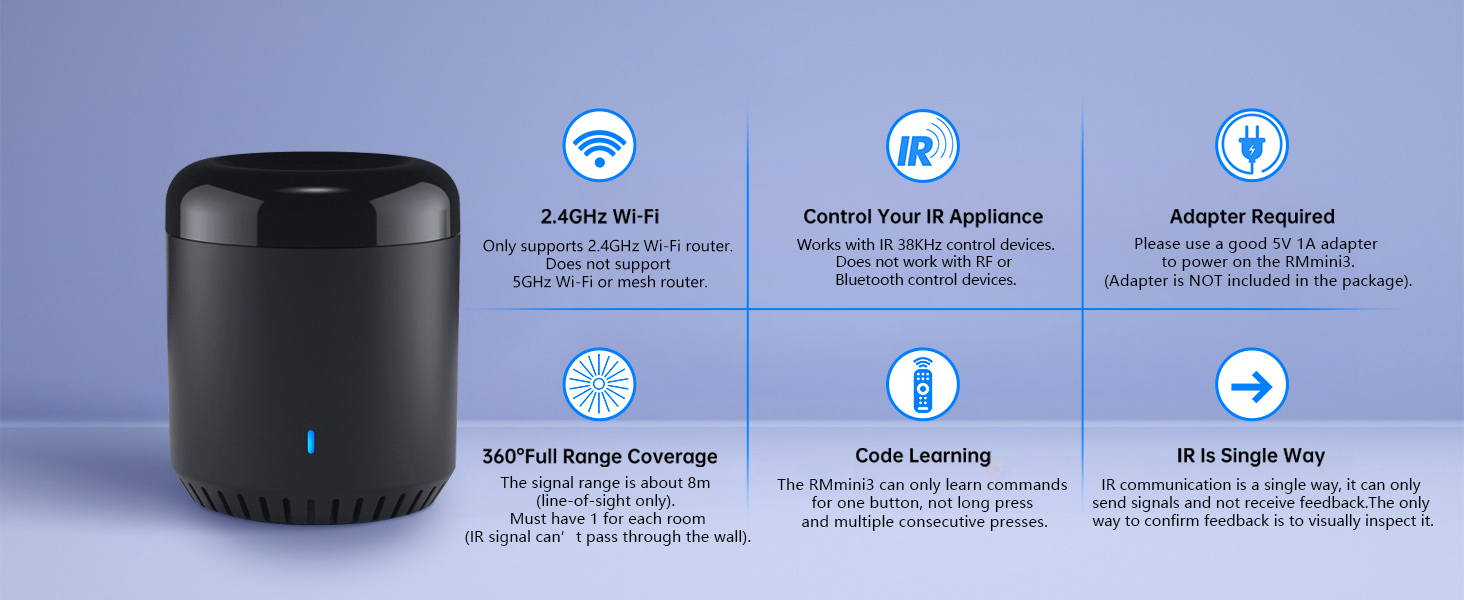
The BroadLink RM Mini 3 is a compact WiFi smart home hub operating on 2.4 GHz that supports over 50,000 IR-controlled devices. Compatible with Alexa, Google Home, and IFTTT, it enables voice control and remote management of TVs, air conditioners, and more. Featuring a cloud-updated IR database and customizable automation via the BroadLink app, it turns traditional appliances into smart devices for enhanced convenience and energy savings.






| ASIN | B07K2DHXB6 |
| Best Sellers Rank | #75,013 in Tools & Home Improvement ( See Top 100 in Tools & Home Improvement ) #87 in Home Automation Hubs & Controllers |
| Customer Reviews | 4.1 4.1 out of 5 stars (1,976) |
| Date First Available | October 31, 2018 |
| Is Discontinued By Manufacturer | No |
| Item Weight | 4.9 ounces |
| Item model number | 8541545902 |
| Manufacturer | Hangzhou Gubei Electronics Technology Co.,Ltd. |
| Product Dimensions | 2.17 x 2.17 x 2.56 inches |
M**A
Works wonderfully
Setting up device in the app wasn't super smooth, but that is expected with these sort of devices (also, required me to reset the device to connect to my wifi), but besides that, works exactly as you would like it to! This allows me to make my heater "smart", so I can turn it off/on and increase/decrease temperature without having to be at home (i.e., save on my electricity bill)! And you can use this device to remote control multiple things at once, so if you have lots of remote controlled devices, it's super worth it to make devices smart! Alexa integration is ok, can power off/on easily but the temp up/down is a bit quirky... though I won't be using it via alexa, so I don't care. Also, it has a micro-usb port; not sure why in this day and age micro-usb are used, rather than usb-c... it comes with a cord though, but usb-c would be much better.
L**Y
Device works wonderfully, I hope this helps
I have the RM Mini 3 and it works great for my Projector, Soundbar, & Fireplace. I didnt have any trouble until I added it to Alexa which was very frustrating at first but [FOR ME] it was fixed by using Routines in the Alexa App. 1.) Download the IHC app (colorful star with dots logo) then register your account using an email or your phone number (DO NOT USE FACEBOOK) 2.) Setup all of your intended devices within the IHC app. 3.) **FOR EACH ACTION** you want executed by Alexa, first create a scene in the IHC app. Alexa will only discover the SCENES you create in IHC. Example: Because I wanted Alexa to turn my Soundbar up by increments of 10 I created a Scene called "Vol Up 10" 4.) Add the IHC Skill through the Alexa App & let it discover new devices. (The skill logo should be the same colorful logo as the IHC app you downloaded) 5.) Alexa will now recognize your Scenes HOWEVER she will ONLY allow you to turn them ON. If you try telling her anything else she will respond that the "Device is not responding" I assume this is an Alexa issue not the device or RM Mini 3. To remedy this just go to ROUTINES in your Alexa app & create a new one. 6.) - "ENTER ROUTINE NAME" [My Example: Vol Up 10] - Choose a "WHEN THIS HAPPENS" phrase [My Example: Alexa, Turn Volume Up 10] - Under 'ADD ACTION' scroll down to pick 'SMART HOME' & choose the skill you want activated. [I chose my "Vol Up 10" Scene] Now it should work how you need it to & just follow the same process for each action you need. I know its long but I hope this helps!
D**.
It’s OK
It’s OK
G**B
Automation to start/stop Holiday Projector
I bought the Broadlink Mini 3 to automatically start and stop my rear screen video projector for Halloween and Christmas projection show in my front window. I bought this device not really knowing if it would actually do the desired job. I was happy to learn that this IR blaster allowed me to connect a non-listed video projector and map all the IR remote control buttons to the Mini 3. From there, I was able to define 2 "scenes"; one to turn on the projector, wait 10 seconds for it to boot up, then define the button sequence to start the desired video from a USB thumbdrive. The other scene turns off the video projector with transmission of 2 button presses of the power button. Each of these "scenes" are started independently at a specific time every day. Once setup, the Broadlink iPhone app is pretty intuitive. Also, the "scenes" are saved to the cloud thus you do not have to have your phone or app running for the automation to work. However, the only setup "hiccup" I ran into was not knowing what "type of device" is the Mini 3 considered in the app. In the Broadlink app, the mini3 is considered a "remote control". From there you can scroll down and find the Mini 3 and complete the setup configuration. I did not need to configure this to Alexa or Google so no feedback on that. Also note there is a power cable provided but there is NOT a power block to plug in the wall.
R**N
Integrate odd remotes into your smarthome, with many sharp edges
-----------------------------------update 4/19/2020 ----------------- The link to Alexa completely failed and I had to disconnect the skill, delete all the devices and try to re-add them. This is just not a solid product. I'd recommend looking at alternatives. ------------------------------------------------------------------------------ I saw this as a way of integrating those "odd remotes", the stand-alone islands in our smart home ecosystem, and it almost does this. Feel free to skip to the Summary and pros/cons if you just want the bottom-line. The first challenge was getting it hooked up, it literally took me 10 times to get the remote paired. I don't know why. I don't know what I did differently to finally make it work. I just followed the same process over and over. Tip: Make sure you're on the 2.4 network in your house when you try to pair and make sure you know your WIFI password. (Neither of these were the issue I ran into, like I said, I don't know why it took so many tries, but this seems to be a theme.) Also, make sure you locate the receiver close to your router as it's WIFI connection is not great. Then there's the support number: 40-4476-4482 (it's actually 1 (404)476-4482, but apparently no one told them how Americans prefer to specify phone numbers.) They are there for you 24 hours a day but only Monday through Friday, no weekends. I also tried emailing, but that didn't work either because it thought I was spamming them (The mail system <[email protected]>: host mxbiz1.qq.com[203.205.232.191] said: 550 Mail content denied.) Once I got the remote up, I was able to hook the TV (Set Top Box/STB) up to it. For "known brands" there are templates for the controls. Unfortunately, because services like the XFINITY remote allow you to combine your set top box and TV onto one remote, the process for picking the template does not work. The on/off that operates the set top box will not operate your TV. It's very confusing.... I actually had no desire to use ECHO to control channels but I was hoping for an ON/Off, after a couple tries I got it to learn the combined STB and TV codes from my X1 remote. "Perfect!" I thought, then I added it to my "LIVING ROOM OFF" routine that shuts off all the lights in the living room and turns off the fireplace. I thought I could have it turn off the TV at the same time, but forgot that the power control on TV's is a toggle, if it's on, it turns it off, if it's off, it turns it on, so the routine worked well in the evening after watching the news, everything turned off. In the morning, however, after coffee and listening to some music, when I issued the "turn off living room" command, the TV turned ON. This is not a failing of Broadlink, it's simply the way TV and STB remotes work. I also thought I could get my bedroom fireplace remote to work with ALexa using this, but the RF frequency is 308Mhz, way outside of the RF range of 432.5MHz-436.3MHz supported by Broadlink. Similarly, I tried to get my ceiling fan to respond, with no luck. Looking into forums devoted to home automation this seems to be a common theme with Broadlink. It will support newer remotes, but not older style remotes because of the frequency issue. I was however able to get it to control my deck sun-shade shade, which is simply a dumb RF remote. You basically control "odd gadgets" like this using the "Lightbulb" option and program on/off to mean something (I used that to control the shade - if it's On, the shade will close, if it's OFF, the shade will open). I have Leviosa shades on my windows so I can now raise and lower the deck shade shade along with the Leviosa shades via Alexa Routines. When I command "shades up" or "shades down" the Leviosa AND the stand-alone deck sun shade both operate. We have them go down a little before noon and then up at 4 minutes before sunset so we can enjoy it, so worth it right there. Tip: You may need to insert a WAIT into your Alexa routine after issuing a command to one of the Broadlinked items. It's a bit finicky at times and I noticed that it sometimes takes a couple tries to get it to "learn". I found that taking the the Broadlink unit and the remote you want to train and camping out just next to the router seems to help. You can then move the Broadlink unit back to it's home (ie, the WIFI is not so great). I also noticed that you need to click the SAVE button after training, or the sequence will not be committed to the button. The UI is not the best. It is also NOT capable of controlling my overhead fan, which I suspect is on an odd frequency, so check your frequency ranges ahead of time. Tip: If you're not sure if your remote is Infrared (IR) or Radio Frequency (RF), do this: Stick the remote in your pocket and click the on/off. If it works, it's RF, if it doesn't, it's IR. Tip: Read the screen, if you see a [SAVE] button, make sure you've hit it before you leave the screen. --------------------------------------------------------------------------------------------------------------------- Summary For $39, it's not a bad solution to integrate some of those "stand-alone" remotes you might have around the house, for instance, if you had a room AC you wanted to control or a (more modern) fan. Pros: - can integrate even off-brand remotes via learning the IR or RF codes - Integrates to Alexa - Can operate RF throughout the house from one unit Cons: - Only operates on 2.4 GHZ WIFI (and then only when it's close to the Router) - Cannot control older standard ceiling fan and fireplace remotes - Subject to the constraints of the protocol (ie, there is no separate ON and OFF for stuff like TV's and Set Top Boxes) - UI is odd and strange ( oriental characters and options, even though I told them I was in the US, no warning when you leave a screen that you'll lose all your work, etc.) - No weekend support - Support email does not work (for me) - Multiple versions of the Alexa skill - IR range is limited to the current room it's in - RF range is limited 432.5MHz-436.3MHz Recommendation: For $39 it's not a bad investment, but with the limitations and the finicky and sometimes messy user interface, be prepared for some "sharp edges" - early adopters - have a ball!
A**R
I bought a Hornbill smart lock on sale in October. Unfortunately I didn't notice when I purchased it that you need a gateway for voice control. The Hornbill documents do not recommend a specific gateway so I chose this one. It works great! Connected to my wifi quickly, synced up with the smartlife app and Alexa and now I can voice control my lock.
T**G
Very fast delivery from the merchant. In terms of the product, i am enjoying it everyday.
P**M
Very useful product, RF & IR , perfect working both frequencies
A**R
Although It's stops working sometime but work for me i use this device to operate my tv , ac with IR blaster feature and my electronic gate lock by RF blaster feature . Rf feature does not support Alexa echo device . Initially I had some difficulty in setting it up.But later it started working fine.
C**U
Je l'ai jumelé avec mon a/c de chambre et il et maintenant contrôlé par mon google home
Trustpilot
1 month ago
2 months ago