Some deliveries may take a little longer than usual due to regional shipping conditions.

DOWNLOAD THE APP


Customer Services
Copyright © 2025 Desertcart Holdings Limited
DOWNLOAD THE APP
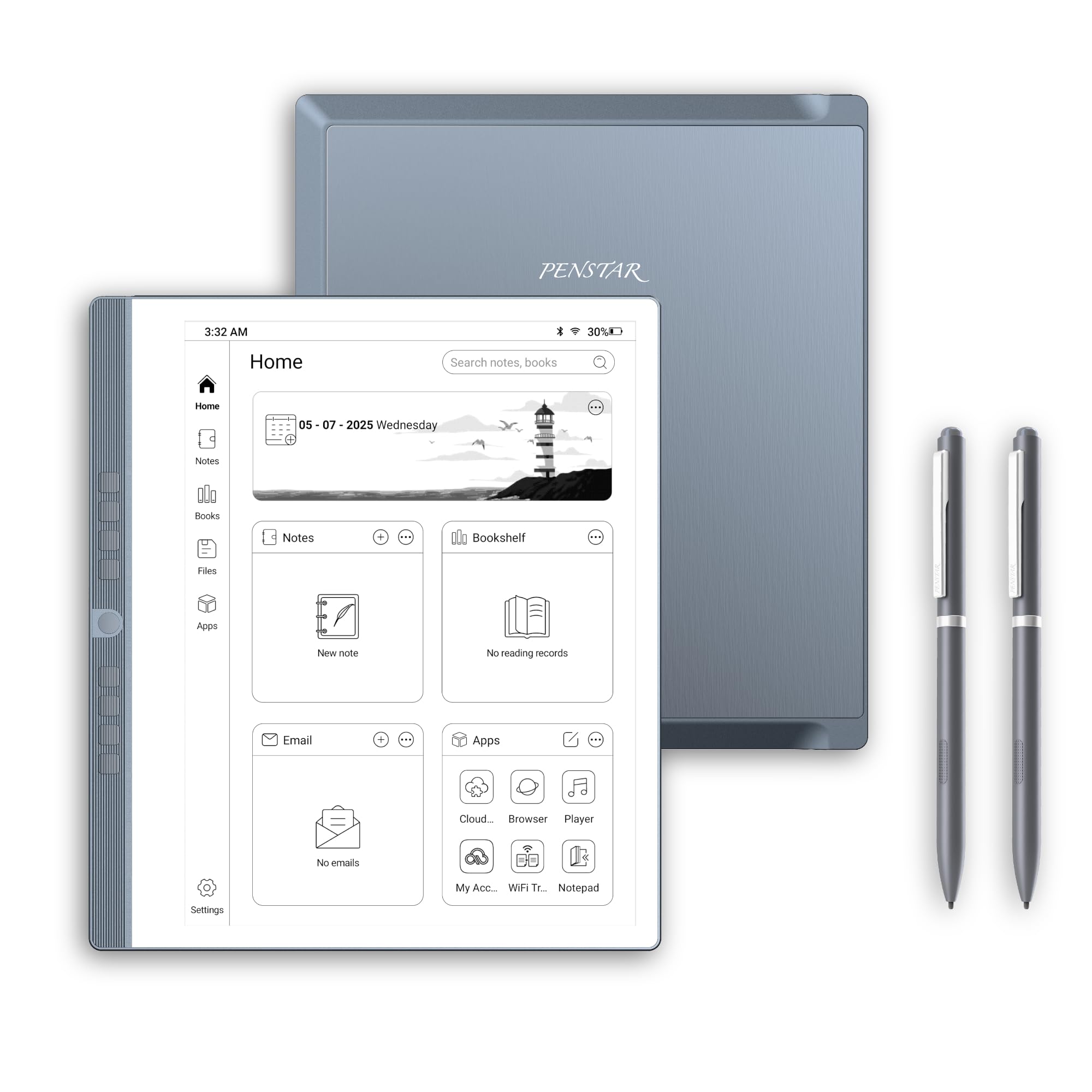
📝 Elevate your note game with the whitest, smartest paper tablet around!
The Penstar eNote 2 is a premium 10.3-inch pen-only E Ink tablet featuring a 300 PPI PureView display that mimics real paper for a natural writing experience. It offers advanced handwriting-to-text conversion powered by MyScript, AI-driven real-time voice-to-text in 52 languages, and 9 customizable physical shortcut keys for optimized productivity. With 128GB storage, 2-week battery life, and multi-cloud sync capabilities, it’s designed for professionals seeking distraction-free, paperless workflows. The bundle includes two high-precision styluses, a magnetic folio cover, and spare nibs, making it a complete, ready-to-use digital notebook solution.


| ASIN | B0FKT9PNFC |
| Battery Average Life | 2 weeks |
| Battery Description | Lithium-Ion |
| Best Sellers Rank | #12,546 in Electronics ( See Top 100 in Electronics ) #309 in Computer Tablets |
| Brand | Penstar |
| Built-In Media | Cable USB A to Type C, Leather Folio Cover with Pen Position, Penstar eNote 2 Innovative Paper Tablet, Quick User Guide, Two B5 Pens Each with 4 Spare Nibs Inside + Spare Nibs Kit (10 Nibs) |
| Color | Gray |
| Compatible Devices | Headphones, Keyboard, Laptop, Speaker, Stylus |
| Connectivity Technology | USB |
| Customer Reviews | 4.3 out of 5 stars 232 Reviews |
| Display Technology | Electronic Ink |
| File Format | EPUB, MOBI, PDF, TXT |
| Human-Interface Input | OCR |
| Item Dimensions L x W x Thickness | 8.9"L x 7.8"W x 0.22"Th |
| Item Weight | 0.97 Kilograms |
| Manufacturer | Penstar |
| Memory Storage Capacity | 128 GB |
| Model Name | eNote 2 Bundle with Two B5 Pens and Leather Folio |
| Native Resolution | 2480 x 1860 (300PPI) |
| Other Special Features of the Product | 4-MIC Array, Anti-Glare Eye-friendly Screen, Multi-Device Cloud Sync, Stereo Speakers, Voice-to-Text |
| Processor Speed | 2.2 GHz |
| RAM Memory Installed | 4 GB |
| Screen Size | 10.3 Inches |
| UPC | 860012201372 |
| Warranty Description | 1 Year Limited |
W**S
Feels like writing in a notebook
This has been an impressive product so far. It takes a few minutes to get your bearings with it, but after that it's smooth. Moving files to/from my laptop is easy, very paper like when writing, light weight, feels solid not cheap. Works great with being left-handed since it is pen only and not touch screen. I've already recommended this to several people. Great price for what you get in the box.
P***
A Fantastic Investment for Work and a Joy for Life!
After researching different paper tablet brands, I finally decided to give Penstar a try. I was hesitant initially, could I really justify the price for something so specialized? However, my primary goal was organizing all my work-related documents and note-taking, and Penstar seemed tailor-made for that at an affordable price. After several weeks of use, this device not only met my expectations but exceeded them in several ways. The value is outstanding, and it has quickly become a staple in my daily workflow! What Stands Out - Writing Experience The writing experience is phenomenal, way better than writing on my iPad. The screen’s paper-like texture and responsiveness make it feel natural, with virtually no latency! - Reading Experience The large screen has completely transformed my reading habits. Compared to my old Kindle Paperwhite, this device is a joy to read on, and I can’t imagine going back, sorry my kindle. - Integrations As an Android-based device, Penstar allows app downloads, adding versatility far beyond a typical note-taking tablet. The device syncs flawlessly with cloud platforms, which is really helpful for my work. - Note Organization As someone who used to rely on multiple physical notebooks, I now manage all my notes effortlessly in one place. The ability to categorize and organize notes is a huge timesaver, allowing me to build a “second brain” with ease! - Customizable Physical Buttons The physical buttons are a standout feature. I was criticizing it’s not touch screen, then after my research, those are like customized action buttons! I’ve customized them for quick navigation for my notes. Since the device isn’t touch screen, it avoids accidental touches as well. - Solid Hardware and Portability The device is ultra-thin and portable, with a USB-C charging port, and I’m surprised about the long-lasting battery, I have’t charged for two weeks, and it still showing 43%. The included case and stylus are well-designed, making it a complete and ready-to-go package. Things to Improve 1. No Backlight While this may be a downside for some, I appreciate the reduced glass layer, which improves the writing feel, but having the adjustable light will be a plus. 2. No Touch Screen Again, not a dealbreaker for me since I’m relying on the stylus and the buttons for navigation, but it might effect some people’s decision. 3. Lightweight Stylus The stylus comes in the kit, but it feels lighter than expected; a heavier option would improve the writing experience, and the magnet-touching function will improve the experience as well. 4. Fingerprint Access I turn on and off the screen really often, it will be huge improve if it supports fingerprint access. Final Thoughts The Penstar eNote has been an excellent investment for me. While I primarily use it for work, I can see it evolving into a tool for countless other applications as updates roll out. For anyone in need of a reliable, distraction-free digital note-taking and reading solution, this device offers great value and usability. Highly recommended!
A**X
Helps me keep organized and off my phone constantly
My new favorite device. It's great for reading and taking notes along with other useful life and schedule apps. Battery life holds up great and the paper display makes it alot easier on thr eyes. Only problem i have is how thin the device is and how little thr folding screen would really protect it. Had to buy a padded carrying case but I consider it worth the investment.
S**S
Great for a beginner
This is my first e notebook. For the most part it's really easy to use. I'm currently struggling with how to install third-party apps but they're not necessary for me to use this product. Mostly I want to install Kindle. Great for work and I love the categories for notes. It's really helping me organize and I not go through 80 million paper notebooks! Great value.
A**A
It is a great Product and the Price is Right!
The Penstar E Note is a great product! It is easy to use and the display looks clear and bright. The characters on the display pop out and are better than the Boox Go 10.3 that I returned. The Penstar E Note is simple to use but yet has so many features. And it is light and solid. The Stylus works very well. The Penstar has eveything you need. And the half case and stylus come with the Penstar E Note. The price was very good making it affordable. I reached out to Penstar with a question and they responded quickly. Penstar is a company with a bright future. Hopefully they will come out with more procducts. Would love to see a smaller version of the E Note. I am so glad i purchased the E Note and use it to take notes for courses and for church. I HIGHLY recommend it!00
S**M
Wanted to Love it Based upon the Majority of Reviews
I had recently purchased the latest reMarkable ePaperPro with keyboard folio and upgraded stylus and she LOVED it and wanted on for herself, but I wasn't going to spend the better part of a $1,000 for a device like this for a child. So, I researched many ePaper Tablets and really was impressed with the reviews of the Penstar and some of it's extra capabilities over reMarkable (which is intentionally designed to be simple to eliminate distractions). Upon receiving the Penstar, I knew that it would be smaller than my reMarkable ePaperPro and it was, significantly, which is totally fine and it is also tremendously lighter which I actually really liked ALOT. I was curious about the use of the programmable side buttons and I really liked the layout of the dashboard and some of the innate capabilities such as the voice recorder, calculator, calendar, etc. I honestly feel that the menu(s) and navigation are much more logical and user friendly to me on the Penstar than on the reMarkable (which honestly is my largest frustration with my ePaperPro). Like other reviews it is true that the "cover" is more of a front cover only and the stylus pen is lightweight but not terrible. I'm not sure that I like that you have to keep it in a pen slot on the side of the tablet cover as I feel that it's just waiting to fall out and be lost. One great feature of the reMarkable is that it has an incredibly strong magnetic attachment for the marker (which also simultaneously charges it...albeit my market charging wasn't working so I had to send my upgraded marker back and am currently waiting on the new one to arrive). Also, the Penstar marker has a button down low that is kind of neat...it can be programmed for different things but it came from the factory preset to erase (as well as having an eraser at the end...which was a pricey upgrade for reMarkable...go figure). Anyway, the issue with the low button is it's almost too convenient and your fingers hit it all the time causing it to erase when you don't want it to...annoying. And from there, sadly, my review takes a steep dive off the cliff. Upon my daughters first use of the marker, it started writing before she even touched the page. When she did write, when she lifts the pen upon fininshing one word and to go write the next word, the marker still writes and draws lines connecting every word. I DO NOT see a way to fix this. I did the marker calibration and this did not fix the isse what-so-ever. Additionally, under the marker options it shows color options (shown not in color, however) and if you select "blue" for example, it just writes in grey. One reason I purchased the Penstar was to give my daughter the color option like I have on my reMarkable ePaperPro (I waited for the color version to come out before purchasing the ePaperPro). So, she's incredibly frustrated with the market tip issues and disappointed with the color options that don't give you color. I experienced all the same issues when testing the Penstar PLUS I felt tht when touching the pen tip to various icons they were nto responsive...I had to often try multiple times which was very frustrating. The included "Quick Guide" doesn't provide any troubleshooting and is not much of a "guide", quick or otherwise. Nor is there an email or phone number for Support. I haven't gone to Penstar's website yet, but this was a Christmas present for my daughter and is hugely disappointing to have a significant marker sensitivity issue which renders the ePaper tablet unusable. I don't see any other reviews stating this issue, but there aren't a ton of reviews overall either. I will try to reach out to Penstar support (which I read two reviews stating they are exception). I hope my experience is exactly that as I'd love my daughter to love this tablet. The reMarkable is for sure the "Cadillac" in this space and the product is highly refined and exceptional in doing what it was created to do. My daughter keeps telling me that I can have her Penstar if I swap and she'll take the reMarkable....honestly, as I wrote earlier, I really like the functionality options and menu/ease of navigation better on this Penstar...so her offer does make me think....for what it's worth. But the product has to function. So, off to contact Penstar I go. Wish us luck!
E**A
Great tool for not taking and storing notes
Excellent product at a great price. Simple to use and convenient for meetings, notes, etc
J**M
Has potential if updated
I have several e-ink devices and decided to give this one a try. Packaging\shipping: It was packaged very well. Packaging had a premium look and feel to it and the device was well protected. No delay in shipping. I had the device in a week going coast to coast. Size: Size wise, similar to a Scribe so it didn't overpower the desk at 10.3 inches. Build quality: The device itself had a decent build quality, meaning it did not feel cheap to me. The cover felt like vinyl and was a half cover, only covering the screen leaving the back of the device exposed. The cover was easy enough to remove and re-attach, but I wondered how long the cover would hold up. Hardware specs: Not the newest or the most robust compared to others. Remembering what this device is for, it works. This is a non-touch screen device. Your "inputs" are the buttons or the pen itself. It does not have a backlight. 227ppi screen. Pen: Plastic with an average feel. No issues with writing and came with extra nibs. This is where I had my first "issue" with the device. Their pen is the only pen that can be used with the device. If I get up from my desk and leave the pen elsewhere, the device is useless. I can't grab another digital pen on my desk and use that. Something I am not in the habit of doing, but I have misplaced pens in the past. This would turn into an expensive mistake. Same if the pen breaks, the device becomes useless. Buttons: This is a different take for an e-ink device. You have to remember what each button does. These can be programmed, and the top button gives you a peak at what the others do. Writing feel: This was by far the "scratchiest" device I have used. Reminded me of using a pencil on rough paper. Didn't have any negative impact on writing though. I didn't mind this as it certainly felt better than writing on glass. (I'm not a fan of the glass writing feel) Interface: I thought the interface has a decent "flow" to it. Everything was easy to find and navigate to. I did not notice any real noticeable lag or pixelization issues with writing. The screen refresh was adequate with not a lot of ghosting while writing on this particular device. If I was using a blank page to jot down ideas and move them around for some assemblance of an order you would notice more ghosting, but in line with other devices. Refresh rate is adjustable. I was able to get email through the device. Side loading apps may prove an issue with Android 11. You can use split screen and record. However, no Gmail or Outlook calendar synch. This was an absolute dealbreaker for me and the reason I returned the device. Customer support: I will say, PenStar's customer service is top notch. Very friendly and they answer any and all questions you have in a timely manner. I had an accessory that I purchased, and they issued a credit before it was even on the way back to them. Summary: I purchased this device through Amazon. At the time, Amazon had a longer return policy than buying it direct. This was on sale when I purchased. For their standard price point, there are others out there for less with better features. Overall, a decent device if you are going to use it for just note taking and journaling. At this time, I think it has limited functionality, compared to others on the market. The pen and the lack of calendar synch need improvement. Hopefully, future updates will improve the device.
Trustpilot
1 day ago
3 weeks ago