
DOWNLOAD THE APP


Customer Services
Copyright © 2025 Desertcart Holdings Limited
DOWNLOAD THE APP


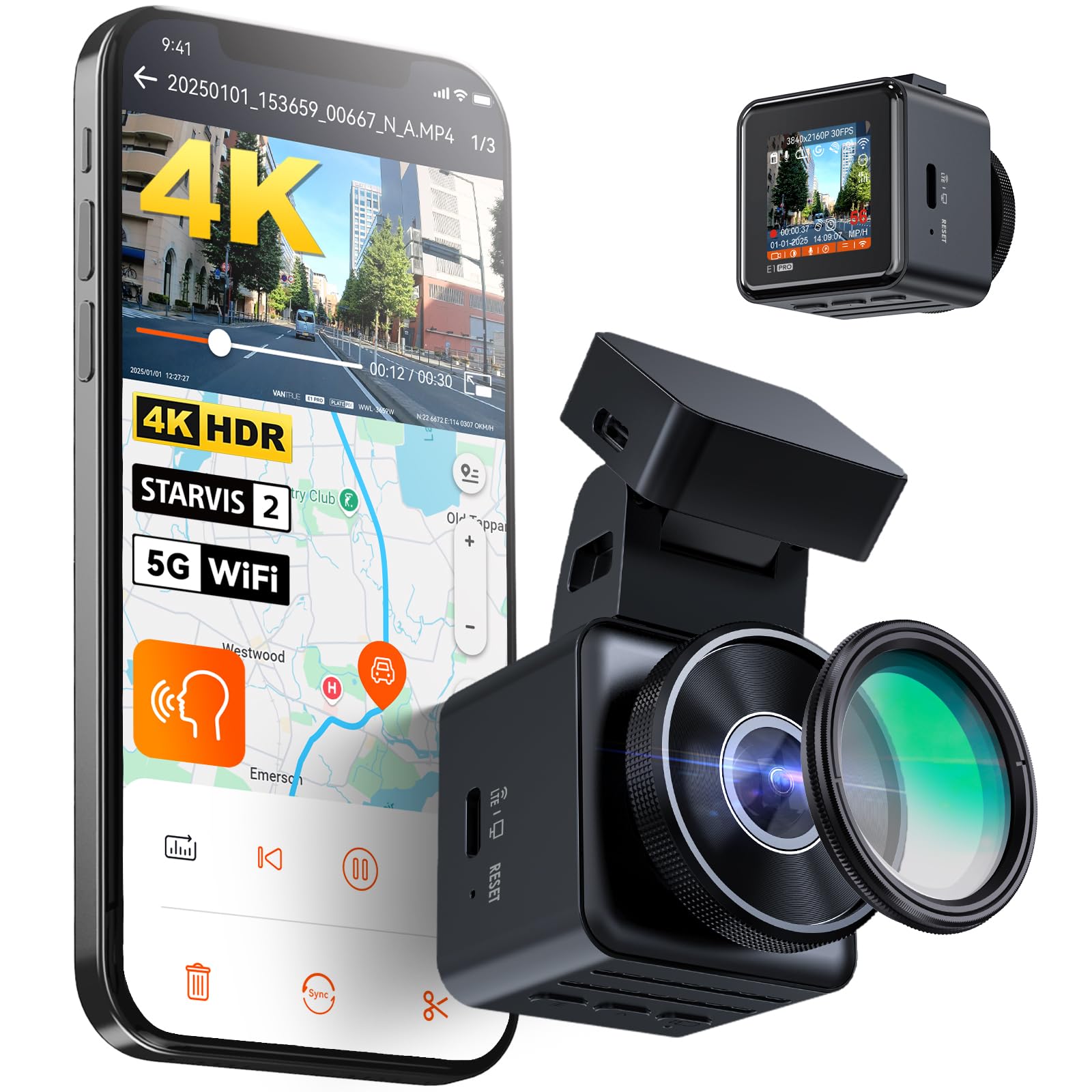
🚗 Elevate your drive with crystal-clear proof and smart safety—because every second counts!
The VANTRUE E1 Pro is a compact, professional-grade 4K HDR dashcam featuring a Sony STARVIS 2 sensor and 158° wide-angle lens for ultra-clear footage. It supports up to 1TB storage, offers stable 5G WiFi and GPS tracking, and includes advanced features like voice control in French, 24-hour parking mode with pre-event recording, and a magnetic mount for easy installation. Designed for millennial professionals seeking reliable, high-quality road safety and evidence capture, it combines cutting-edge tech with user-friendly app integration.





| ASIN | B0DSKXJV3H |
| Best Sellers Rank | 4,453 in Electronics & Photo ( See Top 100 in Electronics & Photo ) 93 in Car On-Dash Mounted Cameras |
| Guaranteed software updates until | unknown |
| Item model number | E1 Pro Black |
| Manufacturer | VANTRUE |
| Product Dimensions | 4.4 x 5 x 4.6 cm; 95 g |
A**R
Very good
Im a proffesional drivers who uses daschams to record every minute of my driving so im quite familiar with how unreliable dashcams can be. Ive tried many of the Chinese brands, and Nextbase cameras. No matter the price, the functionality of the Apps are ALWAYS absolutely diabolical and theyve nearly always been very unreliable. Vantrue and Viofo are probably the only well known camera brands I haven't tried. And considering I can't swap Viofos between vehicles due to no suction mounts being available, I thought I'd ditch my Nextbase and give this Vantrue a go! First things first, the aesthetic quality is outstanding, the attention to detail in the design of the box and the camera itself is superb. It really feels like youre opening a high end product. The camera functionality is superb, the menus easy to navigate, and all settings can be adjusted from the App if you'd prefer. The app, unlike most actually functions, most are horrific, always crashing or refusing to function. My nextbase app is basically unusable. This connects quickly, downloads fast and has never crashed on me yet. The camera video quality is 4k, and obviously fantastic as a result, the Plate pix function does work at making number plates slightly more readable by removing the glare, but it does darken the overall video quite considerably. I would prefer a 60fps function as 30fps always struggles to capture numberplates that are moving. It has a super wide angle lense, which is obviously a good thing, however its so wide it makes positioning the camera awkward as it always captures a portion of the unswept area of windscreen which makes the corner of the video appear dirty. But moving it further away from that area means the right hand corner of the video captures the plastic cover for all of the sensors behind the rear view mirror. Annoying for me, but wont affect everyone. Haven't had any issues with overheating, but we shall see what happens in the summer. 4k cameras always get a little warm. Small ones like this always struggles the most. Overall, a good camera so far. **edit** After about 1 months use i found this to be totally useless at capturing registration plates in anything but bright sun. It performs worse than a 6 year old 1080p 60fps dascham. Night performance is beyond disappointing
M**S
Compact solid Dashcam with great features
The E1 dashcam, while it is small and compact, feels solid and is loaded with many features. It comes well packaged in a box which contains all you need to get up and running except for an SD card which must be purchased separately. I assume the reason for this is to keep the cost of the dashcam lower and it enables you to purchase an SD of the size that suits your particular recording storage needs. The E1 has an adhesive GPS mount which I was a bit apprehensive about as I am used to Suction mounts. I found however, if planned correctly, it is easy to attach to the windscreen in an optimum and unobtrusive position. The dashcam is so small that in my case, I have it almost hidden behind the rear-view mirror and it therefore does not clutter my drivers view. Before I attached the mount to the windscreen, I downloaded the Vantrue App from the play store to my phone, powered on the dashcam in the car and connected my phone to it via Wi-Fi. I was then able to see “live” on my phone exactly what the dashcam was viewing in various windscreen positions. While I could have used the 1.54-inch screen on the dashcam itself, the bigger screen on my phone was easier to use. Using this method, I was able to select the best windscreen position to mount the camera. I then marked the position on the outside of the windscreen with paper stickers and thoroughly cleaned the inside of the windscreen. Using the external markings as a positioning guide, I attached the supplied electrostatic sticker (which is similar to a screen protector you may fit on a mobile phone), onto which I then stuck the adhesive mount. The dashcam easily slides into and out of the mount and is held solidly in place by a magnet. The car charger, which has a USB port built in for charging your mobile etc., plugs directly into the mount itself so the dashcam can be easily detached at any time to connect directly to a PC. The charger cable is 3.5 meters long, enough in my case (Kuga) to route from the mount to the power socket and be easily hidden. The dashcam has three small buttons which allow you to set it up, or in my case, I found setting up the dashcam to my preferences was easy using the app. There are many settings that can be changed, some of which are: Recording resolution, Loop recording duration, G-Sensor sensitivity, Collision detection, Motion detection, speed in KMH or MPH, Time and date stamp, Speed stamp, GPS location stamp, Voice control sensitivity, Parking mode and Auto LCD off. As I mentioned earlier, the dashcam does not come with an SD card so you will have to purchase one separately. It supports an SD card from 32Gb up to 512Gb in size and must be of high quality such as U3 Class 10. Vantrue recommend that you format the SD card at least once a month. This can be done via the app or the dashcam itself, and I was able to set a monthly reminder on the dashcam to do this. Be sure you download any important recordings before formatting as once formatted, all recordings on the SD card are lost. The E1 also has voice recognition. Some of the commands you can use are “take photo”, “Turn on/off Wi-Fi”, “Turn on/off audio”, and “Lock the Video”. I was driving with the car radio on when I said, “take photo” and it was successful. I tested a few of the other voice commands too and while I mostly listen to chat shows and not loud music, the commands worked which impressed me. If however you do listen to loud radio or if there is a lot of road noise, it may not be as reliable. I also found the “Wi-Fi” commands great as I did not have to go pressing buttons on the dashcam to connect my phone. A two-button small wireless remote is also supplied with the E1. One button allows you to turn on and off audio recording and the other is used to lock the current video and take a photo. This may suit someone in noisy environments or who may not want to use the voice commands. The remote which uses a replaceable CR2032 battery, can be attached with the supplied 3M sticker to the steering wheel, the dashboard or wherever suits best. There are quite a few resolution settings that can be set for recording quality and while I didn’t test all resolution settings, I found that the quality of recording was very good on those I did test. I live on the edge of a city so I would be doing both city and countryside driving. This would have an impact on recording during darkness as you would not always have street lighting and therefore you may be relying totally on your headlights for recordings. While the recordings are clear, the ability to read number plates, depends greatly on the environment. Things such as speed, day / night-time, sun glare, headlights, streetlights etc. but in the event of an accident, the dashcam footage even if it did not capture the car reg number, will clearly prove who is in the wrong. The Sony sensor and 160-degree lens has a very wide field of view both left and right of the car so it will pick up what’s happening over multiple lanes of traffic. The E1 can be set for loop recording with file lengths of 1, 3 or 5-minute duration and when the SD card is full, it will continue to record, overwriting the oldest recordings. When the SD card is formatted, three folders are automatically created, “Event”, “Normal” and “Photo”. The inbuilt G-Sensor has different sensitivity settings for the automatic locking and saving of a recording so that if car is hit or shaken, the recording will be locked and saved to the “event” folder and will not be overwritten by normal recordings which continue to be stored in the “Normal” folder. Setting sensitivity too high however may cause the “event” folder to fill up as going over rough road etc. may cause the dashcam to think an “event” has happened. According to the manual, thirty percent of the SD card is allocated to the “event” folder and if the “event” folder becomes full, then new events will overwrite the oldest events. It is therefore good practice to review and download any important events ASAP. The same applies to the “normal” folder. Recordings can be viewed on the dashcam or within the app on your phone. They can also be downloaded to your phone, or you can connect the dashcam to a PC and download the recordings in this way which is much faster. If viewing recordings on a PC, most compatible MP4 media players will work. I tested this with Windows media player, VLC media player and Films & TV. I also tested it with the Vantrue player that I downloaded from the Vantrue website which utilises the inbuilt GPS information in the recording. This shows your speed, time and date, car reg number (I put in ABC123 for the photos) and will also show your car position and the route of your journey on google maps as you play back the recording. Like most technology providers these days, new firmware may be released at times for the dashcam which can be downloaded from the Vantrue website. I found it quite an easy process to upgrade the dashcam but make sure you copy any important recordings before you attempt the upgrade. You simply use a PC to copy the new firmware file to the SD card in the dashcam, disconnect from the PC, power up the dashcam on its charger, and wait a minute or so while it updates. Other than a flashing green light, the camera will appear to do nothing during this process so wait, and it will power itself up once finished. You must also format the SD card after the upgrade. I did find that all my settings were lost after this process however it only took a couple of minutes to re-enter them via the app. In conclusion, I think that this is a great feature rich, good quality dashcam in a small compact size with the bonus of being so easy to set up. While you may not use all its features, I think you won’t go far wrong in selecting the E1. Note: Some of my photos have information blanked out for privacy.
P**E
Unobtrusive little camera
Fairly straightforward to fit, but I found the connection between the mount and the camera to be a bit hit and miss, I had to do a lot of fiddling before the camera would power up. The recordings are of good quality and overall the camera, being small, is unobtrusive. Pleased so far
L**H
Excellent little dash-cam.
Well-made and surprisingly small. Easy to fit and unobtrusive. Unusually, it comes complete with a polarising filter to remove any screen reflections (just twist the filter once fitted until they disappear). Very reasonably priced for a 4k camera with the latest Sony Starvis 2 sensor which produces good, clear video day and night. A one-star review here claims that you can’t power it from a USB C socket but that hasn’t been my experience - it works perfectly for me. The screen is small but usable although it’s easier to set it up initially through the phone app. The only minor issue that I had with it was that if you use the GPS time signal for the internal clock, the daylight saving setting uses the US dates to automatically change in the spring and autumn which are different from the dates we use in the UK. That said, it’s easy enough to set the time manually so not so much a problem as an inconvenience. It does run very warm but no more than my previous dash-cam which lasted several years with any problems.
R**N
I came from the E1 Lite and went from being unable to read a licence plate of a stationary car as I drove past to being able to read anyone's on the road. Almost the same product except higher quality camera and features. Physically identical, very compact.
S**I
Buscaba una Dashcam para mis rutas por el asfalto empecé a mirar precios y calidades y afortunadamente di con un vídeo en YouTube que explicaba todas sus características y funcionalidades. Me decanté a un sin conocer esta marca y he de decir que, aunque llevo pocos días con ella, estoy súper contento con la compra. Calidad excepcional a un precio bastante moderado. En comparación con otras marcas. Pequeña compacta y a todo el que esté pensando en comprarse una cámara de este estilo se la recomiendo porque no se va arrepentir.
M**E
Die VANTRUE E1 Pro 4K HDR STARVIS 2 Dashcam ist ein herausragendes Gerät für das Wohnmobil, das mich in jeder Hinsicht überzeugt hat. Die Aufnahmequalität ist außergewöhnlich: Dank 4K-Auflösung und HDR liefert die Kamera gestochen scharfe, detailreiche Videos selbst bei schwierigen Lichtverhältnissen. Besonders beeindruckend ist der STARVIS-2-Sensor, der klare Aufnahmen bei Dämmerung und in der Nacht ermöglicht – ein deutlicher Pluspunkt für Fahrten in der Früh oder am Abend. Die Installation im Wohnmobil war unkompliziert. Die Dashcam sitzt stabil hinter der Windschutzscheibe, ohne zu stören oder den Blick einzuschränken. Der integrierte G-Sensor arbeitet zuverlässig und speichert automatisch relevante Aufnahmen bei plötzlichen Brems- oder Stoßsituationen. So hat man im Fall der Fälle schnell Beweis- und Dokumentationsmaterial parat. Auch die Menüführung und Bedienung sind intuitiv. Die Einstellungen lassen sich einfach anpassen, und das Display zeigt alle relevanten Informationen übersichtlich an. Die App-Integration funktioniert reibungslos, sodass man Videos direkt auf das Smartphone übertragen kann. Die Verarbeitungsqualität der VANTRUE E1 Pro ist solide und für den mobilen Einsatz bestens geeignet. Das Preis-Leistungs-Verhältnis stimmt, denn man erhält eine technisch starke Dashcam, die speziell für Wohnmobil-Reisen optimale Sicherheit und Dokumentation bietet. Insgesamt klare Empfehlung für alle, die Wert auf hohe Bildqualität, Zuverlässigkeit und einfache Bedienung legen. Eine Investition, die sich auf der Straße schnell bezahlt macht.
M**Y
I bought this Dash camera about 1 year ago. The video quality is awesome; I can read license plates of other cars even at night. Best part is its size; it does not obstruct your view like other dash cams, it is really small. I would recommend getting the polarizing filter, no glare from the sun or other light sources once I attached the polarizing filter. One thing to note is that the camera runs a bit hot during summer, I think it is due to its compact size but does not overheat or crash. The video quality and the app is really good, one of my best purchases from amazon so far.
Z**H
bon appareil, image excellente, le seul défaut c'est que cette dashcam chauffe, jusqu'à présent, sans conséquence négative.
Trustpilot
1 month ago
2 weeks ago