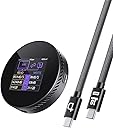
🧲 Power, speed & protection — your MagSafe SSD just got smarter.
The DOCKCASE Magnetic Visual M.2 2242 NVMe SSD Enclosure combines precision engineering with cutting-edge USB 3.2 Gen2×2 technology to deliver ultra-fast 10Gbps data transfers and up to 2TB storage expansion. Designed for iPhone 16/15 Pro Max users, its magnetic design ensures seamless MagSafe compatibility, while 3-second power loss protection safeguards critical data. With dual USB-C ports supporting 100W power delivery, it enables simultaneous device charging and high-speed data backup, making it the ultimate external SSD solution for creative professionals and tech-savvy millennials.


| ASIN | B0DSN3PHXX |
| Best Sellers Rank | #241 in Enclosures |
| Brand | DockCase |
| Built-In Media | SSD enclosure*1, USB-C Data Cable *1 |
| Compatible Devices | Laptop, Smartphone |
| Customer Reviews | 4.4 out of 5 stars 69 Reviews |
| Data Transfer Rate | 1250 Megabits Per Second |
| Hard Disk Form Factor | 2242 Millimeters |
| Hardware Interface | USB 3.2 Gen 2×2 |
| Hardware Platform | Universal |
| Item Dimensions L x W x H | 2.33"L x 0.57"W x 2.33"H |
| Item Weight | 53.8 Grams |
| Manufacturer | DOCKCASE |
| Memory Storage Capacity | 2 TB |
| Product Dimensions | 2.33"L x 0.57"W x 2.33"H |
| Supported Devices Quantity | 1 |
| Warranty Description | 1 year |
J**H
Superb craftmanship for an external drive enclosure
There is one word I will use to describe this drive: Precise. Everything about it feels well thought out and deliberate. The glass and metal surfaces are perfectly machined--you can see exactly what I'm talking about when you take a look at the screw that holds the drive into the slot. It's perfectly machined with minimal tolerances, to precisely fit into the circular molding around it. You can feel the smoothness of the threads when removing the screws that hold the bottom plate in place--it's perfect fitted. There's power passthrough, which lets you charge your device and power the SSD inside, if it draws more power than the USB port provides. I am able to power a Legion Go from a 100W charger through this drive. There's also a display too, but I don't really find it practical to use. It's there and will probably be useful to someone. This thing feels completely over-engineered in every way, and it's pretty great. There is zero jank with this product. This is literally what it feels like to pay more for a better built product. However, despite all that engineering, at the end of the day, the drive is held back by the 10Gbps interface. It's like driving a supercar through city streets with a 15 MPH speed limit. I did have to pay more for what it does, but I also feel that the extra cost was well justified. This is a truly high quality, well machined product.
M**S
Great for Iphone PRoRes use
The cable that comes with it is not as flush as the (HAGiBis) cable. (look it up) Get that too. Dockcase... you need a flush flat cable for this. You should also make this thinner so it fits with gimbals.
M**E
Great external drive: Fast and compact, but I have suggestions . . .
DockCase's external magsafe drive is a nifty device and I do recommend it if you want to film in ProRes Log on your iPhone. It's fairly affordable and comparable to other devices on the market. The metal enclosure is well made and also is a giant heat sink. This device also has the added benefit of letting you choose an SSD with a capacity that fits your needs. However, when you do choose an M.2 drive choose wisely! Some NVMe m.2 drives require more power than the iPhone can support and would necessitate you use an external power supply connect ed to the 100W PD port on this device. Did I mention it has a 100W Power Delivery port for connecting batteries and other accessories? Well it does! Just another benefit of the device. The Screen is bright and clear and communicates information you might need for your drive including temperature, read/write speeds, and also what speed USB you're connected with. This is great when trying to figure out which of your cables is USB 3.2 Gen 1 (5Gb/s), Gen 2 (10Gb/s), USB 2 (480Mb/s) or simply a power cable with no data transfer capabilities. The screen also contains information about your SSD, which can also be useful. Speaking of cables, when using a USB 3.2 Gen 1 port file transfer speeds to my PC were incredibly fast. I can only imagine how much faster they'll be when I can connect to a USB 3.2 Gen 2 hub. The drive enclosure is vented all over to help with cooling, but it will get noticeably warm and can even reach 45C when simply idling. I communicated with DockCase's customer support and they have been very helpful, friendly, and respond within 24 hours, which is great. If I love this device so much, why only 4 stars and not 5? My gripes are as follows: 1. The screws are not magnetic at all so making sure you don't lose any can be a pain point. Include magnetic screws! 2. The included cable, while nice is bulky and gets in the way when I am using my phone. I would reserve this cable for file transfer use only and rely on the compact cable DockCase offers, but YOU HAVE TO BUY IT SEPARATELY. Bleh! Not cool. For original MSRP of over $50, this compact cable should be included. That cable can be bought on amazon and is linked here: https://www.amazon.com/dp/B0DSZZ9WBC?ref=ppx_yo2ov_dt_b_fed_asin_title 3. M.2 drive compatibility is probably the most important thing to know when buying this device. DockCase has a list of drives on the product page they have tested, but none indicate whether or not they need external/additional power to be usable. I first bought a WD SN740 drive and couldn't get the device to work unless I made use of the 100W PD port and plugged in external power. However, I bought a Micron 2400 2TB drive (link: https://www.amazon.com/dp/B0BV1GXT31?ref=ppx_yo2ov_dt_b_fed_asin_title ) and it works flawlessly without needing external power. 4. The screen needs more information and we should be able to manually turn it off to save battery life of our phone. Also, update the firmware so it can communicate power draw. Overall this is a neat, fun device that has enabled me to film in ProRes Log on my iPhone 16 Pro Max. I recommend it but just beware of the little pitfalls and avoid any frustration by getting an SSD that will work without extra power. Also, unless you absolutely need an external drive solution for your phone, wait for it to be on sale like I did so you can get it at around $42 instead of $60. Happy shopping and happy filming!
F**O
Wow!!
Man, this thing is well built and fast! So small, it’s an EDC in my bag. Works great with all my devices including the Fold 7, iPhone 13 mini, and my Galaxy tab s7. The cable is flexible and short but could’ve been shorter to work better with the MagSafe on my IPhone.
J**N
Awesome enclosure!
Very cool device, I used the drive that came out of the steam deck or the legion go, can’t remember. Every device I plug it into, it just works. No power issues like other reviewers mention.
O**A
1TB or 2TB SSDs May Need Throttling To Power On And Use.
Experiencing Reboot and Power Off but don't want to use external power. Your SSD may consume upwards of 10W of power, and your device can't power that much by itself. The solution is to use HCTM (host controlled thermal management), a throttling feature of the SSD. HCTM has 2 throttling points you can set, TMT1, and TMT2: TMT1 == throttling to 50-70% of full performance TMT2 == throttling to 20-50% of full performance. TUTORIAL: STEP 1) Have a linux system that your SSD can plugged into. Open terminal. Install nvme-cli. STEP 2) Identify your SSD device path name (i.e. /dev/nvme0). It will be used in all future steps. >> sudo nvme list STEP 3) Run a script from a github repo "nvme_hctm_throttle" OR follow instructions below. *STOP HERE* If you ran "set_min_tmt_nvme-cli_1.xx.sh" from github, you are done. If you didn't, follow the next steps. STEP 4) Manually run the below nvme-cli HCTM commands in terminal. a) Determine if your SSD supports HCTM. Get the Min and Max accepted TMT temps (in degrees Kelvin). Note - Use the correct device name from STEP 2 (i.e. /dev/nvme0). >> sudo nvme id-ctrl /dev/nvme0 | grep -E '^hctma|^mntmt|^mxtmt' | awk '{print $3}' | xargs b) Determine DEFAULT TMT1 and TMT2 temp values at which your device throttles. Likely between 353-386 degrees Kelvin). NOTE I use my correct device name (i.e. /dev/nvme0). >> hexval=$(sudo nvme get-feature /dev/nvme0 -f 0x10 -s 1 | awk -F: '{print $NF}'); vals=$((hexval)); echo "$(((vals >> 16) & 0xFFFF)) $((vals & 0xFFFF)) Kelvin^" c) Determine the CURRENT TMT1 and TMT2 set values. Likely same as DEFAULT throttling temps. Note I use my correct device name (i.e. /dev/nvme0). >> hexval=$(sudo nvme get-feature /dev/nvme0 -f 0x10 -s 0 | awk -F: '{print $NF}'); vals=$((hexval)); echo "$(((vals >> 16) & 0xFFFF)) $((vals & 0xFFFF)) Kelvin^" d) Here is where you set your throttling temperature to the lowest supported value found in step a). sudo nvme set-feature /dev/nvme0 -f 0x10 -v $(( (273 << 16) | 275 )) --save Note, the above command always sets both TMT1 and TMT2. For ~50-70% throttle, set TMT1 to 'mntmt' and set TMT2 to default TMT2 from step a),b). For ~20-50% throttle, set TMT1 to 'mntmt' and TMT2 to mntmt + 2 from step a). My example here does ~20-50% of full performance (273 and 273+2)
T**H
Heat dissipation issue
The NVMe SSD enclosure offers an excellent concept and strong performance; however, its thermal management is a significant drawback for me. While idling, the enclosure reached 65°C, and during large video file transfers, temperatures climbed as high as 85°C. Although these figures fall within the normal operating range for many laptops and tablets, the sustained high heat is noticeable and uncomfortable during extended use.
K**I
Good stuff
Bought this for my nephew iPhone 15. Not sure if he's using it but it was cool when I assembled it for him
Trustpilot
3 weeks ago
1 week ago