We remain fully operational. Our teams are working around the clock to ensure your deliveries continue safely.

DOWNLOAD THE APP


Customer Services
Copyright © 2025 Desertcart Holdings Limited
DOWNLOAD THE APP
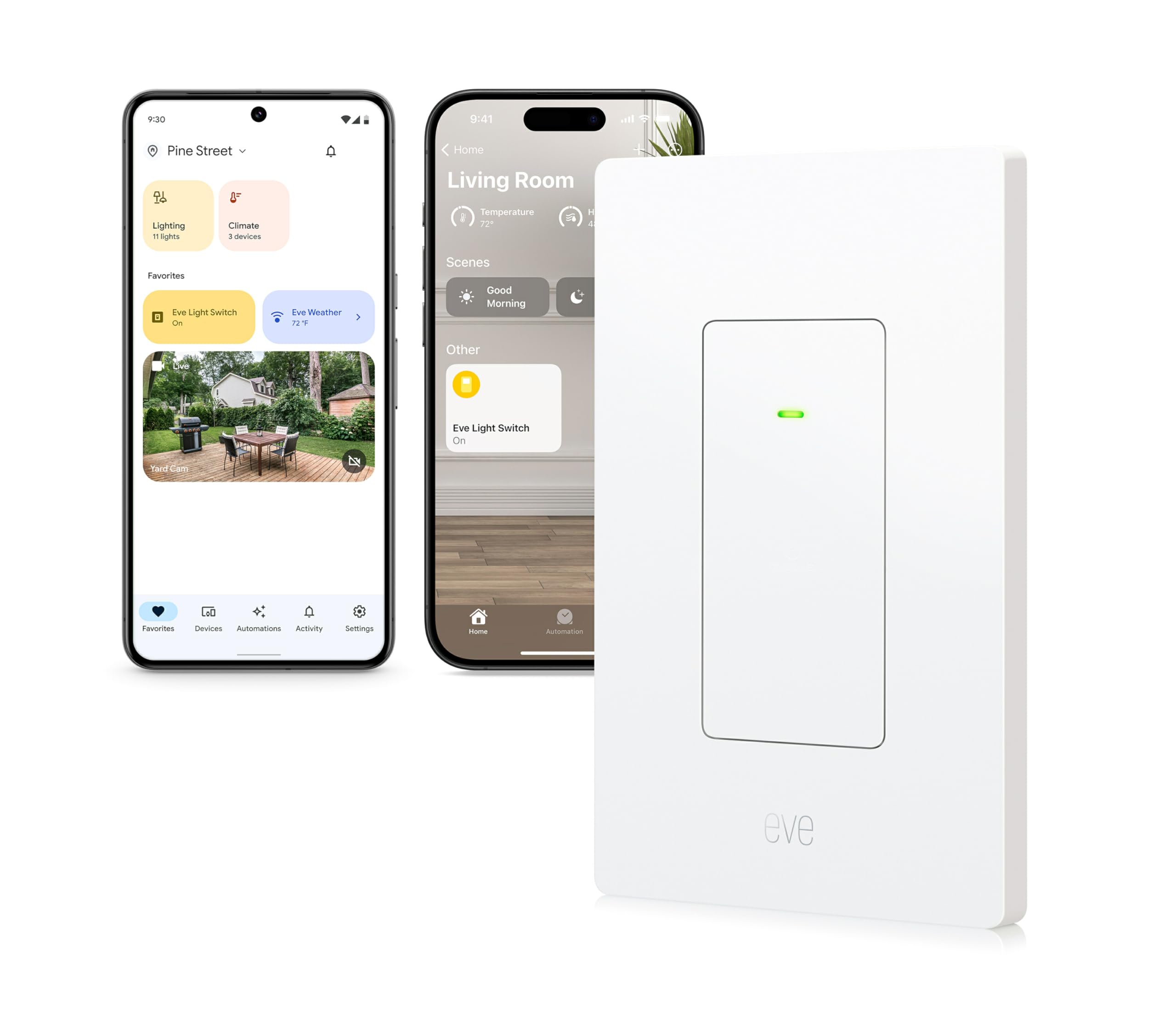
💡 Upgrade your walls, upgrade your life — smart lighting that speaks your language.
The Eve Light Switch (Matter) is a UL-certified smart wall switch designed for single-pole and 3-way circuits, delivering 15A current capacity. It leverages the latest Matter-over-Thread protocol for robust, low-latency connectivity across Apple HomeKit, Alexa, Google Home, and SmartThings platforms. Installation requires a neutral wire and a Thread border router. Prioritizing privacy, it operates entirely locally without cloud dependency, enabling voice, app, and manual control with seamless automation capabilities.


| ASIN | B0DCK65T2Y |
| Actuator Type | Push Button |
| Best Sellers Rank | #35,087 in Tools & Home Improvement ( See Top 100 in Tools & Home Improvement ) #129 in Electrical Light Switches |
| Brand | Eve |
| Brand Name | Eve |
| Circuit Type | single-pole or 3-way |
| Color | multi-platfrom (Matter) |
| Connectivity Protocol | Matter |
| Connector Type | Clamp |
| Contact Material | Brass |
| Contact Type | Normally Closed |
| Control Method | App, Remote, Touch, Voice |
| Controller Type | Amazon Alexa, Apple HomeKit, Google Assistant, SmartThings |
| Current Rating | 15 Amps |
| Customer Reviews | 3.7 out of 5 stars 307 Reviews |
| Included Components | Eve Light Switch, wall plate, mounting material |
| International Protection Rating | IP20 |
| Item Dimensions | 1.77 x 2.95 x 4.72 inches |
| Item Weight | 125 Grams |
| Lower Temperature Rating | 32 Degrees Fahrenheit |
| Manufacturer | Eve |
| Material Type | Plastic |
| Model | 20ECE4101 |
| Mounting Type | Wall Mount |
| Number of Items | 1 |
| Number of Positions | 1 |
| Operating Voltage | 120 Volts |
| Operation Mode | ON-OFF |
| Specification Met | UL |
| Switch Type | Rocker |
| Terminal | Wire |
| UPC | 813180021020 |
| Unit Count | 1.0 Count |
| Upper Temperature Rating | 104 Degrees Fahrenheit |
J**.
Excellent Matter over Thread switches
These work great. The things you should know are 1) Matter over Thread is much better than WiFi 2.4mhz. 2.4mhz devices were OK before 5mhz came along. Once that happened phones and WiFi routers started using 5mhz by default. This is a problem since all the 2.4mhz devices need to be on the same network to be configured and iPhones at least can't be foreced to use 2.4mhz unless you disable 5mhz on your router for th4e duration of the install. This is a pain and not all routers support this. Thread is a separate radio network that forms mesh networks between smart home devices. It works great and configures reliably and is stabile in use. 2) Several reviewers have mentioned that these switches are bulky. That is correct when compared to standard switches, but they are exactly the same size as the other two brands of smart home switches I have installed. So yeah, it can be hard to get the wires back into the circuit box, but these are no worse than the rest. I have found that replacing wire nuts with WAGO connectors helps with making the wiring a bit more compact. 3) Matter is a common protocol supported by Apple, Google and Amazon. No more worrying about brand specific devices.
G**R
Update: These switches become unreliable as network grows. In desperate need of firmware updates.
When you start out with a small Homekit-over-Thread network, these work well. However, as the Thread network grows with more devices, Matter-over-Thread devices join and add Matter controllers / clients from other smarthome systems to the shared Thread network - then these switches start to become increasingly unreliable. I believe this is more of a Homekit-over-Thread protocol scalability problem as other Homekit devices suffer too, but these Eve switches also develop a tendancy to *hard lock up*. They stop responding to local control, and the two-finger reset mechanism does not work. At this point the only recourse is to cycle the circuit breaker for the room. My photo in this review is from a switch in this locked-up state. It is on and cannot be turned off locally or via remote control. A breaker flip was required in this case. The unfortunate thing is that they do have a firmware fix for this but they only give it to a select few people. They had Matter-over-thread firmware (which fixes this particular problem) certified in March 2024, and again in August 2024. But no, you cannot have it. Their support is near useless. When you have problems like this, they'll reply with boilerplate responses about how they're rushing to get everything out, but nothing that actually helps. It's hard to not be bitter at this point. The products had so much promise as a premium product line. But for now, I'm avoiding them at all costs. The company desperately needs to solve its release cycle problem. Withholding certified firmware that fixes actual bugs for 6-12 months is absurd. If anyone else is looking for an alternative, I am very happy with the Inovelli matter-over-thread switches. [Original review, 4 stars] I bought these for several reasons, including to fill in some gaps in a Thread network. They work well and the Homekit support is solid. I'd love to give them a 5 star review, but I have challenges with installation due to their size. 1) They are not small switches. Fitting them in junction boxes can be quite a challenge. 2) The pigtails require wire nuts or wago connectors. This compounds the size issue and makes it even harder to fit them in a box. It would have been quite a bit easier to fit it all in the box if they had screw terminals instead of pigtails. 3) As a result of space constraints, it can be a challenge to get the surfaces lined up so that they look presentable. I've been able to do it, but it hasn't been fun at times. They are hyper sensitive to touch. This isn't necessarily a bad thing but they can be triggered by the brush of an elbow through thin clothing when walking close by. This is something that can be accommodated for and isn't much of an issue for us. Some might find it irritating. For me, I still miss the Insteon switchlinc style rocker panel controls - even though they were unreliable. I had hoped that these might win over my heart but they're not quite there for me. The Eve touch controls definitely feel like they will stand the test of time. In other words: a solid, reliable switch that feels like it will last, but installation can be a bit of a pain.
S**O
WORKS GREAT WITH APPLE HOMEKIT!
Addendum 8/21/2023: We purchased two more of these Eve Smart Light Switches recently, and love them! We used these two for our front and back outdoor light switches, and they work great when you program them to go on at sunset, and off and sunrise. It's so nice to not have to manually turn these lights on or off anymore. I'm really impressed that these switches have been adjusting themselves to the ever-changing sunrise and sunset times, without us having to do anything. Highly recommend! They might be more expensive than other smart switches, but we think it's worth the cost. *********** Finally got these installed today and set up with Apple HomeKit. (I did not use the Eve app.) Two of the three switches were a little stubborn during the set up process, but I restarted my iPhone, and turned the switches off and then on again, and it was easy after that. I knew these switches were not dimmer-capable, but that's okay. I love that they are thread devices. And I love the green LED that tells when a switch is turned on. Very happy with them so far.
Z**Z
More than I expected - in a good way
Initial review: Just installed. NOT yet programmed. I was pleasantly surprised that it retained it's on / off state through a power failure!
P**M
Solid privacy focused connected switch that would be better with some small improvements
I've got a couple of these around my house along with a few Eve outlets. Overall, I have a very robust network for Matter over Thread devices - which is terrific as it's a solid way to create a cross-platform smart home without needing a patchwork of cloud services. Eve continues to be a leader in Matter over Thread devices, but you pay a bit of a premium for that. The devices work well. They quickly turn the lights on and off and allow me to manage my outdoor lights from wherever I am. Installation was relatively easy and all the parts are included in the box - including a number of wire nuts for connecting everything. However, be aware that there are no screw terminals on the device, this means that even if you didn't have wire nuts in your switch box before, you're going to need room in the box for wire nuts now. Not a huge deal, but you'll want a pair of pliers to straighten out incoming leads and snip off a little bit of excess so you can use the wire nuts without having uninsulated wire showing. Adoption was dead simple to bring them into Apple Home - just scan that QR code from the manual and the devices appeared in both the Apple Home and the Eve Home apps. If you don't have the Eve Home app, you don't need it for these, but it will provide a few extra controls for the lights on the switches. You'll want to do this as the green lights on the switches are otherwise bright enough to provide small amounts of illumination to the room they're in. A point that is neither good nor bad, but to be aware of, is that these are not rocker switches like most other smart switches. It's not a case of hit the top to turn on and bottom to turn off. They're completely flat and touching anyplace on the switch toggles the state. If they're next to another switch, you'll be surprised at how often you accidentally trigger the switches. Another point to be aware of is that these are much bigger than some of the other smart home switches that I have. If you're not living a recently built house with large plastic switch boxes, things will get very cramped very quickly. I really had to work to get everything into my boxes - including some creative wiring and removing of wires. The ground wire on the top of the boxes is in a particularly annoying spot for some older boxes because it sticks above the top of the switch and gets easily pinched. Luckily, if you've got metal boxes, you can just rip the grounding wire off. Finally, there are two spots where things can definitely be improved. First, while the QR code for the device is printed on the manual and also on the inside of the face plate, if you're not using the face plate, you still stand a chance to lose it. It would be great if the QR code for device adoption were also printed on the device in case you ever need to move it. In my case, I just write the numeric code in permanent marker on the part of outlet that is in the box. The second spot, which is probably the biggest spot for why I took a star off is that these switches have really cheap screws packaged with them. The screws both strip easily and also, disturbingly, I ended up snapping the heads off two of the screws used to put the switches into the box. Yes, part of that was probably because I have very tight switch boxes, but it's disappointing when you buy a premium product and discover that they decided to save a couple of cents at most by using cheap screws.
B**.
Great switches, huge upgrade to my home
With the help of AI (Copilot, in my case), I was able to install 2 Eve Light Switches (Matter over Thread) even though I don't know much about electrical. I just asked a lot of questions to make sure I understood which wire was which in the switch box. The switches themselves are working *great* so far. Once installed, they worked great—super responsive. Then they paired super easily with my Apple ecosystem (HomePod Minis and an Apple TV 4K provide Thread support for my home). I'm really excited to be able to control lights from a manual switch (i.e. without even involving a "smart" home system) or from Siri, my iPhone, etc. Such an upgrade. The instructions made it seem like there'd be a video if I followed the provided web link, but it was just a PDF version of the instructions that came in the box. They're slightly simplistic, but I suspect they don't want to be liable for non-electricians trying to install this. That's probably wise. I'd encourage anyone to be careful—but…I figured it out safely (I think!).
N**É
Great until it quickly wasn’t…twice
The install was easy, but i hit my first issue as the switch would not work as a 3-Way switch. Not really a problem, with a smart switch, I planned to use more automation and voice controls anyways, so I installed it as a single pole. At first it worked great. Paired with all my thread devices quickly and I setup automations via the Home app on my iPhone and went off. It worked great for about a week, then the smart portion died. The physical switch still worked, but after days of constant hard resets on the device as well as resetting the breaker several times, the switch was never reachable, so I had enough. I loved the convenience of the switch when it worked so I sent it back for a replacement. It arrived 2 days later, same Ver. 3 model I originally installed. The new one did not work as a 3 way switch either, so I set it up as a single pole. Again it quickly paired and I was happy…for 2 days. This time the device wasn’t reachable and even worse, it jammed all my other thread devices making everything in the house inaccessible. Hard resets of the switch and cycling the breaker, as well as resetting my other devices did nothing. I uninstalled the switch, and just like that, everything in my house worked again. The product was great when it worked, but good luck on the quality of the unit you get. I’m going to try my luck with a smart switch from Wemo or Inovelli.
J**.
The good, the bad, and the UGLY - read before you buy the Eve switch for 3-way circuits
First let me explain the rating and then I’ll tell my experience with these switches. I rated it over 3 characteristics taken individually, and then used the average as the final rating: 1) The good: Operating in a single circuit containing only one switch. Rating = 5. 2) The Bad: Use in a 3-way circuit using one Eve switch and one “dumb” switch. Rating = 1 The switch does work like a standard 3-way switch if you only operate it manually, that is by touching the device or toggling the dumb switch. But that defeats the whole Smart switch idea. The problem comes when you try to use the app (either Apple Home Kit or the Eve app). Sometimes you need to do each operation in the app twice before the state of the light changes, and the status displayed in the app is somewhat random. While Eve support always tries to blame this on your wiring, this happens even if your 3-way circuit is wired correctly. More on this later. 3) The Ugly: Installation. Rating = 1 The reason for this low rating is that the switch is very large, making it difficult to jam all of the wires and required wire nuts into any size box, especially if there are other switches colocated. So averaging these ratings and doing rounding, gives us an overall rating of 2. So here is my experience . First let me note that I researched a lot of switches and settled on the Eve. I liked the fact that it was basically Home Kit native. Also, I would only need one switch for each 3-way circuit. And it had a nice simple clean appearance. I also read a lot of reviews and did note that folks were experiencing the bad behavior I noted above.(needing to hit the app twice before the light changes state). But I consider myself tech-savvy and figured they must all be doing something wrong, so I purchased two switches to use in two different 3-way circuits. So I wired up one of the switches to the line side of the circuit and jammed all of the wires into the box, tested manual operation was OK, and then I immediately experienced the bad behavior when I tried to use the app. So I began troubleshooting, and decided to try it on the load side instead of the line side. I got the same result. So I carefully went over all the wiring in the boxes to be sure I knew which were Line/Load, Travelers, neutral, and ground on each end. I had it wired correctly. So I found a video on YouTube from Eve gmbh called Eve Light Switch (3rd generation) Installation Video. This video indeed shows how to install the switch by swapping the wires from the dumb switch to the Eve switch, but they never show the switch in use from the app. This is suspect to me, and gives me no confidence that these switches do operate as advertised. I know it is not my installation that is the issue as there are many comments on line from people having the same issue that I am having. So at this point I contacted Eve support via email and the next day (they are in Germany) and got the standard form letter response to check the wiring, find the neutral and so forth. All of which I had already explained in my original support request. Next they wanted a picture of the wiring. So I sent them a photo of the can of worms inside the switch box (which had another switch also in the box). I Identified all the wires, showing that it was wired correctly. They also said “This is not a typical problem”, but they clearly are not paying attention to the many comments and reviews on line stating the same problem. My though is that they think that the issue is an edge case and not worth it (for them) to pursue a fix. So bottom line was they finally agreed the wiring was correct and told me to get replacement switches from Amazon. Well, before I did that I decided to set up a breadboard 3-way circuit and test the switches I was using. I wanted to see if they would work in a situation where there was no house wiring involved and the connections could not be questioned. So just using open wiring I set up a working 3-way circuit and then replaced one of the dumb switches with the Eve switch. And surprisingly it worked correctly both manually AND with the app. So why doesn’t it work when I install it into my existing house wiring. Well here are my thoughts on that. I noticed that while I was using my digital multimeter to identify which wire went where, that there was AC voltage on some of the wires. These were voltages like 20.vac, 108.2vac, 5.3vac as an example. This is clearly voltage induced from other energized wires in the walls and adjacent circuits. While such induced voltage is normally not a problem, I am pretty confident that the Eve switch is sensing this induced voltage and using it to make decisions for its state machine and how it interacts with he app. Someone else on line had mentioned that capacitance in the wiring might also be a problem for the switch. It seems to me that they need to go back to the drawing board and build in some more intelligence and improved sensing so the switch will function properly in this mode. I think that anyone who has successfully installed these in a 3-way circuit which works correctly with the Home Kit and Eve apps does not have these induced voltages dancing around on the wires. So I am keeping them but not using them in 3-way circuits, just single switch circuits. I’m hoping Eve Systems will get busy and come out with a firmware upgrade to fix the issue. Regards
Trustpilot
3 weeks ago
3 days ago