Some deliveries may take a little longer than usual due to regional shipping conditions.

DOWNLOAD THE APP


Customer Services
Copyright © 2025 Desertcart Holdings Limited
DOWNLOAD THE APP

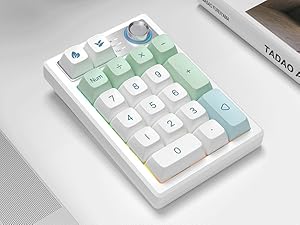
✨ Elevate your desk game with the ultimate tri-mode, programmable numpad! 🔥
The Gasket Creamy Mechanical Numpad is a versatile, rechargeable numeric keypad featuring tri-mode connectivity (Bluetooth 5.0, 2.4G wireless, and USB-C wired), hot-swappable linear Ice switches with gasket mounting for a soft, premium typing feel, and fully programmable 18 keys with memory retention. It boasts vibrant RGB backlighting with 18 modes, durable PBT keycaps, 19-key NKRO anti-ghosting, and a multifunction metal knob for volume and brightness control, compatible across Windows, MacOS, iOS, and Android devices.


| Enclosure Material | Metal, Acrylonitrile Butadiene Styrene |
| Item Dimensions L x W x H | 5.2"L x 3.5"W x 1.4"H |
| Color | Mint |
| Theme | Technology |
| Style Name | Contemporary |
| Connectivity Technology | Wired USB C, Bluetooth 5.0, Wireless 2.4G |
| Number of Sections | 2 |
| Water Resistance Level | Not Water Resistant |
| Button Quantity | 19 |
| Keyboard Backlighting Color Support | RGB |
| Power Source | Battery Powered |
| Switch Type | Linear |
| Number of Batteries Required | 1 |
| Compatible Devices | Laptop, Smart TV, PC, Tablet, Smartphone |
| Mechanical Keyboard Switch Model | KEYCOOL Linear Ice Switch |
| Number of Keys | 19 |
| Is Electric | Yes |
| Keyboard Layout | QWERTY |
| Hand Orientation | Ambidextrous |
| Additional Features | Volume Roller, Backlit, Programmable Keys, Rechargeable, Hot-Swappable |
H**S
Detailed review with video to hear the sounds!!
Protip: if you're using the keyboard wired like I am, turn the on/off button to the off position. Or you'll be co fused when it suddenly stops working not realizing it was using the battery. The only con I can see is the USB is really hard to get into any devices. And it takes pliers to get it back out every time. I really only cared about a few things for this keyboard. I needed the number keypad back because I got a 65% keyboard and I'm missing a lot of keys lol. It's creamy so it matches my regular keyboard and the color scheme also kinda matches, whites and pastel greens and blues. My fav feature is the usb dongle stowaway area on the side back of the item. It pushes down to stay securely within it, so you don't lose it. I super appreciate this as someone with adhd. The 0 zero key was a dud, it sounded dead and I had to immediately switch out the switch with one of the extra they gave and that fixed it up. I appreciate the quality of this. The keyboard has good grips on the bottom to stop it from sliding. It's not the heaviest but also not the lightest. It's firmly in the middle. The lights were a bit much so I changed the settings to only light up briefly when I press a key. That way my retinas don't burn lol. The knob: tuning it does adjust the volume of your connected device, but sadly, it doesn't seem pushing down on it mutes it the way other keyboards do. That's ok tho, my regular keyboard has a knob that does mute when pushed down. I'm using wired. I did not test usb or bt. Instructions: they're in Japanese and English from what I checked (I did not go through the entire booklet though). You get everything you need in this kit for this to function. While I recommend, i wonder if the value is there. I paid 20 more for a 65% creamy keyboard. I'm not sure if this is a normal price for just a keypad tbf.
S**H
I bought it for scripting for lines of text- legal boilerplate
I'll be honest, I was lost for a minute on how to program the macros, the manual I found online doesn't tell you. After about 30 min. I figured it out and after that initial hurdle of figuring it out, I love this thing! The build is nice, the keys sound great. I would buy this again. I am surprised at how long the lines can be scripted for the price (worth it!) I got this for the sole purpose of programming boilerplate legal terms and it is well worth it. There is a cool function software (again, you will have to find it online) where you can share macros and I think I will in case anyone else out here is reading this and plans to use it for the same thing. I even though I love the keys it came with, I have ordered blank keycaps to customize to match what each key does. So far, it has been well worth the $35.00 I spent on it. I will update this review after more frequent use to see how it holds up. But tbh, if it fails down the line, I would buy another one based off of how awesome this one is and how much time it is going to save me typing legal documents. I am still figuring out if I can program the different "layers" (and how to switch between them from the macropad) if so, that would be awesome!
K**F
Perfect, especially for the price
Received this today and haven’t tested it long-term yet (will update later), but my first impression is excellent! The sound profile is far better than what recordings show. It comes across clacky on my iPhone video, but in person, it’s a much smoother, creamier sound, similar to a Nuphy Kick75 for reference. Bluetooth connection works well so far: three devices via FN shortcuts and a fourth through the dongle. The dongle’s hidden release mechanism is clever and keeps it secure! I appreciate that because I have a keyboard whose dongle falls out occasionally. RGB lighting is bright and simple to toggle through, though I wish there were pastel color options. Haven’t customized through VIA yet, but it seems straightforward. It even doubles as a calculator (Windows only which sucks for me as a Mac user). Knob - tactile and the default option is to adjust the volume. Only con - I wish it had adjustable feet. The fixed angle is okay, but optional feet would’ve made it perfect. Overall, love this next to a 80% or less keyboard. I have it on the left side of my keyboard for now because I use my mouse on my right to navigate through excel sheets! Highly recommend this for anyone who needs a number pad like me but want the option to put it away sometimes!
F**.
Macro Muscle, Wireless Freedom: The Ultimate Numpad for Power Users
The TISHLED Wireless Mechanical Numpad Barebones Kit redefines numeric input with tri‑mode connectivity (2.4 GHz/BT5.0/USB‑C), delivering seamless flexibility wherever you are. Its gasket‑mounted, hot‑swappable build gives every keystroke a delightfully soft, "thocky" feel that stationery and spreadsheet warriors will appreciate. The fully programmable 18‑key layout and metal volume knob make it ideal for macro power‑users or those who crave extra control without sacrificing style. In short: a high‑end numpad experience that adds function, flair, and freedom to any desk setup.
R**T
No longer able to reassign keys to certain modifiers and use as a macropad in iPad :(
Update (June 2025): Physically this has held up pretty well. Again not a premium feeling numpad, so keep expectations lower. I don't swap out the switches or keycaps ever really and I haven't taken it apart once to clean in the six months I've had it (gross as it is, I don't eat at my work station so it doesn't bother me too much). Battery life averages for my use case one to two days but I usually charge it when I'm done using it, so that hasn't been a problem. I had to drop one star because the remapping function no longer works reliably with iPadOS unless you get...creative. It’s unclear whether the issue is with Apple or Keycool (which is the company listed in the driver/software, despite the gibberish name on the Amazon listing). Previously, you could reassign any key, like mapping "Enter" to "Ctrl", and it would work fine. As of recent iPadOS updates, that no longer functions properly. I tried factory resetting the numpad, upgrading the firmware, and remapping the desired keys to other keys to see if I could get it to work...but it simply will not function as before. However, I found a kinda hacky workaround: instead of mapping to a pure modifier like "Ctrl," you can map a key to a combo like "Alt + [letter]." This still acts as a usable modifier in apps like Clip Studio Paint for iPad. For example, I remapped the Enter key to "Alt + J" and assigned a shortcut to that. I was also to map the Enter (now "Alt+J") and a number pad key to a different action to be read as "Alt+numkey", and CSP was able to recognize both combinations independently. That said, this is not an ideal workaround. Certain modifiers (ctrl in particular) do not work even when remapping a key to ctrl + [letter/number], so if I try to use a reassigned key (say, Enter) as a Ctrl key instead, it won't even register as anything in CSP for iPad. Additionally, every so often, prior to this functionality straight up no longer working on iPadOS, I would have to force reboot the numpad (occasionally multiple times) to get the remapped keys to read properly on iPad. To have it go from that to not working at all in just six months is worrying. I hope this will still be usable for me in a year if this is the pattern, as I have *many* shortcuts which I've assigned using remapped keys as modifier keys. Otherwise, I would have rather invested in a Tourbox and gotten over the learning curve for that instead. I am now saving up for one because going to input a shortcut only for it to work 2/3 of the time, and at some point stop working entirely, really soured me on this device. I know this isn't advertised as an iPad macropad specifically, but the promise of reassigned keys made this something I was really hopeful could replace the extremely pricey Tourbox. Alas... Original (Dec 2024): Surprisingly decent for the price point. Plastic and light, but the switches feel pleasant and there is definitely a "thockiness" to them that I didn't expect. Programmable RGB and macros are a huge bonus. Can connect wirelessly to up to three devices and has a very neat little 2.4GHz dongle that pops in and out of a dedicated spot in the housing with a little push (google tells me this is called a "push-push mechanism" but I've never heard a dedicated word for it!). Definitely a better mechanism than what I've seen $200+ boards do. The knob is even actually programmable in the software, which is more than what some big companies (cough Gl*rious cough) can say. That said, this isn't a perfect keyboard by any means. In the box you get: - the numpad (K19) - keycap/switch puller - 2 extra switches - 2 extra keycaps - manual (the cover says Chinese, English, and Japanese but inside I saw Chinese, English, Japanese, French, German, Italian, and Spanish so bonus points for that) - business card (only in Chinese for some reason?) with a promising "QC pass" stamp PROS + shockingly decent build quality, feel, and sound + color scheme is pretty. I got the mint colorway and it is indeed nice and minty + comes with two extra switches and keycaps with different designs, so you can swap the two top ones (Backspace and Fn) if you please + technically hot swappable (see cons) + programmable, down to the knob and lighting effects + dongle is stored in a neat way + connects with iPad and works like you would expect! able to set up shortcuts in Clip Studio Paint on the iPad and can even use the knob to zoom in/out in CSP after some fiddling (to do this, you need to program the left/right sides of the knob in the keycool software to zoom in/out, and then set the keyboard shortcuts in CSP with the keypad) + south-facing RGB CONS - not sure how long it will last. I fully believe the switches could be broken if you are regularly swapping out keycaps - keycap is pretty poor quality imo, I pulled one at random and it had a pretty visible chip in the bottom - the switches they included both have bent pins, probably because they were included loose in the box and rattled around in shipping. Should be fine if you just bend them back but they aren't infinitely bend-able and it does kind of look, for lack of a better word, cheap - the method they have for downloading the drivers/software feels insanely sketchy. They have a shortened link in the product description and their website doesn't exactly scream "quality" - I was pretty nervous installing the software, but it works fine and my PC is still working as of writing lol - limited lighting effects (not a big deal for me) - software works but feels very barebones. UI/UX could use some work Can't speak to battery life yet since it's my first day using it, but I'm hoping it lasts decently long and charges quickly. So far it's looking like a very affordable (albeit slightly gimped) alternative to a Tourpad Elite Plus, which is in the $300ish ballpark. For 1/10 the price, I was willing to take the gamble and it seems like things are okay for now. Not perfect, but definitely passing marks with some above and beyond points.
D**A
Overall, a pretty great product
It feels very well built and not cheap at all. Everything has worked so far. I liked that you can customize the rgb lighting of each key. Couldn't figure out how to program macros on the software, not intuitive at all and there's no user guide or anything. But if you have Keyboard Maestro like I do, just program each key to simulate your Keyboard Maestro macros and it works like a charm. Just giving it 4 stars because of the software, other than that, it's a great product. Also because I wished it came with blank keycaps too, and not like a number pad.
C**C
My favorite keyboard
I don’t usually write reviews but I went out of my way to post this because I absolutely LOVE this keyboard. It has 10x’d the speed of my work. It works flawlessly every time with no hiccups. I’ve used it for a solid month now and I only love it more and more. I wanted the option of a small keyboard to be used as a macro keyboard. My job requires a lot of copy/pasting, the program we mainly use also has shortcuts. So for that use purpose, it’s incredibly. I was choosing between this and the EPOMAKER EK21, I had actually bought both. Where the EPO failed me was the horrible software experience. The program was essentially lightweight programming and the simplicity was definitely not there. That is where the two different vastly. This beautiful green beauty comes with a program that allows you to change the function of every single key, minus the FN key, all the way down to the left and right turns, AND pressing down on the knob. So the knob counts as 3 functions. You can program the macros you want, my picture is what I have them set as. And then you can unplug it from the computer you programmed it on, and it will retain it’s functions even on pcs that don’t have the program. I rotated the keys so I use it horizontally and now I’m a short movement to every key. Minimal hand movement. The possibilities are endless. If you need a macro keypad, I 100% recommend this one. EDIT: The keyboard has a thonky weighted feel that feels great. USB dongle, but I choose to use usbc so it never runs out of power.
A**T
So cute and creamy, but not worth the money.
I really loved this keypad, the creaminess, the colors. It’s exactly what I needed next to my Yunzii keyboard. However, it does not hold a charge. I’ve had this number pad for just hit eight months and it is completely dead now. I didn't even use it daily; it has no wear from lack of use. But I’ve had it charged, left it plugged in overnight, and even keep it plugged in now and now it will not respond or turn on. The lights don't ork, the keys don't respond. Nothing is working. That’s absolutely unacceptable for the price of this number pad.
Trustpilot
3 days ago
2 weeks ago