We remain fully operational. Our teams are working around the clock to ensure your deliveries continue safely.

DOWNLOAD THE APP


Customer Services
Copyright © 2025 Desertcart Holdings Limited
DOWNLOAD THE APP

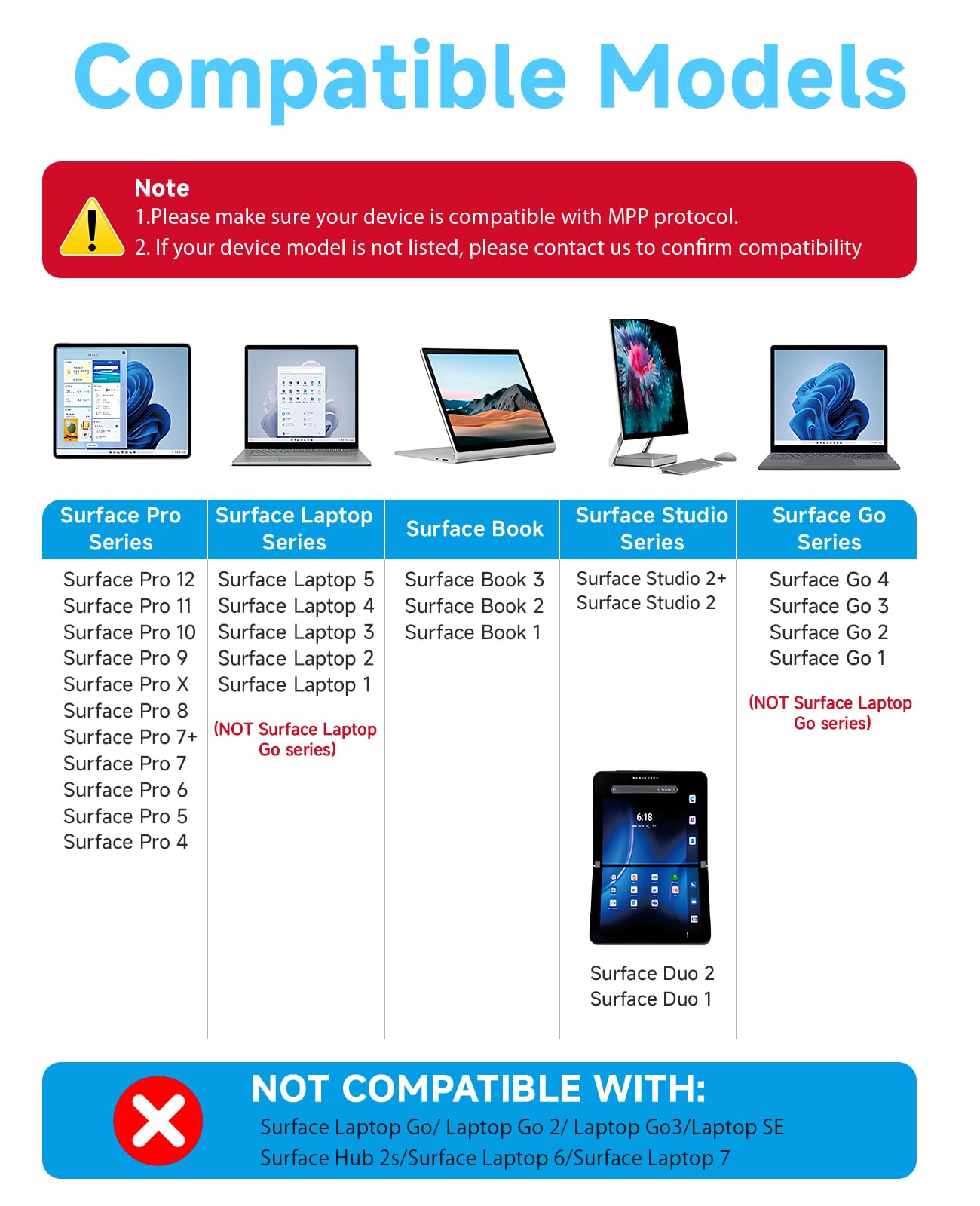


✍️ Elevate your Surface experience—where precision meets power and style.
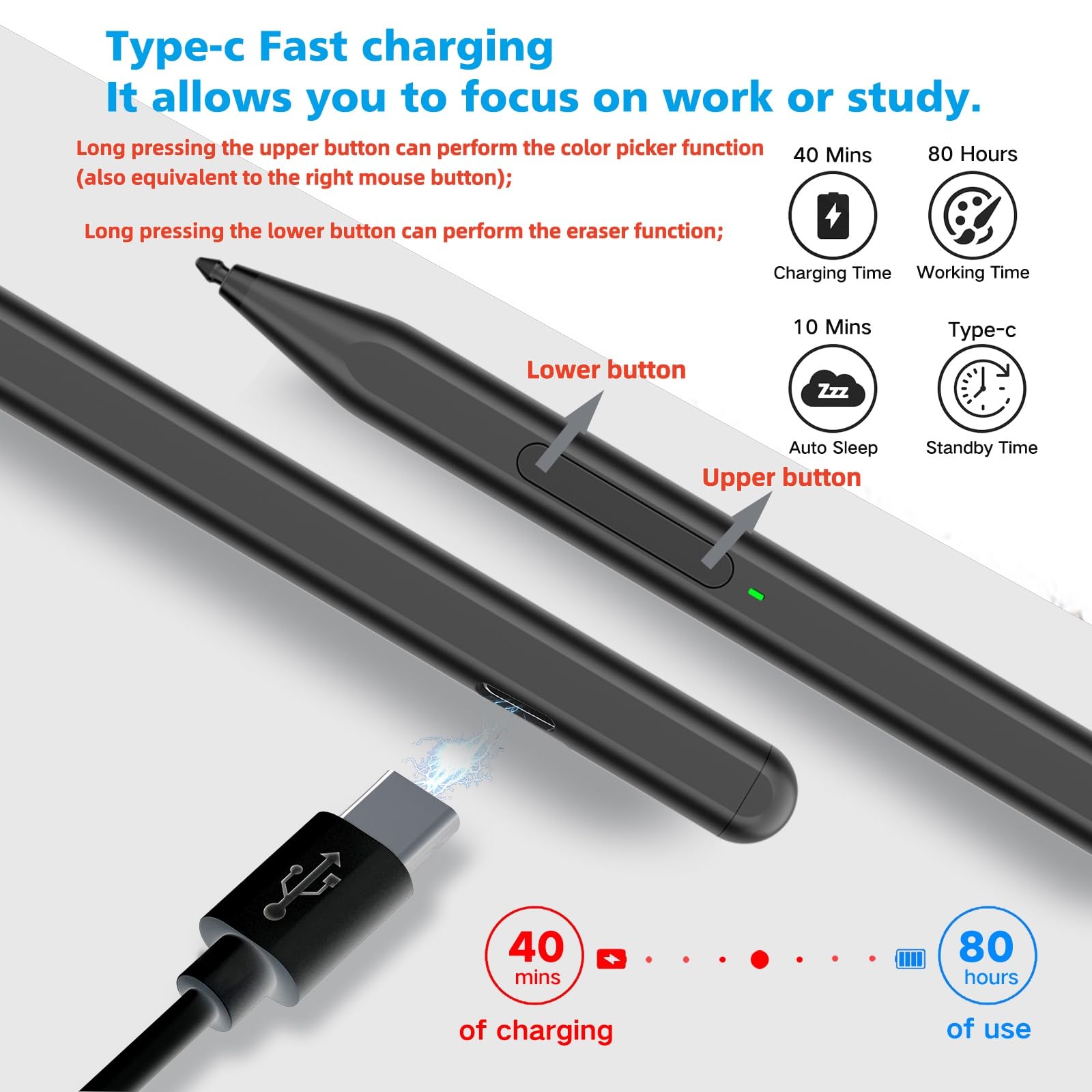
The Milikilo F97 Stylus Pen is a premium accessory designed for a wide range of Microsoft Surface devices, featuring 1024 pressure sensitivity, tilt support, and smart palm rejection. It boasts fast USB-C charging with up to 80 hours of battery life, eraser and right-click buttons for enhanced productivity, and strong magnetic attachment for effortless portability. Ideal for professionals and creatives seeking precision and convenience without Bluetooth hassle.


| ASIN | B0CYXWKWNY |
| Batteries | 1 Lithium Ion batteries required. (included) |
| Best Sellers Rank | #2,528 in Cell Phones & Accessories ( See Top 100 in Cell Phones & Accessories ) #52 in Styluses |
| Customer Reviews | 4.3 4.3 out of 5 stars (1,327) |
| Date First Available | March 24, 2024 |
| Item Weight | 0.494 ounces |
| Item model number | F97 |
| Manufacturer | Milikilo |
| Product Dimensions | 6.22 x 0.39 x 0.39 inches |
J**N
Instant setup, USB-C charging, and smoother writing than the original Surface Pen.
I’ve had ongoing issues with Surface Pens purchased from Best Buy, so I decided to try this one instead, and I’m so glad I did. Although I’ve only had it for a few hours, it’s already far better than any of the original Surface Pens I’ve used. Shipping was fast (arrived within two days), and the pen itself looks great in the emerald green color. It charges via USB-C and comes with two extra pen tips and a pen tip extractor, which is a nice bonus. The biggest surprise was that I didn’t need to connect it to Bluetooth at all; it worked immediately as soon as I turned it on. It also arrived fully charged, which was greatly appreciated. I’m especially happy to be done with AAAA batteries, which are frustratingly hard to find in stores. The writing experience is excellent: very responsive, with strong pressure sensitivity that accurately translates into line thickness. There’s no noticeable lag, and it feels natural to write with. The pen fits comfortably in my hand and is very easy to use. For reference, I’m using it with a Microsoft Surface Book 2, and it works perfectly. Overall, I’m genuinely excited to start using this pen in my day-to-day work.
A**R
Very good basic stylus
Product works as advertised. It feels well built and i have zero complaints about it for what it is. If you need a basic stylus then this is great, however as someone who really likes to use my tablet for drawing, i am going to replace this stylus with one that has the built in eraser side at the end.
E**N
Awesome Stylus Pen
I absolutely love this stylus pen!! It works on my Laptop/Tablet of Microsoft Surface Pro 7. When I first ordered it, I thought it wasn't going to work on anything else other than drawing and art design apps, but....... IT WORKS ON EVERYTHING! My Cricut Design Space, Wizard101, Websites, etc! Super happy I had ordered this. It's sleek, awesome, and the battery life is unreal. Connection is awesome and very quick. Writing speed is like normal writing for me on paper and again, I love it. Thickness however I can't say since I don't have drawing apps, however, this Stylus pen is in general the best. Most likely will buy another one if and when this breaks or stops working.
J**E
It works
Works like a charm, I can now draw on screen and finish art faster .Charge seems to last long and it's magnetic.
A**.
Instant pairing and zero lag, a no-brainer alternative to the $100 official pen.
I needed a backup stylus for field work because I didn't want to risk losing my expensive official Microsoft Surface Pen on a job site. I honestly expected this to feel "cheap" or have connectivity issues, but I can't tell the difference in daily performance. The "MPP" Magic (No Bluetooth needed): Because this uses the Microsoft Pen Protocol (MPP), there is no fiddling with Bluetooth settings. As soon as I turned it on and touched the screen, it worked. • Pressure Sensitivity: It tracks perfectly. If I press harder while sketching a diagram in OneNote, the line thickens exactly like the OEM pen. • Palm Rejection: This is the dealbreaker feature, and thankfully, it works here. I can rest my hand fully on the screen while writing, and it doesn't register stray marks. Magnetic Attachment & Charging: It has a strong magnet that snaps firmly to the side of the Surface Pro, just like the original. • Important Note: While it magnetically attaches, it does not wirelessly charge (unlike the Slim Pen 2). You have to plug it in via USB-C to charge it. However, the battery lasts forever. I’ve used it for a week of meetings and haven't needed to recharge it yet. Tactile Feel: The tip has a nice amount of friction. It doesn't feel like slippery plastic-on-glass; there is just enough resistance to make your handwriting look neat. Verdict: Unless you are a professional digital artist who needs specific tilt-shading capabilities of the high-end Slim Pen 2, save your money. For taking notes, marking up PDFs, and general navigation, this is an absolute steal.
J**R
This is the official high-end stylus designed for Surface devices
Best overall experience: The Surface Slim Pen 2 is hard to beat if you plan to use your Surface Pro 12 for serious productivity or creative work. Great value picks: Mid-range third-party styluses provide strong performance at a fraction of the price, especially if your focus is note-taking, document markup, or general use. Budget-friendly: Simple stylus pens are perfect for casual users or as a backup. Weight & Size: Very lightweight at about 13 g (0.03 lb) — lighter than many competitors, which reduces hand fatigue during long writing or drawing sessions. Compact dimensions (~5.38″ × 0.44″ × 0.25″) give it a sleek, pencil-like feel that many users appreciate. Feel & Balance: Feels thin and modern — closer to a traditional pen than older Surface pens — offering a natural grip. Reviewers often describe the writing experience as pen-on-paper like, with good balance and control. Connectivity & Features: Connects via Bluetooth 5.0, enabling button functions and extra features like customizable clicks. Magnetic attach and optional keyboard dock charging (depending on your Surface accessory setup) make storage and power more convenient. 4,096 levels of pressure sensitivity and zero-force inking make for smooth shading and detailed writing. Pros: Excellent accuracy, light weight, rich features, great for notes & art. Cons: Price is higher than budget options, and you need the right keyboard case or charger to recharge easily.
A**R
Product Defects
The pen worked great for the first few days. I was able to handwrite digital notes with very good legibility. The pressure feedback generally worked quite well. My pen may have been defective. After 2 weeks, the pen would write while floating above the tablet surface, creating scribbly illegible notes. After 1 month, the pen stopped working all together. I tried all of the troubleshooting listed in the self-serve support. Would replace, but window has passed. Cannot recommend this product. Paired with Microsoft Surface Go Model 1962
M**A
Works fine, on surface pro 4
S**A
Funziona perfettamente con surface
T**M
Works great. I have a Surface Pro 7, 9 and 10 and this pen works on all of them without an issue. It holds well (magnetic) on the side of the tablets. I also like that it uses the genuine microsoft tips/nibs. This way you don't need to search for some obscure 3rd party consumables when it is time to replace them. Charging via USB is a nice bonus and simple. No need to constantly buy batteries. All this at a fraction of the price of the original MS pen. Now if they can make one with the form factor of the newer "Microsoft Surface Slim Pen 2", that would be great, so it can easily fit in the dedicated slot that is present on the newer Surface Pro 9 (and above) type covers.
C**R
Está súper bonito, muy cómodo de usar, dice que el botón inferior es para borrar pero en este caso subraya y el botón superior borra, solo es cuestión de acostumbrarse, lo compré para mi Kobo Libra Color y funciona muy muy bien.
K**U
Unfortunately, I am not an artist to evaluate this stylus as an artist might, but I can review it as someone with years of experience in buying tech products and carefully selecting quality items by thoroughly comparing alternatives. The package arrived intact, wrapped in transparent film. Inside, there is a stylus, two additional detachable nibs, a tool for changing them, a USB Type-C cable, and instructions in multiple languages. What impressed me immediately after unboxing was that this stylus is completely plug-and-play. A quick press of a button is all it takes to start drawing or writing right away. There's no need for manual pairing or setup – everything works straight out of the box. Notably, I have a rather old Microsoft Surface Pro 3, and the compatibility is fantastic. The body is made of aluminum and feels solid, with no visible seams. Nothing creaks or sticks out. The double button on the body also feels reliable and doesn’t wobble when pressed. The nib is securely attached and made of a plastic that won’t scratch the tablet screen. It’s important to note that the nib isn't conductive, so it won’t work with other touch devices. Be sure to check compatibility in the product description. The stylus size is very comfortable, and even though I have a fairly large hand, it feels like a regular pen and is not uncomfortable to hold. The magnets inside the body are strong enough to stick to any metal surface, though, unfortunately, my tablet lacks convenient mounting points. The only available area is near the port for the original keyboard, but that’s not an issue for me personally. As for the stylus performance, I’m writing this review just hours after unboxing, so I can’t yet evaluate battery life, but I’ll focus on the user experience. As mentioned before, all features work right out of the box without any need for configuration or connection. The stylus maintains a strong connection with the screen and can accurately detect the cursor position even from 2–3 cm away. There are no issues with touch sensitivity; the pen always responds to contact with the screen without any line breaks when drawing or handwriting. The pen recognizes tilt relative to the tablet screen, not relative to the ground, making it convenient for use in any comfortable position for the user. It also supports pressure sensitivity. This feature felt slightly awkward at first, but I attribute that to not being used to it yet. Overall, the pressure sensitivity works excellently, allowing for both very fine and broad strokes without changing the brush size. Maximum pressure is reached with a regular press, which prevents damaging the tablet screen with excessive force. Palm rejection also works perfectly. I had no issues with my hand resting on the tablet’s touchscreen. There were no phantom touches or accuracy issues (*note that I have disabled the Windows feature that turns off the sensor when a pen is connected; the stylus handles palm rejection on its own). The sleep mode after 10 minutes of inactivity works well too, with the stylus waking up upon pressing any button. Both the right-click and eraser buttons work as expected. Pros: low price, good body materials, high build quality, rich functionality, ease of use, plug-and-play Cons: none found
Trustpilot
1 month ago
2 weeks ago