
DOWNLOAD THE APP


Customer Services
Copyright © 2025 Desertcart Holdings Limited
DOWNLOAD THE APP
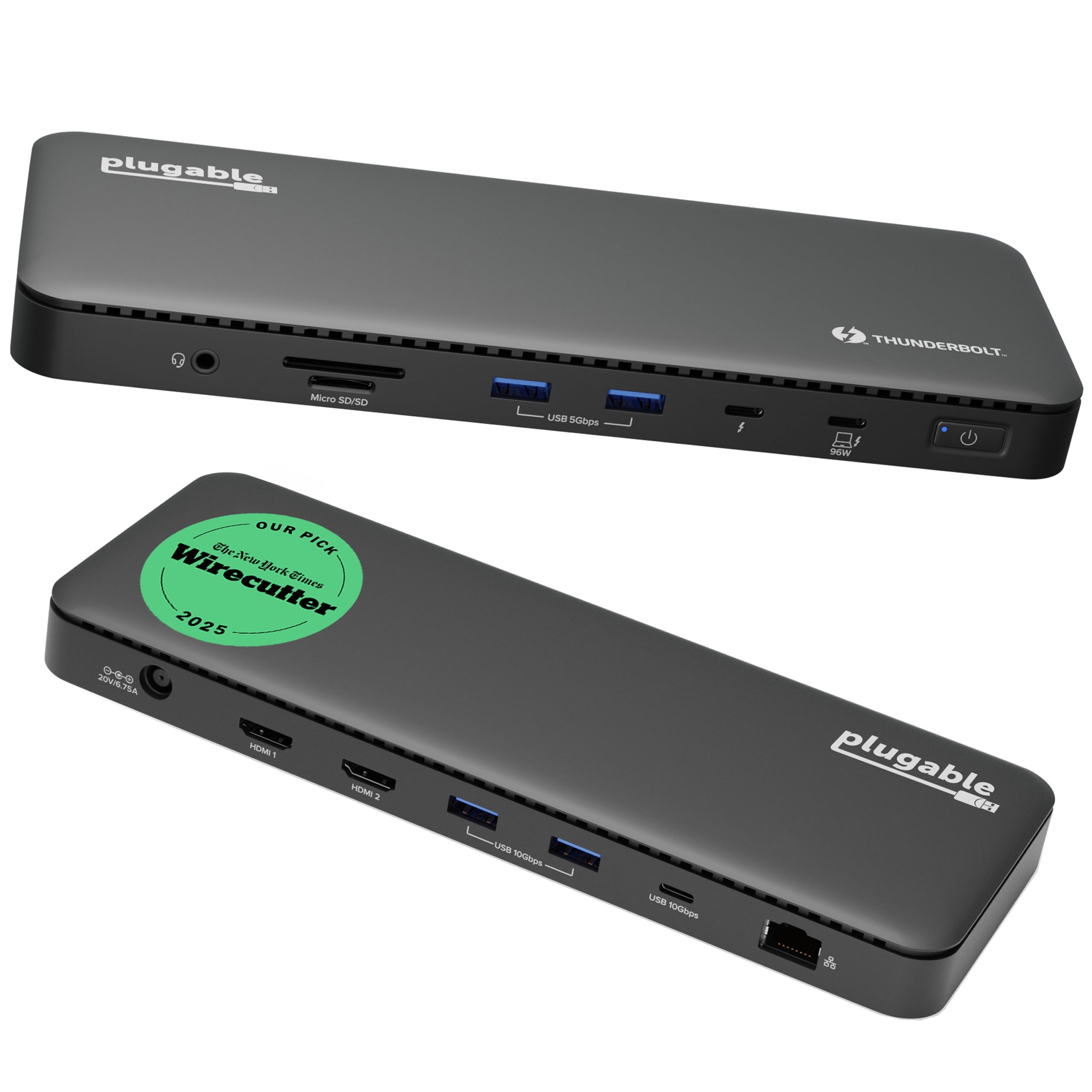
⚡ Dock Your Way to Success!
The Plugable Thunderbolt 4 Dock is a versatile docking station designed for professionals, featuring dual 4K HDMI outputs, 100W power delivery, and 13 ports for seamless connectivity. Compatible with Windows and select Mac systems, it supports high-speed data transfer and enhances productivity with its powerful features.
























| ASIN | B0CNTTVVN6 |
| Best Sellers Rank | #2,226 in Electronics ( See Top 100 in Electronics ) #32 in Laptop Docking Stations |
| Customer Reviews | 4.2 4.2 out of 5 stars (415) |
| Date First Available | November 23, 2023 |
| Department | All Ages, Unisex |
| Item Weight | 2.42 pounds |
| Item model number | TBT4-UD5 |
| Manufacturer | Plugable |
| Product Dimensions | 9.25 x 5.47 x 2.48 inches |
D**S
Buen producto
J**H
Review of Plugable Thunderbolt 4 Dock (TBT4-UD5) I bought this dock to replace a simple USB-C hub for my MacBook Pro — and the upgrade has been a game-changer. Before researching, I honestly didn’t know the difference between a USB-C hub and a Thunderbolt dock. I just thought both gave me extra ports. Now I understand why Thunderbolt docks cost more: they deliver full Thunderbolt speed, power delivery, and rock-solid reliability. Here’s what I’ve noticed since switching: Blazing-fast storage: My external Lexar SSD now runs at full Thunderbolt speed (with the right cable). File transfers are noticeably faster. Instant display wake-up: With my old hub, I had to mash the Return key and wait for my monitor to wake. With this dock, my external display wakes instantly. Future-proof video outputs: It supports dual 4K monitors or a single 8K monitor. I don’t own one yet, but it’s nice to know I’m ready for the future. Reliable Ethernet: The built-in 1 Gbps Ethernet port keeps my internet connection fast and stable. Plenty of ports: I get 4 USB-A ports (2x 5 Gbps + 2x 10 Gbps), a 10 Gbps USB-C port, and another Thunderbolt 4 port (40 Gbps). I can plug in all my external SSDs and hard drives — they mount instantly with no lag. Strong power delivery: The dock charges my MacBook Pro at 95 W and keeps it near 100% even under load. Extra convenience: The audio in/out jack works perfectly for my monitor speakers or a headset mic for voiceovers. The built-in microSD/SD reader let me ditch my old card reader and free up desk space. Overall, this dock feels solid, performs flawlessly, and keeps my MacBook and peripherals running fast and reliably. It’s not cheap, but the stability, speed, and convenience make it worth every penny.
H**K
Plugable TBT4-UD5 Thunderbolt 4 Dock. Got a new laptop with two ThunderBolt4 (TB4, aka. USB4) ports. So, went hunting for a dock to take full advantage. The field is very limited though, and this one seems the best, better even than the "big brother" of it from Plugable. This was the only dock I found that had another Thunderbolt port (on the front, even) for peripherals. As well as a pair of 5gbs USB3 ports on front, and several 10gbs ports on the rear. This is a great dock and is working well here. My only(!) complaint is the dumb front-mounted port for the laptop cable. Lots of other docks make the same mistake, dunno why? It belongs at the REAR, guys!! Otherwise all quite good! There's a white version that is sometimes lower priced: B0FGFW5FVD and also the Kensington AD2010T4 dock appears to be exactly the same thing as this one. EDIT: More than a year on, and it's going strong here and I'm exceptionally pleased with it. No issues. Loving the extra TB4 jack on the front, for backups to external NVMe drives. Solved the front-mounted laptop cable issue with a right-angled TB4 cable that easily routes to the rear and keeps things tidy. Note that I use this almost exclusively with Kubuntu Linux 24.04 on the laptop. Everything works very well with no fuss. Added a photo, with a KVM switch sitting on top.
M**K
I use this Plugable dock for my MacBook Pro M4 Pro. It sits between my MacBook and an HDMI KVM switch that serves my single monitor, keyboard, mouse setup. It works flawlessly when I use the KVM to switch between monitor sources, avoiding the need to unplug and replug the USBC ThunderBolt cable at my laptop, a circumstance I often faced when using another top-notch dock with this MacBook. I also use this Plugable dock to connect the MacBook to two backup hard drives. Since these two backup drives use USBA-to-USBB cables, and since I had already used one of the Plugable's two USBA connectors for my KVM's keyboard/mouse connection, I had to obtain a USBA-to-USBC adapter to get these three USBA cables plugged in to the Plugable's rear-panel two-USBA-one-USBC connector configuration. That said, the Plugable also has the same two-USBA-one-USBC configuration on the front panel, so there are still plenty of connectors available, but I like to keep the connectors on the front panel free for desk front and temporary connections. The TB4 USBC cable that connects the dock to the MacBook is an ample 3-foot length, conveniently longer than those I've used on other TB4 docks, and it disconnects on both ends versus some I've seen with a permanent connection at the dock. Although not a deal-breaker either way, the Plugable's plug-vs-permanent TB4 connection at the dock indeed offers the additional flexibility of changing the cable length to suit your needs. Another dock I've used offers a nice compromise via an optional USBC screw locking connector on the dock side. Additionally, regarding the TB4 cable, the dock's TB4 USBC connector is on the front of the dock, a departure from other docks I've used that place this connector on the rear. Although a rear location suits the position of my laptop stand-up racks a little better, I can see that the front-located connector would be more convenient for those who have their laptops open on their desks, which may be most users. Finally, I love that the Plugable has both mini and micro SD slots (both on the front of the dock). This is a convenient feature that prevents me from having to scramble for my mini-to-micro adapter when I transfer files from my micro SD card. Note that the Plugable's rear panel also sports an Ethernet connector and a second HDMI connector of which I use neither, so I cannot comment on internet performance or dual-monitor configurations. All in all, this is a connector-packed, low profile TB4 dock whose performance and panel configuration serves me quite nicely - 5 stars.
B**N
Works great. We now purchased five of them for our little office. Had a small interaction with their service department prompt courteous and great follow-up. Highly recommend this product does what it says makes it easy to operate multiple screens for the laptop
Trustpilot
4 days ago
2 weeks ago