
DOWNLOAD THE APP


Customer Services
Copyright © 2025 Desertcart Holdings Limited
DOWNLOAD THE APP

🚀 BeeStation: Your personal cloud, simplified and supercharged.
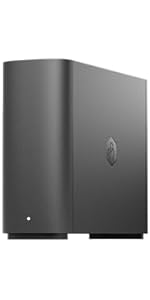
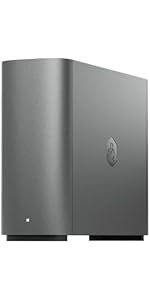
BeeStation by Synology is a sleek, plug-and-play personal cloud storage device that consolidates your files from multiple sources—including cloud services and external drives—into one accessible, subscription-free hub. Designed for effortless setup via QR code and seamless syncing across devices, it empowers professionals to securely store, share, and edit files with family or colleagues, all while eliminating the complexity of traditional network storage.




| ASIN | B0CSSR38F1 |
| Best Sellers Rank | #5 in Network Attached Storage (NAS) Enclosures |
| Brand | Synology |
| Color | Black |
| Customer Reviews | 3.8 3.8 out of 5 stars (245) |
| Date First Available | January 17, 2024 |
| Item Dimensions LxWxH | 4.53 x 10.16 x 9.92 inches |
| Item Weight | 3.36 pounds |
| Item model number | BST150-4T |
| Manufacturer | Synology |
| Product Dimensions | 4.53 x 10.16 x 9.92 inches |
A**R
Great Cloud Storage Device
This is a great backup device for simplicity. The instructions are extremely clear into how to set everything up with scanning a QR code. Everyone complaining that they can't get the device to work is likely just impatient from the slightly long initial startup time. This additionally works with Mas OS Sequoia. Everything was seamless during the update. If someone says it doesn't work with an OS update, they likely did something else to cause their issue. The BeePhotos and BeeFiles app are great. BeeFiles is similar to google drive, where it can sync to a folder on your device. BeePhotos is basically a toned down version of google photos. There is unfortunately no dark mode on these apps. It is extremely easy to share files and albums between users. My one complaint is the link will open up the album in the web, versus in the beephotos or beestation app. Hopefully this will get addressed, but it is not a huge issue. Time Machine works great, which is the primary reason I got this machine. While this doesn't work with a Plex Server, you can view the files locally on a device and a tool, such as VLC and such. This is useful for viewing home videos and photos. The one downside to this device is that it only runs off 1 drive, where many NAS drives will have 2-bays. I recently purchased an external drive to act as a backup device so I don't solely rely on the beestation and the one drive. I will try and update my review after I report how my solution works.
S**.
Love this thing!
I was looking for a simple, reliable, affordable personal cloud storage option. This thing checks all the boxes. Plug and play, you don't have to be an IT geek to get it up and going. To be fair my only hiccup was during the initial setup it kept failing to complete the install, after over an hour of frustration I finally found a page on the Synology website that informed me that the site was temporarily down for maintenance and updating. Tried it again the next morning an voila, easy peasy! Wish they would have made it a little easier to know that little detail. Even with that, it deserves 5 stars, this thing is just what I was looking for. Love it!
J**S
Connection setup to my computer network is terrible
To first preface this I should say I am not a certified IT professional. However, I am highly technical in nature and have had a lot of experience with day-to-day dealings with computers and their interface due to the line of our work. Specifically as it relates here I have used WDCloud devices over the years and their setup was easily done. Their problem is that they have been phasing out their NAS product line. I needed something this time to host family photos and videos. I needed something that was just a 2TB to 4TB setup to be used locally here in the home to access family media through the local home network. Synology lists their product as easily setup. I beg to differ what they define as "setup". Upon opening the box you see a tiny setup card which simply guides you on how to physically setup the device with two methods to "Start Using BeeStation". One was Scan QR code and the other through their online portal. I used the online portal. The device easily and quickly connected to their network and all they did at that time is to declare that the device was "ready to use". Went all downhill from there. I could see from the online portal the drive and could transfer files via the Internet. However, I wanted a drive that was mapped to my computer for more of a direct connection rather than relying on the cloud. No mention was made anywhere from this process that other utilities should be used to effect this connection such as "Synology Assistant" and "BeeStation for Desktop". I had to find these via AI searches troubleshooting mapping the drive to my computer network. I get what they are trying to do as an end result but getting to that point is terrible and I was willing to work to see this through and work within their parameters. However getting this to connect to my network proved to be totally unsuccessful. No matter what I did I could not make a connection. I could see the drive in my system but could not see let alone access any of the folders to transfer files. The drive had been setup with credentials for online access and other credentials for local access. No matter what I did I could not gain local access despite 6+ hours of troubleshooting and using the two previously identified utilities from Synology. I rarely have returns to Amazon but this one is being returned today. I total waste of my time this weekend. I cannot imaging what a nontechnical person goes through in this setup unless all they do is rely on access via the cloud. I need local access as the first option. Terrible. P.S. I would give it a 0 star rating if I could but I had to select at least 1 star to submit.
C**.
Good product setup not straightforward
Great product but instructions are lacking. You must download the synology assistant and beestation app of the website. The qr/http on the card that comes with it will not work if your computer is not encrypted. Had to go in and disable the encrypted checkbox before the computer recognized it. Once setup works great but set wasn’t straightforward.
J**S
Hardware is great but software isn’t.
This was chosen for its size, price, and brand reputation. The backup and syncing software is not reliable so I use my own software. I will use the storage for a long time for my personal data backup.
L**G
Exactly same as described in Amazon. Super easy to setup and worth buying for those who are new to network attached storage (NAS) product.
M**D
Not a super fast NAS but it gets the job done with super easy setup. Of course there is limitation when it comes to configuration but for the price it’s worth it
M**T
NOT A NETWORK DRIVE This is not at all what I wanted. I wanted a 4TB hard drive I could plug into a switch and map to the computers on our home network. INSTEAD you have to take open an account. Even if you want to use the drive locally you have to set up a password, etc. Overly complicated and misleading. I don't want another cloud backup. I want a simple hard drive I can access through Explorer. I will be factory resetting and returning for a refund.
A**R
Extremely easy to set up... Up and running in less than 10 minutes. The actual storage capacity is 3.5 TB... I bought one over a month ago for my wife and I and liked it so much, just bought another one for my two teenage kids who take lots of photos. The Beestation Photos app is like using Google Photos with out the yearly subscription costs. I figure this will pay for itself in three years.
M**.
Sehr zu empfehlen. Habe dieses Gerät angeschafft um Downloaden für iCloud zu minimieren. Und es funktioniert hervorragend. Ob Fotos oder Dateien, alles ist via App vom Smartphone oder über den PC zu handhaben. Ein absoluter Cloud Ersatz.
Trustpilot
2 months ago
2 weeks ago