We remain fully operational. Our teams are working around the clock to ensure your deliveries continue safely.

DOWNLOAD THE APP


Customer Services
Copyright © 2025 Desertcart Holdings Limited
DOWNLOAD THE APP
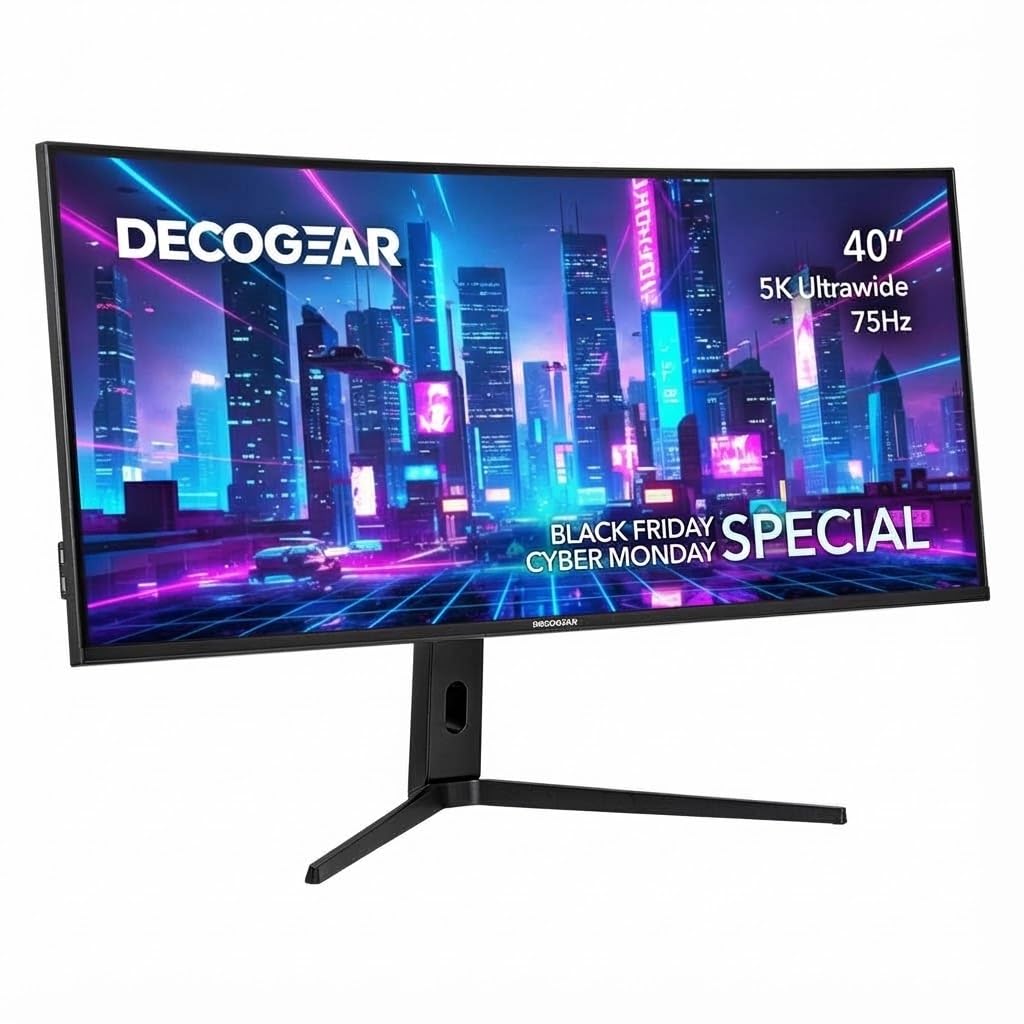
🚀 Elevate your workspace with the Deco Gear 40” 5K UltraWide — where productivity meets breathtaking color!
The Deco Gear 40” 5K UltraWide Monitor delivers a massive 5120×2160 resolution on a 21:9 IPS panel with HDR10 support, offering exceptional color accuracy (100% sRGB, 96% DCI-P3) ideal for creative professionals. Its wide aspect ratio and PIP/PBP features enable efficient multitasking, while a 6ms response time and Adaptive Sync ensure smooth visuals. Comprehensive connectivity options including USB-C, HDMI, and DisplayPort make it a versatile centerpiece for any high-performance workstation.




| ASIN | B0CLHDCHLC |
| Aspect Ratio | 21:9 |
| Best Sellers Rank | #9,161 in Electronics ( See Top 100 in Electronics ) #426 in Computer Monitors |
| Customer Reviews | 4.3 4.3 out of 5 stars (1,979) |
| Date First Available | November 9, 2023 |
| Image brightness | 300 Candela per Square Meter |
| Item Weight | 25.6 pounds |
| Item model number | VIEW401 |
| Manufacturer | Deco Gear |
| Product Dimensions | 12.1 x 37.3 x 23.4 inches |
| Resolution | 5120 x 2160 Pixels |
| Standing screen display size | 40 Inches |
| Total Usb Ports | 4 |
D**M
Deco Gear 39”
I have this same monitor, and it works very well. I don’t have no complaints at all. When I purchased the monitor November 2025. The price was a little lesser. The price right now. I think it’s a little too much. I use my monitor almost every day and I enjoy it. I have played some tv shows and movies on it. I don’t see a major issue. I do see a small issue. Say you are scrolling on a website and you need to scroll down. Now, some characters will bleed some but you have to look really hard to see the bleeding of the characters. A good monitor in my opinion.
R**I
Immersive, high-value ultrawide experience — a standout for home setup
I recently upgraded my home setup with the Deco Gear 49" Curved Ultrawide Gaming Monitor, and I’m genuinely impressed. As someone who spends long hours at the rig (from sound engineering work to gaming and multitasking), this monitor delivers in multiple dimensions. 👍 What stands out: The sheer screen real-estate is fantastic. With a 49-inch diagonal and a 32:9 aspect ratio, the display fills my peripheral vision in a way dual-monitor setups rarely do. The specs show it’s 3840 × 1080 resolution for this model. Deco Gear +2 Amazon +2 The curvature (1800R) is a welcome touch — it wraps around just enough to feel immersive without being overwhelming. Deco Gear Smooth motion and responsiveness: A 144 Hz refresh rate and a 4 ms response time (in the specs) make gaming, fast-moving visuals, and switching windows feel fluid. Deco Gear Solid color/contrast performance: With VA panel, HDR400 support, and a 3000:1 contrast ratio listed, the image is vibrant and deep. Amazon +1 Great for multitasking: The wide layout means I can have multiple windows (DAW, video editing, web, chat) open side by side without feeling cramped. The aesthetics and build feel good: Clean bezel design, good size for a desktop workstation, and it complements the home setup nicely. 👎 Some caveats: While 3840 × 1080 is a large width, it’s still effectively the resolution of “two full-HD displays side by side” rather than a “4K” width. If you’re used to very high-res displays (4K, 5K), you may notice slightly less sharpness than you anticipated. Tilt only (-5° to +15°) and no height adjustment (in this model) means you’ll want your mounting/desk setup to already be ergonomic. (From the specs: “Tilt / No vertical adjustment”). Deco Gear The size means you do need enough desk depth and space. If you’re too close, sitting back or mounting slightly higher may help for comfort. Some tasks—especially very high fidelity color-critical workflows—may push this beyond what its panel supports compared to high-end professional monitors. But for the price and overall mix of gaming + productivity, it’s a very strong value. 🎯 My verdict: If you’re looking for a monitor that does double duty—immersion for gaming and serious desktop multitasking—and you have the space to accommodate it, the Deco Gear 49″ curved ultrawide is a smart pick. It strikes a sweet spot between value and performance. For my home studio / sound-engineer-at-home setup, it feels like a meaningful upgrade. I’d rate it 4.5 stars out of 5 and recommend it to others in the same boat.
A**Y
Great monitor - great deal - easy on the eyes for coding - recommend
Great monitor - good resolution, easy on the eyes, and just that extra sideways space that's super helpful. Half price of similar others, was sceptical but happy I have it a shot (and the size is just right) NOTE: MAC: On MacBook Pro the HDMI connector doesn't support this high a resolution and looks weird when you first connect it. You have two options: a) can make HDMI support it but need to take it down from 60hz refresh rate to 30hz: need to install custom software that modifies the built in resolutions, or b) give up on HDMI and go to usbc (much more built in support.. so put the lower res monitor on hdmi) NOTE: VESA: my VESA mount didn't fit and had to be filed down - after that it was able to connect. And if you hook up vesa with regular screws the decorative piece doesn't fit anymore. went back to included stand and it's fine.
S**S
Great value, buggy operation
The 40" 5k2k screen is nice! I can't tell any difference from the Lenovo P40w-20 I used for several years. I highly recommend this size display to anyone doing IT/programming work. The real estate and aspect ratio is a productivity booster and while not glorious dpi, is still perfectly good enough for your eyes to thank you. The curve is very subtle - just enough to maintain legibility at the edges while not making any content feel distorted. I cannot speak to use for gaming or color accuracy. Where this monitor falls short is in the features and firmware. Unlike my previous Lenovo, this doesn't support high end features like Thunderbolt and passthrough charging/ethernet. But for half the price, that's a more than acceptable tradeoff. What is more frustrating is the firmware. The monitor will occasionally go into power saving mode and forget that it's still connected to my macbook. The macbook comes back, but the monitor can't find a signal. Switching inputs in the on screen controls doesn't work to get it back. Sometimes unplugging the usb-c connection and plugging back in works. Sometimes nothing works and I have to physically unplug power cable from the monitor and plug it back in and turn it on for it to see the connection again. This is with the usb-c cable included with the monitor. Trying to use multiple connections is even worse. I have one laptop on usb-c and one one displayport. Trying to switch between them by selecting the other input in the on screen controls does nothing. So switching between systems usually means having only one cable physically connected at any one time - unplug one and plug in the other. And even then you sometimes get the issue where it can't recognize that a cable is connected. The on screen controls in general are flakey. Thankfully I don't have to switch monitors or change settings frequently, so it's bearable. If you do, I'm afraid you'll have to pony up for another brand. Photo is in native 5120x2160, with 13" and 16" macbooks for reference.
M**E
Love it ty.
A**.
Excelente articulo hasta el momento
A**R
Huge size, a pleasing aspect ratio, crisp resolution, blazingly bright, and the curve creates a fantastic viewing experience!
M**D
Issue is remote do not work tried different way. Going through monitor button is way difficult and finally couldn’t do it. Screen resolution is good. I have two laptop frequently switching is not easy. Price is good but usability perspective it is very difficult. Also blue light removal function is not there but percentage is there but as user I don’t know the percentage . Overall better for single laptop usage .
J**A
Love the panel for gaming. I don't see much flaws in it. I dont see ghosting at all. Brightness is enough for my use. I wanted to consider it badly but alas, i do 60% work 40% gaming. PPI is not enough (for me) to be useful so back to my 43” 4KTV that Im using as a monitor for 3 years now. Going in I kinda knew but Im wasnt sure.
Trustpilot
2 weeks ago
2 weeks ago