
DOWNLOAD THE APP


Customer Services
Copyright © 2025 Desertcart Holdings Limited
DOWNLOAD THE APP




🔐 Elevate your home security with pro-grade 4K clarity and AI smarts—because peace of mind is priceless.
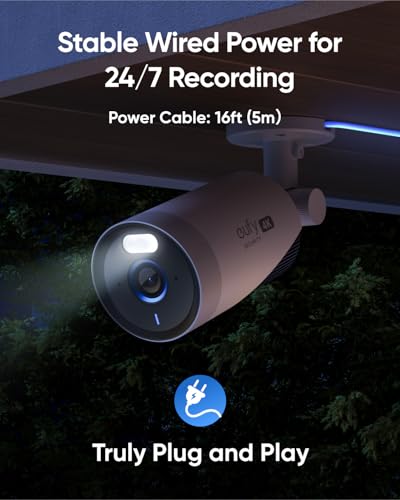
The eufy Security eufyCam E330 2-Cam Kit delivers professional-grade 4K outdoor surveillance with advanced AI face recognition and cross-camera tracking. Featuring plug-in power for continuous 24/7 recording, stable Wi-Fi coverage up to 5,000 sq ft, and expandable local storage up to 16TB, it offers a no-monthly-fee solution tailored for seamless DIY installation and robust home protection.


| ASIN | B0CCTW6GRJ |
| Batteries Included? | No |
| Batteries Required? | Yes |
| Best Sellers Rank | #202 in Home Security Systems |
| Brand | eufy Security |
| Color | White |
| Compatible Devices | Cameras |
| Connectivity Technology | Wireless |
| Customer Reviews | 3.9 3.9 out of 5 stars (565) |
| Date First Available | July 26, 2023 |
| Frame Rate | 30 FPS |
| Hardware Interface | 802.11 ac/b/g/n |
| Included Components | camera |
| Item Weight | 4.89 pounds |
| Item dimensions L x W x H | 8.74 x 8.31 x 9.02 inches |
| Item model number | T8601 |
| Lens Type | Wide Angle |
| Low light technology | Night Vision |
| Manufacturer | Anker |
| Memory Storage Capacity | 16 TB |
| Mounting Type | Wall Mount |
| Night Vision Range | 82 Feet |
| Number of Channels | 10 |
| Operating System | Android, iOS |
| Other camera features | Rear |
| Power Source | Corded Electric |
| Product Dimensions | 8.74 x 8.31 x 9.02 inches |
| Recording Mode | 24/7 |
| Style | 2 Camera Kit |
| UPC | 194644153144 |
| Video Capture Resolution | 4K |
| Video Input | RJ45 |
T**K
Great system, AI detection, rich notifications are a blessing
Definitely satisfied with Eufy as a whole. The wide range of home security products (cameras and door sensors specifically) has served my purposes well and being able to tie these items together and have them in one app is awesome. The AI detection is clearly still learning and sometimes identifies non-human objects as humans. Eufy definitely cares about improving this though, and listens to their customers by asking for input and feedback on different things to help improve their products and user experience. The only thing software-wise that's missing is the ability to block out an area from detecting motion while still recording the area. Currently, the only way to do this is to actually black out a square as a 'privacy area's (intended to avoid impinging on neighbors' privacy rights). There were a few nuisance 'human detection' areas like my AC unit that have a black square over them to remove the nuisance notifications. Not a huge deal, but something to note. I have the cameras mounted to the soffit, and the cords running tucked into the vinyl siding and going in through windows to plug in on inside electrical outlets. The cords themselves are long enough to do so, provided you place them within a reasonable vicinity of a window. The cords are flexible enough to still be able to lock the windows, which is important for me. I don't really open and close the windows, so I'm not sure how doing so would effect the cords being repeatedly pinched in a window, but doing so once in a while has presented no issues. Eventually I'll add electrical outlets recessed into the soffit, but the current setup works well enough. The rich notifications (which include a still image of the detected vehicle/human motion) is great so I don't have to constantly open the app to see who it is. The viewing angle is awesome, I'm in a mobile home park, and due to the close quarters I have the cameras practically pointed at the ground to not give the idea of 'spying' on the neighbors. Despite being pointed almost directly down, it still captures a wide enough angle to cover the full area I need to for my lot. It almost looks impossible for it to capture anything useful based on the downward angle, but it works well. The Homebase is a great local storage option, and takes up next to no space - especially when compared to old traditional NVR-based systems like my older Reolink system at another property. Night vision also works well, and the AI detection still works great at night. Overall, it's the best system I've used. I'll be buying Eufy for my home security needs again in the future as needed.
A**R
Great low cost home security system
Outstanding customer support. Setup/configure is reasonably straight forward. Nice high res cameras work well in both lit and non-lit environments. Getting the right camera angle can be challenging, but with some patience and enough fiddling, just about any angle is possible (easier with two people: one fiddling with camera base and another monitoring the phone app). The s380 home base failed on me. The symptom was "no power". I bought a replacement power supply, plugged it in, and home based powered up - for like half-minute (went from blue status LED to flashing red led, then nothing). I contacted eufy support. They went through the standard 'check this and that', but ultimately sent me a new s380 home base (very pleased with eufy support on that aspect.) I got curious about where the failure occured, so I tested the hardrive with some PC diagnostic/recovery data cables. The drive was completely unresponsive. Realize that eufy uses a proprietary Linux based file system, so I didn't expect to be able to read 'data' from the drive. However, my point here is that the data cable wouldn't even acknowledge that a device was present - the drive was completely non-responsive. Hind sight/takeaway - if you home base fails with blown power supply - check that the hard drive is still working BEFORE swapping in a new power supply
T**W
Top of the line with one drawback. (Updated to 1 star)
UPDATE: 04/02/2025--So after 1 year of use I have to say this the cameras go down frequently and sometimes you will just go into the app and it will say "camera is offline" No idea why I checked my router everything is fine and everything else is maintaining connection fine. Just talked to the Eufy rep after waiting 1 hour on the phone he told my I would have to physically get the camera down and delete it and reconnect it.....Not a good solution that is a horrible way to work your camera system. Because now that means I have to bring the camera and the wire down to be able to plug it in close to the Homebase since you need the Homebase to reconnect the camera. Eufy did nothing to support me in this he just said "we cant do nothing else you have to bring the camera down sorry wish there was more I can do for you" ugh really annoying the reason he gave me that if the eufy camera loses connection it will try to connect 1 time and if it fails after 1 time then its perm offline until you bring it down.... That is a horrible move and a bad way to run a camera system. I will be looking for another product to invest in. Ok I’m a huge Eufy fan, but don’t worry it won’t make me biased in this. The camera quality is great and the recording quality in the app is good. If you are going to spend your hard earned money read this first. It seems like previous reviews here seem to name the homebase as the culprit, my brother in law and I bought this system a few days apart just to find out that his homebase failed and they had to ship him a new one it took about a week and a half which is way too long considering this is security. The home base would turn on and off randomly which would not let him connect he called and they had to send a new one. The homebase itself is the brains of the entire thing meaning if the homebase fails all of your security cameras are down which means you’re out of luck until they send you a new one. That is the one big drawback about the system and once you get your new homebase, you need to bring every camera down and bring it close to the homebase again as an initial set up. I don’t understand why Eufy would make this so hard because it takes a while to set up the cameras. It’s ridiculous to bring them back down just to connect them to the new homebase if your previous homebase failed The Eufy app is good. I wish they would make squares of four to be able to fit the cameras without scrolling too much because I have quite a few cameras. It takes forever to scroll through them. The homebase does add AI to the system to understand faces of your family and friends. It also picks up vehicles a lot faster. There is a pet option but I don’t have it turned on but so far tracking people and vehicles has been great! Plug homebase near router so that you can have an ethernet connection for set up. After you set up all 4 cameras you can unplug the homebase to a more central location so that all your cameras can have good connectivity. Another incredible thing is that it picks up people through different cameras meaning if I go to the front yard and then pass the doorbell it will string these two videos together for you in a report so you can see where they went throughout your house instead of switching cameras Install was easy for me since I don’t have to go up high for my cameras. You just plug them into a normal outlet and find your way outside. Please plug all cameras in before you install since they need to be set up by homebase you cannot set up remotely. Home base has to be really close. INSTALL ALL UPDATES AND CAMERAS BEFORE GOING OUTSIDE TO SET UP. So plug in near homebase set up in eufy app and then unplug and plug in the next camera set up and keep going till all 4 cameras are set up. Once they are all set up you can unplug them and plug them into an outlet closer to the location you want to set the camera up. Other than that everything is else working fine and my homebase is going strong so hopefully this holds up and this system lasts me a long time. Please like this review if it helped you.
A**C
Las cámaras cuentan con una extraordinaria calidad de video y visión nocturna, es necesario buscar la mejor de las configuraciones para que no esté activando falsas señales pero tiene mucha flexibilidad, la función de geovallado es extraordinaria. El Home Base cuenta con muy poca memoria así que recomiendo de inmediato buscar la expansión de almacenamiento de inmediato
N**W
Easy to install and good quality.
J**L
May 4, 2024....Seller contacted me regarding the unit. They are currently working on improved functionality for downloading video. They offered a solution which I am very satisfied with. My rating has been updated due to the excellent customer service. Hardware and setup 5/5. Reason for 2 stars is the very limited useability for me. I bought for the 24/7 recording ability. The 24/7 video can only be reviewed through the app. You cannot download it to phone or PC. Extremely inconvenient if you need to crop an event and save it permanently to PC. If anyone has figured out a way please let me know. This should be a very basic feature.
L**D
Eufy cameras do not meet EUFY's claims off their reliabilities as they r totally unreliable & off inferior quality...total GARBAGE... I regret buying, as product support (Shane) continually ask same questions, this after providing repetitively same info. per their requests, but never with any solutions...DO NOT BUY EVER...
A**R
Very clear image and does not lag at all when using the app to see live feed
Trustpilot
1 month ago
3 weeks ago