
DOWNLOAD THE APP


Customer Services
Copyright © 2025 Desertcart Holdings Limited
DOWNLOAD THE APP

🔐 Unlock the future of home security—smart, silent, and effortlessly secure.
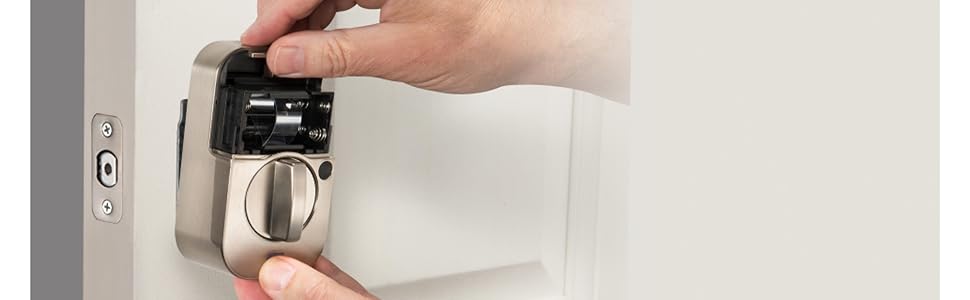
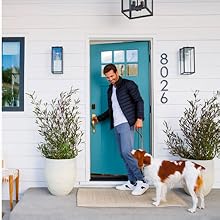
The Yale Assure Lock 2 Deadbolt in Black Suede is a Z-Wave enabled smart lock designed for front or back doors, offering multiple keyless entry options including keypad, smartphone app, and Auto-Unlock. Compatible with major smart home hubs like Ring and SmartThings, it supports unlimited user codes with tracking and features DoorSense for automatic locking. Powered by 4 AA batteries, it combines advanced security with sleek design and quiet operation, ideal for tech-savvy professionals seeking seamless home access control.



| ASIN | B0C2FQ3T5Z |
| Batteries | 4 AA batteries required. (included) |
| Best Sellers Rank | #52,565 in Tools & Home Improvement ( See Top 100 in Tools & Home Improvement ) #229 in Deadbolts |
| Brand | Yale |
| Color | Black Suede |
| Connectivity Protocol | Bluetooth, Z-Wave |
| Control Method | App, Touch |
| Controller Type | Android, Ring, SmartThings, Vera, iOS |
| Customer Reviews | 3.9 3.9 out of 5 stars (167) |
| Finish Type | Powder Coated |
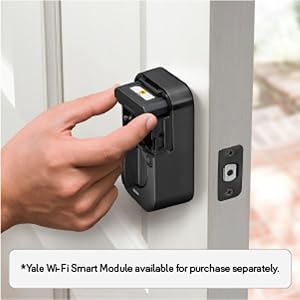
| Included Components | Yale Assure Lock 2, Yale Z-Wave Smart Module, Yale DoorSense, Deadbolt, Strike Plate, One Key, Mounting Hardware, Installation Manual |
| Item Weight | 4.22 pounds |
| Item dimensions L x W x H | 2.5 x 3.7 x 2.3 inches |
| Item model number | YRD410-ZW2-BSP |
| Lock Type | Keypad |
| Manufacturer | Yale |
| Material | Nickel |
| Model Name | Assure Lock 2 with Z-Wave |
| Number of Pieces | 2 |
| Product Dimensions | 2.5 x 3.7 x 2.3 inches |
| Recommended Uses For Product | Entry Door, Front Door |
| Shape | Rectangular |
| Special Feature | Adjustable Deadbolt, Auto Unlock, Auto-Lock, Keypad Entry, Z-Wave |
| Style | With Key |
| UPC | 081023112307 |
D**D
Its very quiet and that's awesome.
First of all I gave this lock a 5 due to looks, expectations and build quality! I purchased the Z Wave lock to set up with my Ring system. Everything that Ring includes works. The Yale app with bluetooth is really only good for settings that Ring does not include. Also the Yale app , since it uses bluetooth really needs to be in the area of the lock to change settings and after that dont use it as the bluetooth is not a strong signal as most bluetooth is not that strong. It works great with Ring. I have changed 2 locks so far and 1 more to go. NOTE! Z wave is awesome long range and very reliable and uses less batteries that WiFi. Note! know exactly what kind of lock you need and want for your home. Dont buy this Z Wave lock and complain about the bluetooth as that's not what it was intended for. If you purchase a Bluetooth only its not going to lock and unlock from a good distance from the doors as its mostly good for set up and changing the settings but will lock and unlock and its very slow to connect too. I have my Ring set with Amazon to double check the locks when I got to bed to lock all doors if they are not already locked. NEVER remove or install the Z wave or WiFi module with the batteries already installed. Yale has a quick start and a small card and the instructions on a PDF and you really need everything all in 1 place as it can get confusing. You need to setup the lock in the Yale app and after that's working enroll the module and then go directly to the Ring app for Ring setup. Go slow and read everything. I would say if you are not a DYI person a little bit and tech savvy at least a little and fully understand the different types of communication don't do it yourself. Oh the most important thing to me is, it's super quiet compared to my old Kwikset 914 locks as they sounded like a train going down the tracks. I think most complaints, not all, are not legit. Due to people with unrealistic expectations and know how. This is really not a super user friendly setup. NOTE! install the complete lock and assure it works very smoothly with zero binding. then install the lock to the Yale app. and make sure its working. then install the lock to ring all in that order. If your the kind that does not read directions and a know-it-all DYI you will screw it up and blame the Yale lock
D**R
Great lock easy setup
Love this lock and all its options. Love how it integrates with my home automations!
N**K
Bought new, got used. Would not Connect.
Product was a previously returned item, missing the strike plate and allen tool, plus 4 random batteries that are not OEM batteries, and factory seals were cut. Considering there is a cost difference to purchase “NEW,” or “Used - Like New,” I purchased the more costly NEW option and received the a used product with missing parts. That said, the lock was in good shape, so I decided to take on the chin, and proceed with installation…. Physical installation was simple, and the device feels well made, but after numerous failed attempts to setup the device, I finally discovered that it had not even been factory reset which prevented it from ever entering setup/pairing mode. I Googled how to factory reset the device, and was successful in performing a factory reset. With the lock now in setup/pairing mode, I made 20+ attempts to connect (uses Bluetooth for initial connection, to allow WiFi setup) using 3 separate devices (two iPhone 13 Pro Max’s, and one iPad Pro M1), the device was never recognized by the Yale Access app on any device, even with the paring lights active. Extremely frustrating. Device is now being returned. Additionally frustrating, is the fact that this device was purchased to replace the same type of device, but non-keyed version, that I had to CUT WITH A SAW to open the door since the 9v backup FAILED to work after the batteries died. I will take blame for this as the non-keyed version should never be installed on a door which is a single access point…but failure of the 9v factory fail-safe system after 2hrs of attempts on a device that was only 1 year old meant I had to destroy the $200+ device just to open the door and replace it with another $200+ device that failed to work. Final point with the failed 9v backup is that I was very diligent to regularly replace the batteries to avoid this very issue. In the week leading up to the dead batteries, I was receiving WiFi connection lost / WiFi connected notifications constantly from the device via the Access app. I think this played a role in the expedited draining of the batteries. Seriously questioning my commitment to Yale. But, I will be trying one last time. My goal is to have my shop door on the same network and control systems as my home front/back entrance doors, which are both Yale Assures (no key) with Z-wave, and connected to / controlled by my Ring Alarm system and Alexa. This is my final attempt with Yale…. I have ordered another Assure 2 w/ lock and z-wave. If this final attempt does not work, I will be transition my entire system to a new brand and platform.
Q**W
It works well, but the "improvements" are a step back in usability
The lock works well once it's installed and configured. The older locks one touch locking worked by touching any button. This one only locks if you touch the Yale button. Forcing you to use a specific button that has no other purpose but locking is a step back in usability! Once touch lock should work with any button like before. The older locks were configured straight from the keypad and were easy to setup. They added Bluetooth to this, and they force you to use the Yale app for configuration. Frequent timeouts, and inaccurate or incomplete instructions in the app make installation and initial setup a far worse experience than the old keypad setup method. And I can't get DoorSense to work at all. Probably because I followed the instructions in the app for flush mounting the magnet 1.5" to 3.5" above the strike plate. The printed instructions show a MAXIMUM of 1.5", and it's to the top of the magnet, not the center. So mine is mounted maybe 1/2" too high thanks to poor instructions. And since it's mounted in a hole drilled in the door it cannot be moved! The app practically forces you to use the instructions in the app, so I didn't look at the printed instructions until it was already installed and not working! Thankfully I have a separate door sensor, and I use that to prevent locking while open.
E**Y
Esta cerradura estaba defectuosa después de que fue instalada por el cerrajero y las baterías añadidas. Los puntos de contacto en la cerradura se calientan indicando un cortocircuito en la cerradura. Además, según el cerrajero, era evidente que la cerradura fue manipulada porque faltaban tornillos, un tornillo tenía grasa y las llaves no estaban en la caja. Desde entonces he devuelto la cerradura a Amazon y estoy esperando mi reembolso a mi tarjeta de crédito. Compré otra cerradura de Yale a Amazon y fue entregada hoy. El cerrajero lo instalará pronto. Espero que todas las partes estén en la caja esta vez.
M**R
Bought the lock from Amazon and tried to install it. When I tried to pair the lock the Yale all says unable to find manufacturing info for this product. I raised a query with Yale Middle East and they responded saying that this product is not sold by them In Dubai and I should contact Yale USA support. The Amazon app has no way of reporting a warranty issue except to contact the seller. The seller is Q Tech Trading LLC but there is no way to contact them. Apparently they are the holding company for Amazon.ae. The return period has expired and there seems to be no answer to resolving this
A**.
This product works only in USA and Canada. Do not work in UAE. Complete waste of money
Trustpilot
1 week ago
1 week ago