
DOWNLOAD THE APP


Customer Services
Copyright © 2025 Desertcart Holdings Limited
DOWNLOAD THE APP


🚀 Elevate your workspace with the ultimate universal dock—power, speed, and versatility in one sleek package.
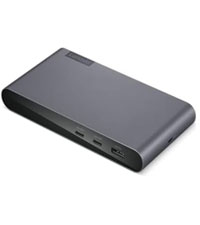
The Lenovo ThinkPad Universal Thunderbolt 4 Dock is a premium docking station designed for professionals seeking maximum productivity. It supports up to four 4K displays or a single 8K display, delivers lightning-fast 40 Gbps data transfer speeds, and provides dynamic power charging up to 100W. Compatible with a wide range of Thunderbolt 3/4, USB4, and USB-C Windows devices, it also features smart remote management for seamless firmware updates without interrupting workflow. With 11 versatile ports including HDMI 2.1, DisplayPort 1.4, USB 3.1 Gen 2, and Gigabit Ethernet, this dock is engineered to future-proof your workspace.




| ASIN | B09GJJ5C32 |
| Batteries Included | No |
| Batteries Required | No |
| Best Sellers Rank | #432,888 in Electronics ( See Top 100 in Electronics ) #167 in Docking Stations |
| Brand | Lenovo |
| Compatible Devices | MacBook Pro |
| Country of Origin | China |
| Customer Reviews | 3.8 3.8 out of 5 stars (262) |
| Data Transfer Rate | 40 Gigabits Per Second |
| Date First Available | 5 October 2021 |
| Does it contain liquid? | No |
| Generic Name | Lenovo ThinkPad Thunderbolt 4 Dock - USA |
| Hardware Interface | Thunderbolt 3, Thunderbolt 4, USB Type C |
| Includes Rechargeable Battery | No |
| Item Dimensions LxWxH | 15.2 x 7.6 x 2.5 Centimeters |
| Item Weight | 526 g |
| Item model number | 40B00135UK |
| Manufacturer | 40B00135US-X800 |
| Model | 40B00135UK |
| Model Name | Lenovo ThinkPad Thunderbolt 4 Dock - US (40B00135US) With 135w AC & Power Cord |
| Net Quantity | 1.0 Count |
| Number of Ports | 11 |
| Number of items | 1 |
| Operating System | ‎android,linux,windows |
| Product Dimensions | 15.24 x 7.62 x 2.54 cm; 526.17 g |
| Special Features | Universal Compatibility |
| Total USB ports | 5 |
| Wattage | 100 |
A**M
Received a used , damaged, faulty docking station. The device was faulty and keeps disconnecting from display. Luckily i had taken an unboxing video and Amazon helped with a refund.
R**W
Recently want to upgrade my Lenovo Thinkpad TB3 dock to this new version, but I found even it fully support Lenovo's own legion laptop with HDMI 2.1 over 4k@120hz. I checked the display info, it shows the card is wired through 'display port' internally. confirmed in game, it's just 4k@120hz, no G-sync, I think it's a limitation on LG CX, it's a special protocol used by LG and nvidia to arrange G-sync compatible. It couldn't output any HDMI signal from my Intel 2019 MacBook Pro 16. I had to use a downstream TB4 port on this dock then connect another USB-C to HDMI 2.0 cable and output to my tv, of course it's limited to 4k 60hz However, it does support my Intel 2020 MacBook Pro 13 and 2021 MacBook Pro 16 which is very strange. Of course, all of them are HDMI 2.0 due to limitation of MacOS And it does USB PD charge with 92w to MacBook Pro but it can't deliver any power to its own Lenovo Legion 7i, even though Legion can support 100w PD charging from TB4 port. Now I'm very confused by this dock. btw, firmware updated to newest 1.07 on lenovo website. Update on 6/5/2023: After a firmware update a while ago, it finally support M1 MacBook output 4k@60hz directly from HDMI port, but too bad due to Mac limitation, it's only HDMI 2.0 signal so no 4k@120hz. But I do "solve" this problem by recent hack from community using a special adapter to convert TB/DP alt signal to HDMI 2.1, I won't go into details, just search Thunderbolt -> HDMI 2.1 solution for M1/2 Mac for solution
S**3
tough to find a dock that will charge and power Lenovo workstations - but this does the job. The secret - this uses the DK2131 dock with a 135w AC power. So now all you need is the one cable from the dock to the laptop and your laptop will turn on, charge and connect to dock. Perfect!
E**K
Not universal. It is partially working with my thinkpad yoga, is getting pretty hot and on a macbook only the audio works. And it is not eligible for return. Worse experience…
A**R
Worked ok at first, but obvious lag on second monitor. If you add a third monitor it becomes unstable- will just randomly drop 3rd and sometimes both monitors, consolidating everything down to just the laptop. Sometimes it comes back on it's own in a couple seconds, otherwise you have to unplug it from the laptop and replug it. Pretty sad fail given that other docks are significantly more stable. Running 4k monitors and a 4k laptop might be too much but then it shouldn't claim it works for that.
Trustpilot
1 day ago
2 weeks ago