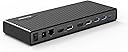
š¼ Dock Your Way to Success!
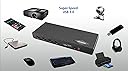
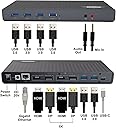
The Diamond Multimedia Ultra Dock DS6950 is a versatile docking station that supports up to 5K resolution and offers extensive connectivity options, making it compatible with a wide range of devices and operating systems. With 14 ports, including USB 3.0 and HDMI, it simplifies your workspace while providing reliable tech support and a one-year warranty.


| ASIN | B072K62KKF |
| Best Sellers Rank | #92,031 in Computers & Accessories ( See Top 100 in Computers & Accessories ) #2,606 in Laptop Docking Stations |
| Brand | Diamond Multimedia |
| Color | Black |
| Customer Reviews | 3.8 3.8 out of 5 stars (74) |
| Date First Available | May 22, 2017 |
| Is Discontinued By Manufacturer | No |
| Item Dimensions LxWxH | 3.3 x 1.1 x 8.8 inches |
| Item Weight | 8.8 ounces |
| Item model number | DS6950 |
| Manufacturer | Diamond Multimedia |
| Product Dimensions | 3.3 x 1.1 x 8.8 inches |
| Series | DS6950 |
D**J
Impressive
Just got one of these for my office. Honestly, I really wanted a dual 4k 60 thunderbolt 3 dock, but I couldn't find one. All of the thunderbolt 3 docks are currently single display output that I saw, and generally more expensive. Also, it forces you to use it with a laptop that has thunderbolt 3, which will probably become more common, but if you have older computers, they probably have USB3. This dock is really close to what I needed. I can plug in a single USB-C cable (in either direction!!!) and have 2 2560x1440 (note, not 4K...) monitors up and running + 6 USB devices immediately. My one gripe is that my laptops (alienware and macbook) both have integrated and discrete graphics, and I have to turn off the integrated card (which requires reboot...) to get good performance from 3D applications over display link. The dock uses the integrated card by default, and you can't change it besides disabling the internal card (a pain for the alienware, a breeze for the macbook). Apparently, this is a Windows 10 issue from what I've read, and has not been solved over the last year or so...I'm not going to hold my breath for an update. The performance on windows on my 2017 alienware (1070) is very good. I'm impressed, and see no reason to ever plug in my displays directly. It's about the same as plugging in directly (maybe a tiny bit of noticeable latency) The performance on my 2013 macbook pro is not so good. Worth just using the dock as a usb hub and plugging my monitors directly in for many applications. Still, it's hard to complain about not getting great performance out of a 4 year old computer. I still haven't played around with the settings much on the macbook, so maybe there is a way to fix it. I also haven't tried just using one display. Two 2560x1440 monitors is a few less pixels than 1 4K, so good luck to those of you who want to use this with dual 4K60 monitors on an older computer. Overall, it's a really impressive product. Even more impressive is that I still have 2 additional ports on my computer, which means I can plug in my Oculus Rift at the same time! I wish the performance was better on the macbook, but it's not a dealbreaker for me. I can always remote desktop into the macbook, which actually works alright, believe it or not.
M**K
Doesn't work for gaming
If you are to connect your cable through the hub you will get lower frames and latency. but if you are to use it for anything else it works good
T**R
So far, best USB-C dock I have used.
Mixed review, just opened and setup less than 2 hours ago. This is my 5th USB-C dock tested and it is the closest to perfect so far. Hopefully the only issue encountered is this unit (see details below). Setup is connect laptop power and single USB-C cable and have everything ready to go - and everything is working with no setup issues! - First, metal construction with good quality and finish. - Be sure to install the drivers from enclosed DVD first. - I have connected 2 1920x1080 HDMI monitors, external speakers, USB dongle for wireless keyboard/mouse, wired Logitech USB cam, and ethernet cable. - I would recommend connecting all peripherals first (everything but monitors) to allow computer to update drivers and do any restarts needed. - Then connect monitors. I am running an MSI GS laptop which has single USB-C port. I have left external monitor set as primary, right external as extended, and laptop monitor disconnected (so laptop is closed and slid under monitor stand). The Diamond USB-C doc instantly recognized monitors, let me configure and so far not a single flicker. - Power: just a note, the Diamond USB-C dock uses a small power block vs. the Dell dock I am currently using that has a large full size power brick. - Wish #1: the one thing this dock is missing is a USB-C port for peripherals. Single USB-C port on it is for connecting dock to computer. So single port on laptop is in use (connecting to dock) and single port on dock is in use (connecting to laptop) and no port available for external USB-C drive. - Wish #2: the Dell WD15 USB-C I have been using has several screen flicker/connection issues (one reason looking for a new dock), but it does have an audio port on the back side, which makes more sense for a dock. The Dell dock then has a headphone jack on the front (but it does not have the microphone jack the Diamond dock has). - Technical problem: I believe the power on/off switch on this unit is defective. The dock power has turned off a few times already. Just touching the on/off switch reconnects power, so I am believing it is the unit not a software thing (only using for a few hours I am assuming it is not an overheating issue). I will be returning and testing another unit.
S**D
FIRE HAZARD: DO NOT BUY. No response from support
I was very happy with this for the first month that I used it; did everything it said on the tin. However, last week I plugged my phone into one of the rear USB3 ports to charge. I had not used that port before. Within ten seconds, my Apple charging cable melted near the lightning connector: if I hadn't been watching, the heat would have set a blaze in my office. My best guess is the current limiter on the USB port failed, so the full power flowed down the cable, which it is NEVER supposed to do. USB cables just aren't designed to take that kind of power. Now, none of the USB ports work on the dock. And after sending me a faulty product that destroyed my property and almost set my office on fire, Diamond have not even bothered to respond to my support request. DO NOT BUY.
A**T
Great device works exactly as intended. Note that it doesn't have a passthrough for charging your device. This product was made in the US so if you're buying in AU, the power supply will need replacing or an adapter.
H**A
Hay que descargar el driver. En general funciona muy bien. El detalle. Lo uso para dos equipos mac (trabajo y personal uno es m1 y el otro es m1 Pro) cuando hago cambio de equipo. En ocasiones no detecta los monitores (tengo dos monitores conectados al hdmi). Para solucionar eso tengo que apagar y prender el dock. TambiƩn me ha pasado que cuando se bloquea la mac al intentar desbloquear no detecta uno o los dos monitores. Por lo que debo desconectar y conectar. No se si esto es problema del dispositivo o del driver.
H**Z
quisiera saber si se requiere alguna actualizacion respecto al modelo anterior ya que no entrega video en el HDMI, quisiera me orientaran
Trustpilot
1 week ago
2 weeks ago