🌍 Capture Life from Every Angle — Because Ordinary Shots Just Don’t Cut It!
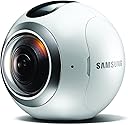
The Samsung Gear 360 is a compact, lightweight VR camera that shoots stunning 4K UHD 360-degree videos and 30MP photos. Designed for immersive content creators, it features dust and water resistance for durability on the move. Compatible primarily with Samsung phones for easy stitching and sharing, it delivers a next-level mobile VR experience perfect for capturing travel, events, and everyday moments in full panoramic glory.


| ASIN | B01D9LVL3G |
| Antenna Location | virtual reality content creation, immersive video recording, panoramic photography |
| Are Batteries Included | Yes |
| Best Sellers Rank | #94,449 in Electronics ( See Top 100 in Electronics ) #423 in Sports & Action Video Cameras |
| Brand | Samsung |
| Built-In Media | Battery, Carrying pouch, Data Cable, Leash Strap, Mini tripod |
| Camcorder Type | Video Camera |
| Color | White |
| Compatible Devices | Smartphone, Personal Computer |
| Connectivity Technology | Wireless |
| Customer Reviews | 3.8 out of 5 stars 946 Reviews |
| Digital Zoom | 4 x |
| Display Resolution Maximum | UHD |
| Effective Still Resolution | 100 MP |
| Effective Video Resolution | 3840 Pixels |
| Exposure Control Type | Automatic |
| Features | Lightweight |
| File Format | MP4 |
| Flash Memory Installed Size | 1 GB |
| Flash Memory Speed Class | C10 |
| Flash Memory Type | Micro SD |
| Flash Memory UHS Speed Class | U3 |
| Flash Memory Video Speed Class | V30 |
| Focus Type | Auto Focus |
| Form Factor | Compact |
| Global Trade Identification Number | 00887276157672 |
| Has Image Stabilization | No |
| Image Aspect Ratio | 2:1 |
| Image stabilization | Hybrid |
| Item Dimensions D x W x H | 3.8"D x 6.2"W x 3.8"H |
| Item Height | 3.8 inches |
| Item Weight | 8.8 ounces |
| Lens Type | Fisheye |
| Manufacturer | Samsung |
| Maximum Aperture | 1.5 f |
| Minimum Aperture | 1 Millimeters |
| Model Name | Gear 360 |
| Model Number | MAIN-2657841 |
| Number of Batteries | 1 Lithium Ion batteries required. (included) |
| Operating System | Proprietary (Samsung) |
| Optical Zoom | 1 x |
| Photo Sensor Technology | CMOS |
| Screen Size | 0.5 Inches |
| Sensor Type | CMOS |
| Shooting Modes | Time Lapse |
| Style Name | Base |
| Supported Audio Format | AAC |
| Supported Image Format | JPEG, PNG |
| UPC | 887276157672 |
| Video Capture Format | MP4 |
| Video Capture Resolution | 4K |
| Video Resolution | 4K |
| Viewing Angle | 360 Degrees |
| Warranty Description | 1 yrs |
| Water Resistance Level | Water Resistant |
| White Balance Settings | Auto |
| Zoom | click-to-zoom |
B**Z
Great first start for a 360 Camera, can improve however.
After doing research on all the 'lower cost' 360 cameras, I constant came to the conclusion that the Gear 360 is the best 360 camera on the market currently. I ended up purchasing the Samsung Gear 360 in October. I took it with me to Las Vegas, the Nellis AFB Airshow, and to Disneyland a few times putting it through a through a few hundred photos and videos. This allowed me to really get a feel for the various aspects of this first effort by Samsung. Photos - As someone who used to do the manual way of taking 20 shots with my phone to make a photosphere, this instant way of taking a 360 photo was perfect. No weird 'half human' stitches from people walking between shots. The photos are stitched well as long as the nearest subject is at least about a foot away from either lens. Putting the brightest light source (like the sun) pointing at the area between the lenses helps to give really nice consistent stitching. The quality, however, is not as high res as you might imagine. While it's better quality than any of the other 360 cameras out there, it looks like a 'medium' res camera took the photo. If you bump up the ISO limit to anything above ISO 800, the image becomes soft, noisy, and looks terrible in the Samsung VR system. Keeping the ISO at 400 makes for sharper and clearer photos, but still not like what the newer smart phones can get quality wise. I was surprised at how non detailed some of the photos could be, especially at night. They are acceptable for viewing in VR, providing you keep the ISO limit low and don't move the camera. But don't expect the quality to be better than a photosphere. Video - Video is said to be 4k, but keep in mind that's 4k when stitched together, NOT per lens. The quality is again decent, but if something is moving fast (a USAF Thunderbird fighter jet flying past at near Mach speeds) you won't see smooth high res motion, but a little more jumpy motion. Night video isn't that great, so you have to bump the ISO limit up for there to be enough light (like at Disneyland at night), and that will introduce noise into the video. At the highest ISO, it can look like the dark sky has the old fashioned TV noise when you flip to a channel that isn't broadcasting. Also, the videos are split into multiple smaller files and can take a really long time to transfer to the phone. However previewing the videos on the phone (without downloading them) is really fast. Phone App - The phone app is pretty simple, and can be slow to respond when trying to connect to the 360. Keep in mind that the 360 DOES NOT stitch the images/videos in camera, your PHONE does all that. I believe only Samsung S6, S7, and S7 Edge phones are compatable (could be more Samsung phones) but there are ways to sideload the app on other phones and get it mostly working. The App is slow to download the images and videos because it has to download them then stitch them. If you have 50 images you want to stitch and a few videos, it could take a few hours to all get done. The app could really use some improvement. That being said, I find it easier to change the limited camera settings (ISO, exposure value, quality/size, white balance, etc) with the app, but it's not something you can do super quickly. I will say that the HDR setting doesn't seem to do anything noticeable for the photos. Build Quality - The camera seems pretty fragile overall, you will NOT want to drop it. Water, dust, dirt, etc are no issue... but the glass bubble lenses are super easy to scratch/chip with even the slightest fall I've been reading... and it's expensive to replace them (if Samsung even will at all!) I wish there was some sort of screen protector I could put on the lenses to protect them. Make sure you keep a cleaning cloth with the 360 as you will want to make sure the lenses are always clean as that can produce weird lens flares. Battery - The battery is small, so if you're using it heavily you will run out of battery within a few hours. BUT, there's an issue with the 360 overheating before you even would reach the end of the battery's life. If it's hot out the camera can easily overheat and it will flash a warning and stop any video recording/photo taking and will force you to wait till the battery cools down. You can pop out the battery and fan/blow on it to cool it down, but this is a major issue. The bad/good news is that all the other 360 cameras out there do this too, so it's something you'll have to live with. I find that if you just turn off the camera in between shots, that helps a lot. BUT, if it does start to over heat, you'll run into another problem that only seems to happen to this camera: 'Blurgate' - As reported on a 360 forum (and as I've seen myself), as the camera begins to overheat, the battery slightly bulges in size. This causes what seems like a very slight movement of the lenses making the camera go slightly out of focus. I've seen this happen myself. It's not blurry to the point you can't use it, but you will notice a suddenly lack of sharpness and detail. Once the camera cools down again, all is back to normal. This seems to be because of the fixed focus on the lenses being a bit too precise. This hasn't been addressed by samsung at the time I'm writing this review (12/2/16), so hopefully either there's an update to help this or the next release fixes this major issue. Again, making sure to turn off the camera in between shots/videos helps keep the camera cool, and in turn keeps the blurgate under control. Accessories - The 360 comes with the battery, a USB cable, a mini tripod (you'll want to invest in a monopod/selfie stick to avoid the 'fat fingers' from holding the tiny tripod), and a nice draw-string carrying pouch. There is an optional accessories pack that includes a remote control, various types of mounts for the 360, and a longer tripod. Overall - It's a great start to what will hopefully only get better. As the whole VR fad continues to get more and more popular, I think 360 cameras will be seen more and more. Right now, everyone stares at my 360 like it's some alien device and are very interested in what it is... but I think we'll see more people with them in the future. If you want to jump on the start of 360 photos and videos, this is a great one to start with having the best quality and stitching time... just make sure you have a Samsung phone. If you're looking to record a concert, show, etc. you might want to wait a year or so as it's not quite there yet. For the casual person who wants 360 mementos from vacations, trips, etc this is the perfect gadget for that.
G**Y
A solid 360 camera
This camera is fantastic! After using it for a few months, here is what I have come to love and hate: PROS: -small! -lots of features! -decent picture/video quality (shoots in 4k!) -It comes with stitching software (which, although slow, actually works pretty good) -It comes with a fantastic carrying bag that can be used without detaching your monopod/etc. -you don't NEED a Samsung phone, or any phone for that matter. It can be used by itself (although there is no preview screen) Some positive thoughts: This camera is very iconic and gets lots of positive comments. It not looking like a typical camera helps people to be less camera shy, and act more natural. The camera's size, shape, and fast controls make it easy to just throw into a bag, usually with a monopod or selfie stick attached. It's very easy to use without a phone, although you will need a decent computer to process your videos. Now some CONS and negative thoughts: -This camera NEEDS a u3 high speed card. If you go with anything slower, the camera will bottleneck with video data and shut down after about 1 minute (and give you a nice, corrupted video) It would have been nice of Samsung to boldly state this fact somewhere on the box. It was a huge waste of time filming with this camera only to find over half of the videos were corrupted (this is with a u1 high speed card) -This camera overheats! After going through a single battery, the internal battery compartment (and the battery itself) becomes almost too hot to touch. I have seen it turn off with the overheated message multiple times (while filming at night, in the winter). This makes me nervous, with all the battery exploding problems that seem to be popping up with companies like..... Samsung. -Extra batteries from Samsung are expensive! I am hesitant to put an aftermarket battery though the extreme heat this camera produces. Since the battery lasts only a few hours, my options are limited! Pay $50 for two Samsung batteries, or save $30 and risk the device... Tough choice for someone who doesn't have $50 to spend on batteries... -The stitching software takes about ten minutes to stitch just one minute of footage. Imagine trying to work with a half an hour of footage! This can easily add up to a whole day of just stitching. It takes a huge amount of your computer's memory and space, by the way. So prepare yourself and your computer. Pro tip: start stitching before you go to bed. -The videos take huge amounts of space! This isn't necessarily a con, but it ends up costing you more money! You should consider buying a 1TB or larger hard drive to store your videos on. I ended up purchasing a 3TB internal Barracuda drive (less than $100) -The included "accessory" is already in the trash. The tripod that the camera comes with is great if your going for the whole ant's view thing. But for anything else, its completely useless. The bottom line: This camera is fantastic! Just remember, this technology is very new! As with any new technology, there will be little things here and there that need improvement. That being said, the problems with this device are easily outweighed by its superior performance and portability.
A**A
The Gear 360 takes amazing VR still photo and video
The Gear 360 takes amazing VR still photo and video, but you need a Gear VR visor to truly enjoy the content the way it is meant to be. THE GOOD: Quality is much better than you expect. The lenses are slightly fisheye, so objects closer to the camera look much better than distant objects. VR / 360 photos look amazing, the realism is so much greater than a flat photo. VR film is another world entirely, the film is running in all directions no matter where you look, it can really immerse you. Imagine sitting on a beach watching the waves. Behind you there is sea grass blowing in the wind. Off to the side there are gulls flying. Maybe down the beach you can see kids playing. Clouds are moving overhead. Film is running in all 360 degrees, no matter where you look, you're seeing real time. VR / 360 photos can be shared to Facebook, which recognizes them and automatically renders them in the timeline as 360 photos. People can view them in the smart phone app or in the browser on the Facebook web site. You can switch to full-screen and 'look' around the whole picture using your mouse or finger. you don't have to have a VR visor to enjoy them, but if you put on a Gear VR visor, suddenly you're really, immersively there. I used my Gear 360 camera this weekend to capture detailed views of the inside of my parents' home, including portraits of them in their favorite chairs. One day this will be a treasured memory for my daughter. She will be able to go back in time in a very vivid, meaningful way to see her grandparents again. VR/360 Video requires the Gear VR visor as far as I can tell, although it's possible there are other Apps that can correctly render these VR videos for a visor like Cardboard. The 360 camera comes with editing software for PC so it's possible to use a PC VR visor like the Rift or Vive. But clearly as a Gear accessory it is made to work seamlessly with the Gear VR visor, and it does so quite magically! All you have to do is place the videos in the Oculus\360Videos folder (if you don't have one, make one and place the videos there. You will then see them as playable content using the 360 Videos app in the Oculus suite for Gear VR.) These VR videos are stunning for what this device costs. VR video weighs in at about 300mb per 1 minute of video, so spend a little extra on an SD card for the camera (it does not come with one). VR photos weigh in about 6.5MB each, by the way. Use and pairing between your Gear 360 camera and your Galaxy or Note smart phone is pretty seamless and easy. There isn't much to it, and you have a simple, clean interface on your phone to remotely control the camera (it is rechargeable and comes with a small tripod). You will be up and running with this thing in minutes. Super-easy. THE BAD: You need a Samsung Galaxy or Note smart phone, and the content you make is best enjoyed with a Gear VR visor. It works so well that it's hard to call this "Bad", but you are definitely buying into an ecosystem and there isn't much room for anything else in this equation. So if you like Sammy, or already have a Galaxy 6/7 or a Note 5, I can highly recommend the Gear 360 camera as a jawdropping entry into VR film and photography. For the cost, you're going to be amazed by this thing. And you'll be making priceless memories that go so far beyond still flat photos... don't underestimate that!
B**L
Not ready for market, too many problems!!!
To my dismay I have just had to return the 360. In short, the camera has a terrible over heating problem. The longest file I have been able to record is 8 minutes and 26 seconds before it shuts off. For this reason I have given it one star. What good is a video camera that can't be used for video? (And that was shooting at night in moonlight on a tripod) As to the picture aspect, it takes a good (not great) 360 picture. But then again, anyone can take a pano shot with their phone and upload to facebook and it will automatically get converted to a 360 image (auto 360 FB conversion as of June 2016). The seems are very visible and the software won't correct for this. Some items are offset, not stitched properly and the color never matches. I included a picture here taken mid day with clear sky and you will notice the color of the sky does not match between the different lenses. ALL pictures turn out with the mismatch color just so you know. I waited a long time for this camera and really had high hopes. I'm not even angry, just really disappointed. After much research I see hundreds of others are having the same issue as well as many others. While starting the return on amazon, the page offered me Samsungs number for tech support. I did go ahead and call just for fun as I knew there would be no fix today. After she placed me on hold for ten minutes she came back on to say that the camera getting extremely hot to the touch was normal and that the camera will shut off to cool down. I asked how filming for only 8 minutes before shutting off could be normal? She said sorry and had no solution. BTW, the action director software that comes with it is the slowest video editing I have ever seen. You can expect 3 times the length of the video for processing BEFORE you can even begin to edit. And that is on a high end PC. Example... 10 minutes of video. Hit import to action director. Now wait 32 minutes for it to be stitched before you can touch it. Then drag to timeline for editing, do your thing to it then hit export to file. Now wait 1 hr and 5 min. Total time 1 hr 37 min to get a 10 minute video file that you can upload. Very inefficient software, I would use different software if you go that route. My only advice before you actually buy this camera would be to check out the "Samsung Gear VR 360°" facebook page to see the problems other users are experiencing so you can make a fully informed decision first. At leas you'll know all the risks first. Like the fact it is a slippery little ball with no grip and if you drop it and damage the protective lens, there are no replacements yet, etc.... Good luck to you! As for me, I'm going with the 6 camera GoPro rig. More expensive, but flawless video.
G**R
A good device in the digital wild west
As a standalone device, this is a really good first generation product, at a very reasonable price, especially considering how complex and expensive VR photography and videography were just several years ago. I'm writing as someone who has the Gear VR and the S7 Edge, meaning that I'm fortunate in experiencing the best possible integration between devices. It really is as easy and seamless as Samsung tells us it is. The implementation is flawless. The quality of the photos is very dependent on light levels. I shot the same indoor scene, on a tripod, at all the possible ISO values, and was disappointed to find that even at 400, there was significant chroma noise in the image - something that is a rarity in these days even on small, entry level sensors. That, to me, was a major disappointment. Similarly, when things get dark because of overcast skies or dusk, the image quality just isn't the same. When it's bright and sunny, the images are really good, but unless you're living in a climate where that is the norm, you're going to find yourself disappointed by pictures taken in less than perfect lighting conditions. Secondly, the video is nothing like the ads would have you believe. Even at the higher resolution (the camera isn't set to it by default), viewing on the Gear VR on the S7 Edge, you're not even going to get HD level quality. Third, and for me this ended up being the dealbreaker, sharing and viewing are a lot of work if you want others to see your images. Sure, I can upload them to Google Photos, but at time of writing, no Apple device will be able to show the full 360° image on Google Photos. I tried on my 2015 MBP and my 12" iPad Pro, and no dice. That's obviously on Google, not Samsung, but it doesn't change the fact that you can't share the 360° images easily with anyone on an Apple device. Windows 10 and 8.1 worked fine, as did Android Marshmallow and Lollipop. I refuse to sign up for FB, which limits me to YouTube for video uploads. Those worked but the quality left a lot to be desired even when all parameters were optimized. A video I took at the default resolution in bright daylight is so bad that it's not even SD quality. And then - what is going to happen to the pictures ten years from now? Will VR be a flash in the pan? Will the Samsung iteration of VR catch on, or will we be left with the equivalent of a stack of laser discs, desperately trying to keep our ten-generations-out-of-date S7 Edge alive in order to continue to enjoy the images we took yesterday? Consider that only recent generation devices even work with the Gear 360 right now. This isn't a knock on the device, at all, but it's a legitimate concern if you're thinking about getting this because by its very nature, this camera is dependent on the larger ecosystem. I realize that anyone buying this is a first adopter, but usually that doesn't mean risking once-in-a-lifetime memories. Between the middling picture quality in anything but ideal lighting, and the lack of any single universal storage, sharing and viewing standard, the idea of entrusting precious memories to this device is just a little too frightening for me. If on the other hand you're using this for sales or product demonstrations or non critical image quality uses, go for it. People that don't require longevity or perfection from their 360° images will absolutely get their money's worth.
Y**S
Can I say tough and good quality?
Let’s ignore the fact this camera is very affordable considering the prices of most 360º cameras, and let’s focus on how tough and good this camera is. I say tough because in one of my attempts to attach this camera to my drone, I made a major mistake of using cheap material to secure it, causing the camera to fall from about 12 to 15 feet in the air, directly to the concrete floor and nothing happened to the camera. I swear I thought the lens would shatter and camera would become useless after this fall, but somehow it survived. When it comes to quality, as you can see on the images I’m attaching, it is great. The same applies for video or when using the different view modes it has. Again, based on the price range of the camera, the image quality is amazing. Also, the fact this camera can be mounted on any standard 1/4” mount tripod, so it can be used on most tripods. Now, the couple of things that can be an issue with this camera, are the following: 1- If you don’t own a Samsung, you’re pretty much limited to take photos, videos, and time lapses blindly. While the google street app allows you to view through the camera, is not the best option. Of course, once the photos/videos are taken, you can edit them in a pc to achieve the desire look. 2- If you own a Mac, you’ll have to do a lot of searches online to find the Samsung app for Mac in order to edit them. Is not very easy to be found. Your could use third party apps, which is a good thing. 3- Depending on how close to objects the camera is, it might cut some of the visual part, where the to lenses meet, so it is always best to use the camera in big spaces. 4- Depending on where the light is hitting the camera (one lense or the other), might create a weird final 360 photo. The reason why is because each lens do their own white balance/ISO adjustment, so one of the photos (half of the 360) might be a little darker than the other, or with a colder or hotter look based on the white balance. So it is always a good idea to put the camera in a way that the light source hits both lenses at the same time.
K**I
Easy to use and great results!
For the price it is out of the ballpark! Key is understanding that if you are not warring the 360 goggles you can use your finger to pan around to see other angles. I bought this for our cruise and wanted to capture everything during our visits to the Mayan ruins. I made a ballcap mount based off a video which you can find if you search out 360 ball cap mount. The video is amazing. Easily used by importing to a pc since I am a iPhone user. If your have a samsung device you will enjoy extra flexibility from the on board app support not avialable on IOS. Even though I had to use a pc to edit I was extremely satisfied with the video quality of the final product. No, you cannot use in splashing conditions. Yes, it will capture a true 360 degree video of your location. Very cool on vacation if your are visiting somewhere of interest but if not who would want to see. I’ve posted on YouTube, which allows 360 videos and they are awesome. For the price just do it!
S**X
Why watch a video, when you can live a moment
Why watch a video, when you can live a moment. I’m a video producer so I’ve played with all the toys out there, but rarely have I come across a device that redefines an industry like the Samsung Gear 360. I’ve experimented with stitching multiple GoPros together to achieve the effect this single camera does with the touch of a button. At almost 4K, the image quality is better than any single package 360 camera available at the time of this review. The fact that this camera is also shock and splash proof allows me to get some incredible angles I wouldn’t dare bring my other equipment. And since you know the device is recording 360 degrees, you don’t have to worry about missing the shot. A single click of the record button and both cameras start simultaneously, eliminated the need to sync in post. And speaking of post-production, I almost can’t believe how simple it is to stitch the footage. What used to take practically a super computer to do the stitching, can be done on a simple galaxy smart phone. I’m almost convinced it’s done with magic. And since you’re using your smart phone to do the processing, once finished, it couldn’t be easier to share your masterpiece to any of your social networks. Even more impressive, many of the most popular social networks like facebook and youtube already have the technology to display 360 content, placing all of your friends in the action as soon as you upload, no special coding needed from you. If you want to do the processing on your computer, it comes with a program called Gear 360 Action Director, which does an equally impressive job of stitching quickly. Unfortunately, its only available for windows at the time of this review, so that tethered me to my desktop, so apple support would be nice. The program is pretty limited, but I only use it for stitching, then bring it in to my Adobe suite, to do the rest. It comes with a cute little tripod that reminds me of EVE from the movie Wall-e, but I purchased a variety of mounts. Most valuable would be a monopod with feet. Tripods will show up in the scene when looking down. The battery will last about an hour of continuous filming and it all records to a micro SD card. The only issue I had with the camera, was some interior lens fogging after moving it from the cold indoors to the humid outdoors. This was a pretty big problem, because once its fogged up, you’re at the mercy of the elements to clear it up. Your footage will be useless if you try to record with the fog. Time eventually fixed it, but be warned, acclimate this camera before any time critical gigs. That is literally the only issue I’ve come across in the month+ I’ve been using it. I LOVE this camera and believe it’s only the beginning in this exciting and revolutionary new media. The industry is moving fast, but Samsung did a great job getting a jump on the competition. The future is NOW!
Trustpilot
5 days ago
3 weeks ago