

Desert Online General Trading LLC
Dubai, United Arab Emirates
Desert Online General Trading LLC
Dubai, United Arab Emirates


Illuminate Your Life with a Touch! 💡
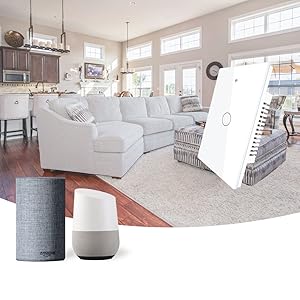
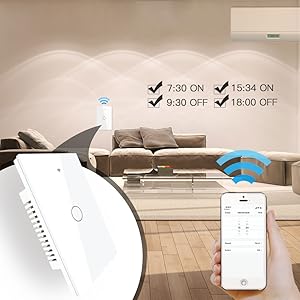
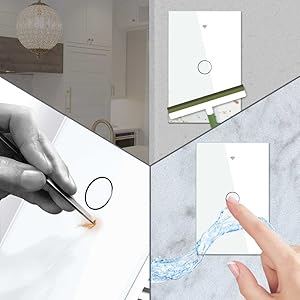
The MoesGoWiFi Smart Wall Light Switch is a cutting-edge, glass panel switch that requires a neutral wire and operates on 2.4GHz Wi-Fi. It allows for multi-control of lights, remote access via the Smart Life app, and hands-free voice control with Alexa and Google Home. With scheduling features, you can automate your lighting to fit your lifestyle.




A**L
Surprisingly easy to install and no fuss to configure and use
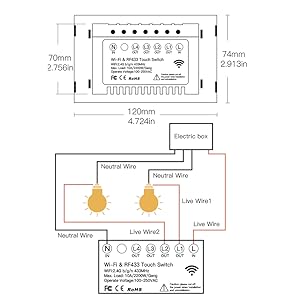
My goal was to replace a set of existing light-and-fan switches. I needed 2-gang (dual switch) in order to control the light and fan separately. The first 2-gang switch was at the front door, the second at the opposite end of the room - a very typical household configuration.The problem I was trying to solve was the need to move one of the 2-gang switches closer to a utility washbasin. I was concerned an occasional splash of water might reach the relocated switch, so I figure using a touch switch would be a smart solution - inherently able to shrug off water and easy to seal up the edges since there are no moving parts. Okay, still with me?This touch switch is NOT a drop in replacement for a traditional 2-gang, 3-way switch. A sketch will help (see diagram). Please note I am only showing control for a single device (1-gang) but if you want separate control of the fan and light you will need 2-gang switches.A typical configuration is shown under the 'traditional' label. As shown the light is 'on'. move either switch and the light is 'off'. Move either switch again and the light turns back 'on'. Simple stuff, right?Well the MoesGo solution is even simpler. Referring to the diagram, only ONE of the MoesGo switches, the Primary, actually controls the light. The other switches are configured to communicate across your home wi-fi network to control the Primary (which in the diagram is MoesGo Switch 2). Note that BOTH switches must have a LIVE and a NEUTRAL connection to power the electronics. Note also, you must be comfortable loading the MOES app onto your phone because otherwise you cannot configure the second switch (MoesGo Switch 1) to control the Primary.I can imagine the change in configuration confuses some people although the actual instructions included with the switches are easy to follow (at least in my opinion). Surprisingly well written!One nice feature of this solution is that you can get the primary working immediately and without the phone App. However if you want to use voice control and/or configure multiple switches to control the same light, then you must download the App and you must configure the switches from this App.Now onto other items:- you cannot operate a 3 way setup using a mix of MoesGo and conventional switches. This would not end well!- you must have a home wi-fi setup that supports 2.4GHz operation. This switch is strictly 2.4G. During configuration from the phone, you are typically using Bluetooth to talk to the new switch, and during the setup process you will give the switch the name and password for the 2.4G link. I strongly recommend you temporarily switch your phone to the 2.4G link too. Once the switch is configured you can revert to 5G.- the switch uses a conventional, mechanical relay. Be careful not to exceed the rated current for this device or, again, things will not go well for you!I also taught Alexa to recognize and use these switches. So I can say something like 'Alexa, turn on the Utility Room Light' and sure enough the light comes on! Same goes for the fan.I've installed many IoT devices so I am now very comfortable doing so. However, I must say these switches are exceptionally easy to install and configure, and the instructions are well written, unambiguous and clear. So for me this was a great experience and intend to buy more of these lights. In particular, I am keen to try out the timer function (although Alexa actually has the same capability).
A**N
Good product
They work fine. Not like the ones that does not require neutral wire from this brand, they do not work correctly, I purchased first this but did not get refunf, then I bought the ones that require neutral wire and they are working great.
R**S
Ramon Olmos
Excelente producto!
P**2
new idea 2 mutil-control should be update more
Finally found Mutil-Control function hidden in switch -> setting. You can access by:1. Click on target switch which is gonna set action to button (not wired button).2. On top right conner click edit symbol.3. Mutil-control will be there.Good: can be make 1 button control on lightBad: button need can only choice one time to link one another button. Which means one light can only be control maximum 2 buttons in 2 switch.My idea is to remove this limited, which allow more than 2 switch can control one or group of lights.Any target switch button can be clone access which physical switch (real switch) to share control the lights, and it's can be more than one target switch.Example for my idea can be in this case:button 1,2 in switch A is connect to 2 light in room.The button 2 in switch B can control to button 1 in switch A.The button 3 in switch B is can control button 1,2 in switch A same time (the status of these light will the same and get reference from button 3B)Then another switch C, button 3 can also control button 1,2 in switch A. And so on which unlock the limited for switch function.I hope you can check and improve it as soon as possible. Thank you very much.
A**R
Nice Looking Smart Switch, Easy to Install
The media could not be loaded. EDIT: I wish they would let me review the different gangs but I won’t so I’ll have to add to my previous one. Having installed the single pole, one gang switch was ease, I wanted to try and do a 2 gang one with a three way switch. THIS IS NOT A THREE WAY SWITCH, even though it says it :(I ended up having to use this on a different location which was simple enough to install as well. I ended up getting the Kasa brand smart switch for a three way switch (also very easy to install). I have included a picture of the set up so you can see how it only goes out to each light (or whatever you have connected to it).I am not a very handy person and I was able to install this smart switch on my own! I watched a couple of YouTube videos to make sure I had the right idea. When I removed my old switch, I only had the black wire so I figured out that I needed to add in a small white wire to complete the neutral line as this smart switch does not come with wires. After a quick trip to the store, I was in business!! Pairing to the app and to my Alexa was super easy as well!! Definitely worth the money for how nice it looks and how easy it was to set up...and how well it’s working so far!!
Trustpilot
3 weeks ago
3 weeks ago