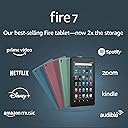


📚 Your pocket-sized entertainment hub!
The Fire 7 tablet (2019 release) features a 7" IPS display, a powerful 1.3 GHz quad-core processor, and up to 32 GB of internal storage, expandable to 512 GB. With up to 7 hours of battery life, hands-free Alexa, and dual-band WiFi, it's designed for both productivity and entertainment. Enjoy your favorite apps and capture moments with dual 2 MP cameras, all in a sleek Twilight Blue design.


| Display | 7” touchscreen, 1024 x 600 resolution at 171 ppi, SD video playback, with IPS (in-plane switching) technology and advanced polarizing filter |
| Size | 7.6” x 4.5” x 0.4” (192 x 115 x 9.6 mm) |
| Weight | 10.1 ounces (286 grams) Actual size and weight may vary by configuration and manufacturing process. |
| CPU & RAM | Quad-Core 1.3 GHz with 1 GB of RAM |
| Storage | 16 GB (9.4 GB available to user) or 32 GB (23.6 GB available to user) of internal storage. Add microSD card for up to 512 GB of additional storage. Some apps may require that they are installed on internal storage. App or feature updates may impact available storage. |
| Battery life | Up to 7 hours of reading, browsing the web, watching video, and listening to music. Battery life will vary based on device settings, usage, and other factors such as web browsing and downloading content. Certain software features or apps may reduce battery life. |
| Charge time | Fully charges in approximately 4 hours using the micro-USB power adapter included in the box. |
| Processor | MediaTek 8163 |
| Wifi connectivity | Single-antenna dual-band wifi. Supports public and private wifi networks or hotspots that use the dual-band 802.11a, 802.11b, 802.11g, or 802.11n standard with support for WEP, WPA, and WPA2 security using password authentication; does not support connecting to ad-hoc (or peer-to-peer) wifi networks. WiFi 6 (802.11 ax) is not currently supported. |
| 4G connectivity | N/A |
| Ports | USB 2.0 (micro-B connector) to connect to a PC/Macintosh computer, or to charge your device with the included power adapter; microSD slot for external storage |
| Audio | 3.5 mm stereo jack and integrated speaker |
| Sensors | Accelerometer |
| Camera specs | 2 MP front and rear-facing cameras with 720p HD video recording |
| Location services | Location-based services via wifi |
| Available colors | Black, Twilight Blue, Plum, Sage |
| Additional features | External volume controls, built-in Bluetooth with support for A2DP compatible stereo headphones, speakers, microphone, and LE accessories support |
| Accessibility features | VoiceView screen reader enables access to the vast majority of Fire tablet features for users who are blind or visually impaired using text-to-speech or a connected refreshable braille display. Screen magnifier enables viewers to zoom in and out, and pan around the screen. Fire tablets also include accessibility settings for Closed Captioning, Font Size, High Contrast Text, Color Inversion, Color Correction, and Convert Stereo to Mono audio. (Captions are not available for all content). Learn more about it here |
| Warranty and service | 90-day Limited Warranty and service included. Optional 1-Year, 2-Year and 3-Year Extended Warranty available for U.S. customers sold separately. Use of Fire 7 tablet is subject to Amazon's Condition of Use and these terms. |
| Included in the box | Fire 7 tablet, USB 2.0 cable, 5W power adapter, and Quick Start Guide |
| Generation | 9th generation - 2019 release |
| Software Security Updates | This device receives guaranteed software security updates until at least four years after the device is last available for purchase as a new unit on our websites. Learn more about these software security updates. |
J**S
Awesome Product!!!
First and foremost, FOR THIS PRICE is a great product!! Unbeatable, I must say; it's a lot more that you can expect!! I am surprised this thing is such a high quality product for just few bucks (I bought mine on eBay for $39,99, but later I found it's the same price here at Amazon). AMAZON x100: It is true its operation is 100% based on a Amazon environment, and that its Android OS is a special version (with some limitations); however I use Amazon store and services a lot, so that does not bother me at all. The inconveniences that are annoying for me I have overcome them satisfactorily... TRILLIONS OF ICONS: For example there are tons of Amazon App icons in the main screen that I don't use, and the app they belong to cannot be uninstalled (or at least I haven't found the way to do it). Well you can stop their services so they don't use tablet's resources, and occupy less memory and space that way; but the icons are still there. Also, they are not allowed to be stored in a folder (by long pressing each icon) so you have to deal with that bunch of icons in the main screen, which is very annoying (to my liking). But today I finally discovered a TRICK ;) to store them in a folder (Yeah!), so goodbye to those disturbing icons that I don't use (I just see 1 folder). My screen is already clean now, and only with the Apps that "I" use. AMAZON'S ANDROID: As for the OS limitations, the only one I could not overcome is that I have an annual subscription to Norton antivirus, and I have it installed on my Desktop, Laptop and Smartphone; unfortunately it cannot be installed on Fire 7 (9th gen). Today I contacted Norton technical support and they confirmed it; they say it cannot be installed due to the version of Android that Amazon uses on their tablets, which is limited and also different, with a very specific configuration that meets their tablets. Well instead I installed a free anitvirus that is going well for now (hope it protects me enough). STORAGE: As in every smartphone or tablet, internal memory is a concern of all of us (it quickly gets full); and this Fire 7 is not the exception. However it has 10.63GB for user's available internal storage (of 16GB it comes with) and I still have 8GB and something FREE, but this is because I use a 32GB MicroSD (it accepts up to 512GB) and configured all apps to store things over there. This is a good advice for all smartphone/tablet users. Oh yes, also Amazon gives you 5GB for Free in their cloud for you to store your stuff (pics, docs, music, or whatever you want). That's space you won't use in your Fire's storage so that's a nice gift. BATTERY: The battery life is awesome; what I've tested so far it gave me about 8 hours while Spotify downloaded my entire playlists for offline use. After that I gave it the second charge and have it playing music for about 5 continue hrs and the battery still has 70% remaining. SPAM: There's something that bothers me a bit which is the advertising of Amazon stuff when I unlock the screen. I haven't found how to stop it so after various attempts to get rid of it I ended up accepting to live with it. I just swipe my finger from the bottom of the screen and advertising is quickly gone. KEYBOARD: It can be set in several languages (well that's standard; I just downloaded the Spanish dictionary so it checks my spelling), but something that I liked is that it includes the Swipe method of "writing" (you enter words by sliding a finger from the first letter to the last; you lift only between words). I love that method and have used it in my smartphones for years now so I'm glad I found it here too. MORE TO COME: I'm so excited with my new Fire that I want to explore more functions, for example Alexa, and more other stuff that comes with the tablet. I will find the time for that later, but for now, I am very happy with what I've got. MY CONCLUSION: I am 200% satisfied with this product, I think it works sensational, at a very satisfactory speed. It plays my Spotify and MP3s playlists without problem, pairing it with my JBL Flip 4 speaker was fast and easy (and it sounds spectacular), the WiFi works perfectly, the email configuration was super fast and without problems, etc etc etc. What a good product!! And for this price, even better!!
B**S
It is a joy to use.
I got this new Fire 7 9th generation KIndle to replace my original 5th generation model which has been behaving weirdly and annoyingly lately. So far, all is good. It boots up fast, it doesn't randomly decide I have not read a book that I am currently halfway through, and refuse to open to the last page I read. It does not give me messages that my internal storage is low, even though I have basically nothing there except what came pre-installed; and I put in a 32 gig SD card which has tons of space on it. So I was getting more annoyed by the day with the old Fire. This new one, I have not even put an SD card in it, as I got one with the 32 gig storage capacity. When I look at the storage in the new model, almost none of it is used, even with all the junk that comes pre-installed. I may not ever add an SD card, if it keeps working properly without it. It seems to work the same way as the older model, with regard to turning pages, going to the hoe page, flipping to the store to buy a book, I am not happy with the "upgrade" in the software that was plopped into the old one, and which came with the new one. I find it a little harder to actually find what I am looking for in my library with the new supposedly easier program. But I guess I will live with it. I give the touch screen 4 stars because it is either too sensitive or not sensitive enough, and that may just be my fingers. No touch screen works right for me, never mind the device. I do not use Alexa, have no idea hay it is good for, and don't plan to learn. But I gave the same model Fire to a friend who loves Alexa and uses it constantly, and says it works great. So I am happy that it is a useful feature for someone. All in all, I think KIndle is the best thing. Ten years ago I moved to Ghana, and the only book store in my town is a backpacker used book store, that runs heavy with romance novels and scifi in German. I was buying books from Amazon when I visited family in the US, and carrying them back, an incredible waste of weight in my luggage which could be put to better use. I started chatting up a KIndle user in the airport one day, and got my first black and white, KIndle, the one with the physical keyboard, as soon as I got to my sister's house some 18 hours later. It is a joy to have something so light weight, so easy to turn the pages, so easy to buy new books. I appreciate it more as the years go by and the arthritis in my thumbs and wrists gets worse, and holding an actual book becomes painful. So for many reasons I am a great fan of the Kindle. I like that I can get movies and TV series via Amazon Prime, and the screen on the Kindle Fire is excellent, clear, with good color and contrast.. So if you are still wondering whether it is better to buy the Kindle Fire, or just download the reading app on your cell phone, get the Fire. The price is excellent. And by the way, I have friends who have the Kids version of Kindle Fire, and it seems to be a war horse, gets dropped, lays on the floor, gets fought over by siblings, has a ton of educational stuff on it, and some clever games that promote learning skills like sequencing. For 2 year olds, there are all kinds of things with basic preschool material available. And I actually think using the device promotes hand-eye coordination. So yes! Go Kindle!
B**T
Not just for entertainment consumption. (Edited 11/2/19)
I’m a semi-retired I.T. tech and one of my customers sometimes needs support when I’m out and about without a computer. My smartphone doesn’t offer a screen large enough for remotely working on the client’s network. I needed a device that (a) is inexpensive and (b) fits into a suit coat pocket, and (c) can remotely access a Windows domain. The Fire 7 sometimes goes on sale, but even the full retail price met my first requirement. (As a bonus, Amazon broke the payments into 5 monthly payments, no interest). I confirmed that the device will fit into my jacket pocket (although one of the jacket pockets is small, requiring removing the case that I bought for the tablet). Requirement #2 met. Initial setup, including attaching to my Wi-Fi network, allowing all Fire updates to install, and going through the various menus and options took about 30 minutes. This includes moving all of the app icons on the home page that I won’t be using into a folder and setting a login PIN on the Fire. I installed Splashtop Business from the Amazon app store. I’m able to access (and troubleshoot) the client’s remote network servers and computers. The screen of the Fire 7 doesn’t have great resolution, but it’s larger than my smartphone screen and works well enough for my purposes. Final criteria met. From there: I set up a new Gmail account specifically for the Fire 7, which doesn’t mean giving access to Amazon to my corporate account. I setup an HP Envy 5000 and a Sharp 3701 printer, using the IP address of each printer. I wouldn’t want to print out the Encyclopedia Britannica with automatic stapling and hole punching using the Fire 7, but it does simple printing. I installed Private Internet Access using the Play Store app. No problems, seems to work O.K. Encryption of the internal storage took less than 30 minutes, and I’ve noticed no degradation of performance (YMMV). I installed an office productivity suite (not that the Kindle 7 lends itself to typing large documents or editing spreadsheets, but in a pinch it’s a good app to have available). Loading Kindle books was, of course, a snap. Reading e-books on the Fire 7 is not as good an experience as a Kindle Paperwhite (plenty of reflections outdoors), but O.K. as a time killer while waiting for my wife to finish shopping. ORIGINAL POST: I elected to stay with the native Silk browser - I’ve seen ‘how to’ articles on installing the Chrome browser, but Chrome tends to be resource intensive and Silk will most likely do for my purposes. EDIT: 11/2/19 I've side loaded Chrome Browser onto the Fire 7, just to make life easier; I spend considerable time in Chrome professionally and I'm finding it easier to stick with one browser. I've noticed no significant degradation of performance. I added a micro-SD card for extra storage (having gotten the el-cheapo 16gb Fire 7). One thing the Fire 7 is missing is a decent file explorer. I’m still experimenting with those apps - there have been security issues with some of them. EDIT 11/2/2019: I've elected to use File Commander for a file explorer. Battery life isn’t great, but I only need 5-6 hours so it works for me. The Fire 7 is marketed as an “entertainment” machine; I’m not much one for watching videos on a handheld device but it can show my “Prime” movies. The 8 or 10 inch models would be better for entertainment consumption - they have more screen room and better resolution. As noted, I bought the 7 specifically for its size, price, and capability, and I’m using it more for productivity than for media consumption. I’m rating it at 4 stars because it’s cheap, it’s easily transportable, it can be secured, it does what I need it to do and did I mention it’s cheap? It doesn’t come close to doing what my iPad can do - but the iPad doesn’t come close to fitting in my jacket pocket or close to matching the price of the Fire 7. EDIT 11/2/19: I've ponied up the $15 to remove the ads from the screen - I got tired of seeing them. HTH Regards, Jim
M**E
Possibly the best $50 I’ve spent on myself so far
I’ve owned this tablet for almost two months now (I didn’t buy it directly from amazon, but through Best Buy because of the great back to school sale price lol as if the price point wasn’t good enough!) and it has been amazing! I have used this tablet daily for just about everything: surfing the web, listening to music, watching videos, gaming... It is so useful and has become a staple in my day to day activities. I was pleasantly surprised at the quality of this tablet, I was expecting it to be pretty cheap at only about $50 but since I mainly wanted it for simple daily tasks I didn’t want to spend a fortune on it. And this fit what I needed perfectly! Better than I was expecting. The screen is great everything looks clear and bright, although the glass is very reflective and leaves finger prints but it was easily fixed with a matte anti glare/anti fingerprint screen protector. The audio is also very good and clear. It runs surprisingly fast, I was expecting it to be a bit slow and laggy when surfing the net or especially when gaming such as Minecraft etc. but I haven’t had a problem with speed. It’s very responsive, honestly it’s as fast as my iPhone. The colors are a big bonus. I love the unique selection, I got the sage green and it’s beautiful! Exactly as pictured. It was actually one of the main selling points that made me decide to try this tablet was because of the visual appeal, it’s nice to have a nice classy pop of color rather than a stereotypical gray or black device. I would love to see a blush pink color option added in the future but that’s just wishful thinking. It’s a good size too, easy to carry in my bag on the go, but still big enough to game and watch videos comfortably. It’s about the size of your average paperback book just slightly narrower. I also like that you can have multiple sign on accounts and kid accounts. The restrictions and curfew settings are pretty great and would make a great family device, or for those like me who like to keep themselves accountable. I also like that you can increase the existing internal storage with a micro SD card. Now as for cons, I don’t have any big ones, at least they are not deal breakers. My only complaints are these 4 things: 1. the battery does charge slowly, (the only reason I gave 4 stars for the battery) it usually takes a couple hours to charge, but it’s not too much of a hinderance. The battery life is pretty good, it lasts a while and I always get a few solid hours use before the battery starts getting low. 2. The tablet starts to get hot after extended use. Since it has a plastic backing it gets a wee bit hot to the touch especially if it’s in a case, but again it’s not that big of a deal and it does cool down fast once I turn it off. 3. More of a wish than a con but I wish it was procreate/photoshop compatible and that procreate or photoshop were available in the AppStore not just knockoffs. As an artist myself I would love to be able to do digital art on this, or if Amazon came out with a tablet and pencil specifically for art I would totally be down. I would prefer not to spend $1000+ on the iPad Pro just for my art. 4. Again another wish rather than an actual con but I wish the newly released Call of Duty Mobile app was available in the Amazon AppStore. Actually I really wish they had more of a selection of apps, there’s precious little, if any, of the actual big name games and apps available, most of them are just knock offs. Over all I love my Fire 7 it’s a great tablet, can’t beat the quality for price point.
S**A
Good, but resolution ain’t so hot.
It’s good for its value, but like all tablets, the price adds up as you start tacking on other things like the case and such. The ads aren’t bad. I think people who are complaining are spoiled or are upset they had to settle. If you have children, obviously you never let them have access to ads because they don’t understand to not download them. In terms of the glitchy, I notice most of those reviews are with people who uses the SD card. I know it shouldn’t and I know any IT person would say I’m crazy, but adding on storage always slows down a pc. I do think over time this will begin o glitch. I saw 2 samples in store. The one that was glitchy felt older and wasn’t updated. The one that wasn’t was updated and felt smoother. So I bought the square trade protection just to be safe. I wanted a tablet for some game playing, web browsing amd amazon shopping, simple writing and reading, portable, smaller than the ipads, but bigger than the kindle screens for reading and that kindle oasis price tag is a joke. Setup was super simple and understanding how to use it doesn’t require much of a tutorial, but I can’t say that’ll be the same for you if you’re someone who yells a lot at computers and complains about this new generation. Some cons: the screen doesn’t feel good to swipe. It’s good for tapping. I am really happy I bought an anti-glare screen protector together with my purchase. I was able to put it on first thing which helped with screen feel issue and harsh light. The resolution isn’t perfect and might be too much effort for your eyes if you’re always working with 4k. It’s heavy. I swear the ipad mini is lighter even though they’re the same weight. I think it’s about weight distribution. The resolution and the weight are going to be my deal breakers. If my eyes feel dizzy or my fingers keep complaining, I’ll return it, no matter that I purchased it with a goft card. Otherwise if you have the money and you really want a tablet without the high price and you don’t notice weight, I’d recommend it. If you have an amazon bookstore nearby, I recommend checking there. I’m starting to realize that the price was a little less in store than online. It’s not a waste and won’t be something you’ll hate yourself for buying even if you do decide to return it. Just don’t wait too long to try it and decide if you want to return it. *After a few days, I’ve decided that if I had money, I would get a better tablet. The weight isn’t much of an issue anymore, but the resolution is awful. I will be keeping it b/c it’s what I wish my tablet would be and there are times where I really wish I had a tablet and this is the cheapest on the market with a brand name I trust and no need for store interaction. (Ads/ “special offers” are still not a problem for me, unlike other reviewers. Just putting that out there for those worrying if the discount is worth it. It is.)
K**5
Can work.
great tablet for the price.
D**S
Depending On Your Use, This Might Not Be For You
For starters, I love Amazon. Who doesn't? And my old Ipad is starting to finally kick the proverbial dust after years of abuse. The battery is finally starting to take forever to charge, and there's lagging issues due to it being so old, and the updates are just killing it more. But it is still beloved to my four year old, who somehow commandeered it. All that being said, I was so excited when it finally came in! It looked awesome, was a little different with the controls all at the top, including the volume, power, charging port, and headphone jack, with the speaker not at the bottom of the device but on the left side, which was an odd placement I thought after I put a case on it, and I typically hold it where the speaker is located. The opposite side close to the top is the slot for an SD card. There are no front buttons as it's fully touchscreen also. I already knew before going in that you could not use Goggle Play, although I'm sure there's a way to get around it. I basically wanted to use it for videos for both myself and my daughter, games, and the occasional book and web browsing. Now, keep in mind we have super fast Internet. When I first started the Fire tablet, there was the required set up process, which didn't take long, just the basics such as adding wifi, signing in, etc. I did purchase the tablet with "special offers" as it did not bother me to see the ads on the lock screen. Once on, it was a pretty nice setup, especially for those that are already "in" with Amazon as it shows a Home screen with my recent book/audiobook purchases up top, then all my apps below it, the next page shows Books, and includes some books from my library as well as recommendations below it, Videos is next, followed by Games, Shop (which was so odd as it shows things I've looked at), Apps, Music, and Newsstand. So basically, if you do a lot of Amazon shopping, listen to Audible as well as Amazon Music, watch Amazon videos, and read Kindle books, then this might be for you. If you don't use Amazon that frequently, then I'd recommend looking elsewhere for a regular tablet, one that is not hardwired for their Amazon customers. Now in my personal use, because I do use a lot of their services, I do like it. But it's also dang annoying. I suppose it's coming from having owned Apple devices, and Samsung devices that I find this tablet to lag tremendously. Actual startup from the time you press the power button takes about 40 seconds to pop on. Not too shabby, but there is a lag from opening the lock screen to opening apps that isn't apparent in a good quality Apple or Samsung product. And let's not forget the horrible lag from going from one profile to the next. It takes forever, and at this point, I finally erased the profile I set up for my daughter. I loved that I would be able to limit her usage as we already do that, but in this way she couldn't even get on without my code. You can download what apps they can use, and manage their profile fully, which is great! But on the flip side, I can't seem to figure out how to get back to my profile without shutting the whole thing down or restarting it as it opens right to her page versus the lock screen when opened back up. And as I previously stated, you can use the Amazon apps, but there aren't as many apps as can be found in Apple. There are some I love to use, and they do not have them available at all, which sucks. Amazon's browsing is called Silk, and works fine, although I still find it slow with fast Internet. The quality of the screen and the battery are two other issues that are definitely cheap and sub par. The screen quality on browsing has the slightly blurred look of a cheap android tablet. Words are ok, such as in an article, but pictures are blurred, and even video is not that clear or crisp. The battery is also very weak I've found. I've had my phone on since six this morning, and turned the tablet on around 10 this morning. My phone, which I've used all morning to make calls, text, watch a few video's, look at FB, browse, etc., is down to 76% battery. The tablet, which I've used to download four apps and had maybe about 20 minutes of use and has been on standby is down to 75%. The battery does not last long at all. If you watch even a few videos on the tablet, you can easily watch the percentage slowly bottom out. The camera is what you would normally find on a cheap tablet, and I wasn't expecting much nor did I get much in return. The kindle portion is fantastic, and I can read easily on it, but I also own a Kindle, and I prefer that to this as the glare is greatly reduced even though you can change the page color and brightness of the screen. I do like seeing the book covers in color though, and maps or things throughout the book that would normally be colored, but otherwise it is still nice to be able to read on it well. Alexa works totally well, and it's easy to use, and I like the fact that you can use Alexa to play some games. My daughter is fascinated with her. In all, this is an okay basic entry tablet that's good for watching videos, and is more tuned towards Prime members who have a lot of Amazon features already. I'm going to keep it as I wanted something cheap for my youngest daughter to watch videos and keep her occupied, and for my occasional browsing. But if you want a crystal clear screen, no lag, and better selection of apps, then I would definitely recommend going with an Apple or different Android device.
M**W
The $50 Tablet That Punches WAY Above Its Weight
The Bottom Line Up Front: After a decade of reviewing tech products from budget to premium, I can confidently say the Fire 7 (2019) is the best value proposition in the tablet market. It's not trying to compete with iPads or high-end Android tablets - and that's exactly why it succeeds. For casual media consumption, kids' content, e-reading, and light browsing, this delivers 80% of what most people need for about 15% of the cost. Just understand its limitations going in. What I Loved (PROS): Unbeatable Value Proposition - Let's address the elephant in the room: this tablet regularly sells for around $50-60. For that price, you're getting a fully functional tablet with a decent display, access to thousands of apps, and Amazon's ecosystem. The price-to-performance ratio is genuinely remarkable. Perfect Kids' First Tablet - This is the sweet spot for children ages 4-10. It's affordable enough that you won't panic when (not if) they drop it. Pair it with a kid-proof case and you have a worry-free entertainment solution. I've tested this with multiple families - parents love not stressing about an expensive device. Surprisingly Decent Screen for the Price - The 7" 1024x600 IPS display isn't winning any awards, but it's perfectly adequate for watching videos, reading books, and playing games. Colors are reasonably vibrant, viewing angles are acceptable, and the size is ideal for portability. Battery Life Exceeds Expectations - Amazon claims 7 hours of mixed use, and in real-world testing I consistently got 6-8 hours depending on usage. For a budget tablet, this is excellent. Road trips, flights, and long waiting rooms are no problem. Lightweight & Genuinely Portable - At just 10.2 oz, this is lighter than most hardcover books. It slips into purses, backpacks, and even large jacket pockets. It's become my go-to travel tablet because I don't worry about it getting damaged or stolen. Expandable Storage Saves the Day - The microSD slot (up to 512GB) is crucial because 16GB fills up fast. With a $15 microSD card, you can download tons of content for offline viewing. This feature alone makes the tablet far more practical. Alexa Hands-Free is Surprisingly Useful - "Alexa, play Bluey on Prime Video" works seamlessly. For kids who can't type well or adults cooking in the kitchen, voice control is more useful than I expected. It also functions as a smart display for checking weather, timers, etc. Access to Amazon's Full Ecosystem - Prime Video, Kindle books, Audible, Amazon Music, FreeTime Unlimited for kids - if you're already in Amazon's ecosystem, this integrates beautifully. The seamless content delivery is a major advantage. Twilight Blue Color is Attractive - The soft blue finish looks more premium than the price suggests. It's pleasant to look at and less prone to showing fingerprints than darker colors. What Could Be Better (CONS): Performance is Adequate, Not Amazing - The 1.3GHz quad-core processor handles basic tasks fine, but you'll notice lag with heavier apps, multitasking, or graphic-intensive games. Apps take 2-3 seconds longer to open than on premium tablets. If you're used to flagship devices, adjust expectations. 16GB Fills Up FAST - After the OS and pre-installed apps, you have maybe 10-11GB usable. Download a few shows and some apps, and you're full. The microSD card slot is mandatory, not optional. Budget an extra $10-20 for storage. Camera is Basically a Placeholder - The 2MP rear and VGA front cameras are 2010-level quality. They work for video calls in good lighting, but forget about taking photos you'd actually want to keep. This is for emergency use only. App Selection More Limited Than Android/iOS - While Amazon's App Store has grown significantly, you won't find every app available on Google Play or the Apple App Store. Major apps are there (Netflix, YouTube, Spotify) but some niche apps aren't available. Check for your must-have apps before buying. Not Ideal for Productivity - This is a consumption device, not a creation device. Typing documents, editing photos, or serious work tasks are frustrating on this hardware. It's for watching, reading, and light browsing - nothing more. Charging Port is Outdated Micro-USB - In 2019 (and certainly now), micro-USB feels ancient compared to USB-C. It charges slower and the port wears out faster. Keep the cable in good condition and consider buying a backup. Lock Screen Ads are Annoying - Amazon subsidizes the low price with "special offers" (ads) on the lock screen. You can pay $15 to remove them, but it's an irritating upsell on an already-budget device. The ads aren't terrible, just unnecessary friction. Build Quality Feels Budget - The plastic construction is solid enough but definitely feels like a $50 tablet. There's some flex to the body, and it doesn't inspire confidence without a protective case. Plan on buying a case immediately. My Professional Assessment: I've reviewed tablets ranging from $50 to $1,500, and the Fire 7 is a masterclass in knowing your lane and staying in it. Amazon isn't trying to build an iPad competitor - they're building a content delivery vehicle that happens to be a tablet. Once you understand that perspective, everything makes sense. This tablet excels at exactly what it's designed for: getting Amazon content into your hands cheaply and reliably. It's a Kindle that also plays videos and runs apps. That's not a criticism - it's brilliant product positioning. Real-World Use Cases Where This Excels: Kids' Entertainment Device - Pair with FreeTime Unlimited and a protective case. Perfect solution for car trips, restaurants, and keeping kids occupied. Low cost means low stress. Bedroom Streaming Device - Keep it on your nightstand for watching shows before bed. I prefer this over using my phone because it doesn't disturb my partner with notifications. Kitchen Recipe Display - Alexa integration + decent screen size makes this ideal for following recipes. Spill something on it? $50 replacement isn't heartbreaking. Travel Companion - Load up a microSD card with downloaded content. The small size and light weight make it perfect for flights, hotels, and beach trips. If it gets lost/stolen/damaged, you're not out $500+. E-Reading - While dedicated Kindles are better for extended reading, this works beautifully for magazines, comics, and shorter reading sessions where you want the color display. Elderly/Non-Tech-Savvy Users - The simplicity and Alexa voice control make this surprisingly good for seniors who want something straightforward for video calls with grandkids and watching shows. Testing Notes (6+ Months of Use): I've used this tablet extensively in various scenarios: Video streaming: Smooth playback on Prime Video, Netflix, YouTube. Occasional buffering on lower-quality WiFi. Gaming: Casual games (Candy Crush, puzzles) work fine. Anything 3D or action-heavy shows the hardware limitations. E-reading: Comfortable for 30-60 minute sessions. Longer than that, I'd prefer an e-ink Kindle. Web browsing: Works but pages with heavy graphics load slowly. Fine for checking email or reading articles. Durability: After 6 months with kids handling it (in a case), zero hardware failures. Scratches on the screen but fully functional. Who Should Buy This: Parents looking for a kids' tablet that won't break the bank Amazon Prime members who consume lots of Amazon content Budget-conscious buyers needing basic tablet functionality Travelers wanting a secondary device they won't stress about Elderly users or tech beginners wanting something simple Anyone needing a dedicated e-reader with some extra capabilities College students on tight budgets needing something for streaming/reading People buying their first tablet to "see if they'd use one" Who Should Skip This: Power users needing premium performance Mobile gamers wanting to play demanding games Professional users needing productivity capabilities Photography enthusiasts needing a decent camera Anyone expecting iPad-level performance and polish Users who need specific apps only available on iOS/Android People with no Amazon Prime membership (less value) Critical Setup Tips: Buy a MicroSD Card Immediately - 64GB cards are $10-15. Get one before you even start using the tablet. You'll thank me. Invest in a Good Case - The tablet itself is cheap; protect your investment with a $15-20 kid-proof case. The MENZO case (I reviewed separately) is excellent. Remove Lock Screen Ads - If ads bother you, pay the $15 to remove "special offers" right away. It improves the experience noticeably. Set Up Alexa Properly - Take 10 minutes to train Alexa to your voice and set up your preferences. It transforms usability. Download Content When on WiFi - Before trips, download shows/books. The offline capabilities make this tablet 10x more useful. Adjust Expectations - This is not a premium tablet. Accept the limitations and focus on what it does well. The 16GB vs 32GB Debate: The 32GB version costs about $20-30 more. My recommendation? Save the money and buy a microSD card instead. You'll get more storage for less money, and you can upgrade the card later if needed. Final Verdict: The Fire 7 (2019) isn't the best tablet on the market - but it might be the smartest tablet purchase you can make. It succeeds not by competing with premium devices but by delivering exceptional value at a price point that makes tablet ownership accessible to everyone. After six months of testing, I've found myself reaching for this tablet more than I expected. Not because it's the most powerful or feature-rich, but because it's adequate for most tasks and I don't stress about using it in situations where a $500 iPad would make me nervous. Is it perfect? No. Will it frustrate users coming from premium devices? Occasionally. But will it deliver hundreds of hours of entertainment, reading, and utility for the price of two movie tickets? Absolutely. Would I buy it again? Yes, and I'd probably buy two - one for travel and one for the kitchen. Recommendation: STRONG BUY for the right use cases ✅ But seriously, buy a case and microSD card with it.
Trustpilot
5 days ago
2 weeks ago