🚗 Diagnose smarter, drive safer—your car’s new BFF is here!
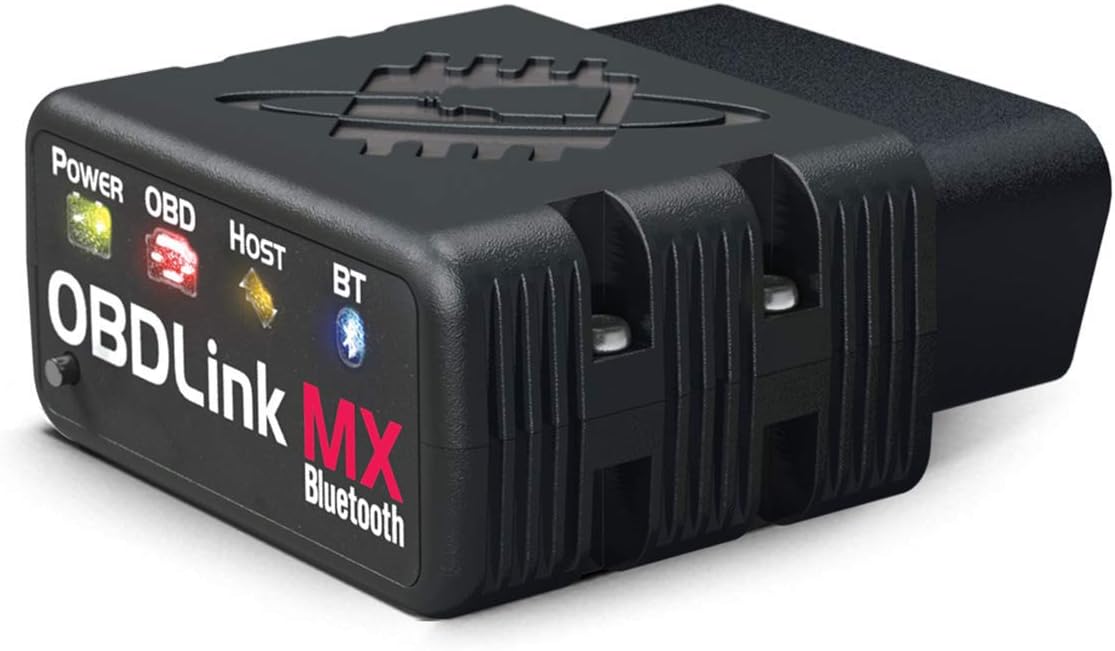
The OBDLink MX Bluetooth OBD-II Scan Tool is a professional-grade diagnostic adapter designed for Android and Windows devices. It delivers up to 4x faster Bluetooth data transfer, supports advanced vehicle protocols including SW-CAN and MS-CAN, and features innovative BatterySaver technology to prevent car battery drain. Compatible with a wide range of third-party apps, it offers hacker-proof security and regular firmware updates, making it the ultimate tool for DIY car diagnostics and performance monitoring.


| ASIN | B006NZTZLQ |
| Best Sellers Rank | #4,145,323 in Automotive ( See Top 100 in Automotive ) #6,506 in Code Readers & Scan Tools |
| Brand | OBDLink |
| Brand Name | OBDLink |
| Customer Reviews | 4.6 out of 5 stars 2,840 Reviews |
| Global Trade Identification Number | 00897155000012 |
| Included Components | 1 |
| Item Type Name | ScanTool OBDLink MX Bluetooth: Professional Grade OBD-II Automotive Scan Tool for Windows and Android – DIY Car and Truck Data and Diagnostics |
| Item Weight | 1.1 Ounces |
| Manufacturer | ScanTool |
| Manufacturer Warranty Description | 3 Year Full Manufacturer's Warranty. Warranty does not apply for damages caused by owner abuse or alteration of the device. |
| Operating System | Android, IOS |
| Power Source | Battery Powered |
| UPC | 897155000012 |
S**E
Awesome Product, Awesome Customer Service
I bought this scan tool based solely off of a response of the owner of the company to an individual that wrote what I perceived to be a bogus review. After reading the owners response, I could feel his passion for his product and his dedication to providing the highest quality product he could make. That being said I bought this from Amazon and it arrived two days later. I wanted to use this scan tool with my Acer A500 Android Tablet. In the meantime before it arrived I went to the google store and bought Torque Pro, Dash Command, and OBD Link, the factory software. I loaded all of the software onto the tablet and before I had received the OBD Link MX. I noticed right off a problem with an intermittent wifi connection but couldn't quite figure out what was wrong with the wifi. In the meantime the scan tool arrived and I set about pairing it via bluetooth with my tablet. I also noticed that Amazon had shipped the package in an envelope that crushed the package. it was also missing the CD from the package. I plugged the OBD Link MX into my 1998 K2500 Suburban and immediately the data was not coming through to the Acer A500. It was late at night, I was tired, so I quit fooling around with it. I did though, shoot off a very short, terse, email to the OBD Link customer service, thinking I would get a response a week later if that. I was prepared to send it back to Amazon, but, by the time I was ready to crawl into bed, lo and behold there was an email reply from the OBD Link Customer Service and I thought to myself, WOW, I have never had an email response so quick. I read it and it took me a couple of days before I could try out the suggestions. It took three more email exchanges over a week to finally resolve the issue. The slowness of figuring out the problem was on my end. It took me a bit of time to finally get out to my Suburban and try something new that Customer service had suggested. I honestly think that if I had been on top of things, all of these email exchanges could have been done in less than a couple of hours. The OBD Link Customer Service was just that fast. They also sent me a replacement CD that I received just a couple of days later. The solution was that the Torque Pro software was ruining the bluetooth and wifi connections. Dash Command didn't work either. But you can bet your bottom dollar that after I uninstalled the Torque Pro software the OBD Link software worked perfectly. Bottom Line is that a measure of a company is not how they perform when things go well, it is inevitably judged how they perform when there is a problem. I give the OBD Link MX an A+ rating, but more importantly I give the OBD Link MX Customer Service an A+++++ rating. They were just that good. I really like companies like this. Unfortunately there aren't many like them that are so customer oriented.
B**L
Perfect device for adding excitement to your driveway (whether you want it or not)
This thing worked the first time. It paired with my Android and gave useful information. I was impressed by the quality of the data stream and the application that reads it. I also used another app, Torque, that provides more options. I bought a wireless charging mount for my Android and was looking forward to watching the internals of the car as I made my boring commute. The next day, it paired and then it seemed to drop. It tried to pair again by giving a different pairing code. While it was doing this, my dashboard was going all Apollo 13 on me. I hadn't even left the garage, but the computer thought the anti-slip was slipping, that the tires were low on air, and that there was something wrong with the engine. All the while, my Android (in its new cradle) was notifying me every 10 seconds that something wants to pair by bluetooth. It was quite an exciting time. I unplugged the thing, which quieted the apocalypse that had become my peaceful cabin. Left only were the traction control (DSC) light and check-engine light. After a few days, these timed out. A couple weeks later, I got brave and tried it again. Same assault on my peaceful place, except that when I unplugged it the only thing left was the tire inflation indicator. I checked the tires and they were fine, but the light took a couple days to turn off. So now it's past the Amazon return time. I have suggested to the manufacturer that they should send me a new one. I'll update this review if they are responsive. Update: They were pretty responsive and say they are sending me a new unit. I'll keep this post updated. Update: Got a new unit and it worked fine. For a while. Turns out that the Nexus 7 head unit that I was using couldn't figure out how to turn off bluetooth when it was sleeping so I'd wake up with a dead battery every morning. I swapped it out with a wired, USB OBD device. Update: Got rid of the Nexus 7 and put in a Joying Android head unit. It turns all the way off instead of just going to sleep, so the bluetooth turns off with it. I put the Scantool MX back in and everything works really well.
D**D
Excellent device. Works perfectly with my Lotus (which is finicky)
Ironically my 2002 Lotus Esprit has TWO OBDII ports, one in the front passenger foot well, and the other in the boot by the battery. Unfortunately, Lotus is very finicky and NOTHING that I have found thus far, such as the ScanGuage II or other generic OBDII readers works with it. I plugged this into the rear port (since the one under the seat is hanging on by a couple wires (they're kind of jenky built). Pushed the button and connected it to my Samsung Galaxy Tablet. Then I fired up the OBDLink software that you get from Google's Play store (for free) and was REALLY impressed by the polish of it. After configuring it to use ISO9141, I was getting readings and seeing error codes and all kinds of data!!!! I'm elated! Realizing that the tablet is way too big to mount to the windshield, I decided I'd try the same process with my HTC Evo 4G phone. Same thing, worked like a champ (meaning I can pair the OBDLink MX to at least TWO devices or more). AWESOME! Two things to note are that this has an auto-off mode so that it will not drain your battery, yet you can basically leave it connected and forget about it. The other is that it is way faster at sending data than the generic ones or any other one that I'm aware of for that matter. So your readings on the virtual guages should be much more real-time. I fired up Dash Commander and Torque from the market and both worked excellent as well. DC seems way more powerful than I need, but it also has the nicest default interface for the guages. The other two require a bit more pre-customizing work. I haven't tried the included CD for PC yet, but the program looks great from the screen shots I've seen.
F**N
Still a good tool
I use this with my Galaxy S5 and Torque Pro, works very well on all the vehicles I've used it on so far. Why 4 stars? Well, this is the second unit I've had to buy. Have no clue why, but the first one just stopped working one day. I normally left it plugged into my '11 4runner, and its possible that is what killed the first one, I do not leave the second one plugged in any more. To be fair, the first one lasted a full year, mostly being plugged into my 4runner, and these units will stay warm, even with the key off. Not hot, but warm, maybe that was enough heat to burn it out. This model definitely works faster and is much more reliable in Torque than the cheapy ELM327 units (you know, those little blue ones for a couple bucks!), as its quite noticeable how much faster and responsive the data rate is within the app.
M**E
OBDLink wins.
I had difficulty deciding between the Bluedriver, and the OBDLink. After testing both, I hope the review below may help you. The ability to use iOS is nice, however, the OBDLink coupled with a $63 Android phablet worked better in my situation, as described below. The layout of the included OBDLink software is excellent. I can easily see many live parameters on one screen, without jumping through hoops and dozens of clicks to display them. With the Bluedriver, I was disappointed with the layout of the real time live data screen. It is nice to have the option to show the graphs on the main page along with the data, however, it was laid out in a semi-confusing manner, hard to tell at a glance which line the data referred to, with no obvious visual breaks between lines. As a mechanic, I prefer the capability to show many items at once on the page, with the field description at the left, and the data on the right. When the graphs always included, it really limits how many fields can be displayed at once. Some of the parameter descriptions were vague, and hard to identify when on the data viewing screen, although they were clearly labeled on the parameter selection screen. It was especially hard to identify which O2 data I was looking at, and which sensor it was for. Being limited to the Bluedriver software was a large reason I selected the OBDLink device. I like the functionality and layout of the ODBLink software, and open compatibility nature of their setup. There are some custom written programs that work with ELM 327 that really do much more than either OBDLink or Bluedriver by themselves, and the ability to utilize those programs, like Forscan, was huge for me. I can get access to seemingly every parameter on my 2012 F350 with the OBDLink and Forscan. Really a dizzying array of data. Since I am not set on using iOS, this OBDLink was a great solution. One thing that would make these devices even better would be bi-directional control.
E**O
Fastest Bluetooth Yet
I've used cheapo bluetooth adapters before, but this one blows them out of the water. Yes, the generic bluetooth devices work, they provide data, but this one from Scan Tool provides information at (according to my Torque) at around 40-50 PIDs/second, at least five times that of the old adapter. This means the sheer amount of data collected has increased fivefold. For me, it isn't really that big of a deal; I only use it to measure and watch my MPGs. From what I've seen, I've only just begun to scratch the surface of the device. What is, however, is the self-power off after five minutes of inactivity. Other readers will continue to drain power until they are removed. Also, you'll need to have a phone or laptop with OBD reading software. For android I've been using Torque to monitor everything, but there is included software to connect to the device on your laptop. ScanTool also has software of its own for Android. I don't have an apple product, so I don't know or have answers for you there. Update Jan 11, 2014: After using it for a month, I have to note that the reader MUST be plugged in tightly, otherwise odd errors will appear on your car. I had my tach stop working (on ignition) due to a slightly loose adapter. After I pushed it in to make sure it was in good contact, that problem went away. Update Apr 14, 2014: It still works just as well as day one. Since then, I've installed a tablet in my car and used Torque's "desktop" mode to monitor my mileage, fuel consumption, and other datapoints. Update Jan 14, 2015: A little over a year later, this guy works without fault. Depending on the location of the OBD port and the drivers of the car, this guy might get kicked and disconnected. Its been pretty durable and has been run over once by a car without breaking. I'd rather not replace it.... but its nice to know. Also, even after getting run over, its been fine and works well.
C**U
When you're ready to stop screwing around with the cheap garbage, step up to this thing - it's WORTH it.
Yes, you can get a similar product for about a tenth of the price and it may work just fine. I did just that a few years back and was happily parroting my advice to anyone who would listen - "buy one of those $10 units and $5 for Torque, that's all you need". I had one in each one of my three cars, gave one to each of my kids and had one with an old android phone I'd loan out to my neighbors who always seem to know I'm the guy to ask about their check engine light. Since then, most of them have stopped working, are difficult to connect and just a general pain. When I recently found a brand new $10 generic one I had lost track of and it was dead out of the package - I had had ENOUGH. Ordered this thing and Amazon brought it the same day. The darn thing WORKS. Connects right up, goes to sleep when the ignition is off so it wont drain your battery if you leave it plugged in. Works fine with Torque (OBDLinks app is pretty decent too) and one of the nice things for me is it can access the CAN network for Ford and GMs that the cheapies can't. Immediately recognized my 2002 Ford, and was able to pull the VIN. Currently $80 here - that's 30 minutes worth of labor at most dealers these days. Sure, you might be able to save $70 and get a generic one but there is no comparison in my book. Should have bought this years ago.
S**X
Well worth the price
I've had a few different OBD-II scanners over the last few years. First I tried a wired Actron CP9125 PocketScan Code Reader I picked up from an auto parts store. While it worked, it was a little too basic for my needs and it was difficult to navigate with only two buttons. I bought a PLX Devices Kiwi Bluetooth Wireless Trip Computer and OBDII Scanner , which is much nicer, but I stopped using it both because they seem to have abandoned support after IOS 7, and because it developed serious problems maintaining a wifi link (a common problem in their forums). Considering the price, I was very very disappointed with it. But since I work on cars for fun (both my own and friends), I wanted a reliable scanner. So, here we are. I purchased the ScanTool 426101 OBDLink MX Bluetooth OBD-II scanner a few months ago, and have been very happy. I feel like it's lived up to my expectations, so it was worth the money to me. If you haven't spent much time looking at OBD-II scanners, please keep in mind this model (426101) only works with Android. Apple devices won't work with this scanner because Apple limits access to bluetooth (probably licensing?) so it won't connect. You'll need an android phone or tablet to use this device. It works with Windows too. From what I've read, the iPhone/IOS compatible ScanTool Wifi device is NOT reliable (as of this writing) and I wouldn't recommend it. But this model (426101) gets consistently good reviews for reliability, and my experience matches that. This scanner isn't cheap, but it's complete. It offers basic OBD-II functionality, plus access to SW-CAN and MS-CAN bus information. This means it can give you a lot more state information about various systems on your car, if your car supports it. If you google "SW-CAN MS-CAN ELM327 FORSCAN" you can build a device with similar functionality for probably half the cost of this item. So why would you buy this item instead of doing it yourself? a. Time. It will take at least an hour to disassemble the knockoff product, solder on a switch/wires, and reassemble. If there's a mistake, do it all over again. b. Reliability. If the cheaper product blows up or wears out, they're not going to send me a new one. c. You'll have to flip a toggle switch on each read to get all the data. Not a big deal, but it's still an issue. d. Support/Software. This comes with free software that's actually pretty good. But their software verifies you're using their hardware, so you can't use it with a knockoff product. The last reason, which is less important, but still worth mentioning, is that this particular device is faster than everything else I've used. I connects quickly, and it updates data quickly. This scanner also works with Torque and Dash Command without issues. According to their forums, it also works with FORSCAN (some amazing looking and free diagnostic software for Ford vehicles) but I haven't tried it yet. I presume it works with other software without problems, but those are the two I own, they're popular, and they work well. The only question for me at this point is, will it be reliable? I thought the PLX was a pretty awesome device for $100 and I hoped to use it for 10+ years, but it died pretty quickly so it was wasted money. If this ScanTool device lasts for a while, I'll be really really happy with it. If I see any issues I'll come back and update this review.
Trustpilot
1 week ago
1 month ago