

iLevel
Product ID: 9696399
Details
- BrandRain Design
- Colorsilver
- Compatible DevicesMacbooks
- Compatible Phone ModelsMacbooks
- Form FactorStand Alone
📏Adjusts height 5.75"–7.5"
🧊Tilt design improves cooling
⚙️Anodized aluminum, Apple-matched
Desertcart purchases this item on your behalf and handles shipping, customs, and support to Colombia.
🚀 Elevate your workspace, elevate your game.
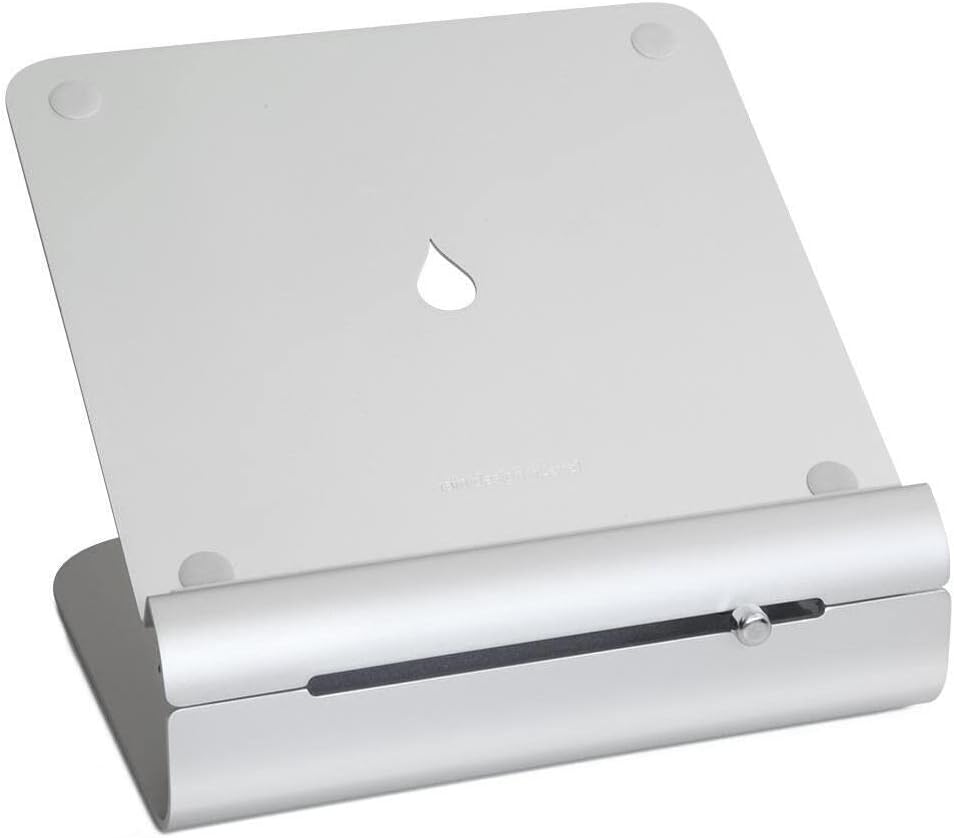
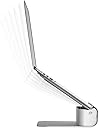
The Rain Design iLevel2 is a patented, adjustable-height laptop stand crafted from anodized aluminum to perfectly match Apple MacBooks. It features a unique front slider for smooth height adjustment between 5.75" and 7.5", a tilt design that improves laptop cooling, and protective rubber pads. Compatible with all laptops, it’s designed for use with external keyboards and mice, promoting ergonomic posture and a sleek, modern desktop aesthetic favored by professionals.


| ASIN | B00LSU4QD8 |
| Adjustable Length | Yes |
| Antenna Location | Laptop |
| Best Sellers Rank | #150 in Laptop Stands |
| Brand | Rain Design |
| Built-In Media | iLevel 2 |
| Color | silver |
| Compatible Devices | Macbooks, Laptops |
| Compatible Phone Models | Macbooks, Laptops |
| Customer Reviews | 4.4 out of 5 stars 1,129 Reviews |
| Enclosure Material | Aluminum |
| Fastening Type | Bracket |
| Finish | Matte |
| Form Factor | Stand Alone |
| Global Trade Identification Number | 00891607000605 |
| Item Dimensions | 8.8 x 10.1 x 7.9 inches |
| Item Weight | 3.52 Pounds |
| Manufacturer | Rain Design |
| Mfr Part Number | 12031 |
| Model Name | Rain Design iLevel2 Adjustable Height Laptop Stand (Patented) |
| Model Number | 12031 |
| Mounting Type | Tabletop |
| Number of Items | 1 |
| Other Special Features of the Product | Adjustable |
| Style Name | Modern Minimalistic |
| Theme | Customizable |
| UPC | 891607000605 |
| Unit Count | 1.0 Count |
| Warranty Description | 1 year warranty against manufacturer defects |
C**R
Well-built MacBook Stand to Help Eliminate Ergonomic Problems
Like so many people these days, a lot of my life revolves around being on my laptop. Like so many people these days, all that time hunched over a laptop was causing physical discomfort. Once I realized the source of my problems and reading up on solutions to common laptop ergonomics problems, I chose this laptop stand as one of my tools to correct the ergonomics issues facing me, and eight months later I am happy to inform you that this has done its job well. Fortunately, I was already using my laptop on a standard-height desk, but having the screen at desk height (30" off the floor) was the major source of neck pain for me. At its lowest setting (the knob all the way to the left), it raises my 13-inch MacBook Pro about 5-3/4" off the table (measured to the bottom of the aluminum body that covers the back of the laptop screen). Note that if your MacBook has a different depth (measured from front to back), the amount your screen is raised will be a little different. At the highest setting (knob to the right), the screen is raised about 7-1/2" off the table. I am just over 6' tall and tend to find that my neck is able to maintain a comfortable neutral position when the knob in the right third of the slide, but of course that varies according to each user, their sitting position, and own comfort zone. All-in-all, this provides a really great range of screen heights that is likely to fit most peoples' needs, especially on 30" height desk. I think the pictures do a great job of covering aesthetics (that is certainly a big part of this purchase). It is high-quality aluminum, and like all aluminum, it is a fairly soft, scratch-prone metal. Mine has remained in nearly new condition after 8 months, and it maintains a clean look that looks almost looks like an Apple product. If you have one of the newer space gray or colored-aluminum MacBooks, that might obviously be an issue. Mechanically, the stand is solid. There are no indents or notches in the slide. There is a slight spring to the upper "lever" of the base such that if you have the knob set to the lower positions, the upper part of the base springs upward to the highest position when the laptop is removed. In the highest position, the stand is already at its highest position, and there is no movement. I suspect that the spring is actually to help the upper arm move upward as the knob is slid to higher positions. One caveat for use of this stand should be used with an external mouse and keyboard. Of course, Apple's Magic line of keyboards, mice, and trackpads work well with this, but the point is that when the laptop is raised, it is no longer comfortable (or ergonomic) to use the laptop's keyboard and trackpad. Overall, this product delivers in every way I need. The price is on the high side, but I hope it will last through the life of this laptop and at least one replacement or three (and maybe even the days when the laptops become archaic relics of the past). The range of screen lift (about 5-3/4" to 7-1/2") suits me well (and I suspect, will suit a large number of people) and the aesthetics are a great match for MacBook users.
C**L
Very sturdy and sleek looking laptop stand
I was skeptical when I first ordered this. It didn't look very sturdy in the pics, but I was wrong. It is very sleek looking and functional, with the adjustable height. Very modern looking as well and my MacBook Pro fits perfectly on it. Very glad to have purchased this for my home office.
S**Y
Sturdy, works great, not quite perfect.
This was the perfect stand to use when my desktop computer crashed and I had to work on my laptop without killing my neck. It's sturdy, well made, and works exactly as advertised. Adjustment is smooth and simple. I was able to work with my monitor at a comfortable height and distance, and it saved my bacon! But, would I want to work on it indefinitely? No. Two things are lacking for me. First, there's a height adjustment, but no angle control. This means that at its max height, the display has a small downward tilt. It also means that on zoom calls, I had to fiddle with the monitor height until my whole head was framed, rather than cut off. Not a dealbreaker, but annoying over the long term, especially with lots of zoom meetings. Second, I'm not sure why I was surprised, but the stand-plus-laptop combo created a kind of aluminum "monolith" on my desktop. I couldn't bend to peer under it, or over it either. It felt as though part of my desk (albeit a narrow portion) became inaccessible. This too is a quibble--I just happen to like a more open and airy feeling. These two nits aside, this is a sturdy and well designed stand that works well and will last a long time.
E**H
Replacement stickers are on the way!!
Edit: Customer service was lovely and I have replacement stickers on the way. This fabulous product has helped me so much and I can't be without it. Back up to a 5 star review. I purchased this product in April 2024. The stickers that help the laptop 'grab' onto the stand are either gone or unstable. See picture below. Can it be repaired with new stickers? How do I get them?
S**S
Great sturdy stand for lap or desk
This is my second Rain Design laptop stand (I also have the mstand). This one is just as sturdy, and is adjustable too. You have to have a laptop on the stand in order to see the adjustability, without anything on it will just spring back to the top position. I actually use this stand on my lap, because it was surprisingly very good for this. Laptops are always too low when you actually use them in your lap but this stand is stable enough with a 14" Dell Latitude 7490 to use on my lap sitting on the couch. It really saves my neck. Some people complain that it's not stable for typing but I found it fine. Maybe their laptops are larger and heavier. On the desk it's fine, but the mstand actually frees up a little more space since you can put things under it. If you can just buy one, the ilevel is definitely more versatile and IMO is worth the extra money. These stands are all very high quality, both the ilevel and mstand are made in Taiwan and very sturdy.
R**S
Underwhelming
Too much hype. It just holds the laptop. Buy something cheaper. The slide adjuster isn’t useful to me at all.
B**H
Useful but not perfect
Useful, but typing with laptop perched on it is unsteady. I use a separate keyboard.
V**S
Why are people trying to type on a laptop stand?
So the overwhelmingly negative reviews you'll notice for this product specifically surround the "bounciness" of this stand when someone is typing on it—however what is confusing to me is how people are purchasing a laptop stand in theory to optimize their ergonomics, yet also stretching their arms out and elevating them to type on said laptop once it's raised. the point of a laptop riser/stand is to elevate the screen so that you can maintain a more natural posture. One would assume you have an external keyboard to use in conjunction with your laptop once you place it on a RISER, because the idea is to elevate your laptop as a SCREEN and then have a level/flat surface to type on, thereby alleviating any awkward hunching or neck strain looking down or anywhere not naturally eye-level. as it is, it's a perfectly functional and elegant laptop riser. I don't find myself wanting to adjust the height often if ever, but in the one or two instances I experimented with it, found no mechanical issues. It looks nice with Apple hardware and allows me to have my laptop's screen flush with the bottom edge of my additional external monitor, so it serves my purposes well. for people complaining about how it bounces when they type on it ... STOP typing on your laptop's keyboard when you have it elevated on a riser! this defeats the purpose and probably also makes your arms tired—buy an external keyboard!
G**A
Quality stand
I've always been skeptical about stands and stopped buying them a few years ago, but this one is "da bomb". I have a 15'' rMBP, and when placed on the stand it feels glued to a rock - the front rib has a strip of soft plastic that keeps the laptop from shifting, without scratching edges. The little plastic bumps in corners keep the laptop up enough to stay well-cooled, and the hole underneath further helps dissipating heat. I used to hear cooling fans running most of the time, because I have two external monitors; since I replaced my makeshift stand (a stack of large books) with this, that problem has gone. And of course, it keeps the laptop screen high enough to be much more ergonomic - if you look at the picture, that piece of paper on the right is an A4 folded sidewise; that's pretty high, for this sort of stands. The finish is high quality and matches modern Macs perfectly. One thing I would recommend is to place the laptop on the stand at the lowest setting (i.e. slider all the way to the left) then adjust it. The slider is very smooth to raise, but pretty bumpy and shaky to lower. If you need to lower, I'd recommend holding on the laptop with one hand just in case. Once in place, it holds perfectly. This is the best stand I've bought in a while. I wish they had a model with quiet extra fans, and then it would be perfect.
T**.
Five Stars
Excellent Product. Value for money!
C**N
Design et ajustable
Très design et pratique
D**M
It doesn’t work at all
After receiving my order on the 27th of February, 2024, I tested it and found it to be defective, matching the issues shown in the video. The gap around the button of the right end is significantly larger than the gaps at the left end. Yesterday morning, I reached out to the seller requesting a replacement or a refund, including the additional delivery fee I paid. However, they dismissed my request, claiming the defect is normal. Despite my insistence, I have yet to receive any further response from them.
C**S
Found the perfect laptop stand for me
Well, it turned out to be a tiny saga (bought the TwelveSouth HiRise adjustable stand... returned it), but I finally found the laptop stand for me. This stand appears well built and well designed. My computer sits perfectly, isn't angled (the HiRise tilted... hence my return), and is easy to adjust. The front-facing slider mechanism to adjust the height is an excellent design choice (though why is it shiny whilst the rest of the stand is matte‽) and easy to use. As someone else mentioned, it's super smooth to raise your computer, but a little bumpy to lower (it's spring loaded, makes sense). However, once you set it to a height, it's perfectly stable. Raising my standing desk makes it wobble a bit, but not in a danger-danger-alert-alert way. The extra height is actually worth the price alone. I've not seen another laptop stand that can go this high, and it makes a huge difference. It raises the computer to exactly the eye-line I need, and it's not even at the full height. Side note: I do use a wireless keyboard, trackpad, and mouse. I would not use the keyboard or trackpad on my MacBook whilst it's on this stand. (Nor do I think that's what it is designed for.) Highly recommend!
Trustpilot
2 weeks ago
2 weeks ago