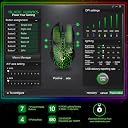
The Basics: Up front, this review is not the norm for me because the manufacturer approached me, not the other way around. During testing I couldn’t help but consider how ballsy a move it was to provide me a copy for review, because I’m always going to find something to nitpick about and then I’m going to make it public knowledge. I know for a fact there are a lot of reviewers with lower standards that they could have approached and gotten the desired result, so both kudos and thanks are in order to Bladehawks. With that said, on to the review of the mouse. The “X6” is a medium-large mouse that handles more like a medium. It has an ATG-4090 sensor which is rated for 6000 DPI and 100 IPS max. The mouse sports soft-touch plastic all over, 10M Omrons, downloadable software and RGB. The Good: * The mouse is 100 grams without the cable, but manages to feel significantly lighter than it actually is. I had to reweigh a couple times because it is so rare that I am off by so much. I would have guessed not more than 95 grams. * Mouse feet are excellent, quiet, fast and smooth. One screw under each, but no internal weight to remove to make disassembly worth the while. * Liftoff distance is nice and low, which is very important given that the sensor position is so far aft. * Scroll wheel is the best I’ve encountered in the $20-30 price range, which is saying a lot since the G203 is excellent and inhabits the same space. The rubber coating is pleasantly cushy and provides good grip. Scroll resistance is light side of moderate. Middle click is nice and light and made better by the fact the scroll is both relatively wide and flat on top. Scroll steps are smooth yet tactile. In comparing the scroll to the overall gold standard of mouse wheels (The Roccat Kone Pure with its Titan Scroll wheel) I preferred the surface finish of the X6 and found the actual scrolling experience virtually indistinguishable from the Roccat, which has slightly more scroll resistance but the same definite feedback with each detent. The Roccat still maintains its status because I could make the X6’s scroll can rattle slightly if I scrolled upward really fast. Still, one of the best scrolls I’ve encountered. * Ergo in the thumb area ergo and patterning is very good with texturing and rubberized plastic that is fine for grip and should wear well too. I prefer rubber sides but did not miss them in this case. * Shape is not especially ergonomic, but nowhere in the realm of uncomfy for me, no issues with extended use in fingertip. * Very easy to pick up. Good for small-medium palm and possibly large palm depending on how tolerant they are of the scroll wheel placement. Good for medium and large fingertip grip. * Finger grooves are more subtle than they appear and I liked the texture on them. * Biggest positive surprise: Software is actually quite good! 50MB installed and highly reminiscent of Steelseries’ clean, intuitive interface in that it looks good and you can select top and profile views of the mouse when tinkering. The software makes changes as you do, no hitting save or apply. * The software offers the option of a “DPI loop” button. I set each of the 6 DPI steps to 2000 each and just used the aft DPI button to cycle between the different colors according to my mood without having to go into software. Nice little touch that I’d like to see more often from others. * DPI buttons are out of the way and the front one is not so far back as to be altogether useless in game. Also, DPI buttons do not rattle and have a quiet crisp click without pretravel issues - they feel good. * Software offers option for up to six different profiles, separate X and Y axis sensitivities along with a nice macro recorder, also nice touches. * The DPI range is 200 to 6000 in steps of 100, lots of easy choices in there without being limited like the 3320, 3325 and older 3050/3090 sensor variants. * RGB has very good color depth, brightness and excellent transitions. It’s all “one zone, one color” stuff, but it works well. The entire top shell of the mouse and the “rim” between the bottom and top sections glows. Unlike the Redragon M719, BladeHawks did not skimp on the LED quality. Color effect options are static, breathing, “neon” (which is color cycling of 3-15 seconds per color) and “finger tapping” which for the life of me, I can’t differentiate from basic color cycling. My initial guess was that it would change color a little bit with each click of the mouse...I’m still stumped. * Another thing which stumps me is the sensor. I haven’t tested a sensor of this type before and this one supposedly tracks up to 100 IPS. I had a very hard time making it spin out. Out of dozens of attempts, I got it to spin out once, and I’m not even 100% sure I kept the mouse flat while I was doing it, so it may not even count. I did not test the entire DPI range of the mouse though, so it is possible that the sensor spins out worse at different DPI and 100 IPS is the most conservative figure within the DPI range. Stumped. * I did not detect sensor accel on my 360 tests. I did not use software. If it is there, I didn’t notice it. **The Neutral:** * The 4090 sensor feels snappier than the 3325 but felt “choppy” somehow at faster swipe speeds. The cursor goes where you want it, but it feels like frames are lost in transit. Overall I’d put the 4090 on par with the 3325 and simply point out that it is its own animal. It is an apparently competent budget sensor, but nowhere near the smoothness of a 3360 or later. * No internal/adjustable weights. * Even though I took the mouse apart, it is comprised of three layers and I couldn’t figure out how to get the upper two separated. Result, I couldn’t verify the primary switches used. Primary clicks require moderate force but remain moderately spammable and responsive, registering around 62-65 grams on average and feeling very much like the G502’s, but slightly heavier with heavier feedback. It is possible to click the primary buttons as far back as the front DPI button, so that’s good. * There is a negligible amount of pretravel on the primary clicks as they are not separated from the shell - not a factor in game and fairly hard to pick up on outside a game. * Cable is somewhat stiff rubber ending in a gold USB. It is nowhere near Steelseries/Zowie, but significantly better than most others in the price range with minimal grab on cloth pads. * Position of the scroll wheel is more to the rear than most mice. I like it, but larger hands and palm grippers may feel like the mousewheel is too far aft. * The aesthetics of the GM-X6 are showy to say the least. In terms of looks, this is not my style. But even I have to admit that this mouse does a good job of doing what it sets out to do. The fact that it has so much surface area with such good color depth and light distribution do make it look more alive and powerful than the average mouse - so the X6 very much succeeds in doing what it sets out to do. * Advertised on Amazon as having a 500hz max polling rate-that is a slight putoff for a gaming mouse. The polling rate is actually 1000hz. The box advertises 6 colors - that is the number of presets that can be saved to a profile, but the mouse is actually fully RGB with the software. The marketing for this mouse falls short of its performance. **The Bad:** * Even though the packaging is nice, it has some Engrish to it: “Perfectly enhance game fighting capacity”...”freely play like human hands and mouse integration, will be the channel in your teal life and the virtual world, to experience the game of war, to fight side by side with you.” At least it’s some of the more inspiring Engrish I’ve seen and it takes nothing from the performance of the mouse. * Very slight rattle when shaken laterally. Could not identify source, even disassembled, not a major concern. * The way the fangs of M1/M2 move apart forward of the scroll wheel could frustrate people who want to palm the mouse while keeping their fingers close to the scroll since there is nothing there or they are left pressing the inner ledge of a button caused by the gap - however this should only apply to large palm in a certain grip. * Prone to mouse drop cursor movement, even with the low LOD. The cursor seems to move a bit more when setting the mouse down than other mice, probably due to the rearward sensor placement. It could just be the way I set the mouse down, but I only noticed when testing deliberately and after I didn’t notice it in-game. * Thumb buttons are placed well but they slope out a little too aggressively. You are almost better off pressing them from the bottom up at a 45 and directly inward at a 90. * Thumb buttons have fairly firm resistance but have significant pretravel. The firmness at least keeps them from feeling spongy, which is good. This was the biggest downside in what is actually good build quality overall and not major enough to be a huge detractor. * Because of the length of the rear end, I can’t recommend for claw grippers with anything less than very large hands due to having to click behind the scroll wheel in some cases. * The biggest con for this mouse for me is the general sense of confidence when aiming. In Quake I noticed that I had to work harder for typical results. Upon closer inspection, the cursor seemed more “jumpy” in game. When I went into the software to ensure angle snapping was off, I found there was no option to turn it on/off. This indicates an oversight in the software or that the sensor is hardwired to a setting. Tests in Paint seemed to confirm fears. Strangely, while play in Quake felt unstable, play in CSGO was good, possibly relating to the decreased verticality in that game. * My kids all want this mouse because it is easily the most colorful one in the house... **The Conclusion:** Interesting mouse with an interesting sensor from an interesting company. There is a “yellow light” in my mind is the apparent angle snapping which applies to the hard-core FPS crowd. Judging only by this single example of the sensor, I consider the 4090 sensor much snappier than the 3325 in every way with this exception, leaving the two sensors on roughly equal footing. The overall quality of the X6 was better than expected but the quality software was the most unexpected surprise. When I was approached to do the review, my first reaction was “sweet”... and then I saw the mouse. I lost some interest because it looked cheap and flashy. If I can’t see wanting to keep a mouse for myself, I don’t bother dropping a review for others. For all the flash, the X6 is a quality, well thought out product and I’ll be happy to keep it. Nit-Noid Rating: 8.4 Bang for Buck: B+
![Blade Hawks Gaming Mouse Wired, [Chroma RGB Backlit] [7 Programmable Buttons] [6 DPI Adjustable], Ergonomic Optical Gaming Mice for PC, Computer, Laptop, Desktop, Windows- GM-X6](https://m.media-amazon.com/images/I/61avXhSWQlL._AC_SL3840_.jpg)