


๐ Take command remotely โ your PC, your rules, anywhere!
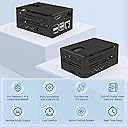
The Geekworm KVM Kit for Raspberry Pi 4 transforms your Pi into a powerful remote KVM switch with IP access, supporting full keyboard, video, and mouse control via a web browser. Designed exclusively for Raspberry Pi 4 models, it features 4 USB ports, HDMI, Ethernet, and a dedicated cooling fan to ensure reliable performance. Open source and Linux compatible, this kit empowers professionals to manage BIOS, power cycles, and OS reinstallations remotely, making it an essential tool for IT managers and tech-savvy millennials seeking seamless remote workstation control.






| ASIN | B0B5R37TT3 |
| Box Contents | 1 x 0.96 inch OLED Module, 1 x Ethernet cable (1 m length), 1 x KWM-A3 Metal Case with Accessories, 1 x X630 to CSI-2 HDMI Module with Accessories, 1 x X630-A3 V1.3 Expansion Board with Accessories, 1 x X630-A5 V1.0 Adapter Board with Accessories |
| Brand | Geekworm |
| Brand Name | Geekworm |
| CPU Model | ARMv7 |
| CPU model | ARMv7 |
| Compatible Devices | Personal Computer, Raspberry Pi 4 |
| Connectivity technology | Ethernet, HDMI |
| Customer Reviews | 4.5 out of 5 stars 117 Reviews |
| Included components | 1 x 0.96 inch OLED Module, 1 x Ethernet cable (1 m length), 1 x KWM-A3 Metal Case with Accessories, 1 x X630 to CSI-2 HDMI Module with Accessories, 1 x X630-A3 V1.3 Expansion Board with Accessories, 1 x X630-A5 V1.0 Adapter Board with Accessories Included components 1 x 0.96 inch OLED Module, 1 x Ethernet cable (1 m length), 1 x KWM-A3 Metal Case with Accessories, 1 x X630 to CSI-2 HDMI Module with Accessories, 1 x X630-A3 V1.3 Expansion Board with Accessories, 1 x X630-A5 V1.0 Adapter Board with Accessories See more |
| Item Weight | 319 Grams |
| Manufacturer | Geekworm |
| Manufacturer Part Number | TB-2022-51 |
| Model Name | KVM-A3 |
| Model Number | TB-2022-51 |
| Model name | KVM-A3 |
| Network Connectivity Technology | Ethernet, HDMI |
| Number of Items | 1 |
| Operating System | Linux |
| Processor Brand | Broadcom |
| Processor Count | 1 |
| RAM Memory Installed | 8 GB |
| RAM Memory Technology | LPDDR4 |
| RAM memory installed size | 8 GB |
| Total USB Ports | 4 |
| Wireless Compability | 802.11b |
M**H
Great Kit - Works Flawlessly with PiKVM
I bought this as I needed remote KVM/IPMI access in an area that I can only get WiFi, and this kit plus PiKVM was a the perfect solution. This was my first foray into PiKVM so I can't it compare to other kits or PiKVM's own product, but this kit had a very easy setup and did everything I wanted. All you need is an RPI4B, this kit (with power supply), a microSD card, and an HDMI cable. Follow the instructions that come with the kit to assemble, then follow the instructions on the Geekworm website to image it with PiKVM, then go to the PiKVM website to finish configuring. If you expect to do some tweaking/experimentation and think you may need to re-image more than once, I suggest you don't close up the chassis. Although there's a slot to take the SD card out through the case it's too narrow to use, so better to leave the case open until you're 100% set up in case you need to remove the card, rather than removing all the screws every time. Once setup and imaged, all the features worked out of the box, including the OLED. It only takes a handful of commands in PiKVM to get it fully functional for immediate use, though there's plenty of tweaking you can do beyond the basics. If you need WiFi I suggest running wifi-menu (the built-in Arch linux wifi setup tool) instead of the instructions on the PiKVM website. You will likely get a repeating error message about low voltage when you first boot PiKVM with this kit attached. This is normal per the PiKVM website and should go away after a few hours of being powered on and building up a charge. It doesn't impact anything beyond being annoying and filling up your screen before you have full monitor resolution. CR1220 battery is not needed but should get rid of it as well. Great product, will probably buy several more in the future.
K**1
This is just a case
This is just a case, you need to buy extra pie to make it work! And you need to know how to install pie in software as well, not for someone new try to assble
K**G
Good
Good item
G**S
KVM over IP on the cheap!
Ordered the product to manage a proxmox homelab running a workstation board that does not have remote management. Kit was easy to assemble, instruction video showed the process perfectly. Flashed pikvm to a sd card and booted it, worked perfectly first time. LCD showed the ip it had been assigned and i was logged in to remote pc in a few clicks. I wouldn't try to use it for remote gaming, programs like parsec work much better, there is a bit of lag. Using it to manage a remote pc for non gaming tasks, it works perfectly, ability to access bios/UEFI and remotely power and reset makes this a very affordable alternative to other products on the market. It does have a few quirks, the best performance comes from using 720p resolution, though 1080p works quite well too, just don't expect 60 fps. It's locked to 50hz refresh rate, and may need a bit of tweaking for some users. Wiki has much info and the KVM can easily be managed using the terminal or third party software such as putty.
O**N
Just what I needed
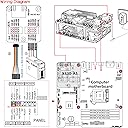
Quick delivery. Easy to assemble. The documentation wasnโt entirely clear about connecting the ATX wiring part to the PC panel but I figured I out after studying the wiring diagram. It works fine powering on off my old pc. Next going to try it with my KVM and remote manage my little home lab.
Trustpilot
5 days ago
3 weeks ago