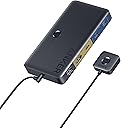
⚡ Elevate your dual-device game with Anker’s powerhouse KVM switch!
The Anker KVM Switch delivers seamless control over one desktop and one laptop with ultra-clear 4K@60Hz HDMI output, 5Gbps USB data transfer, and 100W power delivery charging. Designed for professionals seeking a clutter-free, efficient workspace, it includes a magnetic remote for effortless switching and multiple USB ports to connect all your essential peripherals.


| ASIN | B0CS3H4TCL |
| Best Sellers Rank | #26,817 in Computers ( See Top 100 in Computers ) #55 in KVM Switches |
| Item model number | A83K8 |
| Manufacturer | Anker |
| Product Dimensions | 13.45 x 7 x 1.88 cm; 149.69 g |
Z**E
Alle Anschlüsse funktionieren, Produkt kam ohne Probleme an, habe es mit Desktop-PC und MacBook verbunden und funktioniert alles ohne Probleme.
A**R
Perfect for sharing keyboard, mouse and one screen between one modern laptop and desktop PC. Modern thin and light laptops can suffer from lack of USB connectivity and neither do you want to be plugging and unplugging a set of cables every time you place or remove the laptop. As long as laptop has USB C this is a great solution. Bit of cabling is required to get you started - plug the existing HDMI monitor , keyboard and mouse into the KVM switch. One USB C cable ( provided ) between the laptop and the Anker USB 3.0 HDMI switch is all that is required here to make use of keyboard, mouse and screen. HDMI and USB ( cables provided ) from the Desktop is connected to the KVM switch and can use the provided wired remote control switch to change between using the desktop and using the laptop. The Anker USB 3.0 KVM Switch provides additional connectivity, which I have not yet used, for sharing other USB devices, such as USB stick, or indeed Audio via 3.5mm jack.
A**T
Works as advertised... Takes in type C input(display+usb) from one device and HDMI+USB from second device. The type C also works as a pass through charger if the dock is plugged in externally to a power adaptor.
A**D
How the heck is this so affordable? I am using it with a Macbook for work and my personal desktop Mac Mini. It is working seamlessly. There is some delay when switching between the device but it works perfectly. I also confirmed it's supporting my ultrawide at 100hz. I wasn't sure what resolution supported what refresh rate so glad to see it's working as expected for the 1440p ultrawide. For the price, it also comes with the cables you would generally need for a laptop and desktop. There are USB C cables with one having USB A (probably for your "desktop). There is an HDMI cable to connect up to your display. There is also a separate smaller switch you can connect and set up to have a more hidden setup. I am using the USB C cable to connect my macbook to it and then using the USB A to USB C to connect to my Mac Mini. I would have liked to maybe see an additional USB C cable but at this price point it's really hard to complain. After that I just hooked up my keyboard, webcam, mouse etc to the USB ports and connected the HDMI to my monitor. There is a nice light that shows you what PC is currently selected and they are color coded. PC1 will show as blue and PC2 as orange. For whatever reason I was dreading getting one of these and having to worry about it not working or supporting the right resolution and being a pain to set up but this was a great purchase. Can't recommend it enough for the price. The only unknown is longevity but I feel like Anker makes great products for the price.
I**E
It does what it says. Some buyers didn't read the description properly. This is for one laptop + one desktop, only PC1 has the power delivery, and you will need to plug in the hdmi cable for PC2, which should be the desktop pc.
Trustpilot
3 weeks ago
5 days ago