![【ワイヤレス・ピンク軸】Kinesis Advantage360 Professional【キネシス アドバンテージ360 プロ】[KB360-PRO-KLQ]](https://m.media-amazon.com/images/I/61Rcv4tifEL._AC_SL3840_.jpg)




Buy anything from 5,000+ international stores. One checkout price. No surprise fees. Join 2M+ shoppers on Desertcart.
Desertcart purchases this item on your behalf and handles shipping, customs, and support to Colombia.
⌨️ Elevate your typing game with ergonomic precision and wireless freedom!
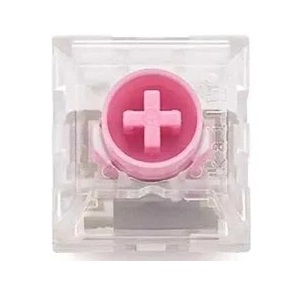
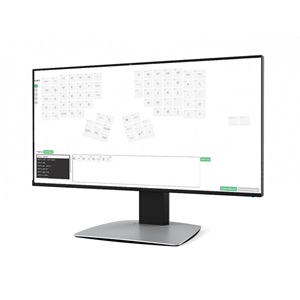
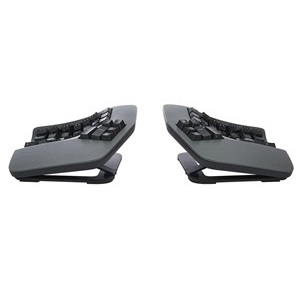
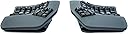
The Kinesis Advantage360 Professional Linear Quiet keyboard features a split, bowl-shaped ergonomic design that promotes natural posture and reduces physical strain. Equipped with quiet Kailh Pink linear mechanical switches, it offers wireless Bluetooth connectivity and extensive key customization via open-source firmware. Adjustable modules and thumb keys enhance comfort and efficiency, making it ideal for professionals seeking a healthier, high-performance typing experience.


| ASIN | B0CT444BH6 |
| Additional Features | Ergonomic |
| Amazon Bestseller | #86,940 in Computers ( See Top 100 in Computers ) #1,286 in Computer Keyboards |
| Antenna Location | Business |
| Brand | KINESIS |
| Built-In Media | 2 x USB Charging Cable, Additional key cap, Bridge Connector, Keycap Puller |
| Button Quantity | 108 |
| Color | gray (dark gray) |
| Compatible Devices | Laptop, PC, Smartphone, Tablet |
| Connectivity Technology | Wireless |
| Customer Reviews | 4.2 4.2 out of 5 stars (37) |
| EU Spare Part Availability Duration | 3 Years |
| Enclosure Material | Plastic |
| Generation | 1 |
| Hand Orientation | Ambidextrous |
| Item Dimensions L x W x H | 38.1L x 20.3W x 7.6H cm |
| Item Weight | 1.45 kg |
| Keyboard Backlighting Color Support | Single Color |
| Keyboard Description | Mechanical |
| Keyboard Layout | QWERTY |
| Manufacturer | Kinesis |
| Mechanical Keyboard Switch Model | kailh_box_silent_pink |
| Model Name | Kinesis Advantage360 Professional |
| Model Number | KB360-PRO-KLQ |
| Number of Keys | 76 |
| Number of Sections | 2 |
| Power Source | Battery Powered |
| Series Number | 360 |
| Style Name | Professional (Bluetooth) | Quiet Switch |
| Switch Type | Linear |
| Theme | Ergonomic keyboard |
| UPC | 607998360408 |
| Warranty Description | 1 |
ま**る
分離型かつお椀のような立体構造のおかげで、胸を開いた自然な姿勢で軽く入力できます。身体への負担軽減を目的として購入したのでその点については大満足です。文字入力は意外とすぐ慣れましたが、記号は少し練習が必要でした。 またキー設定の自由度が高いのは嬉しいポイントでした。 オープンソースのZMKファームウェアを使用した細かなキーカスタム・マクロ作成が可能なので、色々なソフトのショートカットをワンタッチで打てるように設定し、ちょっとした左手キーボード代わりにも使っています。 複数のプロファイルを登録できるので、通常の入力用のほか、各ソフトごとに専用のプロファイルを作り使い分けています。 完全な素人ですが公式リファレンスとAIを活用すれば設定はできました。面倒ではあったので人は選ぶと思いますが、こちらを購入しようという方はプロフェッショナルが多い気がするので不要な心配かもしれません……。 キーカスタムについてのサポートは一切していないと公式から明言されていますので自分と同じ素人の購入者はご注意を。 個人的なマイナス点として、海外製のためサイズが大きく、手が小さめだと最上段のキーまで指が届きません。セットポジションを維持したまま打てるのは手の大きい人に限られると思います。 また左右それぞれの電源を入れる手間があり、Bluetooth接続が安定するまでに少し時間がかかることもあります。 そのためサッと入力したいだけの時には別の普通のキーボードを使っています。 総合して、身体への負担軽減を主目的とするなら満足できる製品ですが、最速入力や接続の快適さなどを重視するなら慎重な検討をおすすめします。なお、デスクに置いてあると気分が上がって作業のモチベは上がります。
H**N
- Feels very comfortable in my hands. - The build quality is decent (nothing extraordinary) but good enough. - It is NOT small keyboard it takes up noticeable desk space and has more height than you’d expect. also you’ll probably spread the halves apart for a better fit Heads up: there is a steep learning curve. im still getting used to it, but enjoying the process. I just wish there were a wired version running ZMK
A**O
This is an excellent product, the build quality aligns with its price and surpasses it. The typing experience is incredible once you get used to it. You can achieve a "flow state" typing that is so pleasant is incredible. Not to mention my wrists pain got away from two weeks of using it. The Bluetooth problems are a thing of the past and the programability is super easy with clique and the latest update which already came with the shipped product from the factory. The pink switches are amazing, I was afraid that they would be too easy to press but they are not.
C**M
I really liked this keyboard overall. It was extremely comfortable to type on and I had basically zero hand or wrist discomfort using it. That part absolutely lived up to the hype. My biggest issue was the reach to the upper pinky letter keys. I have pretty average-sized hands for a man in the US, maybe even slightly above average at around 7.8 inches, and I still could not comfortably reach those keys with my pinkies when my hands were sitting where my palms naturally wanted to rest. If my palms got even a little sweaty, they would kind of stick, and I would have to peel my hand up to reach those keys. A lot of the time I ended up using my ring finger instead. I did not buy the optional palm rests, so I can’t say whether those would have helped. I also was not a huge fan of the Kinesis Clique software. It felt a little too limited for what I wanted, so I ended up going the older route and manually flashing the firmware so I could set up combos and custom timings. That process was not great. The documentation was not very clear, and it took me a while to figure out that you have to use the “no Clique” firmware version. If you use the Clique version for manual flashing, it does not seem to work right. Until I figured that out, the whole experience felt kind of buggy. The other downside for me was gaming. For regular typing this keyboard was great, but for gaming it felt basically unusable unless I wanted to remap a ton of keys. If you play WASD games in the usual way with your ring, middle, and index fingers, the layout just does not feel natural. Aside from those issues, I really did love the keyboard. I ended up returning it because the price is high, and for that kind of money I needed it to fit my needs a little better. Still, for pure typing comfort, I can absolutely see why people love it.
M**K
Overall it’s a great keyboard. It takes time getting used to, but I can type much longer on it without issues than a normal ergonomic keyboard. Which matters a ton and was what I was hoping for. It is an adjustment. I hope you already know how to touch type correctly. I did, except I typed 6 and C with the wrong fingers. I was forced to learn the right way. No big deal. As a developer, I use punctuation more than most, and some punctuation isn’t placed great. But I’m getting used to that, plus I’ve customized the keyboard some. I love it’s got programmability. That’s quickly becoming a favorite feature. I do NOT like it’s done through Chrome. They had a real program, but gave up on it. Oh well. As a Mac user I was not happy with the process to figure out where the modifier keys should go. My keyboard works out of the box but since it has Windows keys on it the key caps need changing to make things nicer. You really want to use the Mac keycaps (included!). Unfortunately there isn’t a single bit of documentation anywhere explaining where they should go. I contacted support. You have to use their reprogramming tool and apply the default Mac layout. THAT will show you. I know the modifier keys work on the Mac without reprogramming. But it would be nice if there was a single insert anywhere in the box showing you which key corresponds to which so you can swap the key caps easily. I don’t use Windows keyboards enough to have what the windows key or the application key should be. Just document it. I got the quiet version of the switches. They’re not exactly silent but they’re certainly not much quieter than a normal mechanical keyboard. I’m quite happy with them.
M**.
For some background, I'm a software engineer and I own my own company. And when I relax with my family? We game on our computers. That means that more likely than not, I'm sitting at my computer. It doesn't matter what time of day it is. I'm working well over 14-16 hours a day either programming, communicating with my employees, or managing clients. And if I'm not working or taking care of my family, we're relaxing and gaming. Basically all-day computer use. I also suffer from SEVERE carpal tunnel and RSI. The kind that can only be fixed by just no longer working or getting surgery and taking a long healing break. But I work anyways because I have to. This keyboard was an absolute NIGHTMARE for me. I'll detail why below. As a programmer and really heavy computer user, a lot of my productivity comes from taking advantage of every shortcut I can possibly remember for main programs I use. Their so-called reduction of strain comes from moving all the keys. Not just the concavity of the keyboard itself but actually moving the keys. Delete/backspace is now no longer the top right but your left thumb. Ctrl + Alt are moved where only the left hand can reach using... the same finger. Forget about using Ctrl + Shift + Alt. Forget about Ctrl + Shift + Alt + S (or any other letter). Forget about even just standard copy/paste shortcuts. It is literally like playing Twister but with your fingers. Now, add to that the concavity? Yeah, no. You could say that the keyboard allows you to customize the keys. Yes, that's true. BUT, the only way to do this is to create your own firmware. They sort of make it easy. Sort of. You have to use Github. No-one but a developer can figure out how to do this. It takes 25 mins to get your layout set up. That's not bad, right? But then you then have to install it like firmware and reset the keyboard, then try it. It's a mess compared to the easy UI/Software that most other keyboards give you to custom program your keys. And if you don't like the layout you created or want to add more layouts for added functionality? You have to go back and waste another half hour creating a layout and testing. Over and over until you can figure something out to fit the weird shape of the keyboard. Other keyboards have built-in programs or work with software that take 3-5 mins per adjustment/layout creation. Now let's get to size and positioning. Columnar keys is great. I definitely noticed an improvement. Tilting was also great. But the keyboard is so huge. It's so big I can't take advantage of the thumb keys at all, which virtually negates the whole purpose of them being in an "easy to reach" place. I have standard-sized hands for a woman. To alt+tab anything was such a stretch. Or if you want to hit any of the numbers? You curl your finger up. UP. If the keyboard JUST had a bend inside the palm, that would be great. But no, it then bends back upwards. Human fingers don't bend backwards like that. So I ended up straining my fingers even more to reach up. I read somewhere that they curve upwards because the keyboard is big so it's supposed to allow you to reach all the keys. Except it hurts to reach those keys or is just plain awkward. Finally, the Bluetooth connectivity on this is horrible. Mine connected to the computer right away upon opening. I was surprised. But did it STAY connected? Nope. And you can't just go back and reconnect. You have to power-cycle the keyboard. That means you first turn off the right keyboard. Then you turn off the left keyboard. Wait 20 seconds. Then turn on the left keyboard. Turn on the right keyboard. Finally, you reconnect Bluetooth and hope it worked, which you don't know until you test since there's no indicator light. This keyboard is a HUGE no-no for me. So if you're going to get it, at least do it here on Amazon where returns are easy peasy. Still a no from me. For this price, it has to be fantastic and this was less than stellar. Maybe if you have giant hands and are a casual typist, sure. For any heavy computer user with average-sized female hands, then go with another, cheaper model. I've used $50 ergo keyboards that were better than this monstrosity.
Trustpilot
2 weeks ago
2 weeks ago