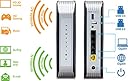
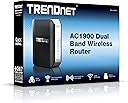
🚀 Elevate your home network game with blazing speed and effortless control!
The TRENDNET TEW-818DRU AC1900 Wireless Router delivers combined wireless speeds up to 1900 Mbps across dual bands, featuring USB 3.0 and 2.0 ports for fast file sharing, and all Gigabit wired ports for high-speed wired connections. Pre-encrypted for quick setup, it supports isolated guest networks and extends coverage with high-power amplifiers, making it ideal for seamless HD streaming and reliable connectivity in medium to large homes.
| ASIN | B00HKEI3DA |
| Antenna Location | Indoor/Outdoor |
| Antenna Type | Internal |
| Best Sellers Rank | #257,491 in Computers & Accessories ( See Top 100 in Computers & Accessories ) #4,290 in Computer Routers |
| Brand | TRENDnet |
| Built-In Media | TEW-818DRU, Multi-Language Quick Installation Guide, CD-ROM (Utility & User's Guide), Network cable (1. |
| Color | Black & Silver |
| Compatible Devices | Personal Computer |
| Connectivity Protocol | Ethernet |
| Connectivity Technology | Wireless^USB |
| Control Method | Touch |
| Controller Type | Push Button |
| Coverage | amplified wireless signal range |
| Customer Reviews | 4.0 out of 5 stars 528 Reviews |
| Data Transfer Rate | 1300 megabits_per_second |
| Frequency | 5 GHz |
| Frequency Band Class | Dual-Band |
| Item Weight | 13.92 ounces |
| LAN Port Bandwidth | 1 Gbps |
| Manufacturer | TRENDnet |
| Maximum Upstream Data Transfer Rate | 1300 megabits_per_second |
| Mfr Part Number | TEW-818DRU |
| Model Name | TEW-818DRU |
| Model Number | TEW-818DRU |
| Number of Antennas | 3 |
| Number of Items | 1 |
| Number of Ports | 5 |
| Operating System | Windows: 8.1, 8, 7, Vista, XP; Mac OS X: 10.9, 10.8, 10.7, 10.6, 10.5, 10.4 |
| Other Special Features of the Product | WPS |
| RAM Memory Installed | 128 MB |
| Router Network Type | hybrid |
| Security Protocol | WPS |
| Special Feature | WPS |
| UPC | 710931130379 803982789600 710931130386 710931130362 |
| Unit Count | 1 Count |
| Voltage | 12 volts |
| Wi-Fi Generation | Wi-Fi 5 |
| Wireless Communication Standard | 802.11ac |
| Wireless Compability | 802.11ac |
J**A
Super Easy, Quick, No Software to Install
So the idea of super easy, no software, quick install routers has been a promise for years, and it's a promise I had yet to see a single router deliver on. The TEW818dru definitely delivers! It really was as simple as open box, plug it in, turn it on, and WPS button your way to awesome. Really, minus my own need to fiddle, you can have a fully functional install in about 15 minutes, or a little more if you have lots of devices to connect up. For my setup, I was replacing another router and the difference was immediately noticeable. What was purchased with a network of a compter, tablet, phone, and a BluRay player, had grown to include the same, and another tablet, two chromecasts, and a gaming adapter, as eell as two kindles and two printers. I also live next to a hospital (and their barage of open guest and secured staff wifi signal) and our new neighbor decided to place their router along an exterior facing wall. Needless to say, it is a challenging situation for any router to handle. The old router was completely overwhelmed trying to keep it all sorted, but the new router is a vast improvement. It handles the multiple devices, and the saturated channels, with ease. As far as performance, signal strength is greatly improved and the links are far more solid. Throughput for speddtest.net shows I am no longer taking any hit from having a router (5-7Mbps on the old one), and finally getting the full 30Mbps connection. Great product! So excited to get it, and loving how many issues it solved in my home network! Also, I had seen reviews mentioning that the menus were sluggish, but I haven't seen that in use, unless their idea of "sluggish" is that every change is accompanied by it's own apply, which is more like a full commit, and does result in a delay to let the router handle that. But even if that is their sluggishness, it isn't too extreme, and its nice to see a stock router that doesn't try to make changes dynamically. Thats one place I know I am glad to trade a bit of speed for a bit of assurance that I am both getting the change made, and getting the changes I intended.
T**N
Excellent DD-WRT router - a bit pricey though
I spent forever looking for a budget-friendly DD-WRT capable router with gigabit Ethernet and 802.11b/g/n (802.11ac was optional), and good reviews at multiple websites. This router was on the upper range of what I wanted to spend but was pretty much the only affordable gigabit DD-WRT router that doesn't appear to have flashing issues. This router also took first place in c|net's December 2017 list of "budget" routers. Since flashing new firmware voids the warranty and risks bricking the device, you've got to be quite certain that flashing will work and spending anything over $70 on a potential brick is not a good use of one's money. Custom firmwares are, in my opinion, best on hardware in the $20 to $50 range - if it bricks, you aren't going to kick yourself too hard. Everything else on my network has been gigabit capable for the past year. This router was the last piece. The TEW-818DRU flashes with DD-WRT right out of the box (i.e. I didn't need to 30/30/30 reset but I also skipped the router's setup screen). I highly recommend NOT using the version found in the DD-WRT router database on the website and instead find a recent DD-WRT beta on the DD-WRT FTP site to be able to take advantage of the "Unbridged + Net Isolation" feature for a super easy guest network setup (I went with r34411 - the latest at the time of this writing). That saved me a lot of time because I didn't have to write a bunch of annoying iptables firewall rules. If you've never used DD-WRT but want to experiment with it, I recommend NOT buying this router. Instead, find a nice, cheap, basic, supported b/g/n $20 router and play with that first until you are comfortable with the interface. DD-WRT is a bit awkward if you aren't used to high-end enterprise equipment. It doesn't hold your hand and there's quite a bit of terminology that even I don't understand. However, I've found that DD-WRT is generally far more stable than most firmwares that come with routers. I'm knocking off one star for the price. I don't think consumer routers should cost as much as they tend to and there's not really that much of a noticeable difference between a $20 router and a $200 router for most users. A router is a necessary piece of equipment to manage and isolate local network traffic. My previous router was a $20 b/g/n 10/100 Rosewill router (flashed with DD-WRT, of course), which served me quite well for the last 5 years. I attempted to flash another $20 no-name router prior to that one with Tomato and bricked it. Your mileage may vary, but the TEW-818DRU is a solid piece of hardware that (currently) fully supports DD-WRT. However, be aware that the wireless radio lights with DD-WRT don't show their status correctly but both the 2.4GHz and 5GHz radios still work as expected. One final note: A lot of consumer wireless router manufacturers apparently have started actively blocking DD-WRT firmware under the extremely weak excuse of "adhering to FCC regulations." If you update to the latest firmware for this router, you may not be able to flash it with DD-WRT later on. I went straight from the shipping firmware to DD-WRT and had no issues. I use WPA2-Enterprise on my network and support for EAP-TLS is rather flaky/non-existent in consumer router firmwares. Also, I use several custom firewall rules to isolate certain aspects of my network (okay, so I had to write some firewall rules still but nothing overly complicated like telling each bridge in a network to not talk to the other bridges - which gets complicated fast when you've got 4+ subnets). Therefore, DD-WRT is really the only option for me.
W**S
Nice router, better support desk than others, and coverage and warranty are outstanding!
I have originally used numerous Linksys/Cisco routers in the past but due to heat problems and replacement issues I tried to seek something different. Going online to read reviews, the AC1900 came up as a top contender, having all the features needed for today and the future all at a great price. The router arrived and I unpacked it and hooked it up. Immediately, the router was issuing IP addresses to my machines both wireless and wired connections; however, it had a lot of issues connecting to the Cisco Cable Modem provided by Charter Internet Services. I hooked my computer into the Charter Modem and was able to connect through there but as soon as I put the router in between my PC and the modem, nothing worked. The router was not getting an IP address like the computer did when I connected it. I tried numerous fixes both resetting the router and restarting the modem and router numerous times but nothing succeeded. I then called their support line and was connected to a support person almost immediately. She went through a lot of the same steps I had already taken and she then waited for me to speak with Charter to see if the problem was on their end. We got the modem reset on Charter’s end and again went through numerous restarts of the router and it finally connected. She was very helpful despite the language/pronunciation barrier and spent nearly an hour on the phone until the issue was resolved. Now that it’s up and running, the speed and connectivity of both the wired and wireless connections is superfast. I’ve transferred large files to test the both speeds (wired and wireless) as well as connecting to the speedtest.net site to compare the Wi-Fi and wired connections and I will say I was impressed. The wireless was only 10% slower than the wired for download and even gave me a faster upload speed. I know that has to do with traffic through Charter as well as the server they use to test but it was encouraging to see both so close in speed. Right now, the device has been up and running for one day and I will say I do like it. The configuration page was easy to change things like admin and Wi-Fi passwords as well as the broadcast ID. It also gave me a quick look at what was connected and various other setup items that I need. I will definitely consider a TrendNet router again should I ever have the need. I hope this one will last a long time and do like having the 3 year warranty included with the device.
J**H
Perfect for home use and Roku high quality video streaming
After a few tries with other routers that worked so-so, I decided to try the TRENDnet AC1900 after reading the positive reviews on Amazon and CNET. With my old router(s), I was having trouble with wireless range, dropped connections, and poor streaming quality on my roku devices. It has been several weeks, and I am VERY satisfied with the AC1900. In order of importance, here is what I found to be its best qualities: 1. It handles video streaming flawlessly. I have four roku units on four tv's throughout different parts of the house. The roku connects to the router every time, loads the apps quickly, and maintains 1080p HD video streaming perfectly EVERY time. I will sometimes have multiple HD streaming going on on multiple devices (roku, tablet, etc.) and is handles this perfectly as well. The difference between this router and my old ones are night and day. Plus, I do not have super-fast internet coming into the house from Time Warner (only 15 mps), but I have never seen any lag. 2. Setup was SO EASY. I used the out-of-box password instead of creating my own. I plugged the unit, connected it my modem, and connected my devices to it -- no issues at all. Up and going within minutes. Plus, the provided password is a simple and easy to memorize pattern of letters and numbers ####XX#### so it is not an issue for guests who want to access my wi-fi 3. Wireless range improved remarkably. I have a 2000 square foot home. I placed the router on the first floor near the center of house. It connects with full bars and no issues in all devices, including my finished basement, all the way up to the mater bedroom in the far corner upstairs. This router is perfect and a great value for a home user like me. I use my router mostly for basic internet browsing and high quality video streaming on multiple devices and it does exactly what I need it to do and it does it very well.
L**E
Avoid this router like the plague!
Update: I'm downgrading my opinion of this router to 1 star. I would give it 0 if possible. I've had this router for five months now and can give a more detailed review. Thankfully, it worked without drops for the month we were on vacation. We were able to monitor the house while we were away with no problem. We are on a DSL connection and have the modem bridged and the router in PPPOE mode. We had the same setup previously with an ASUS router and never had one drop or serious problem. The only reason I changed was for the faster AC aspect of the Trendnet router, its good initial reviews, and the ASUS router had developed the annoyingly common problem where the power button would randomly pop out on its own and power down the router. That was not something you wanted to deal with 7000 miles away. Anyhow, the AC1900 worked like a champ for about 3 months and then all of a sudden started dropping internet. The frequency of the drops have increased from a couple a day to the point that it is off the internet more than it is on it. We have eliminated the DSL connection or DSL modem as the source. The modem alone connection is rock solid. Only when the router is thrown into the mix and wireless engaged do the problems begin. I was hoping that the JULY 2 2015 firmware update would solve the problem but it seems to have made it worse. I have discovered when the internet drops I can go into the router settings under ADVANCED---ROUTER STATUS and can manually click the CONNECT button under INTERNET CONFIGURATION to establish a connection. Some times it works, sometimes it doesn't. When you don't have a connection it is all zeros. When you connect it populates the field with the information concerning the new connection. And lastly, as if this bomb crater wasn't large enough already, an annoying message keeps popping up in the router settings page, even when connected, that states, "The request could not be completed" or something to that effect. So, couple this new batch of problems to the abysmal range of the 2.4Ghz and the uselessness of the 5Ghz band past 1 wall and 20ft and I am done with this piece of garbage. Back to ASUS for me. Worth the extra money to not have to waste hours of my life sorting thru a mountain of crap just to discover more crap. Another thing....Right this instant....at 40 ft and 2 walls my signal quality in the 2.4Ghz band is a blistering 15 Mbps. That's a far cry from the 600 advertised. Spend your money wisely and avoid this router like the plague....END UPDATE... Addendum: I had to reboot the router once and re-establish connection 4 times just in the time it took me to write the review. Original Review: It is just alright at best. I have this paired with the Trendnet AC USB adapter and it hardly ever allows me to connect to the 5 Ghz band at 40 ft and 2 walls. The 2.4 Ghz connects reliably at distance. When in the same room as the router the speed is amazing and it will connect to the 5ghz band. In all honesty I don't know if it is a shortcoming of the router or the adapter. Either way, if range is what you want look elsewhere instead of this combination. Pros: Cheaper than the alternatives and easy to set up. Very fast speed when near router. Cons: Range is limited. 5Ghz band connection is iffy at best
D**R
Excellent
Update 2/10/2015: I have to give Trendnet a lot of credit. They monitor these reviews and saw that I (and others) was having a problem with periodic loss of connectivity. After about two weeks, they wrote to me and said there was a firmware update. I promptly installed it and I haven't had any loss of connectivity since...more than a month. The update is identified as v1.0.10.0. There is also a v2 (which has some features I don't need) so I didn't try it. Great kudos to Trendnet, their customer service and their superior product. I changed my review from *** to *****. Too bad this device was left out of a recent W*ll Str**t J**rn*l review of routers. It would have been among the best, if not THE best. ------ I bought this router because my Linksys E900 would experience periodic loss of connection to the Internet (more about that below). This loss of connectivity required a power cycle and everything was back to normal. Many others reported similar problems. Read a lot of user reports and thought that an upgrade might just stop that. Alas it did not. So, with respect to this very particular problem, the Trendnet AC1900 performed no better or no worse than the Linksys. The product works in all other respects that I use it for. It is an upgrade for me because of the dual band and broader coverage. No, about that perdiodic loss of Internet connectivity. I have a family member who was experiencing the same thing. That person also tried to change routers to no avail. However, when they changed to AT&T over Comcast, the problem went away. Consequently, this seems like a Comcast problem but I sure wish the Trendnet was more robust and could deal with this without forcing a power recycle.
B**N
TrendNet TEW-818DRU Much Better With DD-WRT Firmware
The TrendNet TEW-818DRU is a plain-looking AC-1900 dual-band wireless router, made in Taiwan, featuring a Broadcom chipset (dual-core 800MHz), 128Mb RAM and 16Gb flash, three internal antennae, four Gigabit ethernet and single WAN ports, single USB 2.0 and single USB 3.0. It is affordably priced and has modest pretensions. The router was tested with original firmware which remains buggy, slow and unsophisticated. TrendNet do, however, promote open-source DD-WRT compatibility. I found DD-WRT installation simple and straightforward provided proper process is followed, all critical information to be found on-line. In fact, I loaded a recent beta version from DD-WRT's FTP site. Standard proviso exists: third-party firmware automatically voids warranty, and if incorrectly loaded, may well brick the router altogether, rendering it useless. Entirely at your own risk. OK? Improvement in overall routing and wireless performance under DD-WRT is noticeable. Once beam-forming is engaged and wireless settings optimised, the router delivers steady, stable service at maximum streaming speeds. Latency can be slightly higher than other routers but is not a deal-breaker. Perhaps this router is not top-class but for reasonable cost and DD-WRT installed, more than acceptable. This is a router for moderate networking and streaming, for up to an estimated maximum of, say, five busy devices. Some end-users reported theirs overheat and reboot unexpectedly. I have not found excess thermal dissipation, though I seldom have more than three devices connected to the network simultaneously. It runs warm which is normal for routers, and is yet to re-boot of its own accord. Overall this router is recommended, but only with DD-WRT firmware installed.
J**N
The best router for the money!
Now I'll begin this review my mentioning that I am not a networking expert. I hope this review will be understandable and useful to those of you that also feel a little lost about what router to buy. I'll start by saying that I LOVE this router. It's easily the best $120 I ever spent. I've had it for over 7 months and it hasn't crashed once and is very, very fast. I am a college student that needs reliable, fast wifi. I did a lot of research before making this purchase to learn about what router can give me speed and reliability. I'm frequently up late doing homework, writing research papers, etc. and I need wifi that won't crash on me and that is quick. Waiting for even 20 seconds for a webpage to load slows me WAY down when doing research. I chose this router after reading 50+ reviews. I spent over 2 weeks researching to make this decision. The router I previously owned was very slow and crashed at least 3 times a day. I read reviews about different routers, and I also did research about different router technologies and what it all means. I'll spare the nitty gritty details here and just say that after weeks of reading, I decided the TRENDnet AC1900 Dual Band Wireless router was the best option for me. After owning this router for 7 months, I have been 100% satisfied. Spending $100+ on a router is tough as a poor college student but I haven't regretted that decision at all. It has been a great purchase and I would buy it again. I would recommend this router to anyone. It was cheap for the quality that it is and has worked wonderfully. Here's my short list of pros and cons. Pros: Very fast wifi. Reliable. It's never crashed in 7 months. Easy to use. I pulled it out of the box and 3 minutes later had set up my personal network. Secure. It comes with a pre-set password so that your network is secure from the beginning. Cons: Absolutely none!
S**E
TEW-818DRU
Édit du 19/05 : ai eu enfin une réponse de TrendNet. Avec une procédure bateau. Mais cela m'a permis d'idenrifier le problème rencontré : les dysfonctionnements proviennent dès qu'un device sans hostname (ici Chromebook) se connecte. Avec IP fixe ou DHCP. Problème rapporté au support. Portée correcte. Vitesse correcte. Firmware défaillant et le Support de Trendnet semble ne plus se soucier de ce produit. On a donc : mélange de périphériques wifi dans les connexions filaires (impact sur le qos qui ne respecte pas les filtres par adresses IP). On a également : non respect des plages horaires définies (par exemple impossible de faire éteindre le wifi selon les plannings paramétrés). J'étais très content du tew-813dru mais ce routeur ne fonctionne pas correctement. Et plus personne ne semble s'en soucier (aucune réponse du Support de Trendnet).
A**A
¡Un acierto!
Lo he instalado para cubrir el área de dos aulas de mi centro escolar. Ahora todos mis alumn@s acceden a la red sin problemas de conexión. He llegado a conectar 27 equipos simultáneamente. Es fácil de configurar.
J**O
Excelente opción
Estaba buscando un router pequeño con suficiente potencia y que fuera de banda ac (5GHz) porque la interferencia es muy alta en los canales de banda 2.4GHz en donde yo vivo. He resuelto satisfactoriamente los problemas de banda, e incluso la señal del canal de 2.4 que también publica el router es suficiente para resolver en gran parte los problemas de interferencia.
S**C
Highly recommended
Performs according to specifications. Fast and easy setup.
R**C
Good - but lacks in form factor design
Good. Easy to configure and there are enough features to make the network secured. The radio signal is also good considering I had this in a building with concrete walls. The only downside is, there is no stand to hold this in place. It's quite easy to topple. You cannot mount it as well. The design is good, the heat from the inside of the router is pushed out from the slots on top of the router to keep the heat at bay.
Trustpilot
4 days ago
5 days ago