Buy anything from 5,000+ international stores. One checkout price. No surprise fees. Join 2M+ shoppers on Desertcart.
Desertcart purchases this item on your behalf and handles shipping, customs, and support to Colombia.
🚀 Double your screen, double your edge.
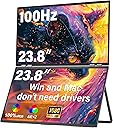
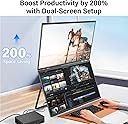
The InnoView 23.8" FHD dual monitor setup delivers vibrant 100% sRGB color accuracy and a smooth 100Hz refresh rate, ideal for professionals balancing creative work and multitasking. Its foldable, adjustable design saves desk space while offering versatile connectivity via HDMI and USB Type-C, compatible with both Windows and Mac systems. Perfect for elevating productivity in modern workspaces.


| ASIN | B0DGPNQY71 |
| Aspect Ratio | 16:10 |
| Aspect ratio | 16:10 |
| Brand | InnoView |
| Brand Name | InnoView |
| Colour | black |
| Compatible Devices | Laptop, Desktop |
| Contrast Ratio | 2000:1 |
| Customer Reviews | 4.4 out of 5 stars 74 Reviews |
| Display Technology | IPS/VA with LED backlighting |
| Display Type | LED |
| Hardware Connectivity | HDMI, USB Type C |
| Has Color Screen | Yes |
| Image contrast ratio | 2000:1 |
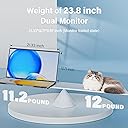
| Item Dimensions D x W x H | 1.7D x 54.2W x 32.3H centimetres |
| Item Weight | 5.78 Kilograms |
| Manufacturer | InnoView |
| Maximum Display Resolution | 1920 x 1600 Pixels |
| Model Name | INVPM609 |
| Model Number | INVPM609 |
| Native Resolution | 1920x1080 |
| Network Connectivity Technology | HDMI, USB Type C |
| Picture Quality Enhancement Technology | Standard color enhancement technology |
| Pixel Pitch | 0.56 |
| Product Features | Foldable |
| Refresh Rate | 100. |
| Resolution | FHD 1080p |
| Response Time | 3 Milliseconds |
| Screen Finish Type | Matte |
| Screen Size | 23.8 Inches |
| Screen size | 23.8 Inches |
| Screen surface description | Matte |
| Shape | Rectangular |
| Specific Uses For Product | Photo Video Editing, Home Viewing |
| Total HDMI Port | 1 |
| Viewing Angle | 180 Degrees |
J**S
Great build quality!
This dual 18"m 2K (2.5K) monitor is superb. I initially paired it with an older Surface Pro 6 and was not able to get it into Extend mode like a wanted. This was due to limitations of the Surface Dock video controller. I ultimately paired it with a Surface Pro 10 and it works perfectly in all display modes. I am also using a single Anker 130W Charger to power the Monitor and Surface. The display draws 21W at 100Hz, full 2560x1600 resolution, and 100% brightness. I have not been able to power the monitor through a single USB-C cable from the surface so separate USB-C is needed for display power (not unexpected). I am also able to power the monitor and laptop using a Baseus 100W, 20AHr Power Bank which shows is using 34W which suggest that the video USB is providing about 14W of power. On this Power Bank it reports that it will las about 2 hours. The monitor refresh rate does not have a big impact on power draw, but the brightness has an almost proportional impact on power. The kickstand is very versatile, and the monitor is very secure in any configuration. Even standing stacked vertically they are stable. The folding hinge is smooth but firm, there is little change of it slipping; perhaps after a few years they may start loosening but that remains to be seen. The screens are large, bright, and crisp. While 4K might be better for photo/video editing, these are perfect for normal business use and CAD work as I intend to use them. I bought a separate single 4K monitor for photo work. Out of the box the color/contrast closely match my Surface (at default settings); I did bump the monitor brightness up from the default 80% to 100% for a perfect match. I found a 17.3" Monitor Sleeve from CaseDeer that fits like a bespoke case. The monitor in the sleeve and my Surface drops perfectly into the laptop compartment of my TUMI fold-top backpack.
O**T
Incredible Quality. Better than 5 other models I tried.
After ordering 6 monitors, I decided to keep the 18" Innoview 2k dual-panel display. They are amazing. The color is vivid, the default white is perfectly tuned, NO adjustment required! The brightness is AMAZING. These things are super, super bright and have a decent viewing angle. The screens are matte, so there's no issue with reflections. (I tried a couple of the EHOMEWEI monitors, because I liked their form factor, but their max brightness was abysmal, and their default color profiles sucked. It took literally HOURS of fine-tuning to get them to look good, and occasionally they'd flicker to a different color profile. The screens were also glossy, leading to annoying reflections. Buy Innoview instead.)
R**H
Great monitor(s) - and I solved the Mac double external display issue!
UPDATE - TO THOSE HAVING TROUBLE GETTING MAC TO SEE THIS AS TWO MONITORS As my original review stated, I had this working with my MacBook Pro as two monitors since I got it. Today, it started doing what others described - could use a USB-C cable to "fill" as a single 2nd monitor but could not get it to show up as 2 external monitors. Turns out that something about the monitor handshaking with the Mac can corrupt the plist (how the Mac "remembers" the monitor, arrangement, and resolution for the next time you use them). This is the procedure that fixed it and brought it back to 2 external monitors: 1. from a Mac terminal window, type, "sudo rm -f /Library/Preferences/com.apple.windowserver.displays.plist rm -f ~/Library/Preferences/ByHost/com.apple.windowserver.displays.*" and press return. You will need to type in your computer admin password. This wipes the cached file of monitor configurations, so it will forget any other monitor configurations you had - so you'll just need to reset resolutions and multi-monitor arrangements if you had any. 2. Make sure that "Fill" mode on the monitor is not on (top side button toggles "Fill On" and "Fill Off" but it takes about several seconds before the change occurs. It needs to be off for this to work. 3. Shut down the computer (not restart). 4. Unplug monitor from computer and from power for 15 seconds. 5. Plug in HDMI cable and plug in power to monitor. 6. Boot the MBP - when it is done booting, go into your display settings and you should see the monitor as a 2nd screen. 7. NOW plug in the USB-C video cable from the lower USB-C port on the monitor (the top one is for power) to the Mac. 8. It shows up as Innoview (2) and renames the other one as Innoview (1) -- two independent external monitors! You can independently set resolutions and arrange them however you like!! The way Mac's do EDID (External Display ID) is a bit different than PC's. That is why this seems to only be a problem on Mac computers. My guess (just a guess) is that the "Fill" mode capability on the dual monitors can confuse the EDID on the Mac and that info is then cached into the plist (memory of the monitor(s)). That is why simply deleting the plist treats it like its brand new monitor connection. BTW, HDMI cannot transmit power, but USB-C tries to negotiate power transfer whenever it is plugged in. That is why I suggested that you start with the HDMI and wait until all is working with that before plugging in the USB-C (and having the USB-C power cord plugged into the monitor before you connect it to the Mac). Original review The hinge is tight - but understandably so - any hinge loosens with age and you would not want this thing closing while using it. The screens are bright and long ago I switched to MacBookPros for color reproduction and these screens look fantastic - They are 18" screens, so they are big in by backpack, but that is not a complaint - it is simple math. If they ever came out with a 17" version that had less of a gap between the two screens, I'd likely buy it - just because my use case doesn't really require the two-sided A-frame capability. I saw some complaints about Apple compatibility - but without any drivers, my M4 MBP works perfectly with these. If I only use a Thunderbolt (USB-C form factor) on my computer, it treats the two screens as one tall screen. But if I use the HDMI and USB-C together, I get 2 external monitors - no problem. I ordered thin HDMI and USB-C Data cables to ensure easy use. Also (and this is physics, not a criticism of the monitors), 2 18" well-lit screens need more power than any laptop USB-C port will provide, so YES, an additional USB power source is required (comes included). I have a small 250W multi-port USB power block I travel with and use 2 of the USB-C ports (1 for the MBP and 1 for these screens). That leaves enough ports and power to charge my iPad, iPhone, and a small multi-device charger for 2nd iPhone, AppleWatch, and AirPodPros - all at the same time. I travel a lot - and now, I have everything I need all together. Setup? there is none - you plug it in.
R**W
This is the way!
Initial impression is this thing is awesome. I was concerned as I’ve never heard of this brand previously. It’s twice as bright as my laptop when turned up all the way. The 2K clarity is a slight bump from a 1080 screen. The 2 screens are as big as you can reasonably go for portable screens. Folding in half for transport is nice, as it protects both screens from damage. It’s seems durable, solid metal, yet light enough in weight. The metal hinges seem strong. I like that I only need 2 cords, one 120 volt power and one USB-C. It fits in my backpack. It’s super easy to setup. I did not have to download any drivers. I plugged it in, my laptop screen detected it and automatically displayed. I only had to extend the display like you do for any screen. When folded, it measures 10.65” x 15.75” x 1”. I tried some other name brand monitors and this is much better than the others I tried. Don’t be fooled by the big name brands. Hopefully this stands the test of time.
T**R
Not a very high quality product
I'm not impressed with the quality here. There's a few persistent issues: - Inconsistent EDID handshake on wakeup, which causes the computer to "forget" the display's specs and treat it with basic "safe" display options - Frequently blacks out for varying periods of time, sometimes for just a few seconds, other times until I reset my computer. I have really high quality display cords, and I'm powering it with a Mac Studio, so I know it's not an issue with hardware on my end. Overall, the flakiness of this product makes it pretty garbage. Not a $500 screen. I would say it's worth more like $150.
Trustpilot
3 days ago
1 month ago