


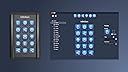

Smart Programmable Keypad - Speed up Your Workflow with Customizable Keys Featuring Full Color Backlit LCD for Windows and Mac
Product ID: 68814315
Review: Wow!! - This is the coolest device and it saves so much time Review: Very good hardware with fair to good software - Very good hardware and marginal software. We bought one which worked fine on a Windows 10 64 bit machine. It speeds up some processes, as long as the application you are using has shortcuts or hotkeys. If not there are no shortcuts in the software you want to use, then the use is limited. The software could be much stronger, but the UI is easy and programming it is fast, if limited. To be more useful the software needs to be more robust. For instance the Text Input function offers only a tiny data field making it difficult to format text. Copy/paste into this text function is also a hit or miss proposition; sometimes the copy paste menu doesn't show. We found the first unit we bought to be useful overall, so we bought another. Sadly, the software doesn't run at all on this second Windows 10 machine, which is running 32bit. We contacted Infinitton and they replied within 48 hours, stating that the software requires Windows 64bit to run. They said they will update their desertcart listing to reflect this. So be aware, make sure you are going to use this on a 64bit machine. Sadly, we had to return the second unit as upgrading the OS to 64bit is too much time to waste in a busy business operation. The seller is responsive and seems committed to the product. Hopefully this will transfer into more software development, making the keypad more useful. I give four stars to the hardware, three stars to the software and four stars to the seller. UPDATE 5/21/19: I use this for audio editing. It works fine as long the application you are using can customize AND save keyboard shortcuts. Many applications cant do this. Also, its been about a year since I first reviewed this product and there has been NO software updating at all. I am guess the developer has probably given up on the product. Shame, it showed potential as a productivity aid. It simply need more work on the software.
| ASIN | B07CGPW4Y3 |
| Additional Features | Backlit |
| Brand | Infinitton |
| Built-In Media | USB Cable |
| Button Quantity | 15 |
| Compatible Devices | PC |
| Connectivity Technology | USB |
| Customer Reviews | 3.6 out of 5 stars 21 Reviews |
| Enclosure Material | Aluminum, Plastic |
| Hand Orientation | Ambidextrous |
| Item Weight | 8 ounces |
| Keyboard Description | Gaming |
| Manufacturer | Infinitton |
| Mfr Part Number | idp-mkp-15p-bk |
| Model Number | IDP-MKP-15P-BK |
| Number of Keys | 15 |
| Special Feature | Backlit |
| Style | Modern |
| Style Name | Modern |
D**R
Wow!!
This is the coolest device and it saves so much time
D**B
Very good hardware with fair to good software
Very good hardware and marginal software. We bought one which worked fine on a Windows 10 64 bit machine. It speeds up some processes, as long as the application you are using has shortcuts or hotkeys. If not there are no shortcuts in the software you want to use, then the use is limited. The software could be much stronger, but the UI is easy and programming it is fast, if limited. To be more useful the software needs to be more robust. For instance the Text Input function offers only a tiny data field making it difficult to format text. Copy/paste into this text function is also a hit or miss proposition; sometimes the copy paste menu doesn't show. We found the first unit we bought to be useful overall, so we bought another. Sadly, the software doesn't run at all on this second Windows 10 machine, which is running 32bit. We contacted Infinitton and they replied within 48 hours, stating that the software requires Windows 64bit to run. They said they will update their Amazon listing to reflect this. So be aware, make sure you are going to use this on a 64bit machine. Sadly, we had to return the second unit as upgrading the OS to 64bit is too much time to waste in a busy business operation. The seller is responsive and seems committed to the product. Hopefully this will transfer into more software development, making the keypad more useful. I give four stars to the hardware, three stars to the software and four stars to the seller. UPDATE 5/21/19: I use this for audio editing. It works fine as long the application you are using can customize AND save keyboard shortcuts. Many applications cant do this. Also, its been about a year since I first reviewed this product and there has been NO software updating at all. I am guess the developer has probably given up on the product. Shame, it showed potential as a productivity aid. It simply need more work on the software.
W**N
NOT for gamers!
I purchased this keypad for gaming. It has a slick interface and awesome resolution on the keys. The software (or firmware's) inflexibility leaves it clearly outside the gamer's domain. Also the keys lip distort the labels based on the angle of the device. For starters its input is not accepted in all games (I tested this in GTA V). The game acted as if the keypad wasn't even there. It would respond to a key press in random ways that were not even programmed. Secondly, the macro function leaves a lot to be desired. You cannot program how long a key is held, nor does it have key-lock & hold functions as you would expect from a gaming keypad. Finally I could not find a way to assign mouse clicks to the keys. This was the final straw. A final thought is the note card that came with the device. It stated that if you did not plan to use the device for a period of time, it should be turned off?! For starters it doesn't have an on/off switch which means you would have to reach behind your machine and unplug it. Other gaming keypads such as the now defunct logitech G12 did not have these short comings, but also did not have the programmable key faces.
P**E
Really great little device
I have been looking for a good macro keypad for sometime, and was going to get one of the large XKeys pads, but then I saw this. By using the folder option, I am able to stack enough commands into the device that it has similar to greater capacity than some of the larger xkeys keyboards. The little screens (appx 75x75 pixels) are bright and clear. The construction is really nice extruded aluminum with plastic ends, but it has a very nice heft to it. Some thoughts: There are two layers of shortcuts you can have, layer 1 is the "Home" layer, and under that, you can have a single layer of folders. I have the keyboard set up so that the home layer is only folders, and each folder is triggered by an application. So if I open Excel, the keyboard automatically switches to the excel layer. If I switch to Word, the keyboard automatically switches to word. In each of the folders, one button is reserved for switching back to the "Home" layer. So the way I have it set up, I can have a total of 210 macro commands, with 14 per each of the 15 folders. Something I would like to see developed is support of multiple folder layers, so in word, for instance, I could hit a "Formatting" button that brings me to a sub folder of all the formatting controls I want to use. I would also like to see support of animated "widget" keys that display real-time data. (Like an email button that shows unread messages, or a suite of system parameter caps) This keypad competes directly with the Elgato Stream Deck. My only concern over the Infinitton is that I am not exactly sure how active development of the product line is. This keypad released in 2016, and as of today (mid-2019) the current version of the resident application is 1.1, and the keypad firmware version is 1.0.1xxx. As long as the application is compatible with new versions of Windows, I'll be happy with the current functionality. One thing to note: If you have the editor program visible on the desktop, the keypad won't behave as you might expect. Automatic app changing, and a few other features are disabled while it is open in order to make programming easier.
C**Y
DO NOT BUY THIS GARBAGE. Failed after a couple of weeks. Hard to see.
This thing was pretty cool while it worked. After a few weeks of very light use the buttons no longer work. I have to press several times and some of the time it will register the press (maybe 1 in 10). It doesn't seem to matter how hard or how long I depress the button, it's just completely random. All of the buttons have the same issue. I see one other review that seems to mirror this issue, so I have to assume mine isn't just "the one bad one". UPDATE: now the software has stopped working too. I was struggling though the issues but now the software has bugged out fully. I moved one button using the software and now all of the buttons function as if I am pressing the one button that I moved. This thing is now completely useless. It's trash, and worse than that, it's expensive trash. The displays are very bright, and clear, but they are very deep inside the thing and they are therefore hard to see at much of any angle. You have to be looking fairly directly at it or just remember where your buttons are (if they still work). The programming is fairly limited, but can be very useful. If you are a programmer you will probably dislike how GUI dependent it is. If you don't know anything about programming you will probably be able to "program" it without too much trouble.
R**.
Great!
Great product, makes life a lot easier.
D**R
Beware. there are keys the software will not record.
You must use the provided software to set up the keypad. I was using the Apple version of the software for this product. it will not remember the control/command or alt keys in any combination. so any function which requires these keys will not work. I tried to contact the company about it but they did not respond. I am not willing to wait for them to fix this oversight on their own because I have no idea if they are ever going to. I have returned the product. What is the purpose of omitting those keys from the software? what was that supposed to achieve? the purpose of this unit is to get all your keyboard shortcuts in one place. this product fails in that goal. I give the product three stars for the nice build quality of the keypad, but no stars at all for the pathetic software.
B**E
Good quality, Some features don't work well.
The product seems like good quality and the program was easy enough to use... but I could not get the keyboard shortcuts to work reliably. With the program running and showing on one of my monitors, I still could not get the buttons to reliably execute the keyboard shortcuts that controlled the profile in OBS. It would eventually work if I hit the button multiple times, but my videos suffered when I had to repeatedly smash the button. Maybe a software would fix this. Other types of commands were more reliable, like launching programs or websites.
Trustpilot
3 weeks ago
2 weeks ago