We remain fully operational. Our teams are working around the clock to ensure your deliveries continue safely.

DOWNLOAD THE APP


Copyright © 2025 Desertcart Holdings Limited
DOWNLOAD THE APP
Buy anything from 5,000+ international stores. One checkout price. No surprise fees. Join 2M+ shoppers on Desertcart.
Desertcart purchases this item on your behalf and handles shipping, customs, and support to Colombia.
🛫 Elevate your cockpit game—fly like a pro, feel the thrill!
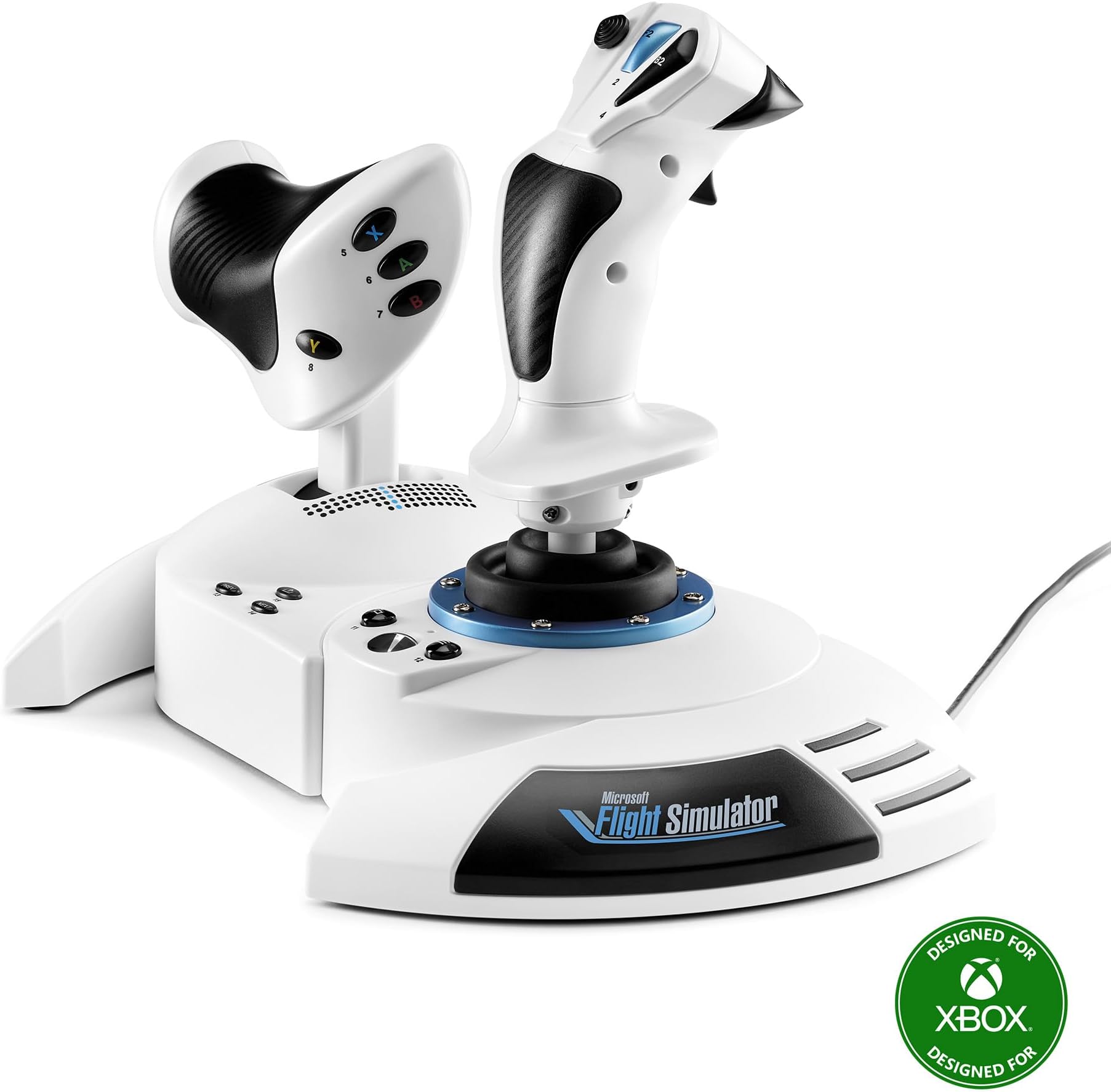
The Thrustmaster T-Flight Hotas One Microsoft Flight Simulator 2024 Collector’s Edition is an officially licensed, plug-and-play flight stick and throttle combo designed for Xbox Series X|S and PC. Featuring 10-bit precision across 5 axes, 18 programmable buttons, and a detachable throttle, it delivers realistic and customizable flight control for all aircraft types. Ergonomically designed with adjustable resistance and dual rudder control, it’s perfect for both beginners and seasoned sim pilots. Expandable with Thrustmaster rudder pedals, this controller offers immersive, professional-grade flight simulation at an accessible price point.


| ASIN | B0DBM9NKQ7 |
| Additional Features | Ergonomic |
| Best Sellers Rank | #580 in Video Games ( See Top 100 in Video Games ) #2 in PC Game Flight Controls #14 in Xbox Series X & S Controllers #54 in Xbox One Controllers |
| Brand Name | Thrustmaster |
| Button Quantity | 18 |
| Color | White |
| Compatible Devices | PC, Xbox One, Xbox Series S, Xbox Series X |
| Connectivity Technology | USB |
| Controller Type | Joystick |
| Customer Reviews | 4.2 4.2 out of 5 stars (320) |
| External Testing Certification | Não Aplicavel |
| Global Trade Identification Number | 00663296425072 |
| Hardware Platform | Desktop, Gaming Console, Laptop |
| Item Dimensions | 9.53 x 10.43 x 10.39 inches |
| Item Dimensions D x W x H | 10.2"D x 10.2"W x 11.4"H |
| Item Weight | 4.5 Pounds |
| Manufacturer | Thrustmaster |
| Model Name | T-Flight Hotas One MSFS Edition |
| Package Quantity | 1 |
| UPC | 663296425072 |
| Unit Count | 1.0 Count |
| Warranty Description | One year |
B**Z
Great Entry-Level HOTAS – Smooth Controls and Perfect for Flight Sim Beginners
The Thrustmaster T-Flight Hotas One is an awesome starter setup if you’re getting into Microsoft Flight Simulator or any flying games on Xbox or PC. The controls feel solid and responsive, and the throttle + joystick combo gives a much more realistic flight experience compared to a standard controller. Setup was extremely easy — literally plug in and go. The joystick has a nice weight to it, the buttons are well placed, and the adjustable resistance is a nice touch. The throttle moves smoothly and gives you good control during takeoff, cruising, and landing. I also like that you can separate the throttle from the stick if you want more realistic spacing. For the price, the performance is excellent. You’re not getting the super high-end metal feel of a premium HOTAS, but everything works reliably and feels good in the hand. Perfect for new pilots, casual sim players, or anyone who wants a big upgrade from using a controller. If you’re looking for an affordable and dependable HOTAS setup for Xbox or PC, this one is absolutely worth it…..
A**T
Don’t download the drivers I was ready to return it
Works mint, just DO NOT FOLLOW THE PAPER GUIDE SAYING TO UPDATE DRIVERS, fresh out of the box it was perfect (bought used like new version) so I decided to myself ”heck why not update them drivers” Worst mistake I made. At first it was fine no issue but mid flight on MSFS 2020 my plane starts sinking, I think it’s me being dumb and not having enough pitch up but I swap views and sure enough my throttle is having a seizure between 0%-25% throttle range. I was like that’s odd, check my game settings and my input for throttle was jumping from 0-25% range, so I decided to unplug and plug it back in, no luck. Google and there’s apparently issues from 3+ years ago of people complaining, I was about to return this thing. I decided to try uninstalling the drivers since I was going to return it anyways, decided to recalibrate it (never gave option to calibrate because I updated drivers so it preconfigured) and magically my throttle works perfectly. Turns out the driver updates break the throttle axis all together and it doesn’t let you calibrate to fix it the only option to get your throttle to function is to calibrate it and not update the drivers. Upon deleting and calibrating it to pc it functions perfectly plus it’s awesome to know I can throw it on my Xbox and enjoy playing too if I decide to!
M**6
Doesn't work well with Call of Duty, but great for flying games!!
This Joystick is amazing and very smooth, at least in Flight Simulator 2024 and Ace Combat 7 on Xbox Series X. It'll make you feel like you actually have great control of the aircraft, assuming you treat the controller well, because it's not the type of controller you want to throw across the room when you crash. Not the best controller for Call of Duty though, so you may want to look for another option if that's the game you want this for.
P**N
A missed opportunity for a well built joystick.
This is a really nice simple joystick made useless because they can't include a diagram to show you which buttons represent what! I am still trying to find the left trigger corresponding buttons so I can accelerate to take off. What they also don't tell you is like the logitech wheel, you should restart the xbox with the joystick plugged in and then navigate to the game via the joystick. I figured out how to navigate the xbox menus (it would have been helpful if a schematic was included but that would have made things way too easy.) I would have given this 1 star but the stick is very well built and PC compatible. I plan on trying this on my pc since it is frustrating getting any game (besides Squadrons) working with the joystick. You would think MS Flight Simulator would have a vested interest and give you guidance on what buttons to push to accelerate, turn, etc... I've crashed now over 3 dozen times running off the runway because I can't find the right button combination to accelerate fast enough. I thought moving the throttle forward would increase the speed but that would be too easy. Sadly this joystick is a big missed opportunity. At least it looks cool.
M**S
Flying with this controller is now disabled due to a loop in a programming error.
This product ceased to work for me after six months of working fine. I know how to keep my equipment tuned with USB hubs, and all of my other controls worked, but the Hotas just died one day. Video attached. To Thrustmaster: I have purchased an HP Windows 11 laptop and installed the latest control panel and updated my T.Flight Hotas One firmware. It informed me on the installation that my firmware was "UpTo Date". I then plugged it into my XBox and exactly the same behavior occurs. I have current firmware from Thrustmaster and from Microsoft Flight Simulator and XBox. Yet now running the program with your controller has been disabled after working fine for about six months of quality play. You blame Microsoft. I blame you for not keeping up with your support or QA. I will remember Thrustmaster as a substandard quality production company and spread the word to anyone who might ask.
S**O
Great addition for a fly sim enthusiast
It works great with my mac and Xplane 12, It's a great addition/upgrade from using a PS5 controller. It feels sturdy and has great things for the price.
N**M
Mine arrived used.
Only giving 3 stars for the fact that I ordered this new. It arrived with signs of being opened. There was tape on the Styrofoam that cushions the controller that was previously cut. A plastic bag, that I am assuming goes on the usb wire was just tossed in. Small scratch on the left side of the controller. Other than that, the unit works fine. This is a great beginners set up. It is not high end, but not bottom of the barrel either. 5/5 would buy again for this price if it is new.
M**L
Works great on Xbox Series X
Great flight stick and easy to program after watching a few videos. I use it with my Xbox Series X.
R**I
Excellent. Everyone should take it. It makes adventure to play Games .
F**R
Es una buena adición para el simulador, además de que incluye los botones de xbox por si lo juegas en el xbox series. yo lo conecte a la pc y ha funcionado muy bien con MSFS 2020, 2024 y X-Plane 12. tiene varios botones para poder configurar a tu gusto
W**M
Funcional.
S**M
مش نفس ما توقعت و يكون في تاخير او ديليي في التحكم فيه
P**K
Funktioniert
Trustpilot
1 month ago
4 days ago