Desertcart purchases this item on your behalf and handles shipping, customs, and support to Colombia.
🎧 Elevate your stream—pro audio power, zero clutter.
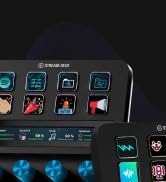
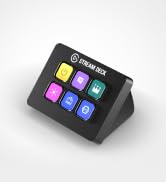
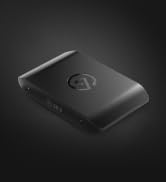
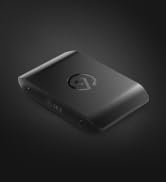
The Elgato XLR Dock for Stream Deck + is a compact, high-performance audio interface that integrates seamlessly with your Stream Deck +. It delivers up to 75 dB of ultra-low-noise gain and 48V phantom power to bring dynamic and condenser microphones to life. Designed to save desk space, it connects both devices via a single USB cable, freeing up ports and reducing clutter. Easy to assemble with just a screwdriver, it transforms your setup into a streamlined control center for audio, video, and streaming commands.


| ASIN | B0D7M9821X |
| Audio Input | XLR |
| Best Sellers Rank | 20,887 in Musical Instruments & DJ ( See Top 100 in Musical Instruments & DJ ) 99 in Computer Audio Interfaces |
| Brand | Elgato |
| Brand Name | Elgato |
| Compatible Devices | Personal computer, laptop |
| Compatible devices | Personal computer, laptop |
| Connectivity Technology | USB |
| Connectivity technology | USB |
| Customer Reviews | 4.5 out of 5 stars 264 Reviews |
| Frequency Response | 20000 Hz |
| Frequency response | 20000 Hz |
| Global Trade Identification Number | 00840006681595 |
| Included Components | Quick Start Guide, XLR Dock for Stream Deck + |
| Item Weight | 0.17 Kilograms |
| Manufacturer | Corsair |
| Manufacturer Part Number | 10GBM9901 |
| Maximum Sample Rate | 96000 |
| Model Number | 20GBM9901 |
| Number of Channels | 2 |
| Number of channels | 2 |
| Operating System | Windows 10 (64-bit) or later, macOS 13 or later |
| Product Warranty | 2 year manufacturer. |
| Supported Software | macOS |
| Supported software | macOS |
| UPC | 840006681595 |
N**S
Get One!
This replaced two boxes I used to connect my XLR RODE Podcaster to my computer. I previously needed a preamp and a USB audio interface (a PreSonus TubePre V2 and a PreSonus Studio 24c, both excellent), but this dock replaced all their functionality and added a great deal more besides. Coupled with the Stream Deck, this has completely transformed my YouTube videos and made the process far more enjoyable. I can now record, stream and set up complex commands with a single click. I can add vocal effects, sounds, remix audio, and change what appears in the stream with ease, with just this one item (as the dock and Stream Deck connect and become a single piece of tech) and the two pieces of software that sit in the background. Such a brilliant piece of kit, if you are looking at this thinking it MIGHT help, please give it a go, it won't only help, it'll supercharge everything. I sometimes want to hug it and tuck it in at night.
F**S
Great device, highly recommend
Was very easy to attach to the stream deck+. Worked straight away. I had a mini xlr that was causing issues with my sound and mic, and no matter what I did I couldn't get the problems solved. Purchased this with the stream deck+ and it's been an amazing combination. Easy to setup, easy to use and looks nicer in my opinion on my desk than the mini xlr.
C**N
A must have for streaming
The Elgato XLR Dock is an excellent add-on that transforms your Stream Deck + into a highly capable, space-saving audio interface and control center. For content creators, streamers, and podcasters who already own the Stream Deck +, this dock is a near-essential upgrade that neatly integrates high-quality XLR microphone input and audio mixing directly into your desk controller.
J**M
Great addition
This product completes the Stream Deck Plus as the all-in-one audio controller and interface. Build quality is ok but the convenience and functionality is what I wanted. Good to reduce clutter on desk with having different audio hardware, this just simplifies things for me.
G**L
Careful with using two wave devices simultaneously
I’ve had the Wave XLR and I wanted to buy another XLR microphone in order to have two of them, and considering I also had from before the Streamdeck +, I decided to buy the XLR Dock Mk2 accessory. But the bad news started when I connected it, it’s not compatible with Windows 10, and according to Microsoft, my PC didn’t meet requirements for upgrading to Windows 11, so I had to buy the original version (second hand) XLR Dock v1 in order to make it work. But then when I plugged it in, the Wave Link software v2.0 doesn’t support two or more wave devices connected, and in order to make it work, I had to download the new version of Wave Link, v3.0. But it’s only compatible with Windows 11. So after a big headache, I managed to update my pc to Windows 11 by configuring some options on the BIOS, and then I managed to update it. So now, everything works alright so the problem was the Operative System and the Wave Link software v2.0 as in order to connect 2 or more wave devices, you will need definitely the Wave Link v3.0 that only works from Windows 11.
J**R
Simple to install. Good software. Complex implementation.
Simple to setup if you have an xlr audio mic feed and 30 seconds to undo two screws and screw them back in through the dock. Wavelink software is a little confusing. It packs a lot of advanced audio management into a simple interface but its still a lot of advanced audio management. I had been using the goxlr for 5+ years which had begun failing and resetting. Of all the options this looked the best and three weeks down the line Im pleased. If you're not somebody who knows the ins snd outs of PC audio it will be a learning curve. I'm fairly technical and its been a journey for me.
R**B
Great bit of hardware for the Stream Deck + allowing you to use XLR microphone.
Amazing addition to the Stream deck +. Allowing you to connect an XLR microphone to the Stream Deck and control the audio quality with plugins. I love it.
P**B
Had a few techincal issues at the start....
I bought this as I love Elgato products, and I had also just upgraded my streamdeck to the Plus version. I set it all up and connected everything, went to wavelink which I had already installed and set that up, went to do a stream and my microphone was not working, in the end I had to uninstall the wavelink software and install it again, since then it's been working fine.
M**N
brutal
me ahorro espacio en mi setup
し**ん
Stream Deck使ってるなら最適解
専用になってしまうと思うので評価は高いです。Stream Deckを使用していて同社のXLRマイクを使うつもりで接続する術がないなら最適解です。接続が不安定になることもなく一体感もあり省スペースで言うことないです!
م**ط
مكسر تحكم صوتي للمبتدئين: مناسب لكن يحتاج تحسينات
البرنامج مو مستقر بشكل كافي، فيه مشاكل في الأداء. المايك فيه كويس لكن مش الأفضل، في خيارات أفضل بكثير خصوصًا إذا كنت تستخدم ميكروفونات مثل “شور”. لو كنت مبتدئ وبتستخدم “رود” أو “فيفاين” ممكن يعجبك ويناسبك، لكن للمحترفين فيه مكسرات ثانية أفضل بكثير
K**K
Almost perfect, but still five stars.
Keeps your desk less cluttered by turning the Stream Deck+ into an XLR mic input. The pre-amps are suitable for the majority of users' microphones, and the WaveLink software features VST plugin support, making this the best microphone input device marketed towards Gamers and Streamers by a long mile. The only downside of this device is the output quality of the headphone out port. At just 77mW and only 3.5mm connectivity, it's not a great source to drive high-end listening devices. You will want a separate DAC/Amplifier to drive your devices. Overall, this unit works incredibly well. Personally, I went ahead and bought third-party VSTs on a black friday sale (AI noise cancellation, standard background noise reducer, 6-band EQ, and a compressor/expander). Now all my microphone processing is independent of whatever VoIP service I'm using, and it's tweakable to sound much better than what most services provide by default. The VSTs that come with the device provided by Elgato are more than good enough for most users, so it's definitely not a requirement to spend extra on third-party plugins. Great product with great functionality. Good job, Elgato!
J**M
Great product.
Works well, legit product. Highly recommend to integrate if you use xlr mic and want wavelink etc.
Trustpilot
4 days ago
2 weeks ago