

Buy anything from 5,000+ international stores. One checkout price. No surprise fees. Join 2M+ shoppers on Desertcart.
Desertcart purchases this item on your behalf and handles shipping, customs, and support to Colombia.
📺 Elevate your screen time—big screen, zero hassle.
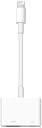
The Apple Lightning to Digital AV Adapter enables seamless mirroring and streaming from your Lightning-enabled iPhone, iPad, or iPod to any HDMI display in crisp 1080p HD with full audio support. Lightweight and compact, it offers plug-and-play convenience backed by Apple’s trusted quality, ensuring flawless performance for presentations, entertainment, and gaming.
| Color | White |
| Compatible Devices | iPhone 14 Pro, iPhone 14 Pro Max, iPhone 14, iPhone 14 Plus, iPhone 13 Pro, iPhone 13 Pro Max, iPhone 13 mini, iPhone 13, iPhone SE (3rd generation), iPhone 12 Pro, iPhone 12 Pro Max, iPhone 12 mini, iPhone 12, iPhone 11 Pro, iPhone 11 Pro Max, iPhone 11, iPhone SE (2nd generation), iPhone XS, iPhone XS Max, iPhone XR, iPhone X, iPhone 8, iPhone 8 Plus, iPhone 7, iPhone 7 Plus, iPhone 6s, iPhone 6s Plus, iPhone 6, iPhone 6 Plus, iPhone SE (1st generation), iPhone 5s, iPhone 5c, iPhone 5, iPad Pro 12.9-inch (2nd generation), iPad Pro 12.9-inch (1st generation), iPad Pro 10.5-inch, iPad Pro 9.7-inch, iPad Air (3rd generation), iPad Air 2, iPad Air (1st generation), iPad (9th generation), iPad (8th generation), iPad (7th generation), iPad (6th generation), iPad (5th generation), iPad mini (5th generation), iPad mini 4, iPad mini 3, iPad mini 2, iPad mini (1st generation), iPod touch (7th generation), iPod touch (6th generation) Compatible Devices iPhone 14 Pro, iPhone 14 Pro Max, iPhone 14, iPhone 14 Plus, iPhone 13 Pro, iPhone 13 Pro Max, iPhone 13 mini, iPhone 13, iPhone SE (3rd generation), iPhone 12 Pro, iPhone 12 Pro Max, iPhone 12 mini, iPhone 12, iPhone 11 Pro, iPhone 11 Pro Max, iPhone 11, iPhone SE (2nd generation), iPhone XS, iPhone XS Max, iPhone XR, iPhone X, iPhone 8, iPhone 8 Plus, iPhone 7, iPhone 7 Plus, iPhone 6s, iPhone 6s Plus, iPhone 6, iPhone 6 Plus, iPhone SE (1st generation), iPhone 5s, iPhone 5c, iPhone 5, iPad Pro 12.9-inch (2nd generation), iPad Pro 12.9-inch (1st generation), iPad Pro 10.5-inch, iPad Pro 9.7-inch, iPad Air (3rd generation), iPad Air 2, iPad Air (1st generation), iPad (9th generation), iPad (8th generation), iPad (7th generation), iPad (6th generation), iPad (5th generation), iPad mini (5th generation), iPad mini 4, iPad mini 3, iPad mini 2, iPad mini (1st generation), iPod touch (7th generation), iPod touch (6th generation) See more |
| Connector Type | Lightning |
| Item dimensions L x W x H | 2.64 x 0.71 x 6.14 inches |
| Specific Uses For Product | Projector,Tv |
J**E
Worth the price because it actually works unlike the knockoffs
Don’t waste your money on knockoffs because this one actually connects and works perfectly well. I’ve had it for a long time and have had no issues unlike others I’ve purchased that were cheaper.
T**M
DON'T WASTE YOUR MONEY, BUY THIS ADAPTER
You want to purchase THIS adapter to mirror if you plan on streaming formats like HULU. I purchased a monitor and my non-apple adapter didn't work. I watched a youtube video that said to use a splitter to by pass and that didn't work. Watched another video that said you have to use Apple's AV Adapter and it instantly worked. Let me help you, don't waste your money, buy this one.
D**E
Great for seeing mobile apps on your tv
Works great, it’s been almost completely perfect. For some reason my phone keeps “adding accessory downloading firmware” almost every time I use it, but it just takes a couple of seconds and then it’s good. I’ve had an app refuse to let videos pass through, which stinks. It was the Netflix app, so I don’t really get why, every platform out there has the app, so it’s not like they’re stopping anything. Otherwise it’s a great way to see anything on your phone that isn’t on your streaming device’s App Store.
F**T
Most Important.......It WORKS 100% without limitations and without hassle!
My phone is an Iphone 13 Pro Max, current OS version is 17.6.1. Plugged the dongle into the phone, it immediately recognized it and did a quick little driver download. I then connected it to one of my newer "smart" TV's via HDMI cable and the phone display was visible on TV instantly. Next I double-checked it's function was complete on Netflix and Amazon Prime, my primary concerns so that I could stop eating up hot-spot data, and they both work 100% without issue. The operation was also 100% when connected via HDMI on one of my 'older' Samsung flat screen TV's that wouldn't necessarily be considered a 'smart TV' (does not have any pre-loaded direct apps, and no direct ethernet connection). No HDCP errors or issues at all- didn't even need to find a particular HDMI input marked for UHD / HDR; it just worked. Instantly and without need to so much as click "OK" to anything. So, if you've found that all those aftermarket dongles come with the notation / limitation of not working with paid apps like Netflix and Amazon Prime, you know what to do: Bite the moderate 'bullet' of a higher initial cost and get the Apple adapter; you'll be glad you did!
M**.
Short life span
I’ve bought this two times with the same results . It starts out working great , but the life expectancy is not worth the price The first one and the second one starts acting up within 30 days like a loose connection and keeps disconnecting from the tv .it keeps getting worse to the point you can’t pick up the phone to surf because the signal to the tv cuts in and out . And now after two months it’s no longer getting the signal to the tv and messing with the cord to the tv continues to go in and out but no picture or sound is seen or heard . The item is not worth 50 dollars for only two months of use . I will say this though , before buying this one and the one before it . I tried the cheap versions that was not made by Apple . The main difference was the knock offs had limitations that would not allow use in Netflix or Amazon Prime . I had no issues with that with the factory version. If there was a way to make the item without the flexible cord coming out of it the connection problem would have taken longer to occur. It’s the constant flexing of the cord on it and trying to hold the phone to surf for something just puts more stress on the cord til the wires in the connection starts breaking or fraying until the connection is severed internally. So only 2 months of service for 50 dollars is not worth the trouble to keep buying and replacing constantly. And the knock offs for less has more problems other than the factory part that I had not went into in this review
R**R
Works well but can be tricky to use at times
I’ve been in a hospital for six weeks so far and I bought the Apple brand AV connector and a high quality (braided and thick) 15 foot lightning to HDMI cable so I can watch various streaming apps from my iPhone. Maybe it’s different when streaming from a different phone brand. Probably no surprise that the Apple TV app seems to mostly work without issues. Although, anytime I accidentally move or even slightly bump the HDMI cable (and maybe there would be less issues using a shorter cable), it causes the video to pause or in some cases crash. There’s also an issue to play content that I downloaded to my phone before I tried using the Apple brand AV connector, and I’ll explain that later in this post. If it crashes, SOMETIMES just shutting down the app and disconnecting the cable from my phone, then reopening the app and reconnecting the cable resolves the issue. More often, however, I have to reboot my phone, turn off and unplug the tv, wait 30 seconds before plugging the tv back in, then turn on the tv, turn on my phone, open a streaming app, start a video playing, and then plug in the AV connector and select the HDMI source in the tv’s settings IN THAT ORDER to get it working again. Whew! Somewhat of a pain, but my other option is the fuzzy 480 resolution quality and extremely limited channel options on the hospital tv, so it’s worth it to me to get a clear 1080 HD picture and watch what I want to. I don’t know if the adapter supports 4k output (I don’t think so) but since the hospital tv isn’t 4k I can’t tell for sure. Other things to keep in mind based on my experiences include which streaming app I’ve tried, the quality of my internet connection, and playing live vs downloaded content. Unfortunately my only internet option right now is a cellular connection, and usually only one or two bars of signal strength, and I’m guessing that adds to any streaming problems I’ve had. In general, except for using the Apple TV app, downloaded/saved content just will not play in any scenario that I’ve tried so far. It seems to be an issue of the video format of the downloaded movie or TV show. In fact, previously downloaded content in the Apple TV app won’t play through my setup either. However, the good news is the Apple TV app will tell me this and then give me the option to re-download the video I’m trying to play in a different video format that WILL WORK when playing it through the AV connector. This is great because I can play a saved video and I don’t have to worry about it crashing due to my crappy internet connection. For any other app that I’ve tried, including Hulu, Netflix, Amazon, Max, Disney, STARZ, and Paramount, saved downloads will NOT play using the AV connector. BTW, I’ve had the best success with the Apple and Hulu apps, and the most issues with the Paramount app, to play most any video using my particular setup. Just saying. Using the Paramount app, I can eventually get a video to play, but it sometimes takes an unreasonable amount of resetting everything in order to get it to play. This stinks because I really like some of their original shows and movies. Except for Apple TV, only streaming (not downloaded/saved) content will play for me. Period. The biggest problem I seem to have in this case is when my internet connection is so slow that it crashes pretty much any app that I’ve used to stream a video. This is ESPECIALLY the case when I’m trying to stream a “live” football game or other streaming content that includes HDCP encryption protection. And unfortunately, trying to FF or Rewind often leads to a crash. Forget using the ESPN app for live streaming, it hasn’t worked in any scenario I’ve tried, although part of that might be my lousy internet connection. However, I have used the ESPN app to stream previously aired football games or whatever, and I have ESPN+ to get access to those. The Fox News app (and other network apps) mostly have a great picture quality when live streaming, but crashes almost every time during a commercial break. Hulu with live TV (and obviously not everyone has that) seems to be the most stable connection I can get for watching live TV. Paramount live content seems to mostly work okay too. Watching live using the Hulu app doesn’t seem to have quite the same level of picture quality as when using the Fox News or ESPN apps, but the stream is stable (as long as I don’t accidentally move or even slightly bump the HDMI cable). Bottom line is the Apple brand lightning to HDMI adapter will work in many scenarios, but it requires some trial and error, and LOTS of patience sometimes. Just my experiences. Yours might be better or worse, but I wanted to share all of this because even though I found some of this information in bits and pieces when searching online, I didn’t find it consolidated anywhere. Plus, after six weeks in multiple hospitals, I’m bored to tears and putting this post together gave me something to keep my mind occupied. Also, at the end of day, even though it can be frustrating at times, the Apple brand AV connector is mostly working for me for most streaming apps and my specific situation, so I can absolutely recommend it. I wouldn’t dare try one of the many less expensive but “generic” lightning to HDMI AV connectors. It’s difficult enough using the genuine Apple device, and that’s why my rating is only four stars. Just my two cents.
C**B
SWEET HDMI/Power Adapter
Operation iPad Streaming: Alternative to an expensive streaming uni-device for my audio system Alton Brown, Good Eats, has only one uni-tasker – the fire extinguisher. All other kitchen stuff needs to serve more than one function. Good advice even for audio/video. Rather than buying a fancy-smanchy streaming uni-device for my audio set-up I bought this little adapter to see if it would first work with my iPhone before buying an iPad. I don't have Spotify or other streaming services; HOWEVER, I do have XM-Sirius in my Outback and the iPhone App. I connected my iPhone to this gizmo, connected an HDMI cable to my McIntosh MHT-300 and a USB/Lightning cable to an Anker Nano 100W USB-C Charger (sweet little charger), set the MHT-300 input to HDMI 3 and fired up SirusXM’s Cool Jazz Chanel on the iPhone 13 Pro (IOS 18.1.1) and I have great Christmas music pouring out the La Scalas! I’ll need to try the Miles Davis channel later. I wanted to make sure I identified the iPhone and IOS version in case others have a different config. Next, I need to video, not a big deal as I have wireless ApplePlay and my Sony Bravia handles ApplePlay from my iPhone. Using an iPad with HDMI on the MHT-300 means I don’t to light-up the TV. So now I just need to buy an iPad. The reason for an iPad is: 1) I want to keep my iPhone portable; 2) The iPad can also be used as a handy computer when needed and stay docked with the audio 99% of the time; 3) I can also use Music/iTunes on an iPad that I’ve collected over the years; 4) Buying another iPhone is more expensive as I don’t need the phone service. I rarely need an iPad as I use my Lenovo laptop as my computer - it will be replaced next year with a MacBook Pro as I've had it with Lenovo. My Lenovo (Yoga X1, 7th Gen, 2 years old.) has a funky random hardware problem with the USB-C ports with a connection to a dock for video monitors and power when not docked. I won't buy another Lenovo product as their support has been poor at best even with a contract upgrade that has now expired. I've used ThinkPads since 2000 when they were IBM and now Lenovo. I always had great service and quality as I traveled 100K miles for 4 years back in the mid-2000s, real road warrior laptop that never a problem. The past 2 years was rough enough that I'll now migrate to Apple. Did you need to read through all this? I hope it helped. This is a really nice HDMI adapter! Now to buy my iPad Christmas present for me!
T**F
Very good product
Good product shipped first would buy again
P**L
Útil
Sirvió muy bien
B**8
works as expected.....it's Apple
After cheating out and ordering a couple of "third party adapters", I bit the bullet and purchased Apple. All devices that plug into it work and charge flawlessly. Ideal for camping and downloading shows / movies to my iPad and playing via HFMI to an old pc monitor for movies night when camping (nothing like watching Freddie when the camp fire's dying down....) Streams all popular available services (Apple TV+, Netflix, Disney, Prime TV, YouTube, tubi, pluto tv) without a hiccup, plays files from device and shows device screen plain and simple. A great, luxury item to have when camping and the weather possible turns... I'd recommend spending the extra for piece of mind over the stress of one of the others that probably, definitely will fail and spoil your escape.
P**E
Great!
It works as described, hopefully it lasts.
C**N
Works with streaming services
This is perfect for mirroring IPad and IPhone to my portable monitor. No issues playing Netflix, Prime, binge and plays both downloaded and streaming contents. I was worried it would not work but it does! Very happy with the functionality and is a genuine apple product
L**A
Cable genera un pequeño delay
Le pongo 4 estrellas por que genera un delay en la imagen versus el sonido, es mínimo pero perceptible. Llegó en tiempo, bien empacado.
Trustpilot
1 month ago
3 weeks ago