Buy anything from 5,000+ international stores. One checkout price. No surprise fees. Join 2M+ shoppers on Desertcart.
Desertcart purchases this item on your behalf and handles shipping, customs, and support to Colombia.
🎬 Elevate your presence—stream like a pro, look like a star.
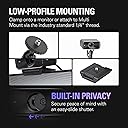
The Elgato Facecam MK.2 is a premium 1080p60 HDR webcam featuring a Sony STARVIS™ CMOS sensor and uncompressed video capture via USB 3.0. Designed for professionals and content creators, it offers DSLR-style manual controls through Camera Hub software, a built-in privacy shutter, and broad compatibility with streaming and video conferencing platforms. Its compact form factor and advanced optics deliver vibrant, low-latency video ideal for streaming, gaming, and remote work.


| ASIN | B0CW1S7XP5 |
| Antenna Location | Gaming |
| Are Batteries Included | No |
| Best Sellers Rank | #23 in Webcams |
| Brand | Elgato |
| Built-In Media | Elgato Facecam MK.2 |
| Camcorder Type | Webcam |
| Color | Black |
| Compatible Devices | Personal Computer, Laptop |
| Connectivity Technology | USB |
| Customer Reviews | 4.4 out of 5 stars 1,462 Reviews |
| Display Resolution Maximum | FHD |
| Effective Still Resolution | 2.1 MP |
| Effective Video Resolution | 1080 Pixels |
| Exposure Control Type | Automatic |
| Features | Face Detection |
| File Format | MP4 |
| Flash Memory Speed Class | C60 |
| Flash Memory Type | SDXC |
| Flash Memory UHS Speed Class | 6 |
| Flash Memory Video Speed Class | V60 |
| Focus Type | autofocus, manual |
| Form Factor | Compact |
| Global Trade Identification Number | 00840006669227 |
| Has Image Stabilization | No |
| Image Aspect Ratio | 1.5:1 |
| Image stabilization | false |
| Item Dimensions D x W x H | 0.63"D x 0.36"W x 0.39"H |
| Item Weight | 0.09 Kilograms |
| Lens Type | Zoom |
| Manufacturer | Corsair |
| Maximum Aperture | 2.8 f |
| Minimum Aperture | 1.5 f |
| Model Name | Elgato Facecam MK.2 |
| Model Number | 20WAC9901 |
| Photo Sensor Technology | CMOS |
| Sensor Type | CMOS |
| Shooting Modes | Automatic |
| Style Name | Facecam |
| Supported Audio Format | AAC |
| Supported Image Format | JPEG |
| UPC | 840006669227 |
| Unit Count | 1.0 Count |
| Video Capture Format | MP4 |
| Video Capture Resolution | 1080p |
| Video Resolution | 1080p |
| Warranty Description | 2 year manufacturer. |
| Water Resistance Level | Not Water Resistant |
| Zoom | Digital |
P**O
Very nice mid-level cam
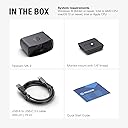
I've been using a Logitech Streamcam since its release and have mostly liked it. It works great in good conditions, but shifted to a more enclosed area with very little natural lighting. And ever since doing that, I've had trouble with it washing out the picture if there's artificial light, or being too dark if there's not. I have a mostly Elgato lighting set up (2 key lights and a light strip) as well as a stream deck. The Logitech has never had good software, but that wasn't a big deal until recently. Given the streamcam was good enough. I am teach undergraduate and graduate students almost entirely online, so I wasn't needing a professional setup, just for meetings, zoom, and recording videos (using xsplit with a small video of me in the corner of a presentation). Recently, the lighting frustration bothered me more and more and I saw this Mk.2 release. I decided to try it out and see if it was an improvement. Yes, yes it was very much. While the lighting isn't perfect, the overall quality is so much better I have no regrets at all about shifting to a similar range alternative. The low light works great, the overall image and recording is better, and the software is far and away more user friendly. I can control many functions through my stream deck, making for more dynamic adjustments on the fly in presentations, online live sessions, etc. Comes with a pretty thick 3.0 USB cable, but if you have a USB C slot in your computer you're wanting to use you'll need to buy your own. Which I did. But having only the 3.0 makes this useable for even older setups.
H**A
Excellent
This is a wonderful webcam. I'm coming from the Razer Kiyo Pro and the Facecam mk2 is so much nicer to use. The image quality seems to be comparable but the elagato has less motion blur and far superior software. I've had constant issues using razer's streaming products that don't seem to exist in the elgato ecosystem. I'm very happy that I was finally able to switch everything over. The camera is very easy to use and set up. It's integration with obs is flawless and there is additional camera control software from elgato that you can use if you'd like. It is optional software and not required for use. This is probably the best bang for the buck webcam you can get right now. It's my favorite so far at least.
J**S
good webcam
Very good and smooth image quality, recommended for live broadcasts
A**R
INCREDIBLE QUALITY! Huge step up from original Facecam
I was previously using the original Elgato Facecam. After seeing a friend upgrade to this, I was convinced to try it myself. The quality out of the box is INCREDIBLE. Huge step up from the original Facecam! Tinkering with the settings (ISO, Exposure, Sharpness, etc.) helped me find my ideal look for my content. VERY easy to use! If you don't know what the settings do, a quick YouTube search will get you the knowledge you need :) The face tracking, blurred backgrounds and other AR effects you can utilize are also VERY nice. My favorite feature is being able to save settings, so you can adjust your settings for a new, one-time situation and it'll reset the next time you load your PC. If you're beginning to take content creation seriously, Facecam Mk. 2 is absolutely worth the price. I have zero regrets. I used the original Facecam since it's release, and I can see myself doing the same with the Mk. 2.
N**S
Good enough but bad quality control
Pros: Good software, "camera hub" has plenty camera settings from shutter speed to white balance. Good enough video quality for the price, though you have to adjust the camera settings for the best results. Cons: Bad quality control, the webcam that I got has a dead pixel in the middle (it's more like a stuck blue pixel), especially noticeable when your doing digital zoom.
D**E
Great quality and very useful
My current webcam—I use it for my streams, good quality for its price.
J**S
On paper, it's supposed to be awesome...but it isn't, not even close.
My review is based on the comparison between my older webcam (a Logi C920s) and this Elgato Facecam. What I had versus what could be. Spoiler, I'm boxing it to send back just after this review. Since the list is long, and these are key points you'll weight in consideration of purchase, let me list the downgrades I'll experience IF I were to keep this cam. - Primarily, I bought this to integrate with Elgato's Prompter...it is SUPPOSED to integrate better than any other camera should. Same manufacturer...sure why wouldn't it work? I installed this as close as mechanically possible to the camera opening with the correct adapter, and the very first thing I had to do was use the digital zoom, to zoom in and essentially "crop" the edges of the prompter that can be seen in the view...WTH...REALLY? The build looks and feel cheap...while it will hardly every move position or get handled, out of the box it just doesn't look like a premium cam. The shutter for privacy is VERY difficult to shut, you'll tough the lens every time...this is 101 ergonomics...and they failed. I'm truly disappointed in both this Facecam and the Prompter integration. The app is not good, limited, and will leave you wanting in the end. - I cannot change the output of the cam (resolution, portrait orientation, square shape, FPS). - Built in keyboard shortcuts to change features don't exist...BUT if you buy a Stream Deck, then it'll work...most people won't. - Watermarks, text overlay, scene effects that I wanted to use, only with a another product like OBS Studio or similar software. I was told I could get great effects to use and integrate with this camera, such as backdrops...well, If you don't have the correct high end video card...you don't get backdrops...not even a simple preloaded effect or Chroma Key capability...all features I'd give up if I kept this more expensive camera...unreal how Elgato is marketing this camera...do not buy into the hype. I was told this camera was better, had more features, and I am extremely disappointed. Pros: The image quality is a bit better...1080p-60fps, but it is in the eye of the beholder...most won't care for web streaming, zoom calls, etc. FPS truly only matters if you're moving fast.
C**S
Great product elgato never misses
I don’t think elgato ever misses. They make their stuff so much better than everyone else it’s not even funny. The build quality is great video quality is great super smooth 60fps the only complaint I could really even pick from this thing is it doesn’t do great in low light conditions it’s almost like theirs lines that is trying to process it at low light but doesn’t look great. That’s a super small problem as well so don’t let that swing you.
I**A
Good quality, resolution, lighting and fps.
Brilliant resolution. If somebody wants a good webcam and forget it with worrying if its resolution is good, lighting, fps, then trust me get this and forget about it. It does everything if you dont own a dslr camera.
A**A
ممتازه
رهيبه
M**I
Finalmente una webcam fatta per chi fa live – nitida, veloce, senza sorprese
Uso la Elgato Facecam solo per le mie live su Twitch e YouTube, e posso dire che è la prima webcam che mi ha davvero convinto. L’immagine è super nitida, fluida, con colori naturali, e soprattutto non ha lag. Si vede subito che è pensata per chi fa contenuti seri, non è la classica webcam da videoconferenze. Uno dei punti forti è che non ha messa a fuoco automatica ballerina: resta fissa, quindi niente sfocature improvvise durante la live se ti muovi un po’. E se usi luci come la Elgato Key Light, la qualità dell’immagine fa davvero un salto – sembra quasi una mirrorless. L’app Camera Hub ti dà un controllo totale: puoi regolare esposizione, ISO, contrasto, nitidezza… e tutto resta salvato direttamente nella cam, anche se la scolleghi. Una chicca che non ti fa perdere tempo ogni volta che accendi il PC. ⸻ ✅ Cosa mi è piaciuto: • Qualità video eccellente per essere una webcam • Immagine fluida e stabile, senza autofocus fastidioso • Software semplice ma completo • Funziona benissimo anche con OBS e Streamlabs • Costruzione solida e look professionale ❌ Cose da sapere: • Non ha microfono integrato (ma se streammi, tanto usi già un mic serio) • Serve una buona luce per rendere al massimo (tipo una Key Light) ⸻ 🎥 In sintesi La Facecam di Elgato è fatta apposta per chi vuole una webcam di livello alto per streaming. Nessun impazzimento con le impostazioni, immagine chiara e stabile, qualità superiore alla media. Se vuoi un aspetto più professionale in live, questa è la scelta giusta.
L**K
UM BOM INVESTIMENTO
MUITO BOA. Recomendo muito pra quem quer começar a gravar vídeos/fazer live investir nessa webcam. Gostei muito de como vc pode mexer nas cores e importar luts. Muito bom.
E**Ü
Düşük Kalitede Mükemmel Görüntü
Düşük ışıkta gayet güzel görüntü vermekte. Elgato Camera Hub ile daha ince görüntü ayarları yapabilirsiniz. Şu anki fiyatına göre üst düzey kalite.
Trustpilot
1 month ago
2 weeks ago