


Desertcart purchases this item on your behalf and handles shipping, customs, and support to Colombia.
⌨️ Elevate your desk game with comfort and style — because your wrists deserve it!
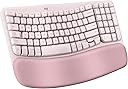
The Logitech Wave Keys Ergonomic Wireless Keyboard in Rose combines a compact, curved key design with a memory foam palm rest to promote natural hand positioning and reduce strain. Featuring Bluetooth and Logi Bolt Receiver connectivity, it supports Easy-Switch between up to three devices and offers up to 3 years of battery life. Crafted with recycled plastics and customizable via the Logi Options+ app, it’s a stylish, eco-conscious choice for professionals seeking ergonomic comfort and seamless productivity.


| ASIN | B0BTNZWYT5 |
| Antenna Location | Office |
| Best Sellers Rank | #9 in Computer Keyboards |
| Brand | Logitech |
| Built-In Media | Keyboard |
| Color | Rose |
| Compatible Devices | Personal Computer |
| Compatible Operating System Family | Windows |
| Connectivity Technology | Bluetooth |
| Customer Reviews | 4.2 out of 5 stars 3,033 Reviews |
| Global Trade Identification Number | 00097855191403 |
| Hand Orientation | Ambidextrous |
| Item Weight | 0.5 kg |
| Keyboard Description | Membrane |
| Keyboard Layout | QWERTY |
| Manufacturer | Logitech |
| Mfr Part Number | 920-012276 |
| Model Number | 920-012276 |
| Number of Batteries | 1 Lithium Polymer batteries required. (included) |
| Number of Keys | 99 |
| Operating System | Android, Mac OS, Windows |
| Other Special Features of the Product | wireless |
| Power Source | Battery Powered |
| Special Feature | wireless |
| UPC | 097855191403 |
| Warranty Description | 1 Year Limited Hardware Warranty |
I**R
Relieves my arm/wrist pain - highly recommend even if you don’t have pain yet
Love it! This is my second Wave Keys purchase - the first one I bought for work. I have mild arm/wrist issues after years of daily keyboard work, and purchased after recent PT for these issues. I quickly adapted to this keyboard. It is not as aggressive ergo-wise as some other keyboards, so it is an easier adjustment. it works beautifully! Quiet typing (the previous version of this keyboard was larger and loud, very 90s design), so this update was welcome! The palm rest is comfortable -not squishy if you are used to that but cushioning is enough for me. Battery life is very good, literally 8-12 months or longer between replacement. I have used rechargeable batteries with no problem. Price is reasonable although you frequently can find discounts. Pair it with a trackball or other ergo mouse. Also I like the color - an understated pale rosy pink.
N**Y
Beautiful, Comfortable, and Worth It — Just Keep It Clean
I absolutely love this keyboard! From the moment I started using it, the quality really stood out—it feels sturdy, well-made, and not cheap at all. The keys have a soft, satisfying feel with great response, and best of all, it’s quiet, which is perfect for working in shared or quiet spaces. The comfort and ergonomics are a huge plus. I can type for long periods without any strain, and everything feels very natural. The size is perfect too—not bulky, but still fully functional with all the keys I need. Speaking of functionality, it’s been reliable and super easy to use. I haven’t tried the Bluetooth connectivity since I always use the included USB receiver—and it works flawlessly for me every time. Now let’s talk about the pink color—because it’s beautiful, but it does need care. From what I read in other reviews, it can stain easily. The key is simple: clean it daily or every other day to keep it looking brand new (check out my video!). I’ve had mine since late December and it still looks like new thanks to this cleaning kit (it even includes a microfiber cloth): 🧼 Cleaning Kit: https://www.amazon.com/dp/B0CPGPFW5Q Directions: Using the cleaning solution included in this kit, lightly spray onto the microfiber cloth—avoid spraying directly onto the surface. Gently wipe in circular motions without applying heavy pressure. Finish by buffing dry with a clean, dry section of the microfiber cloth. Also, avoid using hand lotion or hand sanitizer before using the keyboard. If you’re willing to maintain it, this keyboard is 100% worth it. Stylish, comfortable, and functional—you’re welcome 😎
S**S
If you have wrist pain, buy this
If you work on a computer and type consistently buy this. I work at a computer and type a lot at my job, and my wrists were starting to feel it. I bought this along with the wave mouse and my wrists havent hurt since. It takes a little bit of getting used to for the shape of it, but if you confidently type on a normal computer (without looking at the keys constantly) you will pick it up quick. Its not too too different from a standard flat keyboard, but just enough different to require maybe a few days to get used to. The feel of typing on this is great. The keys are fairly quiet and the perfect amount of springy under your fingers. Ive had this for almost a year and havent needed to charge or change batteries. It comes with 1 dongle and can connect multiple pieces (I have the wave mouse and this keyboard on one). The wrist rest is comfortable and the material is resistant from getting gross (sometimes the cloth ones get gross with constant use). Overall best keyboard I own for work.
M**.
Good Keyboard, But More Compact Than the Logitech K350 Wave Keyboard
If you're replacing a Logitech K350 Wave keyboard like I was, here's the honest scoop after one week of daily work use. The Good: * Quiet, soft keys with a nice tactile feel — much gentler on the ears and fingers than standard keyboards. * Comfortable padded wrist rest that actually helps during long typing sessions. * Handy shortcut buttons for common apps. * Very lightweight and easy to move around. * Wireless connectivity works flawlessly so far. The Not-So-Good: It's noticeably more compact than the K350. The entire layout is smaller, which means keys are closer together. My muscle memory from the larger K350 caused frequent typos for the first several days. The arrow keys and number pad area feel especially cramped. This is a great modern ergonomic keyboard if you want something smaller and more portable than the old K350, or if you're coming from a standard full-size board. The wave shape still provides that comfortable hand position. Battery life is unknown after just a week, but Logitech's track record is excellent. I'm confident I'll adapt fully with more time — it's already growing on me. If size isn't a concern for you, this is an easy recommendation. But it is not the Logitech K350.
S**L
Skip the no-names. Go with a true ergonomic keyboard from a brand leader.
I'm new-school old-school. My favorite keyboard of all time was the Microsoft Natural keyboard from the mid-90s. I pounded that thing into the ground over nearly 20 years and it never gave me a problem. Then it died and I was on the hunt for another ergonomic keyboard. My new go-to - though it doesn't have the tactile, mechanical feedback that seems to be the rage these days - is the Logitech K860. This review isn't about that keyboard, but it tells you a little about my preference. Ergonomic curve, ergonomic split, and ideal for a touch-typist who typically does about 80wpm when he's flying. When I needed a new keyboard for a remote office on the west coast, I immediately thought about the K860. But the problem with the K860 is size. It's wide, like battleship wide, like it takes up waaay more space than I had on the desktop in the temporary space out west. I wanted something ergonomic, with a little more tactile feedback, but that would be slightly smaller to fit the narrower space on the desk out west. Enter the Logitech Wave Keys. What a revelation. Solid typing experience, with more bounce than the K860, and with just enough ergonomic dip and wave to keep fatigue at a minimum. Plus, it fits a narrower desk nicer than the K860. Also, Bluetooth was a must. I can't stand the 2.4g dongles. they always get lost. You won't lose a keyboard, but you might lose that tiny little dongle. The Bluetooth on this keyboard was 100% reliable over two weeks of work at the remote site. I was typing non-stop for almost 10 days and never once flashed back and said, "Gee, I wish this was my K860." In short, a pleasurable workhorse that fit the bill and gave me just the right layout to be productive without constantly fat-fingering the wrong keys.
M**B
Best keyboard I've owned
I have been using this keyboard for work and personal use for 2 days and am loving it so far. It's perfect for my needs and here's why: 1. It has all the functions I need and then some 2. It's just the right size. I was using a separate keyboard for my personal pc than for my work laptop and the other keyboard is much larger, not leaving much room for my mousepad in the desk tray. 3. It connects seamlessly to both, my laptop and desktop so I don't even have to use the other keyboard now! I wasn't looking for that but is a HUGE plus now that I have it setup. You can save 3 connected devices and switch between them using F1, F2, and F3. This was a huge help since I use the same monitor for both devices (I bought an hdmi splitter for that) but would have to use 2 different keyboard/mouse each time I switched. Now I only use 2 different mouses (mice?) which I'll probably upgrade as well. 4. The keys have good response without being noisy. You can hear them, which I prefer, and feel the feedback, also preferred, but you don't have to press hard and don't get the loud click-clack of old school keyboards. 5. It's comfortable to use, at least for me. The palm rest cushion is soft but seems like it will hold up for a long time. The major keys are reachable without lifting my palm and there was minimal adjustment from my much larger keyboard. 6. Very easy setup (I use Windows...can't speak to Mac, Google OS, etc.). As soon as I turned on the keyboard, it paired with my laptop. I had to do absolutely nothing for setup (see note below). The ONLY very small con I have is that it doesn't tell you anywhere in the packaged instructions that you can pair multiple devices. I knew this from another reviewer. Even then, I had to search how to do it, because it's not obvious on the Logitech website. Once I figured it out, it was very easy to do (have your laptop/pc/whatever search for bluetooth devices and hold down the button F1/2/3 button that you want to assign to that device. The device will then discover the keyboard and you're good to go). Other Notes: I would recommend this keyboard to anyone. It's pricier than other keyboards I've bought but I didn't add a con for that because I believe it's definitely worth it. You can change how the function keys work using their application and even setup "smart actions" which will do a bunch of stuff like opening your favorite apps and a bunch of other stuff. All of this stuff is configurable too, although, I haven't tried to use it yet. I just needed a keyboard so I didn't have to use my laptop keyboard but got many features I didn't even know I needed! Get this keyboard!
C**E
Must buy when discounted
This is an EXCELLENT keyboard... for $40..... At $70 this really feels like paying for branding rather than an ergonomic centric keyboard. This keyboard is well built and very compact for it being a full key layout which is a huge plus for small work spaces but really misses the mark on certain features. My biggest complaint is that there are cheaper keyboards with better ergo layouts that have better or equivalent features while also including a rechargeable battery. $70 is too much for a membrane keyboard that runs off AAA batteries. There are $30 keyboards that come with rechargeable batteries. The ergo layout is also a miniscule, if at all relevant, benefit. The "wave" in the middle of the keyboard feels very gimmicky and did not seem to help with fatigue during long work sessions. I'm aware of the "smart actions" that can be used which in theory is a nice feature but in practice is a software sided benefit and not a feature that justifies pushing the price of this keyboard to a hefty $70 without a rechargeable battery. Likewise, if you are in an office setting it is unlikely you'll be able to get the software installed onto locked down work computers anyway. TLDR: This is a well built excellent $40 keyboard being pushed to $70 for the Logitech branding. Get this on a sale or if you really love Logitech products. Otherwise, there are cheaper keyboards that have more or equivalent features, better ergonomics, and rechargeable batteries.
J**H
Perfect ergonomic upgrade for long work days, very comfortable memory foam
I bought this Logitech Wave Keys as a birthday gift for my dad to use at his accounting firm, and he absolutely loves it. Because he spends long days doing heavy data entry and typing up emails, I wanted to get him something that would help with wrist fatigue. The wave layout of the keys does a fantastic job of keeping your hands and forearms in a much more natural posture, and unlike some extreme ergonomic keyboards, the learning curve on this one is very minimal. The integrated memory foam palm rest is incredibly comfortable and provides excellent support. It also easily pairs with multiple devices, and the battery life is supposedly fantastic. If you spend a lot of time typing and want to upgrade your office setup, this is an excellent choice
P**R
Usb alıcısı yok
Merhaba klavyenin içinden usb alıcı çıkmadı göndermenizi rica ediyorum
M**R
Versatile & sturdy
Good quality, took some time to fet used to the key placement. Sturdy & compact
C**L
lindo
cómodo lindo color precioso
A**Z
Maravillosa
De lo mejor que he comprado. Vale la pena cada peso. Escribo mucho en la computadora y ya no me duelen las manos.
A**E
A well-designed and well-built keyboard that offers full functionality in a compact form factor
A well-designed keyboard, well-sized and highly functional. It feels well-designed and well-built. It was easy to connect to my PC and easy to manage via the Logi Options+ app, which I also use to manage a Logi mouse. Part of the magic of why it's easier on your hands is the compact nature of key placement, i.e., it offers all the functions of a full-size keyboard but in a smaller form factor. My hands are large (i.e., I wear size large gloves), and I find the keyboard perfectly well laid out; I don't feel crowded, but this might be an issue if your hands are even larger. A couple of items that I will need to get used to are the placement of the delete key and the arrow keys. I figure it'll take a couple of days, and I'll have the muscle memory, so no biggie. The keys are quiet and firm, yet easy to push. The wrist rest is nice, and I think it will help address the numbness issues I encounter during long work sessions. I'm using it on a sit-and-stand desk and will fine-tune the height to get things dialled in right, but in the meantime, it's working well. You can program a number of the function keys via the Logi Options+ app, something I've done with the mouse; this can be a huge time/keystroke saver for repetitive work. You can also enable the top row to be either F-keys or media keys, which means you don't have to push the function key along with the F-key that you want to use. In case you're wondering, no, this keyboard is not backlit. More importantly, it has raised lines on the home keys, and as a touch typist, this is all I need. I don't look at the keyboard, and don't need it to be backlit. To be honest, I would find it distracting and annoying. Yes, the Caps Lock key has a tiny light on it. Between writing for my PhD and my day job, I easily type for 10+ hours a day, hence why I opted for the ergonomic layout. Other than the minor items mentioned above, which I can adapt to, I think this will be an excellent keyboard to work with. This is an excellent keyboard and well worth the price. I would highly recommend it for someone who can touch-type, doesn't care about backlit keys, and wants the enhanced functionality of programmable keys. ***Update one week later Everything above is still true, but I found the keyboard to be too small for my hands; there were too many awkward finger twists, etc., and it was interrupting my typing/workflow. So, I returned it and got the larger Logi ERGO K860 For Business keyboard - love it!
Trustpilot
4 days ago
3 days ago