


Buy anything from 5,000+ international stores. One checkout price. No surprise fees. Join 2M+ shoppers on Desertcart.
Desertcart purchases this item on your behalf and handles shipping, customs, and support to Colombia.
🚀 Elevate your 3D workflow—navigate like a pro, design like a visionary!
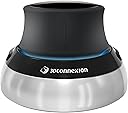
The 3Dconnexion SpaceMouse Compact is a wired 3D navigation device featuring patented 6DoF sensor technology, two programmable buttons, and a durable brushed stainless steel base. Designed for professional CAD and 3D graphics users, it offers precise control in a compact form factor, backed by a 3-year warranty. Compatible with major CAD software and even some non-CAD applications, it enhances productivity by adding intuitive navigation capabilities alongside your regular mouse.







| ASIN | B079Z3T2XC |
| Antenna Location | Office |
| Best Sellers Rank | 10,182 in Computers & Accessories ( See Top 100 in Computers & Accessories ) 102 in Computer Keyboard & Mouse Combos |
| Box Contents | 3Dconnexion SpaceMouse Compact |
| Brand | 3Dconnexion |
| Brand Name | 3Dconnexion |
| Button Quantity | 2 |
| Colour | black |
| Compatible Amazon Tablet Models | Amazon Fire 7 9th Generation |
| Compatible Devices | PC |
| Compatible Operating System Family | Windows |
| Compatible Tablet Computer Models | AAUB P30 |
| Compatible devices | PC |
| Connectivity Technology | USB |
| Connectivity technology | USB |
| Country of Origin | Macau |
| Customer Reviews | 4.6 out of 5 stars 1,066 Reviews |
| EU Spare Part Availability Duration | 3 Years |
| Enclosure Material | Stainless Steel |
| External Testing Certification | Não aplicável |
| Global Trade Identification Number | 04260016340880 |
| Hand Orientation | Ambidextrous |
| Item Type Name | Spacemause for advanced 3D navigation |
| Item Weight | 0.48 Kilograms |
| Keyboard Description | German keyboard layout |
| Keyboard Layout | QWERTY |
| Keyboard description | German keyboard layout |
| Language | English, English, English |
| Manufacturer | 3DConnexion |
| Manufacturer Part Number | 3DX-700059 |
| Minimum Required Operating System Version | Windows 7 |
| Model Name | 3Dconnexion |
| Model Number | 3DX-700059 |
| Number of Keys | 2 |
| Power Source | Battery Powered |
| Processor Count | 1 |
| Product Features | Programmable Buttons |
| Product Warranty | 2 Year Manufacturer Guarantee |
| Recommended uses for product | Office |
| Special feature | Programmable Buttons |
| Style Name | Compact |
| Switch Type | Mechanical |
| Theme | Professional Engineering & Design |
| Unit Count | 1.0 count |
M**.
Surprisingly good!
Thought I'd give this a try as I'm using Fusion 360 quite a bit now, I was going to send it back if I didn't like it. This actually exceeded my expectations in how useful it is. I will be keeping it. It only requires very subtle movements and learning to do one movement at a time is a little bit tricky at first, but it comes with training guide and some demo games which are very useful (wish there were more though as they were fun!). I was pushing it round my desk at first as I was being too forceful, but it's fine once you learn to tone things down a bit. Was surprised that it's supported in non-CAD packages such as Word where you can navigate the document using it. Also it allows you to scroll a browser window. It works in OpenSCAD and Prusa Slicer too. It definitely doesn't replace a mouse though, it adds navigation capabilities in addition to the mouse rather than acting as a replacement. Not really using the buttons yet, but they do seem to be very configurable (I'm using Windows). Had a glaring blue LED in it, but fortunately there's an option to turn it off in the advanced settings. It does feel good quality, but think it could be £40 cheaper really. I don't suppose they sell many because of the niche market. I'd definitely recommend this if you are a heavy CAD / 3D Graphics user.
A**.
Excellent
Very good and functional.... absolutely mesmerized.
M**R
Perfect!!
Perfect!!
A**R
Makes 3D CAD manipulation way easier
Works perfectly on a MacBook with Autodesk fusion. Makes panning/rotating/zooming in CAD so much easier. Not a replacement for a regular mouse, you need this as well as a regular mouse. Very easy to set up. Note, USB A plug so you may need a USB A to C converter.
D**S
Works
Works with the cad programs I've got, on windows and Mac. Drivers were a bit annoying on the Mac, and it's not as easy or intuitive to use as the adverts suggested, but I'm getting used to it steadily. Feels solidly built.
J**T
better than expected, now can we have these at work?
pricey but worth it if you spend a lot of time working in CAD, we don't have this at work so I realy miss it in my job, but at the asking price management don't see the benefit, so I burn time getting the correct positions while working, nice to have, feels far better than keyboard shortcuts, damn cheapskate managers.
G**Y
Solid and sharp
Control on this 3Dconnexion Compact spacemouse is superb. If the larger control pad isn't your thing then these are a very good alternative
R**N
Essential for 3D CAD
I use the big brother of the Compact at work, and with the imminent lockdown and WFH, I decided to get the rather more desktop-friendly Compact for home. It's very well made and finished, with a nice grippy base that doesn't slide about at all. The flyout buttons take a bit of getting used to compared to physical buttons; but still very flexible. If, like me you're working Remote Desktop over a VPN, you CAN get this to control a remote PC running the CAD package. Search for and download VirtualHere which allows (for free) one non-standard USB device to connect to and control a remote machine.
C**N
Wow!
Helt fantastisk! Vande mig väldigt snabbt och kan inte klara mig utan den längre. Den är helt enkelt ett måste när man använder CAD.
C**E
top du top
super produit très facile a configurer.
V**T
Great addition for CAD work
Came early Great quality
C**R
Muito útil para modelagem 3D
Perfeito para uso no meu modelador 3D preferido (Plasticity).
H**H
Einfach Genial, Präzise, ordentlich Verarbeitet, tolle Materialien, keine Treiberproblme
Ich hab die 3D-Maus hauptsächlich für Fusion 360 gekauft. Vergleichsmodelle habe ich nicht getestet aber meine Erwartungen sind vollends erfüllt. In der ersten Woche der Nutzung war ich etwas mit dem Teil überfordert. Nach Nutzung des Trainingsprogramms und der richtigen Handhabung funktioniert die Navigation durch Fusion 360 völlig problemlos. Pro: - sehr präzise auch auf hoher Geschwindigkeit - sehr feinfühlig - liegt gut in der Hand - schwerer und rutschfester Sockel - ausreichend langes Kabel, qualitativ Hochwertiger USB-Stecker - 2 Buttons haben einen eindeutigen Klickpunkt und sind gut fühlbar - Komfortable zeitsparende Navigation in 3D-Programmen Neutral: - eine gepolsterte Handballenauflage wäre toll (ohne Wertung) - Seriennummer ist am Kabel mit einem Anhänger angebracht. Stört etwas den wertigen Gesamteindruck. Contra: - eigentlich würde ich sagen der Preis, jedoch muss man beachten, wie außerordentlich gut das Gerät verarbeitet und auch zu bedienen ist. Daher habe ich kein wirkliches Manko. Abschließend kann ich die 3DConnexion SpaceMouse Compact nur empfehlen. Sie reagiert präzise und gleichzeitig in Echtzeit und flüssig. Die Software läuft problemlos auf Windows7 und kooperiert prima mit einigen Programmen. Nicht einmal der Preis kann für mich den Gesamteindruck derart trüben, dass ich keine 5 Sterne geben könnte. Ich hoffe die Haltbarkeit spiegelt sich im Preis wieder. Ausgegangen davon, dass ich die Maus wenigstens 5 Jahre nutzen kann, ist sie wiederum nicht zu teuer. Uneingeschränkte Kaufempfehlung für lernwillige 3D-Konstrukteure.
Trustpilot
3 weeks ago
3 weeks ago