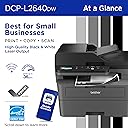
🚀 Print smarter, faster, and greener — because your office deserves the best.
The Brother DCP-L2640DW is a compact, monochrome 3-in-1 laser printer designed for small businesses and home offices. It delivers professional-quality black & white prints at speeds up to 36 ppm, features a 50-page auto document feeder, and supports automatic duplex printing to reduce paper waste. With versatile connectivity options including dual-band wireless, Ethernet, and USB, plus mobile app control, it streamlines document management. The printer includes a toner subscription trial for hassle-free supply replenishment and is ENERGY STAR® certified for eco-friendly operation.


| ASIN | B0CPLFTPCV |
| Additional Printer functions | Copy, Scan |
| Best Sellers Rank | #264 in Office Products ( See Top 100 in Office Products ) #1 in Laser Computer Printers |
| Color Depth | 1 bpp |
| Compatible Cartridge | TN830, TN830XL |
| Compatible Devices | Laptops, PC, Smartphones, Tablets, iPhone |
| Control Method | App |
| Controller Type | Android |
| Customer Reviews | 4.3 4.3 out of 5 stars (2,967) |
| Date First Available | August 2, 2023 |
| Dual-sided printing | Yes |
| Duplex | Automatic |
| Hardware Interface | Ethernet, USB |
| Included Components | AC Power Cord, Drum Unit, Toner Cartridges |
| Initial page print time | 8.5 Seconds |
| Ink Color | Black |
| Item Weight | 25 pounds |
| Item model number | DCPL2640DW |
| Manufacturer | Brother |
| Max Copy Speed (Black & White) | 36 ppm |
| Max Input Sheet Capacity | 250 |
| Max copy resolution black-white | 1200 x 1200 dots_per_inch |
| Maximum Black and White Print Resolution | 1200 x 1200 Dots Per Inch |
| Maximum Media Size | 8.5 x 14 inch |
| Maximum copies per run | 50 |
| Memory Storage Capacity | 256 MB |
| Model Series | DCP-L2640 |
| Number of Trays | 1 |
| Number of USB 2 Ports | 1 |
| Output sheet capacity | 120.0 |
| Power Consumption | 470 Watts |
| Print media | Envelopes, Labels, Paper (plain) |
| Printer Ink Type | Toner |
| Processor Count | 1 |
| Product Dimensions | 15.7 x 16.1 x 12.5 inches |
| Scanner Type | Flatbed, Sheetfed |
| Series Number | 2640 |
| Sheet Size | Up to 8.5 x 14 |
| Specific Uses For Product | Home, Office |
| Supported Media Sizes | Legal (8.5 x 14 inches) |
| Total Ethernet Ports | 1 |
| Total USB Ports | 1 |
| UPC | 012502672685 |
| Warranty Type | Limited |
| Wattage | 10.5 watts |
H**A
Excellent Laser Printer – Fast, Sharp & Reliable!
I recently purchased this laser printer and I’m honestly very impressed. The setup was quick and straightforward, and I was able to connect it to Wi-Fi within minutes. The printing speed is excellent — pages come out very fast, and the text quality is extremely sharp and clear. It’s perfect for printing documents, forms, and school papers. I also love that it’s much quieter than I expected for a laser printer. Another big plus is that the ink (toner) lasts longer compared to inkjet printers, which saves money in the long run. The paper tray capacity is good, and it doesn’t jam easily. So far, I haven’t experienced any issues. If you’re looking for a reliable, fast, and professional-quality printer for home or a small office, I definitely recommend this one.
P**P
Works Great So Far! Reasonably Fast & Clear Printing - Convenient Wireless Connectivity
I have used Brother laser printers for years. I decided on this particular model, mostly because it offered just exactly what my small business and home office needs were. I have no use for a fax machine any more, so this printer and scanner was really all I wanted, and it seemed like a pretty reasonable value. I have tested it several times with various paper media. I print normal text documents, some with graphics, envelopes, and voucher checks regularly. This printer has handled everything really well so far. There was a bit of a learning curve with some odd sized envelopes, but I'm pretty sure my struggle was with the software I was using, not the printer. I did experience a couple of situations where the machine said there was a paper jam when using the front tray to print an envelope, but it was easily resolved. The quality and clarity of the print seems great to me. You can adjust the print density, toner ecology, etc. pretty easily. The machine itself has a heavy duty and durable feel to it, and I'm happy with how it has been working so far for me. WIRELESS CONNECTIVITY: I was reading other people's comments about having issues with this. I am going to share what I found worked best for me, and maybe that will be helpful for others. Since I have owned and used several Brother printers in the past, I've learned that getting the machine on my wireless network is easiest by simply using the machine's console push buttons. I know in the literature it says it should be discoverable by going through the steps outlined in the instructions after downloading their software. However, I've never had consistent luck with that process. I still download the software to make sure I have the right drivers and features loaded, but when it comes to getting the printer on my network, I just use the machine's console to find my router and then type in the password. It's a tiny bit tedious typing the password using the console buttons, but I've never had it not work for me. Honestly, seconds after doing that, the wireless printer was discoverable and available to all of my devices. I was able to print from my CPU, laptop, phone, tablet, etc. without any issues. I know that's not the only way of setting up the wireless functionality on these printers, but it's what I've learned causes the least amount of stress and frustration. I hope that's helpful. They provide details on how to accomplish this method in the accompanying literature that comes with the printer. At this point, I have no reason not to give this five stars. If something shoud change down the road, I'll be sure to update this review.
G**Y
Capable Mult-Function Laser Printer + Copy/Scan funtionality !
Purchased this model Refurbished ! Product installation was easy and simple and it was updated immediately to it's newest Firmware from Brother! It does have a rather small LCD type display and it's many functions are from Menus, but easily accessible. I was surprised that it appears to be Wireless N equipped and thought it would be WiFi 6(E) or higher, yet it retains Wireless N hardware. I would assume this might favor compatibility with Customers with older WiFi Networks. However, it easily connected to my WiFi 6E Mesh system and works very well. Brother has a newer APP {Mobile C} that appears to be an upgrade of the legacy iPrint&Scan that I have used with my older Brother Printers that still function quite well. Thus, a nice lower end MultiFunction Laser that will meet most of Home Office needs!
C**Y
I'm Satisfied.
Good printer. Setup wasn't too difficult. Installing the toner cartridge and drum assembly into the printer was easy. Wi-Fi setup was ok. I choose to set up my connection up without using a cable. I used the control panel on the printer itself. On the quick set up guide, step 8 gives good instruction on how to set the Wi-Fi up using the LCD screen, but one key step they left out is that after you enter you password (Network ID), you have to press AND hold the "OK" button to get it to accept. THEN, you'll see the accept message pop up. This maybe be a "duh" moment for some, but it took a few minutes for me to figure that out. After I did, the Wi-Fi connected instantly. Another issue I ran into was entering the password to download software on my computer. The password is located on the back of the printer. So, I would recommend maybe writing the password down or snapping a picture of it w/ your smart phone prior placing your printer to where it's going to go. Otherwise, once you get the printer situated, you may have to do some moving around and adjusting the printer (like I did) to get the password from behind the printer. After writing the password down, I entered it and the dialog box stated the password was incorrect. I found that the letter "O" I entered was actually the number "0". So, if you run into an issue where the password is incorrect, you may have input the wrong character. Also noteworthy, when entering the password, there is no feature to you reveal what you're inputting. When entering the password, it just shows black dots for privacy. This may be cumbersome for some I can imagine. Other than that, the printer works great. It is kind of loud, but I can deal with that. It prints fast. The scan feature works well. The instruction manual does not come with the printer, it can be found online. The manual is massive (like 600+ pages). But on the Brother website they have it in sections to where you can locate whatever it is you're trying to do. This is my first day using it, but as of now I am satisfied and I anticipate getting many years of use out of this printer. From reviewing the manual, it appears to do more than I thought. I think it's worth the purchase.
D**.
Excelente!! Recomendo a todos, não irão se arrepender!!isso eu garanto, vale a pena.
J**.
So happy to move from ink jet to laser. Will never turn back. Super quality. Highly recommend
F**E
I am in my 70s so definitely not a techie. This printer was a cinch to install and I am very please with it. The print pages are nice and crisp. It is easy to make copies and I even used the scan! All without problems. If like me you are somewhat challenged when it comes to technology, this one is for you.
M**N
I purchased the Brother DCP-L2640DW All-in-One Printer (Printer/Scanner/Copier) and overall it has been an excellent experience. The build quality is solid and feels reliable right out of the box. Print quality is sharp and professional, scanning is clear, and copy results are very impressive. It truly offers great value for money, especially for home offices or small business use. This printer feels dependable and handles regular workloads without any issues. Wireless functionality is available, which is convenient, but unfortunately the Brother mobile app is a downside. The app feels heavy, extremely laggy, and slow to respond, which affects usability. Because of this, I prefer using a wired connection, which works perfectly and is very stable. Despite the app limitations, the printer itself performs exceptionally well and delivers consistent results. Overall, the product itself deserves a solid 5-star rating for performance, quality, and reliability.
K**A
Show
Trustpilot
1 month ago
1 week ago