




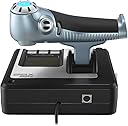


Logitech X52 Flight Control System Joystick, 945-000006 (Joystick)
Product ID: 585360010
🎮Ergonomic Design
🔄Customizable Buttons
✈️Precision Control
🛩️ Take Control of the Skies!
The Logitech X52 Flight Control System Joystick is a high-performance joystick designed for flight simulation enthusiasts, featuring customizable controls, an ergonomic design for comfort, and compatibility with major flight simulators.
| ASIN | B01M9EWQ2W |
| Additional Features | Ergonomic, Wireless |
| Brand Name | Logitech G |
| Button Quantity | 23 |
| Color | Black/Silver |
| Compatible Devices | PC |
| Connectivity Technology | USB |
| Controller Type | Joystick |
| Customer Reviews | 4.3 4.3 out of 5 stars (1,146) |
| Global Trade Identification Number | 05099206069923 |
| Hardware Platform | Desktop |
| Item Dimensions | 6.69 x 6.69 x 10.94 inches |
| Item Weight | 1.76 Kilograms |
| Package Quantity | 1 |
X**X
Como pone en el titulo de esta opinión, es la primera vez que toco un joystick en este caso el x52 de Logitech y mi opinión no podría compararla con otros. Como primera vez me ha parecido un joystick fantástico, con una respuesta bastante buena, con poco que lo muevas ya reacciona, solo lo he jugado en el DCS World, y en un futuro al Microsoft Flight Simulator 2020. Antes de nada hay que instalar los drivers obviamente que se encuentran en la pagina de Logitech de manera muy fácil, reiniciar el ordenador, conectarlo y ya esta listo para jugar, en el DCS al menos todos los controles de dirección vienen por defecto y no tienes que tocar nada y solo tienes que configurar los botones extra que trae el joystick para las diferentes funciones del avión. Alguna pega que le puedo poner, la palanca de gases me parece un poco dura, pese a tener regulador de dureza por mucho que lo cambie no noto la diferencia. Otra mas, es que la rueda de los 3 modos posibles que trae el joystick lo tengo configurado para los modos Aire/Aire y Aire/Tierra y Navegación, pues cuando desconecto la palanca y la vuelvo a conectar se desconfigura y no lo detecta como botón el propio juego, y por ultimo, el precio me parece un pelín pasado si estuviera a 120-130 seria perfecto, aun así es por sacarle alguna pega mas. En resumen, me parece una palanca muy buena, con muchos botones configurables al igual que joysticks que son muy útiles.
O**P
Vous voulez prendre de la hauteur ? alors ce joystick est fait pour vous ! Je passe des heures sur les simulateurs de vol avec ce joystick !
M**I
يتحرك ويشتغل بس الازرار الي على الجويستك ماتضغط ما انصح فيه ابد
E**Z
Imac ile sorunsuz kurulum ve çalışma.
F**S
Having built a custom rig this last month, what was required as a decent controller to use for my sim games and this was the choice I went with. I have previously owned the G920 steering wheel & pedals, but found (for my smallish home anyway) that they simply took up too much space. This I use for my various flying games, for which ideal, and the odd driving game (euro truck sim 2, forza racing game). I found the stick extremely responsive and accurate/precise. The number of buttons which can be customized to do anything in these sorts of games is great, there are several axis controls which is great for any simulator where control surfaces / engines aren't just an "on/off" thing: Joystick X/Y (and Z - twist motion/rudder etc) Throttle lever 1 slider on throttle lever (where left thumb would sit - on the right handed version anyway, which this is) 1 dial on the top of the throttle lever (where your index finger would rest) the throttle and joystick setups are obvious, but in say euro truck, i dont use joystick forward/back for throttle/brake - i use the throttle lever for 'gas pedal' and the thumb slider for 'brake pedal'. Before I got trackIR - i used the twisty joystick to "turn my head" left/right to check for traffic etc. again - you can setup any axis/button to do any command in any game that has a controller/setup page, which 99.9% of games do. I like that the main trigger has 2 stages, good for firing missiles etc, as a part pull you may setup to try get a radar lock on your enemy, and once you hear the buzzer confirmation, you pull all the way, the 2 steps are quite far apart, certainly far enough that you can't accidentally pull trigger all the way, when you only intended for the initial half-pull. A good idea really, as there is every chance you are ducking and weaving and diving and you don't want to waste a precious limited resource in such a situation due to a dodgy trigger!!! I used windows 10 and on the machine I made, once I plugged this in, it was fully working within 10 seconds at the most. I didn't bother installing the DVD software, but i'm sure there may be some settings or something on there, but it's irrelevant for most uses as the thing just works. There is no force feedback of any kind on this model, so be aware that if you want the stick to shake, or go stiff when flying at higher speeds, you need something else. If you dont care for that, but want a high quality, nice to feel, comfortable and above all precise and accurate controller for your PC that's as easy to setup as plugging in a USB cable and waiting 5 seconds for the driver to autoload - then this won't let you down. I saw a review by someone saying the throttle was "too stiff" - there is an adjustment to loosen the throttle, but if he had already loosened it all the way, I can only guess either he was doing it wrong, or had a faulty model, because mine only needed a little bit of loosening to get the throttle to how I like it, and I had plenty of loosening to go.
Trustpilot
1 week ago
4 days ago