We remain fully operational. Our teams are working around the clock to ensure your deliveries continue safely.

DOWNLOAD THE APP


Customer Services
Copyright © 2025 Desertcart Holdings Limited
DOWNLOAD THE APP


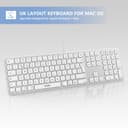


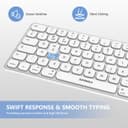


💻 Light up your Mac setup with precision and style!
The Seenda JP300 Backlit Wired Keyboard is a Mac-optimized, full-size keyboard featuring a white adjustable backlight, quiet scissor-switch keys, and a versatile 2-in-1 USB A and Type C connector. Designed for professionals who demand reliability and comfort, it offers ergonomic tilting feet and a numeric keypad, making it ideal for both work and entertainment on any Mac device.


| ASIN | B0C8TRNBKD |
| Antenna Location | Wired Backlit Keyboard for Mac / iMac |
| Best Sellers Rank | 42,130 in Computers & Accessories ( See Top 100 in Computers & Accessories ) 628 in Keyboards (Computers & Accessories) |
| Brand | Seenda |
| Brand Name | Seenda |
| Button Quantity | 19 |
| Colour | White and Silver |
| Compatible Devices | iMac / MacBook Pro / Air / Mini |
| Compatible devices | iMac / MacBook Pro / Air / Mini |
| Connectivity Technology | USB A + Type C |
| Connectivity technology | USB A + Type C |
| Customer Reviews | 4.2 out of 5 stars 208 Reviews |
| Enclosure Material | Plastic |
| Hand Orientation | Ambidextrous |
| Item Dimensions L x W x H | 43.5L x 12.1W x 2.2H centimetres |
| Keyboard Backlighting Color Support | Single Color |
| Keyboard Description | Wired Keyboard for Mac with Backlight |
| Keyboard Layout | QWERTY |
| Keyboard description | Wired Keyboard for Mac with Backlight |
| Manufacturer | seenda |
| Model Name | JP300 |
| Model Number | JP300 |
| Number of Keys | 111 |
| Number of Sections | 1 |
| Power Source | Corded Electric |
| Product Features | Backlit, Hotkeys and Media Keys |
| Product Warranty | 2 Year Warranty Against Manufacturer Defects |
| Recommended uses for product | Wired Backlit Keyboard for Mac / iMac |
| Special feature | Backlit, Hotkeys and Media Keys |
| Style Name | Modern |
| Switch Type | Scissor-switch |
| Theme | Ergonomic |
| Unit Count | 1.0 count |
| Water Resistance Level | Not Water Resistant |
M**Y
Perfect choice of keyboard for Mac computers!
I LOVE this wired keyboard, and much prefer it to an Apple keyboard. And it’s way better than other keyboards I tried which were not fully optimised for a Mac computer. (Using it with Mac mini but recommend highly for desktop Macs as well.) It worked as soon as I plugged it in. The tilted angle and key movement makes fast typing really easy and comfortable. It has all the usual function and volume keys and more. The screenshot, cut, copy and paste keys are a bonus. The backlighting (3 tones) is great for use in evenings. The ‘caps lock’ key lights up green when activated. It is quiet to use. I got this keyboard after returning the wireless version (same brand and model) which had some intermittent connectivity issues affecting some keys. (Mentioned in several other reviews for the wireless one as it happens). Pleased to say I have had none of those issues with this wired one. So If you are unsure whether to choose wireless or wired, go for this wired one. I wish I had read the reviews for the wireless before I bought it as this is so much better. Glad I was able to return it for refund and buy this one instead.
M**G
Lovely keyboard, clear and great for accessibility
I purchased this keyboard for someone who needed a clear, no-fuss, easy-to-see keyboard for use with a Mac. When you have a visual impairment, however minor, clarity is important and this keyboard is clear and easy to read. The bonus is the backlighting, with a dedicated key to set the brightness level. It is a wired keyboard, so you don't have the flexibility of using it anywhere but I purchased this to be used with a Mac Mini and it's perfect for the job. It's also full-size, with a separate dedicated number pad but in my opinion this helps with usability when space is not at a premium. It's not a compact keyboard but it's not designed to be. If you're looking for a Mac keyboard with lovely clear presentation at an affordable price, take this one for a spin. Accesible keyboards, especially for Macs, can cost a fortune so try this one first and see how you get on. You could save yourself a fortune.
A**R
Fine but doesn't last
Smart keyboard looks and feels more expensive than it is. However my "F" key has been temperamental for a few months now and is getting significantly worse to the point where I'm to have to buy another keyboard. So in reality the product hasn't lasted me a year as I purchased may 2024 and already will need to replace soon. Update: I have boosted my rating from 3 to 4 stars. Shortly after my review the company contacted me and offered a refund. I still need to source a new keyboard but can't fault the customer service.
N**E
Imagine a detached Macbook keyboard and you've got the picture.
I have a Mac Mini, and like to work with as little room light as possible in the evenings which has led to desk lights being switched on and off every time I need to check something on the KB. This keyboard is exactly what I was looking for. Lightweight soft touch keys set into a metal frame, it has three levels of light behind the keys (plus an off position). If, like me you are a fairly fast touch typist, the keys need only the lightest of touches to work effectively and the added Mac functionality makes for a seamless integration into your workflow. Command, Option, volume and lighting keys are all the same. None of the loss of function that comes with trying to adapt a Windows keyboard to your Mac. On initial setup, the Mac asks you to press one key, then it configures this keyboard for you. If you have a Mac desktop of any kind, it's as perfect fit, and if you are a Macbook user thinking of buying a large monitor and using your plaptop in clamshell mode on your desktop, or an iPad user needing an external keyboard, it's exactly what you are looking for. Looks like a Mac keyboard, lights up like a Mac keyboard and has all the functionality of a Mac keyboard, for a quarter of the price. All in all great value for money. P.S. This Keyboard has a USB connector. To use this as a dedicated keyboard if you have a pre 2018 iPad you will need a female USB to lightning adapter, and post 2018 you will need a female USB to USB C adapter. Both about £5 here on Amazon. Hope this helped!
P**9
Good keyboard, great value
Compact keyboard which has 3 levels of backlight illumination. All white. Quiet type, really responsive, full width but no excess material outside of keys. Feels good to use. A couple of keys are placed irregularly but that is for me to get used to. Not a negative. Cord has usb c or usb a connection and good solid connection. Can be used for Mac or windows machine and highlights the purpose on the relevant keys. Really nice keyboard and at this price point I can’t fault it. Recommended
D**Y
Highly recommended for Mac users!
I recently purchased the Seenda Wired Backlit Keyboard for my Mac. This full-size slim keyboard comes with both USB A and Type C connectors, making it perfect for my MacBook Pro and MacBook Air.The backlit keys are fantastic for low-light environments, ensuring I can work efficiently any time of day.The keys are responsive and comfortable, providing a pleasant typing experience .Highly recommended for Mac users!
W**D
At first Amazing and then 4 weeks later
Unpacking this I was like wow, the quality is really decent. The 3 illumination settings are awesome. Very responsive, until. Today is just wont turn on, totally unresponsive, no lights, no nothing. Save your money, it’s cheap for a reason
B**B
It's perfect except for one hugely annoying flaw
I got this keyboard, because my room lighting doesn't always light the keyboard up, so the leds in this are perfect. It's great to type on, and generally feels like a quality item. Except!! They put a power button right next to the delete button, so I frequently hit that by mistake and a couple of times have turned off my laptop when I really don't want to (I'm usually saved by the "Are you sure you want to turn your computer off" message). I'm actually tempted to hack into the keyboard to remove this key. It's super annoying, and turns a 5 star review into a 3. Update: The light for caps lock has died. The key is working ok, so it's an annoyance but not worth sending back. Update 2 - so the light stated working again,... BUT the annoyance with the power button's location is too much. I need a new keyboard. It's super annoying and even shut down the computer more and more... and even while I was on a chat with Apple about something else and they marked my issue as solved because I left. grrrrr... stupid bit of design on another wise great keyboard. lost another star.... though I might have found a solution by installing a 3rd party app that remaps the power key so that it just does nothing.... lets' see.
Trustpilot
2 days ago
3 weeks ago