


🚀 Cut the cords, not the quality—wireless HDMI that keeps you connected and ahead of the curve!
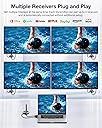
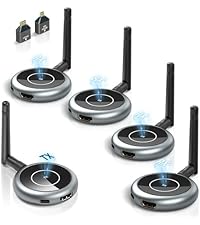
The DARLYOR Wireless HDMI Transmitter and Receiver kit delivers hassle-free, high-definition wireless video streaming up to 165 feet. Supporting 4K input and outputting smooth 1080P@60Hz, it connects one transmitter to up to six receivers simultaneously. Compatible with a wide range of devices and featuring plug-and-play setup, it’s ideal for professional presentations, home theaters, and multi-screen environments where seamless, lag-free streaming is a must.









| ASIN | B0CDB74DSY |
| Best Sellers Rank | #429,828 in Electronics ( See Top 100 in Electronics ) #1,009 in Streaming Media Players |
| Brand | DARLYOR |
| Color | Grey |
| Compatible Devices | Television, Laptop, Personal Computer, Tablet, Smartphone |
| Customer Reviews | 3.8 out of 5 stars 32 Reviews |
| Form Factor | TV Box |
| Manufacturer | DARLYOR |
| Model Name | G70 |
| Model Number | G70 |
| Video Codec | H.264, H.265/HEVC |
| Video Output Resolution | 1080p |
S**R
Easy to use. Worked well
I bought this to use in 300 people hall for 2 ceiling mounted Epson projectors. The projectors were mounted about 25-30 feet high from the floor. I connected the transmitter to my Acer Swift laptop HDMI and the USB-A. The USB-A was able to provide enough power for the HDMI transmitter, so no separate power adapter was needed. It took maybe 5 seconds to startup for the laptop to recognize the transmitter. Then I started the receiver connected to the projector. The HDMI receivers came with the transmitter was already synced with the transmitter. So after maybe 20 seconds, it was connected. I did not need to do any configuration or sync between the transmitter and the included receiver. That made it easy to use and no configuration. Thus I gave Easy to use - 5 stars for the package of 1 transmitter + 1 receiver. I bought a second receivers for the second projector. The 2nd receiver was not sync with the transmitter by default. Thus I had to configure it. The setup was not difficult. There was instruction manual came with the package. The sync process involved pressing the button on both the transmitter and receiver to get them into the sync mode. It did take a few tries for me to sync. A tip is to sync the receivers first before installing the Receiver to your destination device. I bought a 3rd Receiver for a portable monitor and went through the same sync process. For the technical savvy, the device use its own WiFi to perform the transmission between the receiver and transmitter. You can connect your cell phone WiFi to the device WiFi for viewing the video, according to the menu. But I did not test it. Cons One minor issue I found over multiple use was that if I turned on the Receiver before the Transmitter, sometimes, it would not sync. I would then turn off everything again and turn Transmitter ON first, then Receiver. I used the device for PowerPoint presentation. It played good. I used it for YouTube videos. It did good. I also played some premier League soccer videos, it was ok. This is not for gaming.
J**D
Works Well.. BUT
Using in condo unit... Would not transmit well from one room to another even though only about 20 feet
B**S
Projects well, but a little large for screen
Overall, this item works well and super great quality for projection sake on the tv. It was easy to hook up and project from a MacBook! There was no lag in video play and the sound quality was amazing. The cons I have are: 1. A ton of pieces to take on a trip for wireless play. which I travel a lot, so for this hook up it’s not ideal. I would say this is a more hook up and leave it attached to the tv and use when you need to. 2. The screen play was a little large for the tv screen from the projection of the computer screen even with adjusting settings. So you wouldn’t exit out of the top left corner of your web browser via seeing through the tv and it will cut of edges of things you watch/play.
K**Y
Doesn't work.
Couldn't get it to work and customer support non-existent.
U**H
Best way to transmit and receive video!
I got this because my husband needed a way to display a slideshow on a smart tv for his business. we had to plug in a usb stick but couldn’t get video. now we just transmit from his laptop, he made a slideshow on the pc. love this little device it comes in handy!
C**D
Gets hot to fast!
Got 3 receivers for my PowerPoints at church. After 3 months of use, one of the units will longer stay connected for any length of time. They have to stay connected for about 3 hrs at a time. they seem to over heat to quickly.
R**O
100% Recommend
Works exactly as described. Trouble free set up. Great communication.
J**R
IT WORKS AS INDICATED!!
Absolutely does the job for our church!
Trustpilot
1 week ago
3 weeks ago