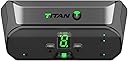
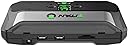
🎯 Dominate Every Platform with One Game-Changing Adapter
The Titan Two is a cutting-edge, fully programmable controller converter that supports PlayStation, Xbox, Nintendo Switch, PC, and Android devices. Powered by a 66MHz 32-bit RISC micro-controller and equipped with multiple USB ports, it enables zero-latency gameplay and extensive customization through downloadable Gamepacks and scripts. Compatible with virtually any HID device, it replaces dozens of adapters with one sleek, future-proof solution—perfect for competitive gamers seeking ultimate control and versatility.
| ASIN | B078J2HQ9D |
| Best Sellers Rank | #91,527 in Video Games ( See Top 100 in Video Games ) #3,674 in PlayStation 3 Games, Consoles & Accessories #4,470 in Xbox 360 Games, Consoles & Accessories #7,558 in Xbox One Games, Consoles & Accessories |
| Brand | Collective Minds |
| Color | black |
| Compatible Devices | Gaming Console, Computer, Keyboard, Mouse, Fight-Stick, Joystick |
| Connector Type | Micro USB |
| Customer Reviews | 3.8 out of 5 stars 544 Reviews |
| Item Dimensions | 4.33 x 9.84 x 1.38 inches |
| Item Height | 1.38 inches |
| Item Weight | 0.35 Pounds |
| Item dimensions L x W x H | 4.33 x 9.84 x 1.38 inches |
| Manufacturer | TITAN |
| Model Number | CT-TITAN2 |
| Number of Ports | 4 |
| Package Quantity | 1 |
| Power Plug Type | No Plug |
| Specific Uses For Product | Gaming |
| Unit Count | 1.0 Count |
P**E
Works great after you figure it out—read this review
Great product, works exactly as advertised. I use my titan two to play with a DS4 controller on my PC. While setting it up, I couldn’t find any guidance online to specifically use it with a DS4 on PC. However, I searches “titan two setup instructions” and found a nice guide on consoletuner.com (the manufacturer’s website). It gave me almost all the information I needed. The one part I got stuck on, however, was configuring the input/output types and the polling rate in the GTuner software. I was trying to set them on the “Device Monitor” tab. This resulted in my Titan giving me an “AU” (Authenticator) error. It turned out I actually had to set those parameters on the “Device Configuration” tab (found in the lower right of the screen). The consoletuner instructions had information on what values to use for my application. There is a large community of people that use the titan two. I found tons of scripts for free in the Gtuner app. I primarily play Warzone, and I found plenty of scripts/youtube videos to help set them up. Once I figured out the initial setup, the rest was easy. Depending on how complex you want to get with your scripts, you can spend hours or minutes tuning it. One downside—unless you buy the expansion pack, you can only use 3 scripts. I really wish the expansion pack was included, and I wish these were stocked better so the price wasn’t so high above msrp. One last thing I would like to add is, that I found a lot of reviews saying this product was a scam. I was very skeptical and reluctant to buy the titan two because of this. Even after searching the internet for reviews and info, it still seemed sketchy. Eventually I found a few articles on reddit and some other forums that described bad blood between the makers of Cronus Max and titan two. Supposedly the owners of the two designs were in business together, and the Cronus guy kicked the titan guy out of the company and stole his designs. The titan guy, who did all the technical work, started his own company making titan ones. I don’t know if its true, but I think maybe there’s some beef between the companies causing some fake bad reviews to go around...or maybe some people couldn’t find the right instructions to figure the product out. I personally think the information I included in this review should be enough to help anyone set up their titan.
G**Y
It works with pc gaming
I was a little hesitant to buy this cause I didn’t read where it could be used for pc gaming. I do not use consoles ( PS4, Xbox etc.) it works perfectly for pc gaming. I read instructions and watched video and everything went smoothly. I choose game pack for my game and everything is great (fingers crossed). Another bonus I like with this product is that nothing sticks out of the pc. It lays flat on my desk next to the pc. I’m using two ten feet micro usbs, one to connect Titan 2 to pc and the other to connect my Xbox controller to the Titan 2. The picture of the product is the old one, I got The newest version.
K**.
Did not work as advertised
I use the Titan Two to connect my Xbox Elite controller my PS4 wirelessly via the Xbox wireless adapter. The product is advertised as supporting this setup, however it just doesn't work. It typically connects right off the bat, but then it's downhill from there as the controller disconnects randomly. Sometimes it will be fine for an hour and disconnect, and sometimes it will disconnect several times in a matter of just a few minutes. When it does disconnect, it can easily take 30 seconds to get it reconnected. A lot can happen in 30 seconds when you're playing an online game with others, so the Titan Two is basically unusable in this scenario. The seller insists that the Titan Two works this way, but I've followed all the documentation and installed all the latest updates. There's also lots of posts online from people having the same problem. Another problem is that there's no real support for the Titan Two. There's a community forum that the seller runs and responds to who he wants when he wants, so you might just never get any help. I wouldn't recommend the Titan Two to anyone. The seller is basically lying about the Titan Two's capabilities and stealing people's money. I would NOT recommend the Titan Two to anyone.
D**T
Best Device on the market, period.
This is the true all-in-one Hardcore Gamers device.. I have owned the xim4 and the xim4 apex, the venom x and the Brooks sniper the cronusmax and Titan one... Simply put this beats them all, run complicated macros at the push of a button.. use any controller with any system.. use a keyboard and or mouse (best set up yet Sony move controller + 19 button mouse(amazing!)) My k:d numbers have improved 300%+ the mouse movement can be finely tuned or just use someone else's script... It's response rate is the best on the market (as in sub 1ms (read zero lag/instant response) not the 1ms to 8ms the apex has) it's as close to 1:1 mouse ratio as you can get on console.. better yet once tuned to the individual user it feels natural.. only cons are software can be intimidating.. but great news the support is amazing... So much to the designer actually personality helped me.. I mean where else can you get that kind of attention... The pros. Best device on the market. Costs less then it's closest rival.. (how I don't know as the technical specifications on this are better) Does macros (rapid fire/jitter/jumpshot/auto reload) Can reassign buttons however you like I recommend it to everyone Pubg Bf1 Cod ESOs complex sequences Warframe World of tanks Halo Rainbow 6 I mean.. any game.. amazing. The cons: At first the software can be intimidating Overview: Best of the best.
N**7
This is worth trying even w/out experience
Let me start by saying you don't need to be a programmer. I got a basic rapid fire and set of controls only using my mouse and a few minutes of my time. I like the device. Being an electronics hobbyist playing with avrs, mcu, raspberry pi's, and having programmed in a handful of languages, this device is very flexible and easy. What I don't like is how much you're paying for something that feels much less complete to say a $35 single board computer *cough* a pi *cough*. However it has a lot of development being done even as I get this review out. User friendliness is on their priority and I expect things to be easier in the future. Lets address a few things: First off: People who reviewed saying programming knowledge is required. This isn't true in anyway. You at most just need to read what other people's work may be. Many scripts are already written and it's as simple as a drag and drop to get basic things going. Anything custom and particular that is very abstract is where you will wanna learn to code. Second: Getting this thing working. This is very quick and easy so long as you make sure everything is up to date first before you begin doing anything. After that it's plug and play for nearly any scenario. This device is very open minded and so it the software. It's flexible to new users and users who wanna make everything custom. If your a tinker, this will be a great addition for your gaming sessions. This lets you dive a lot deeper into what you want to do.
T**Y
Awesome!
As long as you are not technologically illiterate this thing is awesome. It takes some time to get set up, but was totally worth it. Personally, I use it for controller function scripts with a wired controller, so I can't speak to other features. It is much more functional than a modded controller or mod pack, and will likely last much longer. Lots of scripts available for many of todays popular shooters, as well as some universal type scripts available too.
S**E
Pretty expensive for a casual gamer. Only works for a single player, and seems too bulky if you wanted multiple controllers.
The basic functions work out of the box. Pretty easy. I wish I had understood before buying it that this is only for one player. I get that they want it to be high performance, but this is pretty bulky for an item that only works with one controller. I also bought the optional bluetooth module, but that won't work without a non-included power adapter. I wish this just came with everything it needed. Pretty expensive for a casual gamer. I was trying to get rid of clutter more than use my perfect controller on a particular game. Not sure I would buy this again (and I may return it).
M**X
Great for running scripts on your condole of choice!
Incredible device for running scripts on your console of choice. I use mine on Xbox and PS4. I also use a Xim Apex for mouse movement because as wonderful as the Titan Two is at running scripts, it is not as user friendly for mouse movements. I would consider both devices as must have for people who like to run scripts, and gamers who can't play with controllers. If you run the Titan Two with a Xim product you may run into power issues. Both devices can be powered, so if you have issues try to power each unit to solve your power problems. I also initially had issues with my Titan Two not working correctly with an Xbox One S controller. I had to switch to an Xbox One X controller, and then it worked perfectly. If you run into problems, please post a message on the support forums and someone will help you get your issue solved!
Trustpilot
2 months ago
2 weeks ago