

Desertcart purchases this item on your behalf and handles shipping, customs, and support to Colombia.
🖥️ Elevate your desk game with ergonomic elegance!
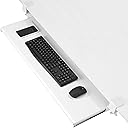
The VIVO Extra Long Clamp-on Keyboard and Mouse Tray (MOUNT-KB15EW) is a 39.4" wide under-desk slider designed to hold keyboards, mice, and accessories up to 11 lbs. Featuring sturdy, adjustable C-clamps for damage-free mounting on desks up to 1.25" thick, it offers ergonomic typing angles and smooth slide-out functionality to enhance workspace efficiency and comfort.


| ASIN | B0C1LHN3XS |
| Best Sellers Rank | #1,615 in Office Products ( See Top 100 in Office Products ) #1 in Keyboard Drawers & Keyboard Platforms |
| Brand | VIVO |
| Color | White |
| Customer Reviews | 4.4 4.4 out of 5 stars (14,142) |
| Date First Available | April 5, 2023 |
| Item Weight | 12.7 pounds |
| Item model number | MOUNT-KB15EW |
| Manufacturer | VIVO |
| Manufacturer Part Number | MOUNT-KB15EW |
| Material Type | Alloy Steel |
| Number of Items | 1 |
| Product Dimensions | 39.4 x 11 x 3.8 inches |
| Shape | Rectangular |
| Size | 34 inch |
A**R
This is a good keyboard/mouse tray.
Overall I am satisfied with this keyboard/mouse pad tray. I do question the need for assembling the tray part that your keyboard sits on. This was the most time consuming part of assembly and I think it could have been built in one piece. Other reviews emphasize the need to check for and measure under the desk for any obstructions that might prevent attaching the tray to the desk and for tray moving distance. Also measure the thickness of the edge of the desk that the clamps go on to. I think, but am not sure, that the maximum thickness is 1.75" s. Both of these suggestions are good ideas. You will end up with a few extra screws when you are done. NOTE: Look for the L and R marked on clamps and track rails. Also, during assembly, you can choose between two options for how far the tray extends from under the desk. Once the tray is assembled attaching it to my desk was easy. Soft plastic pads prevent the clamps from marring the desk top. It is sturdy BUT you should not lean on it. It seems to be good value for the price and should fit just about any desk. My mouse pad has all the space beside the keyboard that it needs. I feel that it looks good, seems to be of good quality, and works as advertised.
A**R
Very Sturdy; Probably Too Low to Fit Over Legs But Makes a Great Shelf/Drawer
I needed a clamp on drawer, but unfortunately my IKEA desk has a metal support bar lengthwise underneath that means only 6" for the drawer to slide back. I couldn't find any long skinny drawers (I need something that can hold rulers) or ones with a lot of clearance but saw this. It's fantastic! I think it would suck as a keyboard tray for my setup because it would jam against my knees or thighs (I sit high enough to use a keyboard on the actual desk). However, putting it off to the right as a rimless drawer keeps it nicely tucked away. And it is *solid*. Heavy metal and wood parts, very well machined. It slides fairly well though one glide is a little stickier than the other. It has enough clearance even with the back plate to slide back under the support bar. It holds very firmly to the 3/4" desk edge. While it's not a complete match to my pale maple veneer desk, it's tonally close enough. Now I have room for my cat's fleece pad in front of my right monitor and can still get at my organizer box of office supplies. Plus my new left monitor has a remote that sits on the sliding shelf where I won't lose it. I even put it together myself despite not being very strong or tool savvy. The instructions were nice and clear with a good mix of illustration and text, and a phillips head screwdriver is easy enough to use. I did position it over my computer so now it's slightly awkward to press the power on switch, but even though I have a huge tower there's still plenty of room especially as I generally only need to press that button once a day. Things that would make it even better: Black clamps and hardware to blend in more with my chair, keyboard, mouse pad and monitor base. Being one big shelf (it comes in two halves that bolt together with a backplate, which maybe gives it more center support, who knows, but that means the two halves don't match in grain or exact hue). Having some sort of grip underneath center front to help pull the shelf out -- needn't be big enough to jam into legs for someone using it for a keyboard, could even be a smoothly polished groove -- my hands are steadily seizing up and losing grip so even a smooth little ridge or bump on the bolted on back plate's edge near the tray front would go a long way. Having a tiny bevel at the bottom front; it currently has a sharpish edge that presses into my fingers when pulling the shelf out from under the desk. All of these are minor quibbles, none of them worth docking a star.
I**K
Minor fixes made this perfect for my use.
This is a nice keyboard tray. There is a known issue of the tray walking away from you as you type. My fix was to purchase a Barrel Bolt Latch and mount it on each side to keep the tray from doing that. The extended pin prevents it from walking. Had this come with something like that, they'd have gotten five stars. The width accommodates my keyboard and my rollerball mouse, along with a wrist rest for each. My desk is a lesser cost up/down desk so I needed to take into consideration the measurement of the space allotment under the desk so it didn't interfere with the up/down drive pin. This works and I can move the keyboard at a whim, not locking me into a specific position at the desk. Value for the money I think is very fair. Drill accuracy was good, very easy to assemble. The ease of use is great. Put a lock mechanism into play on this and you have a great tray. I am very well pleased with this set-up. I don't need the tray to tip forward as the pad I have it on does this. I adjust the height of the desk for ccommodating my wrist/hand tilt. Ergonomic perfection? Nop[e. But it works for me.
K**O
VERY Sturdy, largest tray available, HIGH QUALITY - But make sure you MEASURE!!!
Update January 2022 Tray is great but if you're like my wife who likes to rest her elbows on the tray... over time the (4) M4 screws that attach the sliding rails to the tray will strip. This will cause the whole tray to fall and can be quite dangerous. This happened at least 3 times until the screws were useless. I was on the verge of buying another tray when I decided to see if I can replace the screws. For less than a $1, I replaced the M4 screws with longer M4-0.7 x 8mm. You can get this at your local big box hardware store. I also recommend adding a dap of locktite on the screws as well to avoid them loosening on their own. This made the tray extremely sturdy without jamming up the slide. M4-0.7 x 10mm would be too long. So stick to the 8mm. I believe the original M4 were only 5mm. Highly recommend everyone to do this to make the tray more sturdy and safe. Wife is happy again! CHEERS! ********************** WFH, my wife works at the dining table which isn't the best for ergonomics. After awhile her wrists/hands were hurting because the table, where her keyboard was, was too high. A keyboard tray would be the solution but since it's a dining table there were challenges to overcome and I got lucky with all the measurements. As a keyboard tray it's probably the best and largest one out there for an edge mounted configuration. I needed one to fit both a full 10-key size keyboard AND enough room for a mouse. This was the ONLY one that fit the need. The mounting hardware is very solid, heavy duty metal. For the parts that come in contact with the table, it comes with rubber pads for protection. It's sturdy enough to put some weight on, like if you wanted to rest your elbow on it. I'm going to provide some key specs that I couldn't find but is very important to know if it this will work for you: - The first is understanding the limit of how thick the table can be to use this. The max spec stated for this product is that it can support up to 1.75" thickness. I can safely say that it's an exact number. My dining table is exactly that thick. The mounting hardware will fit this thickness but it will be a bit tight, +/- 1/8" tolerance. So if your table is greater than 1.75" then this will not work for you as the mounting hardware will not fit. - Next is understanding the required depth from the edge of the table where you must have a flat surface underneath the table to clamp the bottom pressure plate to. The mounting hardware is attached via a clamp style mechanism. There is a metal plate at the bottom attached to a screw handle. You tighten this so it "clamps" to your table. This is important to note especially if your table has a recessed, beveled edge that curves underneath vs. a squared edge. Also sometimes, certain desk and tables have support hardware underneath that may interfere with the mounting point. My dining table had a recessed, beveled edge and it was questionable whether I'd have a solid flat surface to clamp to. PLEASE NOTE: FROM 1.5" in from the edge of the table, you must have a flat surface underneath the table to clamp on to. If 1.5" in from the edge of your table, the surface is curved, angled, or exceeds 1.75" in thickness, then you have no way to mount the hardware. 1.5" from the edge of the table is where the center of the screw plate. - Next is the amount of clearance you will have IF you have a 1.75" thick table. If you're pushing the max limit in table thickness, you are giving up clearance that may or may not allow you to retract the keyboard under the table when you're not using it. For me, I'm at the max thickness and as a result I only have 1.5" from the surface of the keyboard try to the bottom of my table. This means, my keyboard AND mouse cannot be taller than 1.5" in height. My wife uses a thin Logitech wireless keyboard that just meets this height but her MX Master 2 is too tall. As a result, while she has a keyboard tray she can use, she cannot retract it underneath the table. It was still worth using to be pain free. Since we're going to be in this WFH situation for the long haul, the need to tuck your keyboard away is trivial. I also should mention that if you have a ergo keyboard and it's important for you to store it underneath your table, it's highly this won't work for you. You need to have massive clearance for those keyboards. - Lastly, the one tip I have is some people have mentioned the keyboard seems to not stay in place if retracted all the way in or all the way out. I have the latter where the tray on the left side, for some reason, doesn't extend all the way out whereas the right side does. It turns out this is due to the mounting hardware on the side that has the issue being a bit rotated. All you need to do is rotate/twist the mounting hardware a bit to resolve the retraction/extension issue. Sometimes, what happens is my wife's chair will hit the tray and cause the mounting hardware to rotate a bit, which cause some warping or deflection of the keyboard tray tracks, which leads to the issue. The other problem could be that your flat surface is not leveled such that your mounting hardware are at different heights ever so slightly. Ultimately, the keyboard tray tracks need to be as leveled and parallel to each other as possible. I highly recommend if it works for your specifications.
J**O
Great Pull Out Keyboard Tray
Everything about this is great. Installs easily, solid in feel and usage, nice appearance, looks and works now as the day I got it, nearly three years ago. Very highly recommend!
J**A
Easy, fast, and quality! Just make sure to adjust it correctly… It struggles sometimes.
It was easy to build together, the quality of the materials was astonishing, and packaging was perfectly clean and neat. Outside of it was slightly damaged but it still works great. Only problem is adjusting and rolling the keyboard desktop out. It struggles and not smoothly, however I must I’ve not adjusted correctly which is a skill issue for me. Overall, it’s perfect and gets the job done!
N**K
Ok for what it is but have some issues
Update 8/7/2023 - It's only been a few months of use but the right side of railing failed and does not come out all the way so when I take the tray out then it is crooked. This product is actually not that cheap and it's sad to see that it does not last a long time. I have a desk that I bought approximately 10 years ago at IKEA. I moved about 7 - 8 times during this time period and this desk stuck with me although it is high for my height. I just can't afford another desk. It's so high I'm practically typing and using a mouse with my shoulders at my ear level. I'm getting to a point in life that I can't sleep at night because of neck and shoulder pain after spending time at this desk whole day so I decided to buy this tray that goes in under the desk so my arms would be in more ergonomic position. And yes it works! I can rest my arms on the arm rest on my chairs and my shoulders and arms are in relaxed position. The package the item came with was very well padded and felt like a premium product. the tray itself came in 2-piece but has 2 metal brackets that holds it together. It feels thick and heavy and sturdy (that's what she said). The clamps it comes with also is beefy and does not wobble around. Now on a few issues. Although this product is wide so it holds both keyboard and a mouse, it is not deep enough. If I place my keyboard in the middle then my wrists hang out of the front edge of the product and has nowhere to rest my wrists. I have to push the keyboard allllll the way back to put my wrist onto the tray then I can't access the top of the keyboard. Also, because this is 2-piece I can feel the flex in the middle. Because my desk is too high I rest my elbow on the tray and put my hand on my face to ponder about life and I feel the flex in the middle. I'm worried about durability of this product but we will see. Lastly, the rail on both sides of the product so you can pull your tray in and out does not work smoothly. My right one is smoother than the left so if I try to pull the tray out from the left or right side then it gets stuck. I have to pull somewhat in the middle to pull the tray out smoothly. Overall, I think it's a good product. It was easy to assemble and I mean I have assembling ability of a 3 year old. It was pretty expensive for me, about equal to my monthly allowance, so I'm wary of the issues mentioned above.
V**A
Space to Spare
Beautiful piece of furniture, Works well. Smooth movement; stays where placed. So happy I bought this. And the large size is wonderful for a large keyboard, mouse, and a notepad.
C**S
Qualidade!
Tem o tamanho mínimo perfeito para mesas pequenas, os materiais são de alta qualidade, parece ser robusta e durável o suficiente justificando completamente o preço. Recomendado!
F**D
Excellent
Bonjour, Le moins cher et pourtant excellent, la qualité de fabrication et bonne, ,robuste et pratique, je ne regrette pas cet achat.
K**A
Solid keyboard tray
Needed this for my 49 key MIDI keyboard and it's the perfect fit, except for the height which I bought the height extender from the same brand for. So happy!
S**T
Very sturdy and smooth
The tray feels very solid and sturdy, and slides very smoothly. Also very easy to install and looks very clean. The quality definitely feels good and not cheap. It's wide enough to house a full-sized keyboard and a comfortable amount of room remaining for a mouse. It was well-packaged and didn't show any signs of damage. Some observations based on my first few days of using this: - There is very little clearance between the tray and the bottom of the table. Make sure you measure carefully. My tabletop is about 1-3/8" and there's only about a 3mm gap above my Razer Deathadder + mousepad. - There is no height adjustment for the tray, so for best ergonomics you'll want to use this with an adjustable standing desk. However even with a normal desk, it's still a lot more comfortable having the keyboard lower when you're shorter. - There isn't any covering on the side where the tracks and ball bearings are (which is the case with a lot of these trays). Sometimes I find myself resting my hands on the sides or trying to adjust the tray by holding the sides - and end up with a handful of lubricant - The tray is 11.5" deep but only about 9.5" will be "out" of the table at max extension. I have a Grifiti wrist pad that's about 4" wide, so with a standard keyboard, the row of F-keys are basically right against the edge of the table. - You can only install it in one of 2 ways - either you have 9.5" of extended space and ~1.5" poking out from under the table when it's "tucked in", or you can have about 8" of extended space and the tray being almost flush with the table edge when tucked in. Either way you'll have at least a little bit poking out and some lost space.
S**T
Awesome...except for 1 thing!
This keyboard tray is excellent! Perfect length! You can fit a keyboard and mouse on it no problem. It's strong and sturdy! The 1 big problem, is that the clearance between the tray and the desk you mount it to is way to small/low. You will need a low profile keyboard, and a darn near flat mouse to be able to hide the whole thing away under the desk. This is the biggest issue with this, if it had a height adjustment on the mount so you could lower the tray another inch or so, then this would be perfect and the mouse could stay on the try. Ass it is, you need to take the mouse off first before you slide the tray under the desk. This is such a simple fix, and it should be done right away!
Trustpilot
1 month ago
1 month ago