๐ Capture Life in 360ยฐ โ Because Your Story Deserves Every Angle
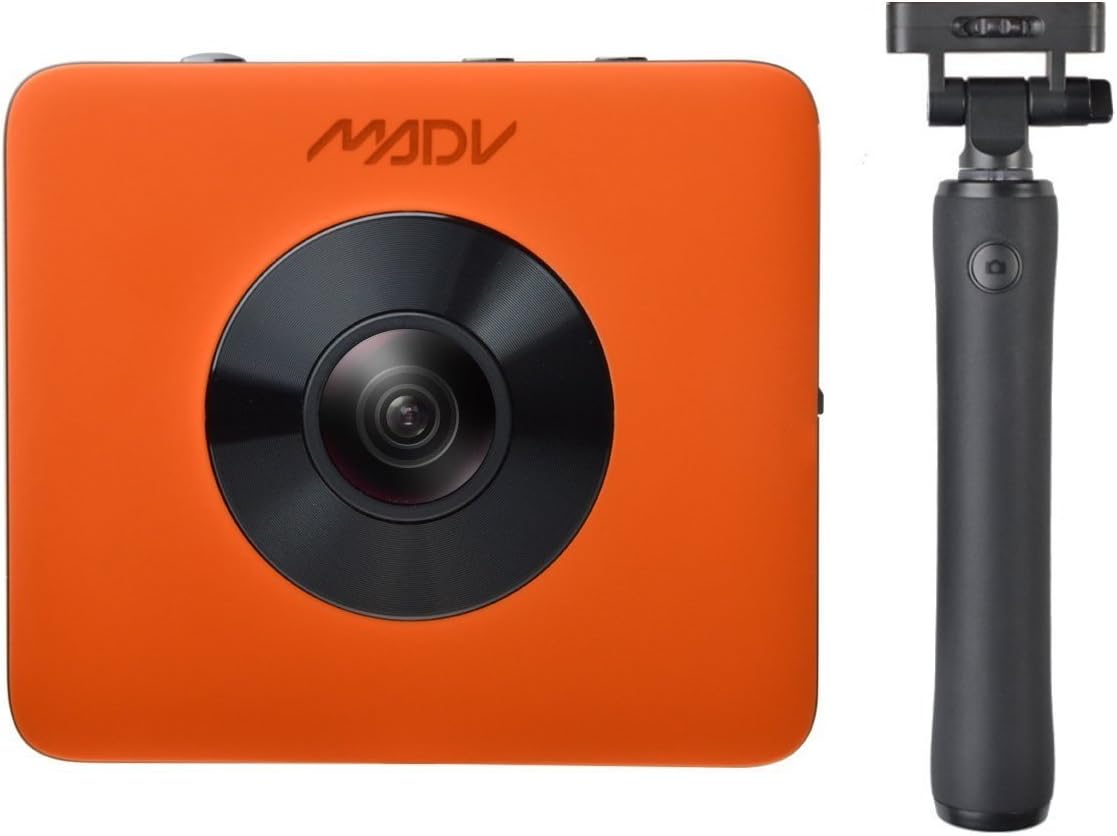
The XiaoMi Madventure 360 Camera delivers professional-grade 24MP photos and 4K video with multiple shooting modes including panoramic and little planet. Its IP67 waterproof rating ensures durability in extreme environments, while 6-axis electronic image stabilization and an invisible selfie-stick provide smooth, immersive footage. Dual wide-angle lenses automatically stitch images for instant sharing, complemented by manual exposure controls accessible via a dedicated app. Lightweight and compact, itโs the ultimate 360ยฐ camera for adventure seekers and content creators alike.


| ASIN | B076FCYYBQ |
| Are Batteries Included | No |
| Aspect Ratio | 16:9 |
| Auto Focus Technology | Contrast Detection |
| Autofocus | No |
| Battery Average Life | 75 minutes |
| Battery Type | Lithium Ion |
| Brand | MADV |
| Built-In Media | Battery |
| Camera Flash | no flash |
| Camera Lens | Wide angle lens with a focal length of 2.0 |
| Color | Orange |
| Compatible Devices | Micro Four Thirds |
| Compatible Flash Memory Type | microSD |
| Compatible Mountings | Micro Four Thirds |
| Connectivity Technology | USB, Wi-Fi |
| Continuous Shooting | 30 FPS |
| Customer Reviews | 3.7 out of 5 stars 75 Reviews |
| Digital-Still | Yes |
| Display Resolution Maximum | 24.17 MP |
| Effective Still Resolution | 24.00 |
| Expanded ISO Minimum | 80 |
| Exposure Control | Manual |
| File Format | JPEG, RAW |
| Flash Memory Bus Interface Type | UHS-I |
| Flash Memory Speed Class | 10 or U3 |
| Flash Memory Type | Micro SD |
| Focal Length Description | F=2.0 |
| Focus Features | Contrast Detection Autofocus |
| Focus Mode | Manual Focus (MF) |
| Focus Type | Manual Focus |
| Form Factor | Compact |
| Frame Rate | 30, 60 |
| Has Color Screen | No |
| Image Capture Type | Stills & Video |
| Image Stabilization | Digital |
| Image stabilization | Digital |
| Item Weight | 108.3 Grams |
| JPEG Quality Level | Fine |
| Lens Construction | multi-element |
| Lens Type | Wide Angle |
| Manufacturer | Madventure |
| Manufacturer Part Number | XJ0002US |
| Maximum Aperture | 1.32 f |
| Maximum Image Size | 24 MP |
| Memory Storage Capacity | 128 GB |
| Minimum Shutter Speed | 32 seconds |
| Model Name | XJ0002US |
| Model Number | XJ0002US |
| Model Series | Madventure |
| Mount Type | Tripod |
| Movie Mode | Yes |
| Optical Zoom | 100 x |
| Photo Sensor Resolution | 24 MP |
| Photo Sensor Size | 1/2.3-inch |
| Photo Sensor Technology | CMOS |
| Real Angle Of View | 190 Degrees |
| Recording Capacity | 90 Minutes |
| Remote Included | Yes |
| Screen Size | 10 Centimeters |
| Sensor Type | CMOS |
| Shooting Modes | Panorama, Custom, Landscape |
| Special Feature | Electronic Image Stabilization |
| Supported File Format | JPEG, RAW |
| Total Still Resolution | 24 MP |
| Total USB Ports | 1 |
| Total Video Out Ports | 1 |
| Video Capture Format | MP4 |
| Video Resolution | 2160p |
| Viewfinder | Electronic |
| Water Resistance Level | Water Resistant |
| Waterproof Rating | IP67 |
| White Balance Settings | Custom |
| Wireless Technology | Wi-Fi |
T**S
1st Arrived Defective, 2nd arrived in perfect condition.
Update: ------------------- 20 Nov 2018 -------------- now 5 star I Love this camera. I only use it for Photos which I post to google.com/maps, google.com/streetview. I use Cyberlink PhotoDirector 10 to make my modifications because the screen on my phone is too small. I have zero issues with Phone control program. It is easy to use and gives a great feature set. I tried the HDR feature but I think for outside the auto setting images are more than good enough. If you are taking photos do not worry about battery life. I have taken photo's for 45+min on WiFi and barely dented the battery charge. I am going to assume that taking video would take much more. I am thinking of getting on of these for my father. Update: ------------------- 11 Sept 2018 -------------- 4 stars because I have only had this for 6 hours. I returned my 1st defective camera to Amazon (zero issues) Re-Ordered the camera and it arrived in 2 days as stated. Opened up with a bit of trepidation. Battery was completely dead. But I plugged it in and battery light turned red. immediately pushed the power button and it turned on for very short time. Yeah. Let it charge and was able to use it. I have been using reviews and videos from website: 360rumors.com - youtube: 360rumors.com & Ben Claremont youtube: "Ricoh Theta V vs. Xiaomi Mi Sphere HDR comparison" On my first test I used the bracketing option and took 3 photos with a delta of 2.0. pushed those into Vibrance HDR to create HDR image. pushed that into Theta Converter (edit360) to add 360 metadata Then I was able to modify colors in Google Photos although I liked the initial result. I also tested the included selfie stick, awesome! I can't wait to take daylight & outdoor photos Original: ------------------- 8 Sept 2018 -------------- NOTE: will change review if I get a functional camera. When I received the camera I tried to turn it on. Nothing except a red battery light. So I plugged it into Samsung power changer. Same one I use to charge phone and tablet correctly. After 2 hours battery light is still Red. Left it on overnight. Wake up to orange battery light. Short, medium or long push to power button does nothing but make the battery light flash. Tried this with power cord off and on.. Same behavior. Tried plugging into computer, no response. I will send this back and get a replacement. Obviously this camera is working for some people. If the new one does not work I will assume they have manufacturing issues and move on to a different 360 camera.
W**S
Nice little camera, and fun.
I've had a lot of fun with this camera. The image quality for stills is very good considering the 360 view. Video quality isn't as good as it could be...at least using the Madv desktop application. The app turns the dual circular fisheye video from the camera into 360 video, but there are no controls over compression and quality suffers. The Madv app on Android works well for the most part. The preview quality using the app for camera control is quite low resolution, but usable. I prefer to use the base ISO of the camera, since the small sensors are quite noisy. You can run the camera via the top buttons, but you can only do basic controls: power on/off, WiFi on/off, switch from stills to video, and shutter release. You need the phone app to do more advanced control. The selfie stick has a wired button that lets you do the basic camera operation by long and short presses of a single button. Be aware that for still photos, there's a beep, followed by a second beep. The second beep indicates the photo being taken. In Jpeg mode, the lag between beeps is about 1 second. In raw mode, it's three seconds. I have no idea why there's a lag, but be sure to wait for the second tone for your shot. To get the most out of this camera, you'll need third party software. I use PTGui (the current beta version) for stitching and I recommend Affinity Photo for 360 mode image editing - like editing out a tripod. Battery life is poor, especially with WiFi enabled, but you can run the camera via external USB power. Be aware that the images between the two lenses aren't calibrated to each other, and we've seen some variability of the lens coating. The color toward the edge of the fisheye view shifts toward green and gets darker, so stitching via the Madv apps can show exposure artifacts. The lenses are prone to flare with bright lights or the sun. Dynamic range is relatively poor. You can shoot bracketed exposures, but not in raw mode. For the price, I think the Madv 360 is a capable and fun camera. It disappoints some in more advanced modes, but that isn't unusual in 360 imaging for now.
D**F
This camera is amazing and fun to use / FAILED after 5 months
---- UPDATE BELOW --- This camera is amazing. Please see Attached photos. Purchased for my bf--who is a photographer, but never had any experience with a camera of this type. He just watched a few videos on Youtube and was good to go. Not sure if there were any instructions, but he didn't read them. The quality/resolution is really good, but not sure about attached photos on Amazon since I downloaded them from his fb account which may mess up the resolution. Takes great videos also, but wasn't able to post those. ---------------------------------------------------------------- AFTER 5 MONTHS IT JUST STOPPED WORKING. Not working at all and I can't get the the pics from my last trip off of the camera. So sad!
A**R
Great camera (edited review to include a good tripod setup)
Nice 360 camera and the app is good too. I donโt use it for video so much as the quality doesnโt look that great, but the camera is great. The one thing to note when using it as a selfie camera with the included stick is you have to have the video/camera lights on the camera facing away from you if your main focus is the view in front of you. If you donโt, youโll get a photo of you and the stick. If you hold the stick directly above you - fine, but then you wonโt be able to see if the camera is level. The only thing I would say about the app related to the above is there should be an option to swap the two images it takes and re-stitch them later. Also the selfie stick could do with a 1/4โ thread on the bottom to screw onto a tripod/tripod base. One thing mentioned in another review is the app and it connecting to WiFi. You connect to the cameraโs WiFi, so you obviously lose the ability to use another WiFi signal for data, but youโll be using the camera outdoors primarily anyway where there likely is no WiFi. LTE still works fine when connected to this over WiFi. The phone (or app - Iโm not sure) knows if itโs a data WiFi connection, and if it isnโt, it reverts to mobile data but keeps the WiFi connection with the camera. Edit: If you want a good shoulder height low footprint tripod setup for this without really having to edit anything out of the final photo, I got a Neewer carbon fiber monopod, a DJI Osmo tripod which I already had for my DJI Osmo Mobile 2, and some hardware. Total cost of this is about 90, but itโs worth it. I found flipping the monopod over to be the best solution. Both ends of it are 3/8โ female. I used a 3/8โ to 1/4โ converter (search for Sunmns 1/4 Inch and 3/8 Inch Converter Threaded Screws Adapter Mount Set for example on here), on the bottom/thicker end to make the 3/8โ female thread 1/4โ female. This allows me to attach the DJI Osmo tripod which has a small footprint. The top/thinner end of the monopod, I used the included male 3/8โ and 1/4โ adaptor to connect the camera. Only downside to this setup is it has to be level to get a good photo, but after trying all manner of flimsy selfie sticks etc, I think this is the best setup so far (if I donโt want to be in the photo that is)...
M**Y
Poor Software and Instructions No Support
Using S9 Galaxy with this. Got it the day before vacation trip. Process to retreive files is convoluted with no instructions. Downloaded the desktop zip files on madv360.com to my Windows PC. Unzip and ran the executible and only recieve a folder with hyperlink back to their site and a uninstall folder. Software sucks but camera works great. It really gets hot while downloading via wifi to phone, that's a concern. Only option I found to get the files off the phone was 1st downloading image via wifi to phone 2nd. editing each photo 3rd then selecting save and picking the drive to save are share to. That is a pain for each image. But then I don't have the desktop software to view or edit.... If anyone has any info to share please post! Would love to keep it, but maybe sending back. UPDATE: This is a nice camera after using for 2 weeks on vacation. Mega issues with accessing the videos to view om Samsung VR. 1. Have to use wifi to download images and video to phone. 2. Problem, Ocules can't get to the directory of the files through the vr. So, I move the files using the share icon on top right of video. The Madventure software stiches the video and moves it. Now I have only a 30 sec clip from a 3 minute vid. What happened!!! Pain in the butt to just to watch a video. I am not trying to edit or do anything fancy. Just want to use my Samsung VR to see the vids. Also, found that if I use the selfie stick at angle, like 30ยฐ while holding it in front of me, it shows up in the pictures. Going to try and reach out to manufactor. If that doesn't work salvaging my images and sending this back. 1/8/2019 No response from manufactor and after sending email. So this will have to go back and I will wait for a better product with more support. Right there are just to many steps to use this device. 1. Download from app to phone storage. Takes a long time for video to download via the wifi connection to your phone. Haven't found a successful method to do so with wifi to my desktop. 2. Dosen't automic stitch video. Starts stithing when you attempt to share the video or move it to another directory on the phone. Just to tedious to use overall. Video quality is good and the ability to use your VR goggles with it is awesome. No technical support and very few youtube videos to learn more about the device. 1/27/2019 I give 5 stars to Amazon for return and refund process. 1. This camera took good pictures but the stitching process happens when you are ready to download. That takes a long time for video. Using S9. 2. Using a netgear R7000 router to move files to my NAS via wifi very, very slow. Finally hooked up to my desktop, dug through the embeded file directory to move files over from phone. 3. Kept getting software update for the camera. Download it but could never figure out how to update the camera. No options in settings. Sent email to CS and no response. Sorry for the repeating my concerns. Don't waste your money. Add a 100 bucks and go get a insta 360 one x or something with more supprt.
B**O
Excellent photo quality
Photos are excellent for a 360 camera at this price range. The next cheapest camera with nearly the same photo quality is the $400 YI 360. (Update: I've seen more YI 360 photos and footage, and it's bad. This camera is so much better than the YI. The best comparison I've seen is from the YouTuber LIFE in 360 titled "GoPro Fusion vs. SIX Top 360 Cameras- Best Overall Look?") The camera is best when paired up with an Android or iOS device. It pairs up nicely with my iPhone 8. There are lots of complaints about heat when the wifi is on and short battery life, but I never leave the camera running long enough to experience heat or battery issues. The camera will function while connected to external power, so the battery is less of an issue if you're prepared. The Mi Sphere is the same camera (just black) with only minor differences in the software/app. Before you buy, I suggest checking out the the active Facebook group named "Xiaomi Mijia MI SPHERE and Madv360 Madventure 360 Camera Users and Fans" and visiting the 360rumors website to read up on both of these cameras (and you might find a current discount code there too). If I had more time, I would have bought a Mi Sphere from Gearbest for a lower price and for the black camera body, but I was going on vacation and the Madv360 was cheaper than the Sphere here on Amazon.
K**N
Good value camera, but soon found wanting more.
My biggest disappointment about this camera is the gyro noise. It is faint, but you can hear it "ticking" in the background in every video. Second disappointment is the phone app. The quality is significantly reduced and it will not output full resolution video. I use the USB cord to upload all the files to PC and stitch using the PC software. WiFi mode kills the battery quickly anyway, so I just don't use WiFi or the app, which I am sure is a big portion of what you are buying when paying $300+. It syncs up and works very well otherwise. Sometimes I'll use the app to check something quickly in the field. What I like most about the camera is the still photo shooting. Photos are crisp, well stitched, and the auto ISO seems to adjust well to the lighting situation. I wish there was more software to support the product (or better options within the app to use full resolution). A better PC program would be nice for simple cropping of the video and trimming/merging video clips. I now need a third party program to do this, which is additional $$$ on top of the 300+ for the camera. I have used the camera for about a month now and this is my first 360 camera. I think I have used it to all its ability and wanting to upgrade already. If you have the money to spend, go for better rated cameras. This was a good intro camera though, so 3 stars is where I feel this product lands.
D**D
Unit longevity 1 year??? - 2nd Update
Used unit almost daily for motorcycle commutes. After one year, it seems unit is having battery issues. Not charging almost exactly one year. Ironically, manufacturer warranty expires after one year. Image quality was okay, but my opinion is that most items are overpriced for what you get. This unit compared to others is above average for the cost. Disappointed unit lasts for only one year. Basically 1 dollar a day for use. Wrote Madv360 support to see if they can help. I got a pretty fast response call from Madv360 reps. In fact, I was the slow one in providing information. They simply asked about the symptoms and the log files from the Camera. Engineers confirmed issue is with battery, based on log error. I am awaiting to confirm that they would replace. Ironically, I just went ahead and placed a separate order for a new GOPro Fusion which has recently price dropped to $399, and this time I got the 3yr warranty with Amazon, just in case. Of the 2 Madv360 still seems to be a better deal of the 2, but suspect the GoPro will provide a bit better programming and video quality.
L**K
Brilliant Madv360 camera
Spent 6 months reviewing 360 cameras and finally decided to buy Madv360. Very satisfied with the camera and quAlity of the photos and videos it produces. Took a while to get used to it as my mobile only had 8Mb of memory and that is insufficient to run the app. Minimum needed is 16mb 32mb is even better. Down loaded app for PC for stitching and use Cyber link Power Director for editing. Now just trying to find good subject matter to record.
P**O
Good camera but Is not that perfect as they show on Ads!
First, the 4k resolution for 360 is not even close to the 4k we are used to see on 2D videos, if you don't know thats is the total resolution of the full 360 (Monoscopic) video and in the screen you'll watch just a portion of that, maybe equivalent to 720px. Secondly, you really can see the stitches in the video, really badly and for last the worst, seems to have just one way to make the selfie stick invisible as they promise and you will have to figure it out on your own, lack of support.
J**N
Great camera and fantastic service.
This 360 camera is awesome! I received fantastic service from MadV360 UK, answering my email very quickly.
Trustpilot
2 weeks ago
2 months ago