Desertcart purchases this item on your behalf and handles shipping, customs, and support to Colombia.
⌨️ Elevate your desk game with the MX Keys S — where precision meets productivity.
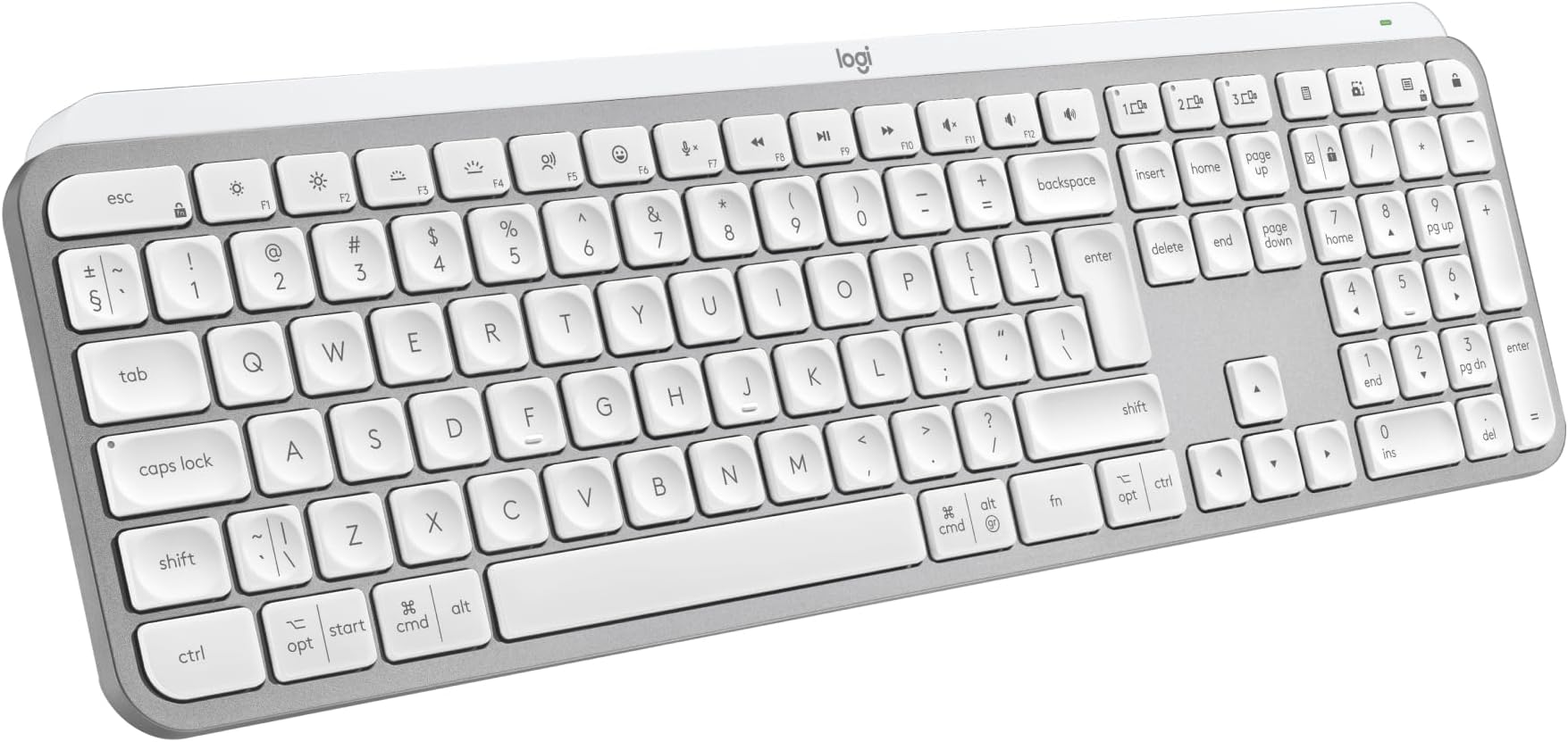
The Logitech MX Keys S Wireless Keyboard is a premium, full-size UK QWERTY keyboard designed for professionals who demand seamless multi-device connectivity, smart adaptive backlighting, and a superior typing experience. Featuring a rechargeable 1500mAh battery, customizable Smart Actions via the Logi Options+ app, and compatibility across Windows, macOS, Linux, and more, it’s engineered to boost productivity and style in any modern workspace.


| ASIN | B07W5JK38Y |
| Antenna Location | Personal |
| Best Sellers Rank | 558 in Computers & Accessories ( See Top 100 in Computers & Accessories ) 6 in Keyboards (Computers & Accessories) |
| Box Contents | Keyboard, Logi Bolt USB receiver, USB Cable, User documentation |
| Brand | Logitech |
| Brand Name | Logitech |
| Button Quantity | 104 |
| Colour | Pale Grey |
| Compatible Amazon Tablet Models | Amazon Fire HD 10 11th Generation |
| Compatible Devices | Chromebook, Mac, PC, Smartphone, iPad |
| Compatible Operating System Family | ChromeOS, Linux, MacOS, Windows |
| Compatible Tablet Computer Models | Amazon Fire HD 10 11th Generation |
| Compatible devices | Chromebook, Mac, PC, Smartphone, iPad |
| Connectivity Technology | Bluetooth, Logi Bolt USB |
| Connectivity technology | Bluetooth, Logi Bolt USB |
| Country of Origin | China |
| Customer Reviews | 4.6 out of 5 stars 814 Reviews |
| Enclosure Material | Plastic |
| Generation | 1 |
| Hand Orientation | Right |
| Item Dimensions L x W x H | 43L x 13.2W x 2.1H centimetres |
| Item Type Name | Wireless Keyboard |
| Item Weight | 810 Grams |
| Keyboard Backlighting Color Support | Single Color |
| Keyboard Description | Standalone |
| Keyboard Layout | QWERTY |
| Keyboard description | Standalone |
| Language | English |
| Manufacturer | Logitech |
| Manufacturer Part Number | 920-011585 |
| Mechanical Keyboard Switch Model | Meccanico |
| Minimum Required Operating System Version | ChromeOs 134, Mac OS X 10.0 Cheetah, Windows 1 |
| Model Name | MX Keys S |
| Model Number | 920-011585 |
| Number of Items | 1 |
| Number of Keys | 104 |
| Number of Packs | 1 |
| Power Source | Battery Powered |
| Product Features | Backlit, Customizable Display Keys, Hotkeys and Media Keys, Rechargeable |
| Product Warranty | 2 year manufacturer |
| Recommended uses for product | Personal |
| Special feature | Backlit, Customizable Display Keys, Hotkeys and Media Keys , Rechargeable |
| Style Name | Modern |
| Switch Type | Linear |
| Unit Count | 1.0 count |
X**K
Expensive but worth it
Well as a stand alone keyboard for a computer, £83 is exteremely expensive but this is where this keybopard comes into its own. I currently have the main computer that i do a lot of work on and a laptop that i use when the mrs wants to watch tele as i use the big tv screen on the main computer. I also have a work computer that i connect up to a system i have in the house on a three monitor setup. This keyboard has the ability to connect to three computers so as long as they are not all being used at any one time, a simple press of the button switches its connection to the computer you need to connect to. This for me is what drove me to get this as we rarely have more that onr computer on at a time. You can also get a mouse that i have that does the smae thing and used the one USB adaptor to connect to but you can also use bluetooth to connect with. The weight oif this keybopard is unreal, it really does weight a fair bit by far the most of any i have ever had but it comes accross as super sturdy. Functionality of the keys is a dream, super feedback and allows for really fast typing. Worked as soon as i connected the keybpoard but there is an app to go with this called Logi Options and shows all applicable connected devices and displays tjhe current battery strength which i really like. Keyboard comes with the dongle to connect to but if you get he mouse, it does not come with one so something to be mindful off. Also comes with a USB C charging cable that is top quality although it is only a meter in length. Brightness of the keyboard works great and is easy on the eye but it loods superb when lit. Has an auto shut off so when nothing is pressed it will go off but pops right back up once you pick it up.
M**H
Best keyboard I’ve owned
Love this keyboard, you can feel the quality as soon as you pick it up. Great feel, love typing on this keyboard. Stylish, looks fantastic and it helped to keep my desk clear being able to use the keyboard on both my PC & Mac and can also connect to a third device if needed. With a matching Logitech mouse also switching between machines it made multi machine working a breeze. It’s not cheep but the quality is there and it feels very premium, materials all top-notch. Easy to charge, last a long time. 100% recommend this keyboard.
M**N
Fantastic Keyboard
This is a fantastic keyboard. I did question paying nearly £90 for it but it is well worth the price. It has a good weight to it and build quality is great. I am sure it will last a good number of years. I decided to purchase this keyboard so I could set up a workstation at home as well as being able to use it in the work office because I will be hybrid working and I wanted a good keyboard to use at home and at work. It's taken a couple of days to get used to the keys but it's a joy to type on and it's virtually silent, even quieter with the keyboard cover I purchased to help protect the keys from crumbs and dust. Great to be able to program some functions such morning start up for opening all the apps and programs I use for work at the touch of a button but you do have to give up whatever the function key was originally assigned to do in order to do this. I do find a number of the function keys to already have some useful quick access functions already built in, so I am limited with the number of keys I am willing to give up and program. It would have been good if there were some completely user programmable keys not already assigned to a function. The battery is lasting as expected when I have the backlight on so I would expect to have to give it a charge every 2-3 weeks going forward. I do use the backlight on middle brightness most of the time. It's great to have the ability to have it linked to my work PC and my personal Mac at the touch of a button and there is still a spare key to assign to another device such as my iPad or phone. The keyboard is going to get a lot more use as a result of this function so in my view helps justify the high price paid. The only thing I don't like is the lack of riser legs which I would have thought would have been incorporated in a keyboard of this price. I do find the fixed rise of the keyboard to be minimal and could do with it being more of an angle. I have purchased some extra height risers that clip on which should make the keyboard the perfect height. Also purchased is a carrying case to keep the keyboard in pristine condition when putting it in my backpack for work. Overall this is just a fantastic keyboard and you won't be disappointed if you take the plunge and purchase one.
J**M
Amazing Keyboard
I purchased this as my current setup from home isn’t ideal. Only space for a small desk. I was getting pain in my forearm and elbow. It turned out to be the mechanical keyboard combined with a lack of space for a wrist rest and the flexing that was causing on my wrists as a result. I had tried a flatter Bluetooth keyboard but the key bottom out was too hard and that was only adding to the problem. So I got this. Firstly, forearm issues solved. Secondly, this keyboard is an absolute joy to use. It’s really well made, construction feels very sturdy which was a pleasant surprise considering the thin profile. It feels as sturdy as the Corsair mechanical I was using before. The keys have a nice amount of travel, more than my MacBook keyboard. They also have a soft bottom out removing dulling the impact for heavier typists. Back lighting is excellent to. I have it set to light as I touch the keyboard. The sensor feature is appealing to the gadget geek in me. It literally lights up as soon as you touch the metal facia anywhere. Better life is also excellent. Lighting time out is set to the minimum for me which is fine. The keyboard software is also excellent. Easy to install, use and understand. This give some customisation to some of the shortcut buttons. I personally only changed the screen snip button to initiate screen snip and immediately copy to the clip board for pasting which saves having to click the screen snip pop up on Mac OS and pick what to do. 99% in the time I just need to snip and paste. Overall, this keyboard isn’t cheap but as a device I use all day for work, I think it’s totally worth the money. It definitely gets my recommendation.
A**O
Quite Happy but A Challenging Amount of Visual Clutter
Logitech MX Keys S Programmable Wireless Bluetooth Keyboard - Graphite -- 3.5 to 4-stars This keyboard was teamed with the Logitech MX Master 4 productivity mouse, which I'll review later. On paper, it seemed like the perfect combination. Overview Generally, this is a very nice keyboard. It looks good and you can type words with it at speed. If you regard the Apple MacBook keyboards as the top-of-the-line measure, this keyboard is up there and punching above its weight for the price. The first thing you notice as you unwrap this keyboard from its tissue packaging, is the weight of it. The sheer weight and heft of this aluminium skinned, slimline keyboard, makes it seem as if it is hewn from a single ingot of dark metal. It's not, of course. It's made mostly of recycled plastics but very nicely made recycled plastics and covered by a well-fitting, graphite-coloured, low-carbon aluminium bezel, or "Key Module bracket". I think the majority of the weight in this keyboard is attributable to its Li-Po 1500 mAh rechargeable battery - which should last "up to 10 days with predefined settings (30-second time-out) or up to 5 months with backlighting off". This feeling of 'heft' made me dare to hope, to anticipate, that this lovely looking, low profile design would live up to its entry-level, premium price tag. It's not cheap but its price point is by no means expensive for a keyboard and, generally, it succeeds in feeling like a premium product and performing with a premium feel. There is one caveat, however, that's really been bugging me. More on that later. What is it? It’s a full-size keyboard meaning it has "all" the keys laid out in the standard way. It also means it is wide, and a lot of people don't like that. It's a close equivalent of a MacBook keyboard both in looks and performance with typical soft click, butterfly mount, backlit keys. The crowning glory of a full-size keyboard is having everything on display. Everything is there in front of you which is why I always lean to the full-size form factor. I can use “Insert” and “Delete” without having to remember the function button combination. Installation Setup is, as always on Windows, “OK”. I would love Windows to be better - who wouldn’t? When you disconnect your old keyboard and switch on this new one, in an ideal world, Windows should pop up and say, “Hey, I found and installed a nearby Bluetooth keyboard because there isn’t a keyboard connected right now and you need a keyboard so you can use your computer... no?” It doesn’t do that, of course, but Windows "found" it easily enough at which point you have to start clicking around to finish the install - which is fine… And it was painless. Once installed, everything worked. That might sound obvious but, believe me, it isn't. A first-time installation in minutes without a hitch or a glitch is a big win! Then Logitech starts pestering you to install its "Logi Options" software, which is fine. In this you get see the charge state which becomes a good prompt to charge it with the supplied 1 metre USB-A to USB-C cable. Out of the box it showed 50% and took about an hour to fully charge. General use In use it’s “nice”! It feels solid. Key resistance is well judged, slightly firmer than a MacBook, and you can thump away with confidence. It feels immovable, firmly planted on its rubber feet, which are fixed with no height adjustment. It’s worth noting that the heft of this keyboard is significant and you'll notice its weight if you're in the habit of regularly moving your keyboard to one side. It has this 'thing' it does! By default the backlighting, which is every bit as subtle and good as an Apple keyboard, "sleeps" after 30 seconds of no use. I didn't like this at first and thought I'd have to increase the time-out. It also made me start to doubt the advertised battery life of this wireless-only device. You can't plug it in to use it as a wired keyboard. It depends entirely on the battery to work wirelessly via Bluetooth or the supplied Wi-Fi dongle. To extend battery life, it does this thing which I think works well to discourage you from adjusting the backlight time-out. If the keyboard backlight is off and your fingers get close, it lights up. You don't have to touch it but if you do just touch any of the keys (you don't need to press) the keyboard gracefully lights up. It's actually pretty cool and has me no longer doubting its claimed battery life. Size If you’re used to a full-size board, the space it occupies on the desk won’t phase you, but moving from a laptop footprint could present a small surprise at just how wide it is and, indeed, how retro the full-size layout appears! I like my spreadsheets so the number pad is handy and something I used to use a lot. These days it's only some of the time - a tiny amount of time, actually, like most people - and I do find myself asking why those ten extra keys to the right of the main keyboard are so important to me. These days, number pads are readily available as a separate, plug-in item, so there is a strong case for the shorter, “Ten Keyless” (TKL) designs. However, if, like me, you’re fully subscribed to the “just in case” society, you’ll appreciate the presence of that right-hand number block that you hardly ever touch, "just in case" you ever need to exercise that number-thumping muscle memory for ten seconds or so, and you'll quietly accept that you'll moan to yourself about its width, and the extra reach required to find your mouse, and, possibly, how heavy it is to move to one side with one hand. My Issue With It! So far, I've mentioned minor, and highly debatable "issues" but, for me, there is one, really niggling failure with this keyboard. I can live with its size. I can live with its weight. I can live with its quirky, cool backlighting. But I'm really struggling with some of the key printing! It's bizarre, I know, but I'm really struggling with it. I actually can’t stand it. It’s really irritating. And yes, this is highly subjective. The keys are very nicely printed in a good, clear font, but some keys are just a mess and it really spoils what could be a very sleek, minimal and cool design. The operator keys are plastered in dual purpose labelling, to save on production costs, I presume. At this price point, though, I'm not sure that such 'savings' are justified. The Windows Start key is [ opt | start ] with a tiny symbol. The 'Alt' key is [ cmd | alt ] with another tiny symbol. The apostrophe and hash or backslash keys are littered with dual symbols and markings. The apostrophe is [ " | @ ] and features the apostrophe mark crammed underneath. It's just a mess, and something which, once you've seen it, you can't unsee! At least it is for me. The "2" key is horrible! This is a manifestation in the physical product that is in front of you that you feel because of its presence. The photo shows my gripe but until it was in my presence I didn't even notice these details. It had no effect. I think it's a real shame that Logitech has tried to shoehorn ANSI-US and ISO-UK and Win/Mac onto a single, one-size-fits-all keyboard price-pitched at the edge of premium. On a budget device? Well, OK! But at this price point? I think not. No! It's a real pity on an otherwise quality product. Logitech really could have done better, and this is proven by the fact that there's a "for Mac" variant which looks much better - cleaner - as the design demands. So, if there's a "for Mac" version, it begs the question why there isn't a standard Windows version? This is a very, very good keyboard but I feel Logitech has tried to squeeze just a little too much into it and ended up spoiling it, a bit like a good shirt that fitted beautifully last summer, but this year is bulging around every button.
S**N
expensive but good quality
good build quality, feels very solid. connected to pc quickly and very stable. backlight works well and can be adjusted in strength and time for how long it stays lit. app works well and no problems finding the keyboard. the keyboard can connect to 3 different devices with quick switch buttons. I tested and worked well with pc, mac and android tablet. It feels nice and quiet to type on and there is a little travel of the keys - not quite as usable for gaming as it is for office work. travel is shallow and deeper travel is often more suitable for gaming. its not a cheap keyboard and maybe a little on the premium end of the market.
T**R
Amazing Keyboard….
I've been using the Logitech MX Master Keyboard for a few months now, and it has quickly become an essential tool in my daily workflow. Here’s a detailed review based on my experience: Design and Build The design of the Logitech MX Master Keyboard is both sleek and functional. Its low-profile, minimalist aesthetic fits well on any desk. The build quality is outstanding, with a solid construction that feels durable and premium. The keys have a slight concave shape, which enhances comfort during long typing sessions. Typing Experience The typing experience on the MX Master Keyboard is exceptional. The keys provide a satisfying tactile feedback with just the right amount of travel. This makes typing fast and accurate, significantly reducing fatigue during extended use. The keyboard is also remarkably quiet, which is a bonus in shared or quiet environments. Connectivity One of the standout features of this keyboard is its versatile connectivity options. It can connect via Bluetooth or the included USB receiver, allowing seamless switching between multiple devices. This multi-device functionality is incredibly convenient for those who use different devices throughout the day. Battery Life The battery life is impressive. A full charge lasts several weeks, even with heavy daily use. When it does need recharging, the USB-C port makes it quick and easy to top up the battery. Additional Features The keyboard comes with customizable function keys that enhance productivity. The Logitech Options software allows you to assign specific functions or shortcuts to these keys, tailoring the keyboard to your workflow. The backlighting is also a nice touch, automatically adjusting to the ambient light and ensuring visibility in any lighting condition. Comfort and Ergonomics The MX Master Keyboard is designed with ergonomics in mind. The slight incline and comfortable key spacing reduce strain on the wrists and fingers. It’s suitable for prolonged use without causing discomfort, making it an excellent choice for professionals who spend a lot of time typing. Pros: - Premium build quality and design - Exceptional typing experience - Versatile connectivity options - Long battery life with USB-C charging - Customizable function keys - Ergonomic and comfortable for long use Cons: - Higher price point compared to basic keyboards - Initial setup and customization might be overwhelming for some users Conclusion The Logitech MX Master Keyboard is a top-tier choice for anyone looking for a high-quality, versatile, and comfortable keyboard. Its premium build, excellent typing experience, and advanced features make it a worthwhile investment, especially for professionals and power users. Despite the higher price tag, the value it provides in terms of productivity and comfort is well worth it. I highly recommend it to anyone in need of a reliable and feature-rich keyboard.
E**L
A great big keyboard
I purchased the MX Keys s for use with work. I currently have a remote position where I type all day every day and so it makes sense for someone like me to invest in the tools most used. I was likely one of the first people to purchase this as it had only just released a day prior to purchase without knowing of it's release date, so that was a nice surprise. Build Quality - The overall quality of the keyboard is really good having a hefty and sturdy feel. There are more premium feeling keyboard's out there but for how thin it is and it's good choice of plastic construction it has been designed well for it's intended users, putting functionality and typing experience over material and useless features. Battery Life - So far I've never run out of battery from use. I've had it for over a month and it's only been charged once. This is however with strict backlight restrictions as this is not my primary keyboard for my personal computer and I do not work at night so for those using it 24/7 as a main everyday keyboard you'll find your battery may drain quicker with constant use. Price - I'd say the price of the keyboard although steep for many can be justified for users like myself after something that will be used day to day and is comfortable to use for long periods of time. Usability - The keyboard is an absolute joy to type on for day to day work use and it's clear to see who this is aimed toward, i.e. Everyday all day typers, administrators, coders and designers. The full size keyboard has a wide variety of function buttons to make using the system convinient. It has the common lot of play, pause, skip, brightness and so on however the addition of multi device connection, emoji, mute and calulation are welcome additions. The keys themselves have a firm clacky tone with dimples for accurate and comfortable typing. Note that there are two varients of the keyboard, this one with the numpad and additional keys on the far right and the mini which maintains the same layout without these. Some may find the mini more appealing if they have no use for the extra keys and would prefer extra room for their mouse. Best suited for - The keyboard is hands down perfect for those with a keyboard focused workspace and handle numericals often. Although it can be used for gaming and wouldn't actually be that bad you may as well invest this type of money in a proper mechanical board if gaming is your thing as you'll find they'll withstand punishment better and the keytravel is more satisfying/comfortable.
D**P
Amazing keyboard
This is the best keyboard for programming
O**L
bazı harfler yok klavyenin üstünde
bazı harfler neden yok. onun dışında kaliteli malzeme güzel basma hissi. fiyat biraz pahalı yine de
L**M
Worked really well!
I have bought this product last year 2024. But it is still alive and worked, never disappointed me. 👍
O**3
The best
Best keyboard ever
R**E
Wonderful product
Simple to install, lovely to use a great keyboard ⭐️⭐️⭐️⭐️⭐️
Trustpilot
3 days ago
1 week ago