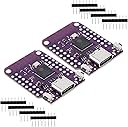
ESP32 S2 Mini V1.0.0 WiFi Board Based ESP32-S2FN4R2 ESP32-S2 4MB Flash Type-C Connect Fit for MicroPython
Product ID: 525380121
Details
- BrandDiGiYes
- Connectivity TechnologyWi-Fi
- Memory Storage Capacity4 MB
- Model NameDiGiYes ESP32
- Ram Memory Installed Size4 MB
💾4MB Flash + 2MB PSRAM
📶802.11a/b/g/n/ac WiFi
🔌Type-C USB with USB OTG
COP 68325
1
Sold byAmazon ColombiaDelivered byDesertcartCustomer service byDesertcartReturns14 days · 30 with PRO
Buyer Protection · Full refund if your order doesn't arrive as described.
Desertcart purchases this item on your behalf and handles shipping, customs, and support to Colombia.
Secure transaction
Details
- BrandDiGiYes
- Connectivity TechnologyWi-Fi
- Memory Storage Capacity4 MB
Description
🚀 Elevate your IoT game with the ESP32 S2 Mini — small board, massive potential!
- PLUG PLAY READY - No driver hassle—just connect, program, and innovate with MicroPython compatibility out of the box.
- COMPACT YET POWERFUL - 27 digital I/O pins with PWM and interrupt capabilities packed into a sleek, Type-C USB form factor.
- ROBUST MEMORY ARSENAL - 4MB Flash paired with 2MB PSRAM delivers ample space and speed for complex MicroPython applications.
- SEAMLESS WI FI CONNECTIVITY - Cutting-edge 802.11a/b/g/n/ac ensures blazing-fast, reliable wireless performance for all your IoT projects.
- VERSATILE PERIPHERAL SUPPORT - Full suite of ADC, DAC, I2C, SPI, UART, and USB OTG interfaces to power your next-level embedded designs.
The DiGiYes ESP32 S2 Mini V1.0.0 is a compact WiFi development board featuring the ESP32-S2FN4R2 chip, equipped with 4MB Flash and 2MB PSRAM. It supports a wide range of interfaces including ADC, DAC, I2C, SPI, UART, and USB OTG via a modern Type-C USB port. Designed for MicroPython, it offers 27 versatile digital I/O pins with PWM and interrupt support, making it ideal for advanced embedded and IoT projects requiring reliable wireless connectivity and robust memory in a small footprint.


Specifications
| ASIN | B0BXX6R15D |
| Best Sellers Rank | #37 in Single Board Computers (Computers & Accessories) |
| Brand | DiGiYes |
| Built-In Media | WiFi Board |
| Connectivity Technology | Wi-Fi |
| Customer Reviews | 4.6 4.6 out of 5 stars (47) |
| Manufacturer | DiGiYes |
| Memory Storage Capacity | 4 MB |
| Model Name | DiGiYes ESP32 S2 Mini V1.0.0 |
| Number of Items | 2 |
| Operating System | MicroPython |
| Processor Count | 1 |
| RAM Memory Installed | 4 MB |
| RAM Memory Technology | PSRAM |
| Total Usb Ports | 1 |
| Unit Count | 2 Count |
| Warranty Description | This item can be returned in its original condition for a replacement within 30 days of receipt. |
| Wireless Compability | 802.11a/b/g/n/ac |
Common Questions
Yes, all products are sourced directly from authorized retailers in the US, UK, UAE and India. We maintain strict quality control processes and verify each product before shipping. All items come with applicable manufacturer warranties and are covered by our standard return policy.
Delivery times vary by destination country, typically ranging from 3-9 business days. Each order is fully trackable through our system. We handle all customs clearance and use reliable courier partners for last-mile delivery. You'll receive regular updates about your order status via email and our app.
Desertcart is an international e-commerce platform operating since 2014. We securely process thousands of orders globally each day. Every product goes through our quality verification process before delivery, and we provide end-to-end order tracking, 24/7 customer support, and a comprehensive returns policy to ensure a safe shopping experience.
Our prices include the product cost, international shipping, import duties, customs clearance, and local delivery charges. We handle all customs and import procedures, ensuring there are no hidden fees upon delivery. PRO members receive additional benefits including free shipping.
Trustpilot
TrustScore 4.5 | 7,300+ reviews
Shop Global, Save with Desertcart
Value for Money
Competitive prices on a vast range of products
Shop Globally
Serving millions of shoppers across more than 100 countries
Enhanced Protection
Trusted payment options loved by worldwide shoppers
Customer Assurance
Trusted payment options loved by worldwide shoppers.
Desertcart App
Shop on the go, anytime, anywhere.