Buy anything from 5,000+ international stores. One checkout price. No surprise fees. Join 2M+ shoppers on Desertcart.
Desertcart purchases this item on your behalf and handles shipping, customs, and support to Colombia.
🚀 Elevate your smart home with radar precision and next-level safety.
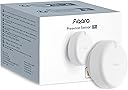
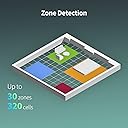
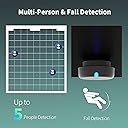
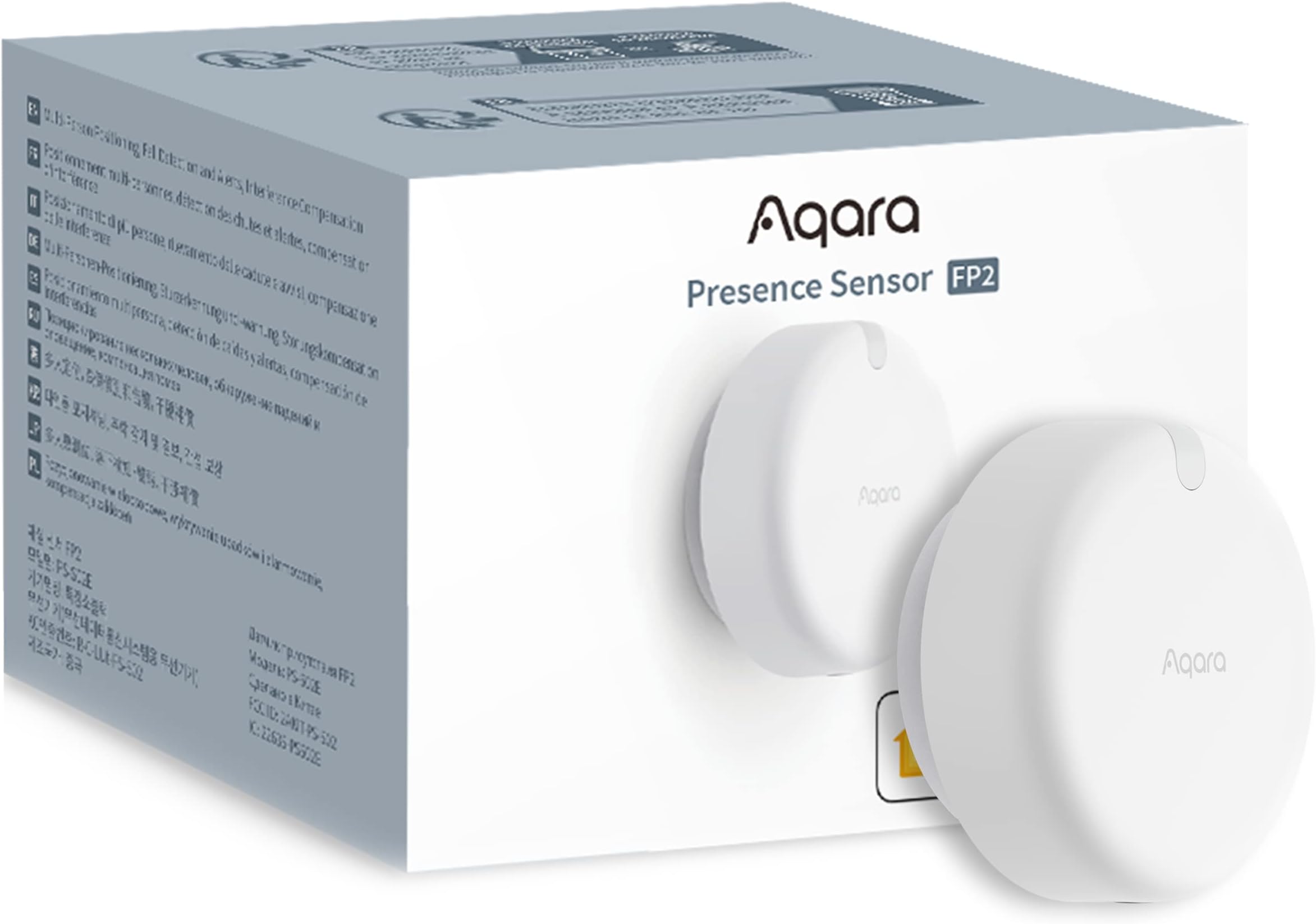
The Aqara Presence Sensor FP2 is a wired mmWave radar motion sensor that covers up to 40㎡ with 30 customizable zones, detects multiple people simultaneously, and features fall detection alerts. It integrates seamlessly with major smart home ecosystems like HomeKit, Alexa, Google Home, and Home Assistant without needing a hub. Its privacy-focused radar tech requires no camera, supports local automations, and is powered via USB-C for uninterrupted performance.


| ASIN | B0BXWZMQJ3 |
| Antenna Location | Presence Sensor for Moving and Still Detection, mmWave Presence Sensor Home Automation, mmWave Presence Sensor for Fall Detection, mmWave Presence Sensor for Light Detection, mmWave Presence Sensor for Sleep Monitoring |
| Battery Description | Battery not included |
| Best Sellers Rank | #15,382 in Electronics ( See Top 100 in Electronics ) #51 in Motion Detectors (Electronics) |
| Brand | Aqara |
| Built-In Media | Presence Sensor FP2 ×1, User manual ×1, USB-C to USB-A Cable × 1, Metal Plate × 1, Sticker × 1, Screw Kit × 1 |
| Color | White |
| Compatible Devices | Alexa |
| Customer Reviews | 3.7 out of 5 stars 2,467 Reviews |
| Frequency | 60 Hz |
| Item Dimensions D x W x H | 2.51"D x 2.51"W x 1.14"H |
| Item Type Name | Human Precense Sensor |
| Item Weight | 2.72 ounces |
| Lower Temperature Rating | 14 Degrees Fahrenheit |
| Manufacturer | Lumi United Technology Co., Ltd |
| Maximum Range | 8 Meters |
| Mfr Part Number | PS-S02E |
| Model Number | PS-S02E |
| Mounting Type | Ceiling Mount |
| Operating Temperature | 14 Degrees Fahrenheit |
| Power Source | DC |
| Smart Home Compatibility | Smart Home Compatible |
| Temperature Range | 14 Degrees Fahrenheit |
| UPC | 192784000830 |
| Unit Count | 1.0 Count |
| Upper Temperature Rating | 104 Degrees Fahrenheit |
I**.
Amazing sensor, easy for techy people to operate.
This product is absolutely amazing. I love having the ability to set multiple zones and each having different routines/automations. It is very easy to use and not having to worry about batteries is a major plus. If it's this good now, I can't wait to see the company's future products. Well worth the price! Update, still works very well. Once in awhile it has detection issues where one person won't be detected. I would like to see a microwave sensor that would really add functionality. With this one sensor I was able to remove 4 motion sensors. I can't wait to see the next version of this amazing sensor. No batteries required+++
J**B
Great Device That Needs Tweaking
I've been incredibly excited for this to come out. I was able to purchase an FP1 model from Alibaba a few months back, which was never sold in the US, and it had promise but the motion detection capabilities were very lacking. I had to pair it with an Aqara motion sensor to get the best results. So when they talked about this version I was excited to see the updates made. Overall I really like this product but be warned, it's not perfect and definitely needs to be tweaked, hopefully future software updates will fix some of the things I ran into when setting it up. You really need to set up your zones in the Aqara app before you start messing with it in Homekit. I was able to purchase 2 of these, one for my kitchen/living room and the other in my master bathroom to replace the FP1 and Aqara motion sensor. For the kitchen one I've set up 4 total zones to control my Homekit devices, the main one being in the kitchen where I have 2 NanoLeaf lightstrips under my cabinets. When you walk into the kitchen the lights will turn on and when you walk out they'll turn off. Took a bit of time to get the zones worked out correctly but after messing with it I was able to get a good result. It's not perfect as it sometimes doesn't register that you've entered the kitchen or left but I'd say since tweaking everything in the beginning it works 90-95% of the time as I'd expect. In the master bathroom I set up 4 zones with 2 primarily being used to control devices. The bathroom area turns on the main lights from my Meross dimmer switch and the shower area turns on the shower light and shower fan with both regular Meross switches. Initial placement didn't work out very well as the bathroom mirror seems to mess with the sensor so I moved it to be over the mirror to get it out of the sensor's view and that seems to have fixed a lot of the initial issues I was having. The glass shower door seems to mess with it a little bit but overall like the kitchen one it's working 90-95% of the time as I would hope. I think after some more software updates this will be even better over time. The motion sensing actually works really well when it's functioning properly. It's incredibly fast, even faster than the regular Aqara motion sensors. The design of the FP2 is better than the FP1 as it's flatter and you can remove the cord from the sensor itself which uses USB C. The mount is very smart in my opinion as it is magnetic. So you get an adhesive sticker that you put the included metal disk on and your sensor sticks to the magnet which makes it so much more convenient to take off if needed. All in all I'm happy with the purchase but I will say it's a bit overpriced. I was hoping for this to cost around $50 so when I saw $82.99 I was in shock, thankfully at launch they did have a 15% coupon that helped a bit but I'd say if you can wait I'd wait for the price to drop a bit.
M**M
Useless junk
Got this to use for presence detection in my bedroom. Unfortunately it has far too many problems to be useful. Minimal annoyance, this comes with a short USB cord but does not come with a power supply so you'll have to buy that separately. That's probably the nicest thing I can say about the product though. First, the setup is quite annoying as it requires an app with an account to set up the sensor, even if you only want to use it local with Homekit connectivity. There are also many confusing, contradictory, and vague labels and descriptions in the app that I'm guessing are related to badly translated words or unknown differences between parts of the world and no good descriptions such as which sensitivity is for what size room in quantifiable units. It is also very vague and confusing how you set up the detection zones/squares and then attempting to use the guided/automatic setup generates errors saying something can't overlap but doesn't really explain what is overlapping or wrong to guess how to fix it. Worth noting, Homekit integration (at least with Home Assistant) only shows a true/false indication of presence in a zone, not the count of how many people are in a zone like the Aqara app reports. So don't plan to use this to do something like tell if you have 1 vs multiple people in an area. Assuming you get it set up, it doesn't seem to work well. I tried having it in the middle of a wall as suggested, as well as in different corners of the room. All of these had massive mis-detections with numerous false-positive and false-negative results. I tried running the "AI learning" mode, however it didn't seem to help much. If I ran "learning" with my ceiling fan off, it would work decently until I turned the fan on or the blades were moved. If I ran "AI learning" with the ceiling fan on it would work slightly better on false-positives but frequently failed to detect people actually in the room. I'd also tried the "ignore pets" mode (which warns it will miss children) but it didn't actually seem to do anything for reducing false-positives from either of our dogs. Even more confusingly it seemed like it more-frequently would "lose track of" our bigger dog (around 50lb) and more frequently thought our smaller dog (around 40lb) was a person. The other very annoying thing I found was it seemed to have false-detection on stuff that can move around - for example the pillows on my bed being piled differently seemed to be detected as another person and/or it would get confused if I was laying on my side holding a pillow then got out of bed without putting the pillow back up at the headboard would think I was still in the bed after I left the room, or would think 2+ people were suddenly in the room. A similar thing happened when I did laundry and put the laundry bag on a chair until I got to folding the clothes it thought there was a person randomly in the chair. And again with a suitcase that I put down after a weekend trip when I didn't have time to unload and store it immediately. I also briefly tried this in our livingroom but it had many issues there too. It frequently "lost track of" where I was if I sat on the sofa behind a table in the middle of our room for a couple minutes but then getting up would think I was a 2nd person. Do that a couple times and it thinks there are 4 people sitting on the sofa when I'm the only one in the room and would not "clear" the ghost-people until I forced a re-learning or power-cycled the unit (and then that wouldn't fix the problem, just cleared it until I sat down again). It seems this product is aimed at only people who have a perfectly clean room with nothing in the middle and nothing that ever gets set down or moved, and does not have any ceiling fans. I guess maybe an office building or schoolroom might work acceptably but it sure is not suitable for a residence where you have personal belongings that can be picked up or set down on different furniture or might not put everything away instantly upon returning home. It also seems unsuitable if you have pets. I can't recommend this unit, especially given its quite expensive and requires constant power. I'm going to stick with inexpensive PIR sensors.
M**N
Perfect for home automation.
First of this is a great sensor and works great with multiple people in the room with home assistant. It can be a little buggy at times but that shouldn't stop anyone from getting the sensor that uses home assistant. I can't speak for the fall detection or the sleep tracker since you have to pick your type of setup and can't do both at the same time.
F**.
Not very accurate.
This thing detects everything, but just people. Fans are people. Electronics are people. Even just air are people. And those things move around like ghosts. I have to keep using the app to remove new imaginary people. The set up is ok unless you need it for home assistant. The webkit only integration is garbage. It will just stop working and then you have to reset the whole thing, set up your zones, and start over. It would be nice if they had matter or anything other than homekit. You can't rediscover this device once lost. It does work locally after setup. The app is not great since i have to manual search for the device each time. It's a hassle and not worth the price.
H**5
Excellent Smart Sensor, Previous Shortcomings Improved
Ok first, earlier reviews that talk about the shortcomings of the app and installation were on point at the time of their writing, however, with updates to the app and device, that is no longer the case. The app is much more intuitive and I’ve had no issues with detection and clearing. So much so, I now have three. I have one in the master bathroom, one in the kitchen, and another in the garage. These are all places where we might be for a while, moving too little for a traditional PIR motion sensor to pick up that we’re still present and so cut off the lights on us. This sensor is double the price of other motion sensors out there, but then there is a Great Deal more going on under the hood with this sensor. Also, the device is not battery powered, which I love. One less to keep up with and given all that it’s doing, you would be constantly changing the batteries anyway. Now if you want to add this device to Home Assistant as I did (it was useless to me otherwise), that too is an absolute breeze as an Apple iOS user, as long as you know how to do it - Apologies , I cannot speak for the Android path. There’s only one video out there describing it. It’s important that you know that this device DOES NOT require the Aqara hub as their customer service will tell you. In fact, it’s actually incompatible with it. The hub is used to add Zigbee based devices and the FP2 is WiFi based. It does not use Matter for the connection either. When adding the FP2 via the Aqara Home app in iOS, the app will automatically add the device to the Apple Home app. Once the entire set up m/config process is complete, you just need to open the Apple Home app, use the ellipsis in the upper-right to navigate to the room you selected for the device and remove either the luminosity or presence sensor from the app. Now open Home Assistant, navigate to Settings —> Devices and look for an as yet configured HomeKit integration with “FP2” in the name. Click configure and it will ask you for the 8 digit PIN code that is just above the QR code located on the swing arm on the back of the FP2 sensor. Once entered, the device is now available for automations and you done. Again, while this process is a cinch to execute, it is anything but intuitive so the process could either use some work or at the least they should make that process clear in the instructions or that the sensor ties itself to Apple Homekit. I also think they should make it clear in both the instructions and on the item page in Amazon that the FP2 cannot be added to the Aqara hub rendering the hub irrelevant for the FP2. Other than that, this sensor hits all the marks and is Exactly what we needed.
D**5
I wanted to like it....but seems like a "beta" product..don't buy just YET
I'm very much into the Smart Home with both Home Assistant and Apple Homekit. I have a ton of smart devices and a lot of automations. I really, really wanted to love the FP2 but it has some significant teething issues. I'm using the latest 1.1.6 firmware as a reference, and the iPhone v3.2 Aqara app: 1. The iOS Aqara Home app will frequently freeze and not show my location in the room in real time. I have to force quit the Aqara app dozens of times while mapping out a new room. The FP2 seems to be OK, as Homekit/Home Assistant still gets real time updates. This seems to be an iOS App problem, not a sensor problem. 2.On a few occasions when saving a zone I get a popup error saying the zone can't be saved. I have to exit creating the zone (losing my zone work), then re-create the zone. This only happend 3-4 times while setting up several rooms. 3. Often the FP2 will show multiple people in the room even though there is just one. A lot of room map changes and setting 'absence' state when I leave the room does help, but doesn't totally resolve the problem. 4. Each FP2 calls home to USA Amazon/AWS servers exactly every 15 minutes, even though I have NO cloud integrations configured. I'm ONLY using Homekit. 5. Automatic room mapping doesn't really work at all. 6. Although the FP2 has a USB-C port, the FP2 does NOT support USB-C power delivery. You MUST use a USB-C to USB-A cable for power. Big design flaw. 7. You can't add "height" information to Interference sources. So if I have a ceiling fan right over a zone (like a couch), I can NOT add the interference zone as it sees the couch as a zone and I can't say the interference zone is 'on the ceiling'. So I'm unable to add ceiling fan interference zones. 8. Stickers have a maximum size, which often are not large enough. I have a very large couch and also a kitchen island. None of the stickers can be enlarged enough to match the real physical size. 9. You can't rotate the "door" sticker in all the possible orientations, such as which way the door swings. 10. Tracking multiple people in a room is VERY buggy. 11. Aqara is a Chinese company, and some of the English localization in the iOS Aqara Home app is awkward. One screen still had some Chinese on it. 12. I don't have any pets, but I've read reviews that the FP2 is hit or miss on whether it detects pets or not. Aqara is supposed to release a future update to better detect or ignore pets. 13. Using the FP2 in the bedroom for tracking sleep zones can be buggy, and doesn't always detect presence throughout the whole night. Aqara is supposed to release a firmware update to help ix this. When the FP2 works, it's like magic. But the 'magic' is greatly tarnished by the firmware and app issues. So I would NOT purchase the FP2 in it's current state. I would give it a month or two of firmware/app updates to see if they can address the issues above. Many people on Reddit and other forums report the same issues, so I know it's not just me.
E**Z
Well worth the money. Amazing device
I've watched a lot of YouTube reviews on this sensor. Being on a tight budget made me hold off and try less expensive options. They all failed so I cut back on a few things and ordered this one. MIND BLOWN! This thing is amazing! Most of my house is automated and run by voice via the excessive number of Alexa devices, plugs, and bulbs I have. I was so excited when this arrived that I just plugged it in and balanced it on my TV so I could play around. I haven't even gone through the proper setup for it yet and it's crazy good. I created a few zones and it's truly blown my mind. After dark, when I pass from the livingroom zone to the kitchen zone, a light automatically turns on at a dim level so I don't get blinded in the dark. I return to the livingroom and the light goes off. I'm fortunate to have an open floor plan so the sensor covers a fair amount of my living space. It seems very good at presence detection. When someone else is in the house I pull up the app and you see the other person. I walk away and within a second or two I can see that I've moved away from the other person and we started walking around and the sensor kept updating our location. I can't wait to actually put it in a permanent location and go through the proper setup. I love home automation and will probably make a video about this thing. I haven't tried the ceiling mount for fall detection yet, but I will test that because I've got an elderly father who is a high fall risk and it would bring great piece of mind knowing if he falls, yet again. Especially if he were unable to call for help or he was home alone. If other Aqara devices are as good as this sensor, this will be my new go-to. As finances allow, I'll be adding additional sensors and devices to my nerd ecosystem. I gave it 5 stars for value because you get so much functionality and integrations are simple. Time is money and you could spend far more than the price of this sensor trying, like I did, to find something less expensive only to realize how much money you've spent and how many frustrated hours you've spent trying to get different cheap thing to work or properly integrate.
A**9
Capteur précis avec intégration Home Assistant via HomeKit, mais nécessite une alimentation filaire
Je suis très satisfait de l’Aqara FP2, notamment grâce à son excellente intégration avec Home Assistant via HomeKit. La configuration est simple et les zones de détection définies dans l’application Aqara fonctionnent de manière fluide pour détecter l’occupation. Le capteur est très précis, et il s’intègre parfaitement dans des projets domotiques avancés. Cependant, il y a quelques points à améliorer. Par exemple, il n’est pas possible de récupérer le nombre exact de personnes occupant une zone, ce qui pourrait être une fonctionnalité utile pour optimiser les automatisations basées sur la présence multiple. En outre, il est important de noter que ce capteur nécessite une alimentation continue, ce qui peut parfois rendre son intégration plus complexe si l’on souhaite éviter les câbles apparents. C’est un point à prendre en considération lors de l’installation, notamment dans les espaces où l’esthétique est importante. Aussi, les différents modes de détection (détection classique, détection de chute, et analyse sommeil) ne sont pas combinables et fonctionnent séparément. Bien que chaque mode soit efficace dans son propre contexte, pouvoir les utiliser simultanément serait un réel avantage. Malgré ces quelques limitations, c’est un excellent produit pour ceux qui recherchent une solution avancée de détection de présence et d’occupation. Je recommande vivement cet appareil pour sa fiabilité et son efficacité, surtout pour les utilisateurs avancés en domotique.
L**K
Samen met een Aqara Hub heel gemakkelijk te gebruiken
Ik ga deze melder gebruiken om enkele ruimtes die met elkaar verbonden zijn in één keer goed te in kaart te brengen (met een Aqara hub) en zo de verlichting slim te kunnen schakelen. Ben benieuwd of dit goed gaat lukken maar na het zien van wat Youtube videos zal ik probleemloos moeten gaan. Mocht het toch niet helemaal gaan zoals ik wil dan is het een optie om eventueel nog een te bestellen en die toe te voegen.
M**B
Finally, a sensor that actually knows I'm there!
I've been using the Aqara Presence Sensor FP2 for a few weeks now and honestly it's on a different level compared to the old PIR motion sensors I used to use. Those basic sensors always leave me sitting in the dark if I don't move enough while reading or watching telly but this thing uses mmWave technology which means it can see me even if I'm just breathing. It's properly clever how it tracks multiple people at once and you can set up different zones in a single room. The setup was a bit fiddly in the app at first because you have to map out your room and define where the furniture is located. I did struggle a bit with some 'ghost' detections where it thought someone was in the room when it was empty but moving the sensor away from a rotating fan fixed that. It's much more sensitive than a standard motion detector so you have to be careful with placement. One of the best bits is that it works as a light sensor too so I can automate my curtains and lights based on how bright it is in the lounge. Since it's mains powered with a USB cable you don't have to worry about batteries dying every few months which is a massive plus for me though it does mean you have a wire trailing down the wall if you don't hide it well. When you compare this to a traditional PIR (Passive Infrared) sensor the pros are obvious as you get way more detail and no 'timeout' when you're still. However the cons are that it's much more expensive and requires a constant power source whereas a PIR can live on a coin battery for a year and is tiny. If you just need a light to pop on in a cupboard stick with a PIR but for a smart living room this FP2 is the way to go. There is also a fall detection feature which is great for peace of mind if you have elderly relatives living with you although I haven't had to rely on that yet thank goodness. It integrates perfectly with my HomeKit setup and the lag is almost non-existent. Overall I'm really chuffed with it despite the slightly steep price tag.
M**I
Ottimo per determinare la presenza statica
Grazie a questo sensore ho potuto ottimizzare alcune scene che prima - utilizzando i sensori di movimento - avevano delle limitazioni in caso di presenza statica. Premessa per chi non conosce la differenza tra "sensore di movimento" e "sensore di presenza". Lo spiego con un esempio; la scena "accendi le luci quando entro in cucina e la luminosità è inferiore a 20lux" è possibile con un sensore di movimento abbinato ad uno di luminosità (nel mio caso, prima di acquistare questo, usavo uno combinato, ma spesso servono due sensori distinti)... e fino a qui questo prodotto non da un grande valore aggiunto, se non per il fatto che - dal momento che è costantemente alimentato - l'aggiornamento dei sensori è più frequente e quindi ho la garanzia di leggere un valore di luminosità in tempo reale e non uno aggiornato magari a 20 minuti prima (visto che la quasi totalità dei sensori di movimento è alimentato a batteria e - per preservarla - si opta per un aggiornamento non in tempo reale ma ad intervalli regolari di diversi minuti). I problemi si verificano con le scene di spegnimento: "Spegni le luci quando esco dalla cucina", con un sensore di movimento da risultati parziali. Infatti se resto fermo mentre mangio ed il sensore non rileva alcun movimento, mi ritrovo a mangiare al buio. Si può migliorare la situazione aggiungendo un timer, ovvero "Spegni le luci 2 minuti dopo l'ultimo movimento rilevato in cucina"... supponendo quindi che anche mentre si mangia, si genera un movimento almeno ogni 2 (o il valore scelto) minuti... ma in tal caso, quando esco definitivamente, devo aspettare due (o più) minuti prima che le luci si spengano. Con un sensore di presenza, invece, so esattamente quando qualcuno è presente in cucina... e quindi l'automazione diventa precisa, immediata ed a prova di errori: quando la prima persona entra in cucina si accendono le luci, quando l'ultima esce si spengono. Questo ovviamente solo per fare un esempio... le possibilità poi sono molteplici. Veniamo al prodotto in questione: Installazione e configurazione: è la parte più delicata... e che richiede il suo tempo. Se non vi interessa il monitoraggio delle cadute (per la quale è richiesta l'installazione a soffitto), la posizione migliore è al centro della parete stretta, ad un altezza compresa tra 140 e 180cm. La scelta della parete più stretta è dettata dall'angolo di circa 120 gradi (in realtà ho verificato esser anche qualcosa di più), quindi al centro della parete lunga rischiereste di aver gli angoli ciechi. L'installazione ad angolo è possibile ma è più complesso disegnare la mappa (speriamo in un aggiornamento sw) Nella mappa vanno segnati i confini delle stanze, le zone di entrata ed uscita e soprattutto quelle di interferenza. Le zone di interferenza sono molto importanti e vanno impostate in tutti quei punti dove potrebbero generarsi "fantasmi", ovvero: - oggetti in movimento (piante con foglie mosse dal vento, tende, ...) - riflessi (specchi, TV, finestre, ...) - variazioni repentine di luce e movimenti esterni (finestre, lampadari) Attenzione che nel momento in cui completate la configurazione delle stanze, lo spostamento anche di pochi mm potrebbe inficiare tutto il lavoro ed obbligarvi a riprendere da capo. Utilizzo con Home Assistant: personalmente ho usato l'app originale solo per la configurazione, HomeKit non lo uso ma uso solo Home Assistant. Home assistant, però, non prevedendo al momento un'integrazione specifica, lo vede come dispositivo home kit, quindi prima dovete configurare HK (Home Kit), poi verrà automaticamente riconosciuto in HA (Home Assistant). Verranno esposti: - un sensore di luminosità - un sensore di presenza generale - un sensore di presenza specifico per ogni stanza Qualora doveste modificare il nome o il numero delle stanze, dovete cancellare il dispositivo da HA, da HK e riconfigurarlo, prima da HK e poi da HA. Considerazioni: è più di un mese che lo uso e sono molto soddisfatto. Purtroppo non è economico, ma vi permette: - un'economia di altri sensori, con conseguente semplificazione nella gestione e manutenzione (batterie) - maggior precisione nella definizione degli scenari che prevedono l'effettiva presenza e non semplicemente il solo movimento. Ne comprerò altri non appena ci saranno delle offerte 😀 Spero che la recensione vi sia stata utile: in tal caso, un like è molto gradito.
H**R
Unfassbar gut
Unfassbar gut. Ich bin schon seit mehreren Jahren im smart Home Bereich unterwegs und dieses Gerät hat alles verändert. Es ist unfassbar präzise und, was ich selber nie gedacht hätte, unglaublich zuverlässig. Es erkennt sogar auch, wenn ich am Schreibtisch sitze, obwohl es von hinten ist und der Schreibtisch ca. 5m entfernt ist. Bemerkenswert ist, dass das Gerät absolut fehlerfrei läuft. Es erkennt nie Geister und erkennt nie die Abwesenheit wo nach Anwesenheit ist. Einziger Kritikpunkt sind manchmal Spiegelungen. Ich habe im Bad auch einen Sensor für das Licht und dieser ist auch auf die Scheibe der Dusche gerichtet und er erkennt mich daher manchmal doppelt aufgrund der Spiegelungen. Aber auch dies kann man alles in der App optimieren. Insgesamt total überrascht, wie präzise und zuverlässig es klappt. Das hätte ich NIE gedacht
Trustpilot
2 weeks ago
2 months ago