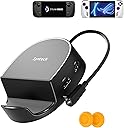
Dock it like a pro! 🎮
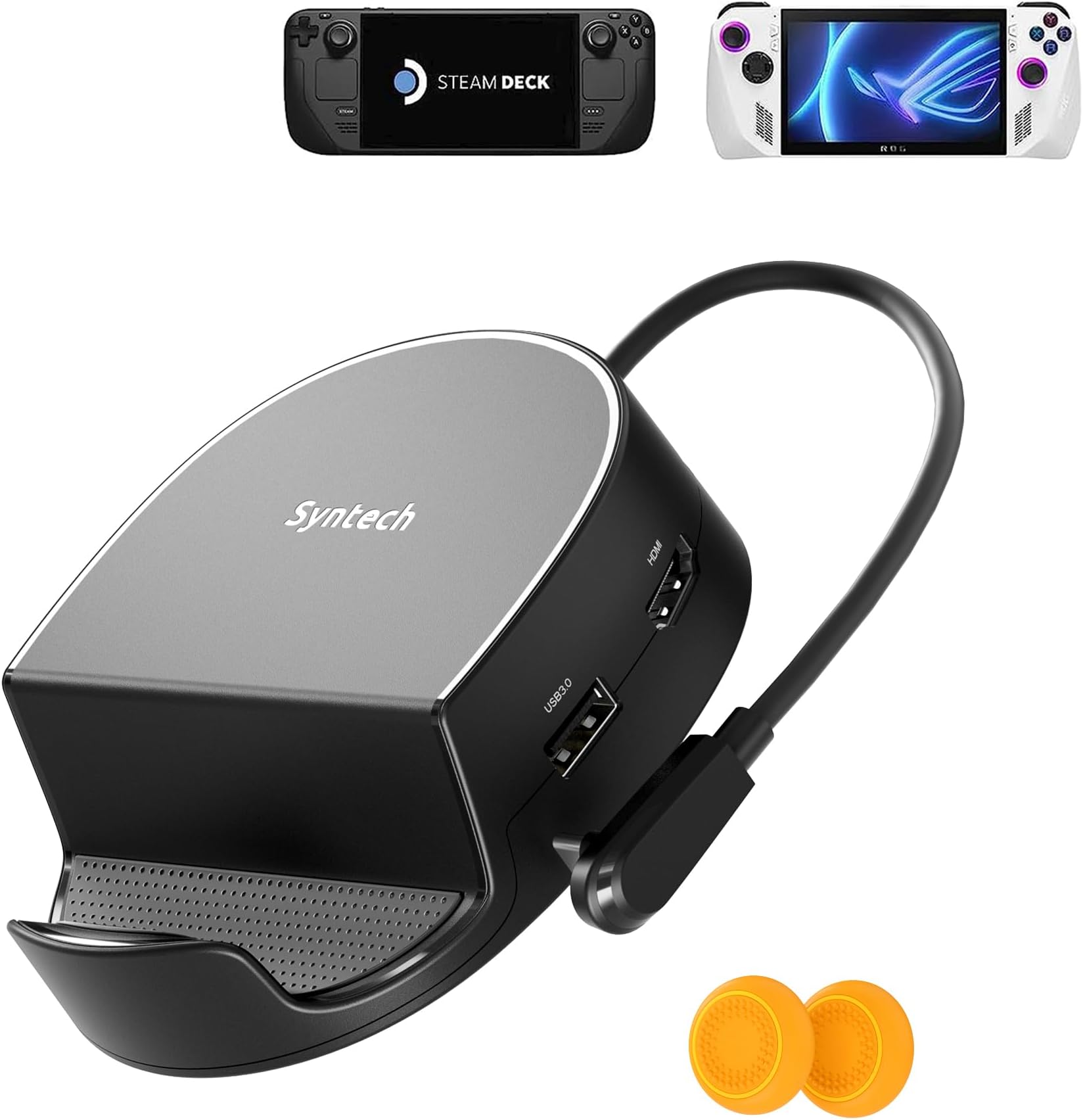
The Syntech Mini Dock is a 6-in-1 docking station designed for the Steam Deck, Steam Deck OLED, and ROG Ally, featuring HDMI 2.0 for 4K@60Hz output, Gigabit Ethernet, and multiple USB ports. Its compact design ensures portability without sacrificing performance, making it the perfect accessory for gamers and professionals alike.


| ASIN | B0BP24YDP1 |
| Best Sellers Rank | #2,083 in USB Hubs |
| Brand | Syntech |
| Color | Black |
| Customer Reviews | 4.2 out of 5 stars 346 Reviews |
| Hardware Interface | Ethernet, HDMI , USB 3.0, USB Docking Station , USB Type C |
| Item Dimensions L x W x H | 4.24"L x 3.62"W x 1.25"H |
| Item Weight | 153 Grams |
| Manufacturer | Syntech |
| Mfr Part Number | SYNM050 |
| Model Number | SYNM050 |
| Number of Ports | 6 |
| Product Dimensions | 4.24"L x 3.62"W x 1.25"H |
| Total USB Ports | 3 |
| Total Usb Ports | 3 |
| Wattage | 30 watts |
C**Y
Great to make a PC
Great product. Key element to turn my Steam Deck into a fully optimal PC.
K**L
A great steam deck docking station for half the price of the official one
I've only had this for one week, but it appears to be built solidly, and I have it hooked up to a 4K TV, it's great for playing couch co-op games with external Bluetooth controllers. It seems to charge quickly through the pass-through USB c port, and it has 3 USB 3.0 ports as well, to plug in wired controllers or external storage. This is also great for going into desktop mode with the steam deck and hooking it up to a keyboard, mouse, and external monitor. Overall, a great alternative to the official docking station for about half the price.
G**I
Great dock!
Disregard the mess. The dock’s body is made from a sturdy plastic, rubber caddy for the Deck and rubber for the base. If you don’t have an hdmi plugged into the dock, the Deck’s screen stays on and charges; which is a nice feature. With a hdmi cable plugged in, it just switches over to the tv. The expandability is nice for wired controllers. I’m not using the Ethernet port here but it is gigabit (Checked it with device manager on a computer). Overall pretty nice 😊
C**S
Firmware Update Impossible
I've plugged this device into three (3) different Windows systems, and every single one of them report the exact same issue: "Device Descriptor Request Failed". I watched the YouTube video and followed the link in the PDF. I'm using the hub's USB-C PD port to connect from the hub to the host device. I've tried every port on each system and numerous cables and adapters with the same result. The firmware update utility never detects the device. Oddly enough, if you plug in the USB-C cable which is intended for the ROG Ally/host device, the Gigabit Ethernet device shows up and the hub appears to be functional. However, the FW update utility doesn't see the device using that cable either. This unit genuinely appears to be defective (when connected using the USB-C PD port which is explicitly called out to be used for flashing). Unfortunately, that means my ROG Ally doesn't charge at 30W leaving this device completely useless. Will update if the second unit functions, but based on other reviews, I'm not holding my breath.
C**B
Great puck shaped dock, but makes cable management difficult
I liked that this had a smaller footprint than literally every other steam deck dock. It has clear ventilation to the rear vent ports, and despite being narrow, it has a pretty secure grasp of the deck. It has the standard ports that every other dock has, ethernet, usbc power, 3 usb 3.0 ports, and hdmi 2.0. The reason I'm returning it, however, is that, due to the way the ports are oriented, it makes cable management difficult. Your cables will be radiating outward like spokes on a wagon wheel, with no easy way to wrangle them until several inches away from the dock. It was a small insignificant issue, so I'm only taking 1 star off. Ignoring that, the dock actually works very well, and I'm sure if that didin't bother me, I would have enjoyed using and keeping this dock. If you don't think this will bother you, then you can't go wrong with this dock.
S**6
Works With ROG ALLY w/ bios update on device
Just installed it last night with the bios for the docking station as well as the ally. You must install the bios via their link. After the bios was updated the ally now does turbo 30w with just the rog power supply, no new one needed. Another note I had to use my laptop, I could not use the ally to update the dock as it did not 'recognize the device'.
A**S
Works as Intended, and works well!
#UPDATE: after having it for some time I can say that it has some genuine issues. The biggest being display resolution. If you start the SD while plugged to the dock your resolution will be stuck in 800x600 until you unplug it and plug it back in. Occasionally while playing a game for some time, it will glitch out either audio or video. Not sure if mine is defective, but honestly it's just been a really mid experience. I had no intention of running 4k Video through it, seems a bit overkill for the SteamDeck as great as it is as a handheld 4k is a bit taxing on any system. The size of it was never really a concern for me I don't think it'll leave the house. It's giving me a solid picture with no signs of degradation, the audio is working as intended external controllers through the USB Work, I haven't tried to load a game from an external Hard Drive so no clue if it can keep up with the picture while loading something like GTA V through the USB port. It doesn't really block the vents aside from a small corner that needs to be covered to get it centered nothing that would effect the SteamDecks performance. Overall I'm very happy with it. I don't know if it'll last a long time and if it breaks within 1 year I'll update this review but so far it works perfectly as far as I can tell. but it's basically just a USB Hub with HDMI output over USB-C. The one irritation I have is that it didn't come with a charging cable, and I had to provide my original SteamDeck Charger to power it, leaving me without a charger, any time I don't want to dock it.
M**E
Excellent, does everything I wanted
Bought for my steam deck and it’s perfect. Plugs into my tv like I wanted, it’s not big and bulky, very aesthetic in my office/game room. Love that it charges my steam deck while I play. This has really enhanced my gaming experience.
M**L
Agréable et fonctionnel
Mise à jour suite dernier bios Asus Le produit fonctionne parfaitement, depuis la dernière mise à jour Asus, ce dernier permet le mode 30w mais en revanche pas avec le chargeur 65W d'Asus. J'ai du prendre un chargeur 100W. Ceci est encore une amélioration qu'Asus doit apporter. Le produit est de qualité, le boîtier est élégant et compact. Les patins anti dérapant permettent un bon maintient du dock et des équipements mis en place dessus. Le SAV est soucieux de ses clients qui m'ont contacté et aidé à résoudre les différents problèmes ---------------------------- Ancien commentaire : Fonctionne très bien mais ne permet pas le mode 30W sur la ROG Ally que ça soit avec le chargeur officiel ou derrière une batterie.
L**O
Very good value for money
Il dock station Syntech 6-in-1 mi è stato consegnato in tre giorni, spedizione perfetta. Il prodotto è molto valido e robusto. Risulta compatibile con tutti i più diffusi handheld PC in commercio (Steam Deck, ROG Ally e Legion GO). Avendo la Legion GO, avevo chiesto al venditore di confermarmi la compatibilità prima di comprarlo. Mi hanno risposto in poche ore, rassicurandomi che avevano testato il prodotto e confermando la piena compatibilità, come poi ho potuto verificare da solo. Ad oggi risulta forse l'unica dock station compatibile al 100% con tutte le console handheld, a questo prezzo poi è stra-consigliato. Venditore super gentile e disponibile.
E**5
Macht was es soll und das zu einem sehr guten Preis
TL;DR: Ich nutze das Dock mit dem SteamDeck und bin extrem zufrieden, super Preis-Leistungs-Verhältnis. Von mir daher volle Punktzahl. Etwas ausführlicher: Nutze das Dock mit dem SteamDeck, um damit von Zeit zu Zeit via XBox-Controller vor unserem kleinen Fernseher zu zocken oder dort über das Deck Disney/Neflix zu streamen. Zu 4k kann ich nichts sagen, bei 1080p (FullHD) läuft alles problemlos. Ich nutze das Dock auch nur mit dem beim SteamDeck mitgelieferten Netzteil, auch da keine Probleme mit dem Laden oder ähnlichem. Die Auflagefläche für das Deck im Dock ist relativ klein (durch das runde Design), aber selbst wenn das Deck nicht genau mittig im Dock steht, kippt es im schlimmsten fall nur leicht zur Seite, mehr nicht. Ich stelle das Deck einfach ungefähr mittig ins Dock rein, da muss man jedenfalls aus meiner Sicht nicht besonders aufmerksam sein, damit es genau mittig im Dock liegt. Zu dem Preis gebe ich auf jeden Fall 5 von 5 Punkten für das Dock. Möchte es nicht mehr missen.
S**P
ROG Ally 30w turbo mode works
Works good, tried everything but Ethernet port and it does what it should. Pros: Lots of peripheral ports Light weight for travel Will do 30w turbo mode however the stock charger that comes with the ally is not enough, using an 87w Apple MacBook Pro charger does the trick. Cons: somewhat cheap plastic construction. small docking slot does not accommodate device with a protective shell. Summary: good little doc for someone who moves around and travels a lot and needs extra ports. However for a permanent desk docking station I would go for the Ugreen one or the one with the double fans. As the solid metal construction of the ugreen and the larger docking slot makes it more versatile. However ugreen does not have many ports. Just enough for a basic desktop set up.
L**Z
Es un buen eockstation
Me parece un dockatstion para el lenovo legion go de lo mejorcito ademas tiene batantes conexiones y es de buena calidad
Trustpilot
1 month ago
1 month ago