Buy anything from 5,000+ international stores. One checkout price. No surprise fees. Join 2M+ shoppers on Desertcart.
Desertcart purchases this item on your behalf and handles shipping, customs, and support to Colombia.
๐ Never Miss a Moment with Digi-fun!
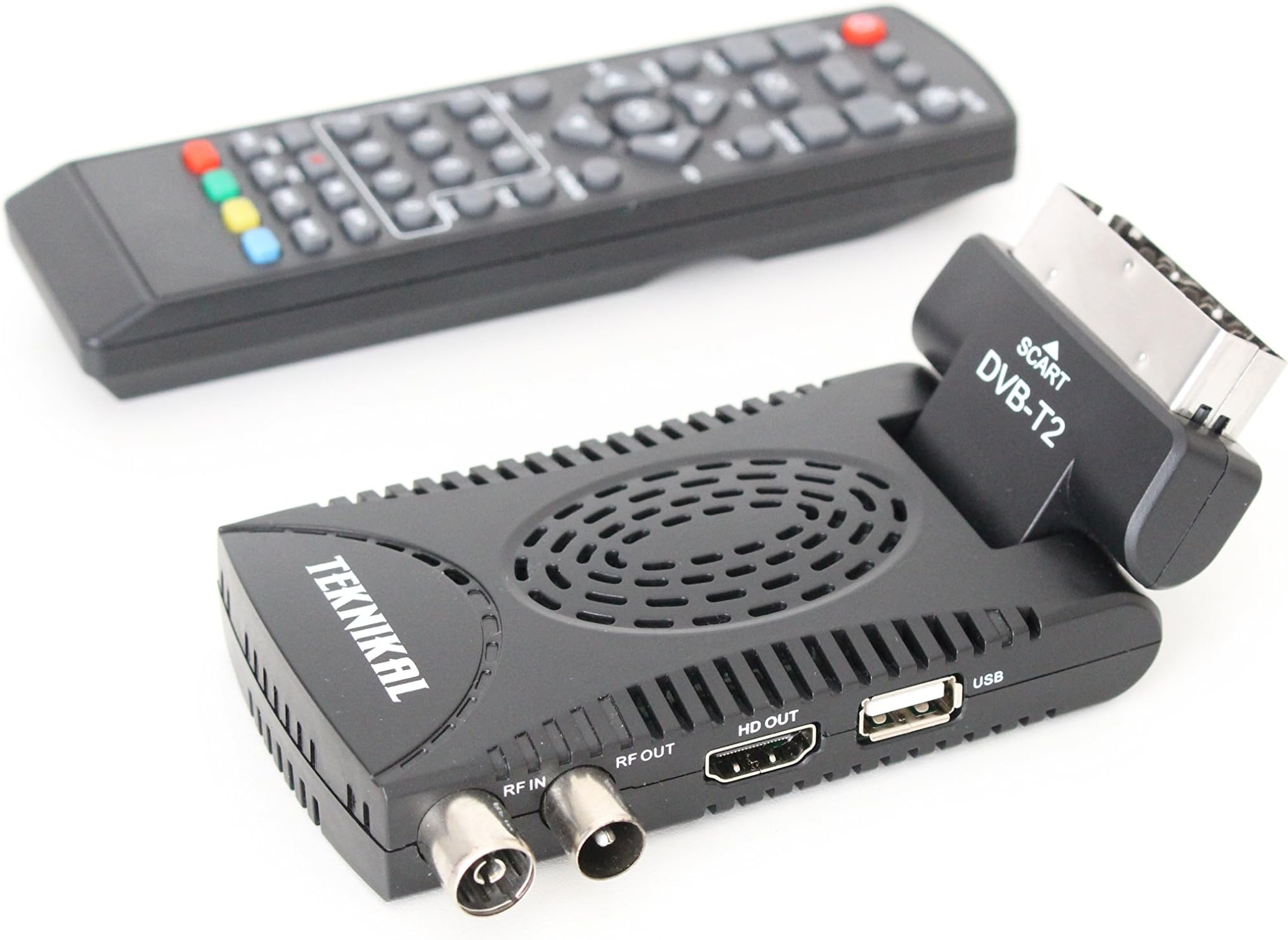
The Digi-fun Scart Freeview is a versatile Digital HD TV receiver that allows you to access and record over 80 digital TV and radio channels, including HD options. It features USB memory recording, ensuring you can save your favorite shows effortlessly. Compatible with both digital and analogue TVs, this set-top box is designed for seamless integration and future-proof entertainment.
| Audio output mode | HDMI Multi-channel |
| Brand | Designo |
| Colour | Black |
| Connectivity technology | HDMI, USB |
| Total HDMI ports | 1 |
| Total USB ports | 1 |
D**R
Worth persevering
At this price point you might not expect too much of this product, but it's worth persevering with it. It arrived earlier than anticipated, and the queries I had were dealt with very fast, including one reply on a Sunday morning. Impressive, and for me, a company worth doing business with. As to the item - it's neatly packaged, and you get the device, a power supply, a remote control (with no batteries, so two AAA required from your own resources) a little IR receiver, a USB extender cable, and little gadget with a USB plug at one end and a socket for an SD card at the other, and a manual, of sorts. Pretty impressive for less than twenty quid! As a Freeview receiver, it really was a case of plug it in, turn it, let it find the channels, watch the TV. The channel ordering isn't immediately ideal, if you care, but can be fiddled with if desired. It doesn't respond to the remote very fast, or change channels/pop up the EPG (yes there is one) very quickly, but it's acceptable. Picture quality is ok too - not going to set the world on fire but perfectly watchable, and no issues wth lip sync or ghosting. No nasties. The strength of this unit though, and my reason for purchase, is the ability to record onto an external USB device, which is hard to find at this price point. As long as your USB device is formatted FAT32 it's fine, and if it is not and you are prepared to allow it to, the unit will format it for you. Recording can be done in three ways. You can just press "Rec" on the remote when watching a programme and it records. Or you can pull up the EPG, navigate to a programme somewhere in the next seven days, press Record and it "makes a booking" - yep, it records. You can also display your "bookings" and delete them if you make a mistake. Finally, if you are old school, or want some finer control, you can set up a timed recording on a set channel at whatever times you want, so you can add ten minutes or whatever if you think there might be an overrrun. The manual states that the unit will shut down after a couple of hours if you don't press the remote. I thought at first that meant it wouldn't record something in the middle of the night, but it worked fine. So, what do you get when you record? Simple enough - it creates a dated and sensibly, named after the channel folder on your USB device, and in there you get files. Easy eh? Not quite. By default it seems to produce files in .dvr format, which is used by lots of digital recorders. However, not all .dvr files are the same, and the manufacturer has some leeway in exactly how they are produced, including making them unplayable on any other device. At first I thought my plans to archive recordings to my PC had come unstuck here, especially as I had no software that would play or convert the files. A question to the supplier was answered swiftly and they recommended a bit of software called KM Player. However, I didn't go down that route as I found a better way. Tucked away in the settings, where incidentally you can alter such things as the aspect ratio, there is a recording setting which can be toggled from the default TS (transport stream) to PS (program stream), If you do that (and I understand there may be issues with ps stream, but they've not happened to any of my recordings yet) then you get files in mpeg2 format, named 000.mp2, 001.mp2 etc, and these can be played just fine. Your only final gotcha here is that the recording might be split into multiple sequential files, and you then either need to use some software to join them into one, or,as I do, use XBMC, which will "stack" files like this automatically and treat them as one recording for you. Other players may do that, too, I don't know. The end result when played back on a PC looks fine, and certainly better than it looks on the TV in the first place. Of course, if you are planning on recording from the unit and playing back directly on the unit too, none of that need worry you. Make a recording, play it back, no fiddling required. Job done. For me, this is a backup system. I have a Virgin+ box and most of our recording is done on that, but on the occasion we want to archive something it's a fiddle, as we have to send the output to a DVD recorder, then rip the DVD to the PC, then encode it...using this unit as a kind of of "backup" recorder for anything we know we want to archive that's on Freeview works well for us. So, for my money, a great little product from a good seller. It does what I want, and for the money, does it well. If it lasts a year and breaks, well what do you want for twenty quid? Recommended.
M**J
Good product that works well.
I chose this item because of is spec and price, good value for money, It's easy to set up and gives a quality picture. As other reviewers have stated the manual is terrible, one of the worst that I have ever seen. It is however fairly intuitive and I think that I have sorted it out. The biggest disadvantage for me is the recording facility, Whilst it records well, in play back mode it is impossible to fast forward or reverse. If therefore there is only a part of a recording you wish to watch, you have to sit through the whole recording until you get to the part that you are interested in. Hence only 4 stars.
M**B
Well worth the Money
I purchased this as the areial connection had broken inside my TV. I was able to connect this via the HDMI connection into the TV so saved me a fortune on a expensive repair. Set up very easy and excellent picture and interface.
P**E
Very poor.
I bought this unit to convert an analogue only TV. I have not tried the recording functions as they were not the primary purpose for purchase. Set up was straight forward. Automatic tuning found all the channels that I expected it to find. Despite the outside of the box and the manual (more of which below) stating that teletext can be received this is not the case. Pressing the text button on the remote brings up a menu on the screen containing one item - which if selected - appears not to do anything. Pressing the red button brings up a `Feature not supported' message. The manual is abysmal!! The print is extremely small (I couldn't read it without a magnifying glass) and the translated English varies in quality between hard to follow and impossible to understand. The wording of the on screen menus means that many functions are un-intuitive. The idea of having a discrete little unit which fits behind the TV is a good one. However this unit is made visually intrusive by an extremely bright and unpleasantly distracting LED mounted in the remote control receiver which has to be placed within sight of the viewer. There is also an LED on the power supply which if plugged into a visible power point is also distracting. If you don't intend to use this item in a bedroom and can live without Teletext then it may be OK for you. However I am contacting the seller with a view to returning this item for a refund.
A**R
Good Buy but Beware (revised)
I had given my previous Thompson PVR box away to a friend and needed to replace it without spending a fortune. Reviews for this device seemed favourable, so I sent off for it. Digifun sent it within a couple of days. The unit fixes and is held in place in the SCART socket. This is a weakness as it is fairly heavy and relies on friction. So it can slip, or, like mine, the metal part of the socket begins to collapse. There is a IR dongle for the remote control (which is slightly oddly laid out), but with a bright red LED which is unnecessary and a bit annoying. The box says nothing: no contact address or website, just "Digital Terrestrial Receiver," made in China. The tiny instruction booklet that comes with it is not really very clear. The process for recording is odd if the timer is involved. A "booking" has to be made which in turn picks up timing details. Instant recording is a however the usual one-button process. The tuner only supports recording the channel being watched. Programmable review and freeze-live-programmes works well. I have used both an HS card and a memory stick for recordings - a later review on this site says it only records on a memory stick: this is wrong. It can do both. I was very surprised at the results: not highest definition of course, but very good. A bonus is that the recording can be chosen to be in MPEG and this plays straight back on a computer or a TV or device with a USB input. This unit also records radio broadcasts (my Virgin box won't). One slight disappointment is that teletext just does not work. The usual symbols for playback (eg << >> ) are not evident though the functions are present as sub-menus. There is a suggestion that there is a software update available, but without a website or source to go to, I cannot think how one would download it. There is no over-the-air (OTA) function.If anyone knows about this, or has updated the software, please post how this was done. All in all very good value for money and it fulfils just as well the functions of a much bigger and pricier product. Its shortcomings and more than compensated for by its results. FURTHER IMPRESSIONS (24th Dec 12): Having had time to play with the PVR, I have some negative comments: it is prone to rejecting or failing to see an active memory card and it is necessary to reboot to reset it. Also, the SCART plug fitting is frail and has needed refitting. The unit has often just stopped working or rebooted. I think therefore, considering all the points, I would still recommend it for secondary use, but not as a primary unit. One star off : 3 *** only now. UPDATE 11th Feb 2013: I got tired of the constant resetting and freezing. Also the scart plug fell apart, so this went into a drawer for a bit. Using it again now. Impossible to find a software update (which I suspect it needs). For the price and for OCCASIONAL use, this is fine. Better as a receiver than recorder. Three stars absolute maximum.
J**Y
Great Piece of Technology!
I wanted to record TV programmes that were on after my bedtime or in the middle of the night! After finally deciding that this wasn't going to happen through my VCR/DVD recorder (I did try the digifun as a digital tuner, to no effect) I decided to just to use it as an additional freeview with the added recording functions. I wanted to have both my freeview box (as I like the functions on this) to watch, whilst this little gadget recorded programmes for me that were either on at the same time or on during the night. So I plugged the freeview box into one socket on the tv, and this into the other. Simple to switch between the two using the tv remote (from scart 1 to scart 2). Not wanting to use a signal splitter, I attached the tv(roof) aerial to the freeview box, then a co-ax cable from the freeview RF out to the RF in on the Digifun box. And hey presto! Freeview through the freeview box and freeview through the Digifun box. So now I can record on Digifun whilst watching Freeview on the FV box. The scart sockets on my tv are very close together and the digifun has quite a wide outer shell, however I squashed them in and they both work ok. I have ordered a scart coupler so that there will be a bit more space, might work. The digifun is soon tuned in and the programmes come up in number order and are named, so you get Channel 1: BBC1 and so forth, you don't have to remember which number is which station. To record instantly, just press the red record button (with USB stick attached) and away you go. Timed recordings are nearly as simple. Just press the EPG button to bring up the listings, find the one you want to record on the timer program and highlight it, then press the red button to book. You can switch off the tv, but leave the freeview and the digifun box on, not on standby. Any interruption to the signal or switching off the boxes will result in your timed recording orders being lost. I used a 16meg usb memory stick to record. The digifun box (the first time I used it) flashed up a warning about the write speed being too slow. However, the resulting recording was excellent - no gaps, blank bits, pixellation or anything. And no loss of picture quality or sound either. It records at a rate of approx 1 meg per hour, so approx 15 hours of recording time. The only thing I have to do now if I want to play something on VHS or DVD through my old player is to switch the scart cables. Oh and if you want to transfer what you have recorded to a dvd, plug the usb stick into a port on your computer and use a program like AVS Video converter to convert the TS files into video format and burn to a dvd disk! All in all, an excellent recording facility/freeview box which is very small, works well and is very versatile. Thumbs up from me. :)
A**S
Cheap, cheerful but very good
This is an extremely good solution for the price. My application was to provide digital channels to a secondary DVD/VCR combined recorder, which is capable of upscaling to 1080i signals but lacks a digital receiver. This little unit not only revitalised it with the minimum of externally added cable, but also added a decent PVR for very little money. In fairness I wasn't expecting much. Instead I found the DVB-T reception and picture quality to be excellent with very good stereo audio, delivered however at a lowish maximum level. The unit also works well with digital radio channels and can play Mp3, Jpeg and Mpeg files from either its SD card slot or its USB port. Notice that it can ONLY record using the latter. video recording quality is excellent. It records in MPEG-2 at ~14-15 MB/min for programmes broadcasted in 544x576 format or approximately ~26-27 MB/min for the 720x576 format (still nearly 5 hours using an 8 GB USB pen). Adding an external self-powered HDD would result in a PVR of very considerable capacity. However notice that the unit only records on FAT32 formatted drives and the USB DC current output may be insufficient to power some portable HDD. It couldn't with mine, but the unit worked very well with the USB pen and also with an externally powered HD. You may need to reformat it, which can be done by the unit itself in a few seconds using the remote control (press MENU and select Partition/Format). Obviously you will loose all data present on the HD. The reformatted unit can be seen normally by Windows, Linux and Apple PC. For the latter however notice that the default media player (QuickTime Player) does not decode MPEG-2, unless a separate codec is purchased for a small fee. A good idea is to reuse a small capacity cheap or old HD SATA drive for/from a laptop, inserting it in a cheap enclosure that allows for external power feeding. One such unit is made by IOMAX, which allows external power feeding using a standard USB power supply. Also notice that the arial bypass is active: arial signal is blocked when the unit is switched OFF. I struggled a bit with the arial connector, but I believe this to be more an issue of my old connector than a fault of the unit. As noticed elsewhere, the user manual is not the best of its kind, but I still found some information concise and useful. The GUI instead is more than adeguate in my view. The EPG function is a bit slow to gather data but is actually very complete, once the coloured buttons on the remote control are used properly. These set the daily or weekly EPG views and allow access to more detailed information on each TV programme. The video recording can be operated either in real time and very simply, using the dedicated "RECORD" and "STOP" buttons on the remote, or it can be programmed. This action is perhaps a bit less intuitive, but it is actually very simple. The unit has a general purpose timer that can be programmed for up to 8 entries in order to store actions of different kind, which also include the option for the TV channels time-programmed recording. For this, the best way to proceed is simply to set the EPG in daily view (the default mode), then to highlight the desired TV programme and press the blue button using the remote control. This automatically transfers all the relavant channel information to the timer, leaving only to select the correct RECORDING option (instead of another action such as "TURN ON" for example) and finally to store the programme into an empty entry of the timer register (numbered from 1 to 8). Notice that this procedure seems to work only when the EPG is set in its daily view. I found this the only oddity of this simple unit, but for this price there cannot be complaints... I did not try the teletext functions, since I usually access it from the TV set. ADDENDUM. On the 8th December (about one year after my purchase) the unit stopped responding to the remote control. I contacted DigiFun who have been extremely helpful. I returned both unit and remote which were replaced immediately with a new set and the technical support was excellent. The new unit has a different SW and a better manual (still not the best of its kind but OK). Overall the new unit operation is more intuitive and easier to use. The programmed recording sequences I indicate in this review does not apply to the newer units and I left them only for people who have the old set. The recording from the EPG menu is now more intuitive only requiring to highlight the programme and to press the red button which is labelled "Book". Final confirmation is then easily done following the on screen instructions. HOWEVER the set can be dispatched with a different remote which lacks the Rec and Stop buttons. Having noticed this I contacted again DigiFun who again were very helpful. They dispatched immediately another old type remote which works absolutely fine. They also told me that they are dealing on this issue with their supplier. All in all I do not feel the need to derate the product from its 5 stars as it is actually better still (but only with the right remote) and faults can happen. But having had the chance to deal with after sale support, I can only praise DigiFun for the excellent service.
D**S
Great functionality; unbeatable value
So good we bought two of them. Really. Bought one a while ago for the TV in a spare room, but we don't use that TV much. Nevertheless, the fact that this offers HD as well as being super-cheap and very compact, was a decider. Recently the TV in the kitchen gave up, so bought a HD flat panel display and a sound bar and bought another one of these. Connected it all together using HDMI and presto! we have a full HD (1080p) TV on a 15-inch display, with excellent sound. A couple of minor quibbles, so it does not get the full 5-stars: * The TV guide is nearly impossible to use * It is a bit slow to respond to the button pushes on the remote. I think this is due to limited processing power on the internal chips. * the red LED on the magic eye receiver is a bit bright * when used for radio, the screen id not blanked out, or even dimmed. Those few quibbles aside, I'm thrilled with it for the price. I use the USB out on the Teknikum box to power the sound bar, as we record TV elsewhere. The picture is excellent at 1080p; the sound coming out of the sound bar is very good. The unit is very compact; I have taped it to the back of the flat panel, so it does not take up space. I did manage to switch on the software update function, so the thing would turn on every day at 4am, asking for confirmation of a search for new software. Took me a while to work out how to switch that off (menu-->setting-->Update-->OTA-->off), but now it is just ideal for our needs. I have no hesitation in recommending this product to other purchasers
Trustpilot
3 weeks ago
1 month ago