

🔐 Unlock next-level security with Thetis Pro — your digital fortress in a sleek key!
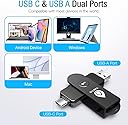
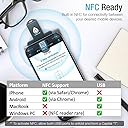
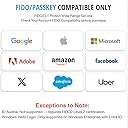
The Thetis Pro FIDO2 Security Key is a durable, dual USB-A and USB-C hardware token supporting FIDO2 and HOTP two-factor authentication across major platforms including Windows, MacOS, Linux, and popular apps like Gmail and Facebook. Featuring NFC for mobile tap authentication, a 360° rotating metal cover for enhanced durability, and a compact design that fits on your keychain, it offers a seamless, battery-free security upgrade for professionals demanding robust multi-factor protection.


| ASIN | B0BJP64YTT |
| Are Batteries Included | No |
| Best Sellers Rank | 10,421 in Computers & Accessories ( See Top 100 in Computers & Accessories ) 171 in USB Flash Drives |
| Colour | Black |
| Connectivity technology | USB |
| Customer Reviews | 4.2 4.2 out of 5 stars (1,206) |
| Date First Available | 5 Nov. 2022 |
| Flash memory type | USB |
| Guaranteed software updates until | unknown |
| Hardware Connectivity Technology | USB Type A, USB Type C |
| Item Weight | 28.3 g |
| Item model number | MB000493 |
| Manufacturer | Thetis |
| Model name | Thetis PRO FIDO2 Key (flip-x) |
| Product dimensions | 74D x 18W x 13H millimetres |
| UPC | 196852715633 |
J**S
Great key :D
Got this as a secondary key to my primary YubiKey, it works great, having usb C and A all in one is very convenient, and the NFC mode works well too. So far it’s worked on all platforms I’ve tried it on. Was easy to setup on Windows but can’t say how well it would work with Linux or MacOS
A**R
Amazing security
Bought this so I can set up 2FA on things such as Facebook, Instagram, Microsoft and any other websites/apps that allow 2FA via a security key. Works flawlessly. Just waiting for more websites to introduce allowing access via a security key. Very easy to setup, once set up you just need to input your chosen password and input the device into your phone or PC and press the button and bam, you're logged in.
A**R
USB SECURITY KEY
Arrived quickly and worked perfectly well.
R**N
Good security key
Security key comes with a little pouch you can attach to your key ring. Works with android, you do have to do security checks via chromium based browsers ( at least for me ) Otherwise, the product is good. I use it for securing my password manager and feel more secure with this physical MFA step.
R**I
Excellent
Excellent product to do your work.
R**I
USB C NOT WORK
usb a works fine but usb c just doesnt work for me
J**Y
The added security
A must have now passkeys are becoming more popular, i have been using it daily for months. The OTP works flawlessly as well
H**E
beware
caused me no end of problems just to complex eeen for someone with my pc knowledge if i was away and took my laptop and forgot the key i was knackered...couldnt get in my programs
G**N
Very easy to figure out how this works.
S**R
Funciona perfecto. Necesitaba una llave FIDO para asegurar mi gestor de contraseñas. Y me encanta que tenga NFC para utilizarlo en el smartphone.
C**S
Gostei muito, a unica desvantagem é que continuamos tendo que digitar a senha, eu achava que so a chave ja seria o bastante e eu nao iria precisar digitar mais a senha. Porem é uma seguranca grande ter a chave de seguranca FIDO é uma protecao a mais.
D**A
Wszystko ok.
R**M
This security key is very easy to use. I used it to set up Passkey security on my Gmail account on my Windows 11 PC. To do that, here are the steps I used: 1. I went to the Thetis web site listed in the instruction manual and downloaded the Thetis Key Manager. 2. I then started the Thetis Key Manager in Administrator Mode. It tells you to insert the key in a USB port. You have the choice of USB-C or A. 3. You're then presented with a list of options, some based on different Thetis devices. For my test I selected FIDO. 4. You then are instructed to set a PIN. It doesn't tell you the minimum number of characters to use. I first used 4 and it failed. I then used 8 characters and it succeeded. You can then close the app as you're done with it unless you want to change the PIN. 5. The key has 50 slots, according to the product page, which means you can secure up to 50 apps or sites with the key. The instruction manual says it has 200. At any rate, it's a lot. 6. In my test, I wanted to secure my Gmail account with the key. To do this, I went into my account and clicked Manage Your Google Account...Security...Passkeys and Security Keys. 7. You're then prompted to enter your Gmail password. 8. From there, you then click Create A Passkey twice on 2 screens. 9. It then prompts you to plug in your key and press the button when prompted. 10. Your passkey is then registered for Gmail on your security key. I've listed the steps in detail but in reality it's pretty simple and fast. From then on, any time I need to log into my Gmail account I'm prompted to plug in the key. The process works well. The device itself is well constructed so it seems it is built to last. The included instructions are sufficient to get you started. It comes with a little pouch and keychain you can use to carry it around. It would seem prudent to get a second one as a backup in case you lose or break one. All in all I'm very happy with this security key. The price is very reasonable compared to other security keys on the market. It's easy to use and works well.
Trustpilot
1 month ago
3 weeks ago