๐ก Elevate your TV gameโrecord, rewind, and relive every moment!
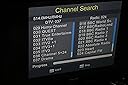
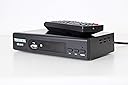
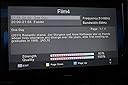
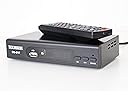
The Digi-Fun Freeview Set Top Box is a sleek, easy-to-use digital TV receiver compatible with DVB-T, offering access to over 84 HD and standard channels. It features USB recording and playback capabilities, allowing you to save live TV shows on external drives and enjoy instant replay. With HDMI and SCART connections, plus multimedia playback for music, photos, and videos, it transforms your TV into a versatile entertainment hub tailored for the modern viewer.
| Asin | B00AGPJ8RK |
| Audio Output Mode | Surround |
| Audio Output Type | Speakers |
| Best Sellers Rank | 108,274 in Electronics & Photo (See Top 100 in Electronics & Photo) 90 in Satellite Receivers |
| Brand Name | DVBT2 |
| Colour | Silver |
| Compatible Devices | Television |
| Connector Type | HDMI |
| Control Method | Remote |
| Customer Reviews | 4.0 4.0 out of 5 stars (598) 4.0 out of 5 stars |
| Format | AVI, WAV, WMA |
| Manufacturer | DVB-T |
| Network Connectivity Technology | HDMI, USB |
| Other Special Features Of The Product | USB Recording and Media Playback |
| Surround Sound Channel Configuration | 5.1 |
| Total Hdmi Port | 1 |
| Video Encoding Format | H.264 or HEVC Main 10 |
User
Excellent all rounder, belying its budget price
An excellent product, all around. No complaints at all. The enclosure is metal, not plastic like so many others, feels robust and well-made. It picks up all available channels except, it seems, Talking Pictures. The 'live' picture quality is excellent too and comparable with the best. Recordings made to USB flash are indistinguishable from the original, so excellent too. The operating software is clear and straighforward to operate with multiple menu choices one might expect on a top-of-the-range product. Of particular merit is the fact that, if you set a time-schedule recording via the built-in programmin app you can edit the default start and stop times. TV programmes occasionally start earlier than advertised and end later, so I manually edit those defaults to start a minute earlier and end a couple of minutes later than the advertised times. It's a very useful feature you don't always get on far more expensive Freeview boxes and which I miss on my LG TV's built-in hard drive recording facility. This is the cheapest Freeview box you can buy on Amazon, but it turns out to be of a quality comparable with the best and most expensive.
User
Make portable recordings
Freeview receiver/recorderIt set itself up with no problems.Connection to TV is via Scart or HDMI (although I couldn't test the latter as my TV is old and only has Scart). There is also a โcoaxial" port for sound although I'm not sure what use you would put that to.Usefully the device has a front panel display that tells you which channel it is on. This means that, even with the TV off, you can switch channels to initiate a manual recording and know you are on the correct channel. Perhaps not quite so usefully the display does not indicate whether or not it is in recording mode (so I would recommend that you get a USB stick with an activity light so you can tell it's recording when the TV is off - the USB stick's light will flash when it is recording but stays off when nothing is going on).It records in a file format with the extension *.mts. This is not as common a format as the likes of AVI/MPG/MP4 so other basic playback devices might not be able to recognise it. The format plays successfully on my tablet using several different video playing apps and also on a PC using VLC player. Another useful thing is that the recording includes the broadcaster's subtitle track which you can optionally turn on on your playback device. It also recorded the audio description track where there was one.The size of a recording per hour in GB varies depending on the channel. Channels with higher bit rates used up more. On the BBC channels 1 hour was tending towards 1.5-1.8 gb. On some other channels 1gb was more typical.The USB port is behind a fold down panel on the front although this seems of little practicality as you'll probably have it down all the time. Unless you don't plan on recording with it and just want to use it to watch.As far as I could tell it doesn't support teletext (red button BBC) services. There is a text button on the remote but when you press it on a BBC channel a message says that there is no teletext service even though I know it works fine on another older Freeview box. You can still view the red button channel itself by changing to its designated channel number (601).Interestingly, it provides an ability to watch one channel while recording another. But only one on the same MUX group as the channel being recorded. So for example you could record ITV while watching C4 which is on the same MUX group, but you couldn't watch BBC1 which is on a different MUX group.The unit has a button on the front to turn it off into standby (or use the remote to do same) from which it will wake itself if you have set a recording - but also it has a hard on/off button at the back if you want to turn the unit off completely . If you turn it fully off it remembers the channels and general settings (as you'd expect) but it also remembers any unfulfilled timer settings.The unit comes with the remote and its batteries. But you'll need your own Scart or HDMI cable.The remote operation seems somewhat particular about being in just the right line of sight to operate which might get frustrating.There is some contradictory information in the manual with regard to the supported USB capacity.At the very start under โBasic Instructions โ it very clearly states that the maximum size USB memory stick you can use is 32mb.However at the end in the technical specifications under USB 2.0 it states โSupported Capacity: Unlimited"Also elsewhere under Notes it states it cannot guarantee bus power to mass storage devices.So maybe you can use an external hard drive if the 32mb thing is a strange misleading error. But if so perhaps one that is mains powered rather than relying on getting power delivered through the USB would be preferable. I have not tested using a HD and I have no USB stick over 32mb with which to check if there is such a limit.It doesn't have a memory card slot but I suppose using a USB memory card reader might work.I noticed a previous reviewer said the EPG is an hour out when in BST. I concur but there is an easy solution to this. On the settings menu change the time setting from Auto to Manual and then choose the offset you want (i.e. +1) and the EPG time will readjust. All this means is that every six months when the clocks change you will have to adjust the offset up or down.
User
Brilliant for our bathroom TV
We use this to bring back into service our bathroom TV which only had an analogue tuner, and so was useless when that signal was switched off a couple of years ago. Removing it would have left a big hole in the wall! Have had one of these since then, and it works fine until recently when it packed up, so got a couple more so we have a spare. On fixing the new one it appears that it was the infra red sensor (which for some reasons continues to light up even when there is no power to it - not quite sure why!) that was the problem, so putting the sensor from the new tuner into the old one worked a treat.The only little niggle is that whenever it is switched on it defaults to subtitle mode, meaning that we have to remove this using the remote each time, which is a little bit of a pain, but no great disaster, and at least we can use our bathroom TV again,,, :-)
User
Easy setup.
I didnโt expect much for the price but it was just for a bedroom tv so thought I would give it a try. Itโs basically plug in and away you go. Very easy setup completes automatically in a short time. Good program guide, although one problem I have is I canโt seem to change the time to bst but I can deal with the time being an hour out. I actually get more channels on this than on the humax one on my other tv. Excellent value for money.
User
It can be glitchy but overall has done the job
If you like all the bells and whistles of a set top recorder then dont buy this. If however you want to record TV programs to watch later on another device then this does the Job.Pros - Cheap - Recordings are transferable - Does what I needed it to do.Cons - Recordings are named by channel and time not program name - So I find myself having to watch the first few mins so I can name the file when I transfer it. Occasional glitches (requiring to switch off and on again to fix) and the EPG is poor.
User
avoid at all costs!
Oh dear! This box is not worth the bother as reported by lots of other buyers, in all fairness the seller was great. The first box out of packing was dead as a do do when plugged in. I contacted the seller and he sent me a replacement box, this worked for a few hours then packed up and become unresponsive and made my new UHD television crash as well. The seller quickly gave me a full refund which i thank him very much for. The product, give it a miss! It really is not up to the job and has a very erratic way of operation. Save up and buy something more reliable.
User
Easy set up, great hd picture at a very reasonable price!
I have an older TV which I want to use in a bedroom and conservatory in summer. Ime not worried about having a smart tv, as the lounge TV does all that, just want main ch hd programs. I live in area where signal reception is weak, and didn't hold much hope of improvement, but thought ide give this box a try. Plugged box in, connected hdmi cable, turned on TV, and hey presto within two mins it scanned for channels, and had all main ch in great hd! Very satisfied with it at this point, yet to discover other functions. Would recommend!!
User
Pretty good value for money.
Pretty good value for money. But after about 1/2 hour there are a few relatively minor things I should mention.It's advertised as having YouTube etc, but this doesn't mention that you need a USB wifi dongle, which isn't included. So if like me you don't want to also buy a dongle (which has to be the correct type) then you can forget about any network stuff. I don't need the network stuff, but I find this a bit dishonest.The Instruction manual is too small. I tried to find one online, but there doesn't seem to be any model number to search for, so I had to resort to a magnifying glass.For some reason the subtitles seemed to keep switching themselves on, so it was a bit of an irritation to keep having to switch them off. I've changed the subtitle language to "OFF" which I hope will fix this.Other than that, all I needed was a cheap Freeviex box that works, and so far it does that nicely.
Trustpilot
1 month ago
2 weeks ago