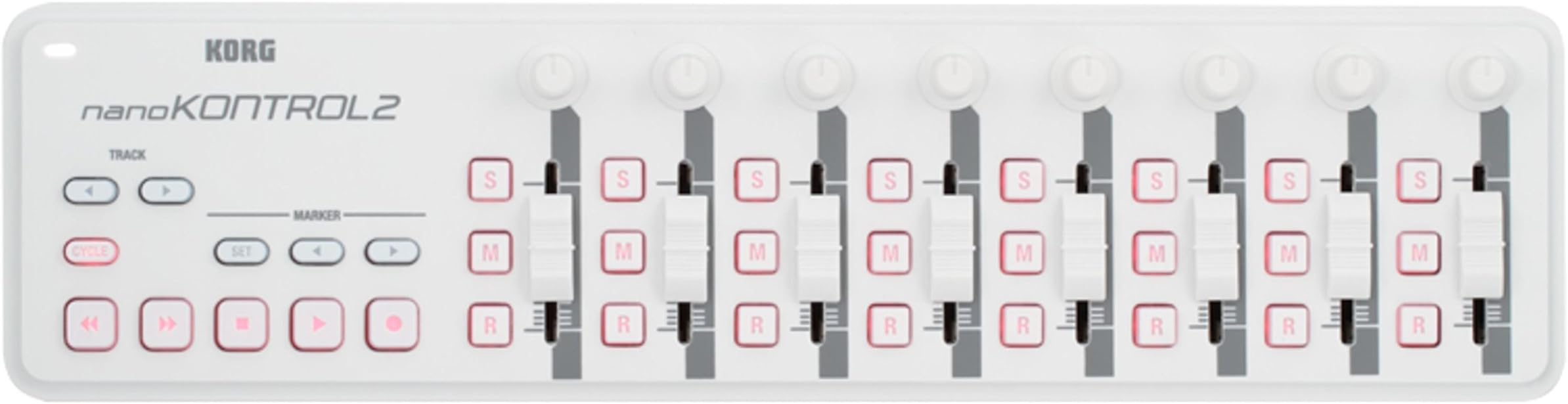
🎛️ Elevate your studio game with the sleekest MIDI control on the block!
The Korg nanoKONTROL2 is a slim, USB-powered MIDI controller featuring 8 faders, knobs, and buttons designed for precise DAW and app control. Compatible with Mac, PC, and iOS devices (via camera kit), it offers plug-and-play convenience and comes with a free software bundle to kickstart your music production anywhere.


| ASIN | B004M8UZ3S |
| Brand | KORG |
| Brand Name | KORG |
| Colour | White |
| Compatible Devices | Computers (Laptops, PCs), some tables and smartphones with USB port |
| Connectivity Technology | USB |
| Connectivity technology | USB |
| Connector Type | USB |
| Control Method | Touch |
| Control Type | Button Controller |
| Country of Origin | China |
| Customer Reviews | 4.2 out of 5 stars 6,972 Reviews |
| Global Trade Identification Number | 04959112081079 |
| Hardware Interface | USB |
| Hardware Platform | PC/Mac |
| Human Interface Input | Buttons |
| Included Components | USB Cable |
| Instrument | Multiple instruments / Digital audio workstation |
| Instrument Key | Any |
| Item Type Name | midi controller |
| Item Weight | 0.97 Pounds |
| Keyboard Description | Button-based control surface with 8 channels, no traditional keyboard keys |
| Manufacturer | KORG |
| Mixer Channel Quantity | 8 |
| Model Name | NanoKONTROL2 |
| Model Number | NANOKON2WH |
| Model Year | 2018 |
| Model name | NanoKONTROL2 |
| Noise Control | None |
| Number of Keys | 1 |
| Number of keys | 1 |
| Platform | Mac |
| Product Style | white |
| Size | talla única |
| Special Features | Compact |
| Special feature | Compact |
| Supported Software | Primary DAW Soft |
| Total USB Ports | 1 |
| UPC | 989898857593 |
| Unit Count | 1.0 count |
J**N
Great Package - REVIEW UPDATED
Delivery - Excellent. Build quality - better than expected. Performance ? Read on.... I have a Korg nanoKontrol 2. Great product. Slightly short faders but fits on the bottom of a Macbook real sweet. Also works with several KORG apps on iOS - iMS20, iElectribe and Gadget. Best is iMS20 by far. One button switches between mixer and synth. If the app had Link it would be the total business. Only drawback is the USB lead. Not good on an old school 32 pin iPad with a camera adapter, better on a Lightning equipped model. So the wireless version should provide all of the functionality of the USB only model right ? Maybe a bit more ? Wrong. All my KORG iOS apps recognise it and flag it as connected. So let's try some of them.... iDS10 ? No. Well I could hope.... iMS20 ? No. iElectribe ? No ! Gadget ???? After all, there is a button on the front panel labelled "SCENE" - maybe you could cycle between scenes ??? Very limited mixer control only. Jog wheel, scene buttons and FF/FR buttons are redundant. The track buttons are duplicated by the Select buttons above the faders and don't illuminate.... Leave them alone. And why is there a label with Wireless on it painted out ???? I will keep it. In a few years time, secondhand iPAD Pro's will be within my grasp and a Link locked 8 track version of Gadget will run like clockwork. Oh dear KORG it could have been so much more..... How about some downloadable profiles for the editor ??? TIP - If you connect this unit to the editor on Mac, the SCENE lights will come on and the unit will no longer talk via Bluetooth. If you can find a factory reset mentioned anywhere on the net, you are well clever. I used the same routine as described for the wired version ? Hold down CYCLE and the two TRACK buttons and power up using USB. Worked for me. UPDATE 20/5/22 I HAVE UPGRADED TO IPAD AIR. WITH KORG ELECTRIBE WAVE, THIS UNIT PROVIDES FULL CONTROL. 2 BANKS OF 8 FADERS INSTANTLY. WELL DONE KORG FOR IMPLEMENTING. INCREASED RATING TO 5 STARS
R**D
Usable keyboard if you need an ultra-portable setup.
This is a great little keyboard. I hoped that it would be set up in Windows 7 without drivers needing installing (as a USB composite device) but the Korg software needed installing before my DAW (Reaper) would recognise it. After that it was just a case of letting the DAW know what it was and I was entering MIDI note data into the program literally in minutes. It's obviously nowhere near as lush as a proper controller keyboard, and there's no niceties like aftertouch available, although there is rudimentary velocity sensing, and the small keybed needs careful playing if you're after any kind of subtlety or nuance - but it does try. For me, its a way of entering melodies into the DAW as a kind of MIDI notepad, and it does a grand job of that. It's small enough to slot into your laptop case, probably along with the other Korg nano controllers. So long as you're not expecting to emulate Chopin using this keyboard you'll not be dissappointed. It will be pretty good for entering basic synth elements into club music and electronica - it just won't offer you the expressive capabilities that aftertouch can provide. If you're good with that limitation and need a go-anywhere keybord this is certainly worth a look. Korg also offer a download code for various software components to get you going, together with introductory versions of DAWs like Ableton Live Lite. This bundle isn't quite as good as the one I received with a NanoPad a year or two ago. If you buy this you might want to check what the bundle presently is. It's possible that Korg changes it from time to time, or perhaps there's a different bundle depending on whether you buy the NanoKey, NanoPad or NanoController. I already have a Samson Graphite full-function controller keyboard, and also use a Yamaha digital grand piano (88-key) for playing, but realised I have a need for something that is as portable as possible for a mobile setup. This is that keyboard - basic, useable, sometimes even fun!
J**O
First Impressions
My nanoPAD2 arrived this morning and I must admit I was intially caught out by the packaging. The USB lead is tucked neatly at one end under a cardboard flap so it appears the box is empty, hopefully that tip will save you a couple of minutes. Installation was swift, the drivers seemed to install well on Win7-64 even though the site suggests a fix would be needed for Win7 32/64. My tool of choice is Propellerheads Reason 6. Adding the nano2 to the Reason set up was simple and I was tapping away drums and messing about with synths in no time. The construction seems solid and the device itself is bigger than I expected which makes it very comfortable to play (for scale purposes the touchpad is similar in size to that of a notebook's). The 'Kaos' pad can be used in a number of modes which will be fun to play with even though I'm not sure what I'm going to do with it yet... The note-pads themselves have a decent - velocity sensitive - response and I had a lot of fun tapping out beats with it and I'm no drummer. One thing that seems to be a bit of a gripe is the apparant inability to change the octave of the pads themselves. While the touchpad is in 'touch scale mode' it is affected by octave shifts. This may be a limitation of my understanding of how to use this but I thought it was worth mentioning as I didn't even think of this when I bought it. I is perhaps possible to do this within the Korg Kontrol Editor but my brief experience with this software wasn't plesant. I will endeavour to flesh this part of my review when I have more experience. All in all though my 4* is based on the fact that this seems a quality bit of hardware for a very reasonable price.
H**Y
A decent option for the price and niche
Although the keys feel a bit loose and rattly, they work surprisingly well in practise and the velocity sensitivity works well enough to be useful. The editor software is a bit crude and shonky (as is standard with Korg), but it does work. Do note that this device is a USB client only. If you wanted to plug it directly into something like an Elektron Model: Cycles, you can't just use a USB cable with the right connectors- as neither end is capable of USB host mode. To achieve that, you'd need something like the Retrokits RK-006 (which is tiny, powerful and highly recommended), then you can use a TRS cable to go between one of the RK-006's MIDI outs into the M:C's MIDI in, and everything magically works. In any case, this is a deceptively useful little controller keyboard, once you have the connection sorted out. It's a lot nicer than using your QWERTY keyboard with DAW, or using the weird button "keyboard" on small instruments. For a portable setup, it's very functional and hits a sweet spot of size vs functionality that the smaller Akai controllers can't. If you absolutely need to pack light, this isn't a bad choice at all. You might end up wanting to find an angled mini-USB cable for it to make the cabling more tidy, but otherwise, I have no real complaints. Just be sure that you understand what you're getting and know that you can't plug it directly into MIDI ins without some extra kit, as above.
M**D
Best of the nanokontrol range, but limited usage for me.
Nice unit - feels up to the job for the price range. I can see why people would break the keyboard and pad versions, but the controls on this feel ok. I accept that my review is skewed towards my own experience but I'll explain why I haven't used it much: I bought it to make mixing tracks down in Logic less fiddly, but within seconds of using this tiny device I realised that it made it harder, not easier. Unless you cover the thing in stickers and colour coding you're going to spend most of the time looking back and forth from screen to nanokontrol and trying to link the channels. I tried to lie to myself that I would use this, if only for controlling busses, but it's just WAY easier just to do it on screen. The second usage I considered was setting it up to control resonance filters etc on some of the logic instruments with the sliders and knobs, for live use. This worked ok, but actually getting Logic to UNLEARN these controls so i could go back to mixing mode ( sliders mapped to console ) proved to be anything but straightforward. The KORG plugin seems to provide options to change things but they just flatly didn't work for me. This inability to quickly change or reset control assignments became a real pain, and so i just didn't bother with it anymore. I accept there is no doubt some kind of work around for this but you get to a point in life when fiddling in music programs for hours on end loses its novelty, and it's quicker to change track and do something else. Overall a nice little idea, but not for me. I hope some people made good use of this device.
B**B
Yay! Portable and excellent
This is a very compact keyboard, it's lightweight and slim. The keys are hard plastic which is good (I thought they might be rubbery). I bought this to use with Mini Piano Pro on my Android phone and it works perfectly with a USB C OTG adaptor cable. It also works with my laptop, I use Musescore Studio 4 and the NanoKey to enter notes into the score and Simplepiano to use the Laptop as an electronic organ. The Nanokey is fully polyphonic. According to the manual it uses less than 100mA so the phone doesn't really notice the current draw. So it's the perfect solution, I can use it with my phone as a small musical keyboard on the go and I can use with my laptop as a musical composition and score capture tool.
G**R
PC users Avoid at all cost ( conditions apply)
PC users Go Elsewhere, this is not for you (conditions apply). Stay well away if you use PC and already have more than 10 USB devices installed on your system. Korg still uses a ridiculously outdated USB driver that 100% will not work if the Korg device ends up up at number 11 or above in the register. Instead of fixing the driver, the Korg advice is to go into the Windows Registry and delete some of your other USB devices to allow the Korg to move up the table and into slot 10 or below. Ridiculous and dangerous advice for non experienced in Registry management.
S**R
Surprisingly solid.
The pits and sliders feel good for such an inexpensive controller. Setting it up for controlling a Metric Halo Mio Console software mixer was straight forward using the downloadable editor. I soon after bought a second one because they’re inexpensive, take little space on the desktop and they just work.
Trustpilot
2 months ago
1 month ago