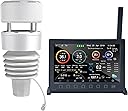
![ECOWITT [2023 Newest Upgraded] Wittboy Pro Weather Station HP2564, with HP2560 TFT Display Console and WS90 Outdoor Solar Powered Weather Sensor, Supports WU/WeatherCloud/Wow/ Servers,915 MHz](https://m.media-amazon.com/images/I/61a6uDOzAzL._AC_SL3840_.jpg)


Buy anything from 5,000+ international stores. One checkout price. No surprise fees. Join 2M+ shoppers on Desertcart.
Desertcart purchases this item on your behalf and handles shipping, customs, and support to Colombia.
🌦️ Own the Weather, Own the Moment
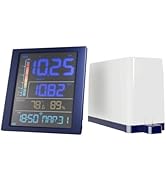
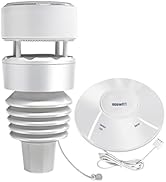
The ECOWITT Wittboy Pro HP2564 is a cutting-edge 7-in-1 weather station featuring a vibrant 7'' TFT display and a solar-powered WS90 outdoor sensor. It delivers precise environmental data including temperature, humidity, wind, UV, and rainfall with IPX5 waterproof durability. With 915 MHz long-range transmission and Wi-Fi connectivity, it integrates seamlessly with major weather platforms and supports an expanding suite of Ecowitt sensors—perfect for professionals who demand reliable, real-time weather intelligence.


| ASIN | B0BM3BQ425 |
| Additional Features | Waterproof |
| Are batteries included? | No |
| Brand | ECOWITT |
| Brand Name | ECOWITT |
| Color | Black or Dark Gray |
| Connectivity Technology | Wi-Fi |
| Customer Reviews | 4.4 out of 5 stars 240 Reviews |
| Display Type | LCD |
| Finish Type | Smooth |
| Frequency | 915 MHz |
| Included Components | [HP2560 TFT display console, WS90 outdoor weather sensor, USB to 2.5*0.7mm DC 5V power cord] |
| Item Dimensions D x W x H | 12.2D x 23W x 18.3H centimeters |
| Manufacturer | ECOWITT |
| Material | Plastic Metal Glass |
| Material Type | Plastic Metal Glass |
| Model | HP2564CA |
| Part Number | HP2564CA |
| Power Source | Indoor Console: Cord Powered. Outdoor Sensor: Solar Powered Or Battery Powered (Batteries Not Included). |
| Power source | Indoor Console: Cord Powered. Outdoor Sensor: Solar Powered Or Battery Powered (Batteries Not Included). Power source Indoor Console: Cord Powered. Outdoor Sensor: Solar Powered Or Battery Powered (Batteries Not Included). See more |
| Recommended Uses For Product | Garden, Home, Office |
| Recommended uses for product | Garden, Home, Office |
| Sensor Technology | Multiple (Temperature, Humidity, Rain, Wind, Light) |
| Shape | Rectangular |
| Special features | Waterproof |
| Specific Uses For Product | HP2560 Indoor Display Console: with built-in temperature/humidity sensor and barometric pressure sensor; Pair with ecowitt developed sensors and send their data to the Internet., WS90 Outdoor Sensor Array: Temperature/ Humidity/ Piezoelectric Rain gauge/ Wind Speed&Direction/ UV light&solar |
| Specific uses for product | HP2560 Indoor Display Console: with built-in temperature/humidity sensor and barometric pressure sensor; Pair with ecowitt developed sensors and send their data to the Internet., WS90 Outdoor Sensor Array: Temperature/ Humidity/ Piezoelectric Rain gauge/ Wind Speed&Direction/ UV light&solar Specific uses for product HP2560 Indoor Display Console: with built-in temperature/humidity sensor and barometric pressure sensor; Pair with ecowitt developed sensors and send their data to the Internet., WS90 Outdoor Sensor Array: Temperature/ Humidity/ Piezoelectric Rain gauge/ Wind Speed&Direction/ UV light&solar See more |
| Style Name | Compact |
| Temperature Accuracy | + 0.3°C |
B**N
Best weather station I've owned.
I have an Ecowitt WS 90 sensor and HP2560_C Display. I have had the unit for about 4 months now and I am so please and excited with it. I was worried about it when I ordered, but with the help of the Ecowitt support team. I have calabrated it and it works amazingly. The manual for the displays seems to be a cut and paste of several manuals and sensors. It is not a complete guide to the HP2560_C display. Cons first: 1. Very disappointed with the display size of the HP2560c. There is too much information to display on such a small screen. It looked so much larger in the advertisement photos. If Ecowitt comes out with larger I will buy it. I can’t read much of the display data unless I hold the display in my hands. I know I have the information on my phone, but I like the display and like showing it off. 2. in my Manual the QR code is not correct for HP2560c Wifi set up. 3. The manual for the HP2560c must be used for more than the WS90 sensor and is confusing, because of different references to other sensors. BhmMan: I suggest you go to the Ecowitt website and download the whole manual and quick start. Use the support tech team. They usually respond in 1 or 2 days, and be patient. Pros: Just about everything else. Easy to install, with a little help from support easy to set up, and most of all being able to calibrate your readings. Note: I have emailed the Ecowitt support team all the below questions. They have been super helpful, and maybe this will help you. Q. I have a Wittboy with a Mdl HP2560_C display, I also have a GW2000 hub. Do I get any advantages installing the Hub? I had my HP2560_c already connected to the internet but can’t connect to the Wunderground. It is connected to the Witt weather app though. Ecowitt - If you have HP2560 console, then there is not much use to have the hub GW2000, as they are doing the same job with different display method. (I returned my Hub) Q What am I doing wrong that I can’t connect to the Wunderground? I have wunderground set up. I have put the numbers into the console. Is it supposed to go automatic from there or am I missing a step? I finally deleted everything except my account, started over, and it finally worked. Ecowitt - Please check your spelling for the ID and password input. The characters from WU can be misleading for 8:B, l:1. Etc. (This was my problem) Fill in your WU ID and Password, if it is connected to WU server, the WU icon will be lit on the main display. (Mine is at the top left.) Q. Is the 32 gigabyte micro SD card used just for Backup or just for software and hardware updates? What else is the SD card used for? Can I use the small USB plug in for updates? Can you give me instructions for how to use updates? Can I go directly from computer or cell phone to the Micro USB to update? Ecowitt - You can use any SD card with size no larger than 32GB & 32 fats. Down load the update file to your computer unzip the file, copy user bin file to SD card (max 32GB), insert into console and upgrade will start automatically. BhmMan: The SD card is for firmware updates, you can also leave the SD card in and history data will be saved on your SD card. I guess that would be my back up since there is no battery in the monitor. When I lose power, I only lose data while the unit is off, all the old data is saved on the SD card. Q. How can I use my app on my other devices like my lap top, iPad, my wife’s iPhone, and my neighbors mobile Phone. I know I can share for 30 days. But then I must reset each every 30 days. I’d like to know if I can share permanently. Ecowitt - We are extending the sharing time to 90 days. But it is not possible to share it permanently. You can refresh the share lease time to 90days by click on the “refresh” button and your friends can keep using the same link. What you need to do is refresh the link within the expiring date. Q Main. The Manual for the Ecowitt HP2560_C has a calibration Screen. I Note the Solar, UV, Wind, and Rain. These have a series of Numbers called Gain. I do not understand what each setting does to my overall display. Question 1. In this Calibrations Mode: in Rain Setup “Rain gain” has a “1” showing as a Factory preset, meaning - Sight glass rain gauge with an aperture of at least 4”. What do numbers 0.01 thru 5 Mean? Question 2. In Calibrations Mode: Rain Setup also has Piezo Rain1, Piezo Rain2, Piezo Rain3, Piezo Rain4, & Piezo Rain5. What do the numbers 0.01 thru 5 mean for each of these, and How do I Set these for my Ecowitt WS 90? Question 3. In Calibrations Mode: Wind Gain has a “1” showing as a Factory preset, meaning - Calibrated laboratory grade Wind meter. As in Question 1, What do numbers 0.10 thru 5 mean? Question 4. In Calibrations Mode: Solar Rad Gain has a “0.10” showing as a Factory preset, meaning - Solar radiation conversion from lux to w/m2 for wavelength correction - What do numbers 0.01 thru 5 mean? Question 5. In Calibrations Mode: UV Gain has a “1” showing as a Factory preset, meaning - Calibrated laboratory grade solar radiation sensor. What do numbers 0.05 thru 10 mean Ecowitt - Gain means factor that’s used to multiply with your original sensor data. So if you set gain larger than 1.0, it amplifies, if you have the gain set below 1.0, then it minimizes. BhmMan – this was especially helpful setting my rain gage. When I first set the unit out, my rain readings were way low. I set each rain setting to “2” and now it seems accurate with my Tube Style rain gage. So happy.
V**D
ECOWITT Wittboy Pro Weather Station HP2564, Includes 7 Inch HP2560
Great weather station with many weather info, additional sensors can be added. I have no issues with connection dropouts from sensors /wifi - all works fine. During sunny days, roof sensor is powered solely by solar panel, it uses AA batteries only after capacitor discharges during few days of darkness/clouds. (solar doesn't charge internal AA batteries but supercapacitor) To get accurate readings, some settings need to be done after 1st powerup (like altitude/pressure). Only small drawback i found so far is that lcd brightness in auto mode is controlled by exterior light hitting the outdoor sensor, there's no ambient light sensor on indoor lcd unit
J**N
Simple y completo
Simple y completo. Interfase accesible y fácil de manejar Cumple muy bien su función.
M**M
Excellent so far, easy to install and no moving parts
Bought this 4 weeks and so far really like it. It provides accurate readings, has a nice and easy to read interface on both the console and the app and it's easy to link to Weather Underground and other websites. Installation is simple, it's an all in one unit that just needs to be attached to a pole, I placed mine on top of my TV antenna and it fits perfectly. The fact it has no moving parts, weather vanes or tipping buckets hopefully means it will be more durable then your more traditional weather stations. There is a solar panel integrated in the design to power it and you can also put a battery in it as backup but from my experience it fully charges daily from solar alone even on cloudy days where I'm located in Perth, Australia so this should be enough to power it unless you live in a place with long extended cloudy periods and/or somewhere with low light levels in winter and very cold weather as I've noticed it discharges more of the stored energy at night when the weather is cooler.
C**E
La météo de précision, sans entretien et ultra-connectée !
Passionné de météo, j'ai opté pour la Wittboy Pro HP2564 et je suis bluffé par la technologie. C’est un bond en avant par rapport aux stations classiques à pièces mécaniques.Capteur Wittboy (7-en-1) : Le gros avantage est l'absence de pièces mobiles. L'anémomètre ultrasonique est très réactif et, surtout, on n'a plus à craindre que des oiseaux ou de la glace ne bloquent les godets. Le capteur de pluie haptique est aussi très impressionnant de précision.Console TFT HP2560 : L'écran est magnifique, très lisible sous tous les angles et les couleurs sont vives. L'interface est moderne et permet de visualiser l'historique et les graphiques directement sur la console.Connectivité et Écosystème : L'intégration avec le serveur Ecowitt, Weather Underground et d'autres services est un jeu d'enfant. C’est un vrai plaisir de pouvoir consulter ses données précises sur son téléphone depuis n'importe où.Installation : Très simple à monter. Le design compact du capteur est discret sur un mât.Les points forts :Pas d'entretien mécanique (pas de pièces qui s'usent).Console haute définition très complète.Évolutivité : on peut ajouter plein d'autres capteurs Ecowitt (humidité du sol, qualité de l'air, etc.).
Trustpilot
2 weeks ago
1 month ago