Buy anything from 5,000+ international stores. One checkout price. No surprise fees. Join 2M+ shoppers on Desertcart.
Desertcart purchases this item on your behalf and handles shipping, customs, and support to Colombia.
❄️ Stay cool, save smart — control your comfort like a pro!
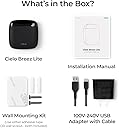
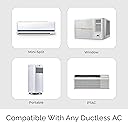
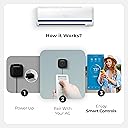
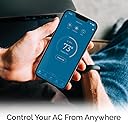
The Cielo Breez Lite is a sleek, plug-and-play smart AC controller compatible with over 2000 mini-split, window, and portable AC units. It offers remote control via a free app with no subscription, supports voice commands through Alexa, Google, and Siri, and features built-in sensors for optimized comfort and energy savings. Easy to install and scalable for multi-zone HVAC setups, it empowers millennials to effortlessly manage home climate with cutting-edge smart home integrations.


| ASIN | B0BMTRCNG3 |
| Best Sellers Rank | #49,811 in Home & Kitchen ( See Top 100 in Home & Kitchen ) #150 in Accessories (Home & Kitchen) |
| Brand | Cielo Breez |
| Brand Name | Cielo Breez |
| Color | Black |
| Customer Reviews | 4.4 out of 5 stars 640 Reviews |
| Display Type | LCD or LED |
| Global Trade Identification Number | 00853937007068 |
| Included Components | 5V DC Adapter with USB-C Cable (100V-240V) |
| Item Type Name | Smart AC Controller |
| Item Weight | 1.28 ounces |
| Manufacturer | Cielo WiGle |
| Material | Acrylonitrile Butadiene Styrene (ABS) |
| Material Type | Acrylonitrile Butadiene Styrene (ABS) |
| Model | BL102WA |
| Part Number | BL102WA |
| Smart Home Compatibility | Smart Home Compatible |
| UPC | 853937007068 |
| Warranty Description | 1 Year replacement warranty. |
I**S
It's the best wireless mini-split system ever.
It's the best wireless mini-split system ever. first of all, let's talk about the standard mini-split remotes the standard mini-split remotes come in two general styles A. the most basic remote they can manufacture and include with the units. B. the "high-end" remote which comes with the bigger units. If you were unlucky and received the basic remote then you are limited in the settings and the ability to set up comprehensive timers. if you spent the extra money on the bigger units and they rewarded you with the "high-end" remote good luck trying to set up the weekly schedule. Once you come to pieces with your purchase or figured out how to set the timers you will realize very fast that you are spending way too much on your electric bill. Hence, you do what every good person does and try to find out how you can connect your units to the internet to control them from your phone and that's where the companies get you. either you have to order a special part that costs an arm and a leg to get and that is when you find out that most places that carry it for a decent price require you to be an authorized HVAC installer or reseller. let's say you have a way of getting it most of the time you have to hard wire it into the mini-split head. even with all that it does not work :-( in comes the Cileo breeze light the Cileo breeze light is built as a plug-and-play system! It works using the IR sensors on the head (the same system that you use when you use the remote that came with the unit) The Cileo breeze light seamlessly connects to your home wifi and your phone using the Celio home app. the Celio Home app gives you the ability to save money by allowing you to control your mini split from anywhere (as long as you are connected to the internet) Cileo Breeze light empowers you with the ability to set up (almost) unlimited timers Cielo empowers you to turn off the unit if your kids/roommate/spouse/(the guy who is not paying the electric bill) leaves it running. the last and most important thing is IT WORKS :-)
E**Y
Handy little wifi enabled AC controller
Just received the Cielo Breez Lite Smart AC Controller. I've already provisioned it to control my portable AC via wifi. This controller was a Breez to set up. Simple. Easy. Stress free. Just how I like things. I appreciate the app that is used to interface with the controller. The app and control unit work together to sense and display the ambient temperature and humidity level alongside the temperature your AC is set at. So far 5 ⭐️⭐️⭐️⭐️⭐️
E**Y
Great product for my use case.
Worked out of the box with two AC units, needed support for setting the third to Celsius (only autodetected the Fahrenheit version of the remote, the Celsius version can only be manually selected). Support was great, they called me back and walked me through everything, answered all my questions, thank you Jason ;) Shows (not too precise) temperature and humidity levels (both can be manually calibrated) and offers most important functions (heating or cooling mode, set temperature, set fan level, power on/off), some extra functions (like turbo mode on the Samsung AC), although I think not every function is supported for my ACs (like horizontal swing). I especially liked it that when i changed the temperature on the remote, the App instantly showed the new target temperature and sent a notification to me about it. Power usage is so minimal, that my smart socket can not even measure it. Device set-up and the app is rather convenient, worked with WiFi password and with passwordless MAC-based WiFi, worked with three very different ACs, could re-configure to another AC and/or WiFi in under a minute. If you want a remote temperature+humidity sensor and a way to start heating/cooling before you arrive to your home/garage/weekend house, or to save a penny on varying electric costs, this is a great product for you ;) Note: you'll probably need the original remote to set this up and some functions are more convenient on the original remote, so this might not be a great replacement for a lost remote. Good value for money and I have to admit I love the design ;)
S**L
Works great! I do have a wish list though for the app
I've had this device for about 4 months now (over the summer). This device worked great to make my dumb a/c smart. There are a few devices out there that can do this but Cielo offered one of the cheaper ones along with my criteria of it being a US company, as I did not want to install an app made by a foreign company. Setup was a breeze. My GE a/c is so old, it's not on their list. My remote was also not working, so I was concerned I wouldn't be able to complete the setup at all, but I was still able to manually add it based on the code on the back of my remote. Earlier this year I started a cold water aquarium that required the water to be between 60*-70*. It already has a chiller, but with the summer heat wave of over 100*, the chiller alone was not cutting it, so I had to turn on the a/c. By using Comfy Mode, I'm able to set the a/c to turn on and off automatically whenever the temperature hits above or below a certain temperature, so just enough to keep the water temp within range. This helps save electricity, vs just running the a/c constantly all day when it wasn't needed for human comfort or when no one was home. I do wish the app had more functionality though, below is a wish list. WISHLIST of the app functions: -The app's a/c timeline doesn't show the actual time of when the a/c turned on or off. Instead, it shows how many hours ago, which requires mental math. Showing the actual time would be much more convenient and shouldn't be hard to implement. -A widget that would show what the current temp reading is, instead of having to go into the app to look. -A widget where I can one-tap turn the a/c or or off. Currently have to open the app, select the unit, then turn it on/off. It requires 3 taps to do, a minor inconvenience. -An alarm if temp hits a certain number. It's happened twice when the device became un-synced with the a/c. (The device kicked in and had sent a signal to the a/c unit to turn it on, but for whatever reason, the signal got blocked so it didn't actually turn on the a/c.) An alarm would alert me that the room is getting warmer than it should be, which would indicate the a/c didn't turn on. All in all, happy with the purchase.
L**6
Excellent for mini-split control
Works great with my Lennox mini-split. I use this in one room and the Breeze Max in my main living area. Both were easy to install and configure. I have full control over fan, heat, A/C, temp, swing, etc.
R**D
Great product
Very easy to setup and works!
E**W
Price is Great and So Is the Functionality
I have several Cielo controllers installed in my home with Fujitsu mini-splits. They are easy to install and much less expensive than the similar controllers you can buy from Fujitsu. Most of the reasons I purchased and installed the Cielo controllers are mentioned in other reviews so I will not list them all again here. I will say they are easy to use at home or while away home and all satisfy most owners requirements for an A/C controller. The Comfy mode and program scheduling may not be obvious when you first set them up, but take time to understand how they work if you want to take full advantage of the controllers' functionality. The Alexa integration works as advertised, but be aware than sometimes Alexa misunderstands a request as a Cielo request when you meant to turn on/off something else. That's actually an Alexa issue and not a Cielo issue. Also, note that the controller does not sync with your Fujitsu remote. So if you change a setting using the Fujitsu remote then that change will not be reflected in the Cielo app or the Cielo controller. My advice is that once you install the Cielo controllers, put away the original remotes, although that might not be workable if you have someone in your home who prefers using the Fujitsu handheld remote versus the app. The app is relatively easy to use and it is your only option if you are not using a controller with controls physically on the controller. I have both types, but use the app for all of my controllers, but it is helpful to be able to glance at the controller and see the current status without opening the app. Finally, you can place the controller wherever you like as long as the transmitters on the controller can reach the mini-split unit. There are several transmitters on each controller. However, the room temperature will reflect the temperature where the until is located which may be hotter or colder than the actual temperature where you are sitting if it is a large room. However, the same is true for temperature sensors in the mini-split which usually are not located where most room occupants are in the room. So you may have to set the set point up or down to get the actual room temperature you want. For most of the Fujitsu mini-splits you can set the thermostat in each mini-split to actually set the temperature low or higher than the actual room temperature. For example if you need to set the mini-split to 78 to get a room temperature of 75, you can set the mini-split to automatically do this so that when you set the temperature to 75, the mini-split actually is set to 78. This may be true for other mini-splits as well. I highly recommend the Cielo controllers. The only real decision is which controller best meets your requirements.
C**H
Finally found something that works...sort of.
First of all, I DO love this thing. But there are a few things you should know. I purchased this about a month ago. I live in a small, 400 sq ft apartment, but it's 100% smart. I have a window AC unit that cools the entire apartment, but it needed to be brought up to the 21st century. Easy installation. Easy set up. No tricks or gimmicks. Just download the app, connect the device, point your remote at it and it's done. I can't remember if I had to link it to Alexa or if it did it itself. (see below for more on Alexa) The device/app will allow you to turn on/off AC; change the temp, mode or fan speed. However my LG unit defaults to "Energy Saver." it will kick on an off in an annoying way and takes much longer to actually cool the room but allegedly uses less electricity. This is my unit, NOT the Breez Lite. With the Breez Lite and my unit, you can manually change it to "Cool" where it will just run the AC like a normal person's AC unit....However...if you're running "Comfy," it will not turn off. SMH. The temperature display on the app is off. Several degrees off from my Mysa thermostats. But to be fair, I have two other devices that measure temp and none of them agree. This is a big stumbling block, because which one do you go by. However, there is a calibration feature, you can change the temp displayed to match, say, my Mysa thermostats. The problem with this is that for some unknown reason it does not stay synced. I have to recalibrate to the Mysa everyday, several times a day. (BTW the Mysa thermostat is about 12-16 inches away from the Breez Lite mounted on the wall.) One of the biggest selling features was the "Comfy" setting. It allows you to chose a range of temperatures - one on, one off. So you can tell it to turn on at 74 degrees, and off at 72 degrees. I love this feature, but just today and maybe last night, it went haywire, not triggering the AC on. So I manually turned it on, it ran for a while, and then at the determined temp, it kicked off. Today, it turned on at 74, after about 10 minutes the display read 75. WTH? The Comfy setting was set to 73/71. Which actually translates to: on at 74, off at 70. Well it kicked off at 73.??? So I manually turned it back on and it was fine. You can set as many Comfy settings as you want and toggle through them for maximum comfort. You can also set Comfy up for humidity, which I thought would be nice for folks in the South. However, you CANNOT delete them. (scratching head). They're always going to be in there. This has no effect on the quality or function of the device, except for OCD people who like everything perfect all the time...like me. There's a timeline feature on the app. I love this too. It records every event: on/off, mode, temp, how it was triggered, etc. Buuutttt it is a little buggy. Not recording all the events and some just show up out of nowhere. For example, last night I got a notification that my AC kicked off, while it was on. The strongest and most useful feature in my opinion, is the scheduling feature. And I wish other smart devices did this: You can set your Comfy setting, and then you can block it out to activate at a certain time. I work from home two days a week, and in the office three. So I set it up to power off the AC and temporarily disable the Comfy setting at 10:00 am, then turn it on (the comfy setting) at 6:00 pm, comfy activated - one hour before I leave work for home for a nice cool apartment when I get home. So far this seems to work pretty well and it is a real energy saver. This is especially good if you live alone like I do. Most frustrating feature: Alexa Yes it will connect to Alexa. (I named mine AIR Conditioning). So you can say "Alexa, turn on the AIR Conditioning" and it will turn it on....except after a short time, it stops working - Alexa tells me that my "AIR Conditioning is off, please select a mode to turn it on." OK... I also have SmartThings, so I connected it to ST. Named it AC in ST and it worked perfectly....until it started saying "AC is set to cool," and not turning it on. OK, now this is starting to piss me off. So I removed it from ST and then created a routine in Alexa, naming it "Air Conditioner." Worked perfectly....until it didn't. "AIR Conditioning" and "Air Conditioner" are apparently indiscernible to Alexa. Even though it worked before. So I renamed it "AC" and we're back to working. The company is apparently based in Bellevue Washington (Seattle). They have a support phone number right on their website. I called during posted business hours and got a message that I was calling outside of business hours even though the recording itself stated the business hours. So I left a message. They called me back first thing the next morning. The guy had an Indian accent, but the number is in a 425 area code, so it's anyone's guess as to where the support is based. Indian people live in America too. I'm praying that the bugs will work out because I love this device. It allows me to have the same feeling as central air. I have had in the past, other smart devices that control the AC, but they are no longer supported, which means the app still works but no Alexa, and no way to set up schedules or Comfy settings. I did try SwitchBot before, but it couldn't find my remote. FIVE STARS (theoretically) THREE STARS (practically) EDIT: So today was not a hot day in Oregon. 76 degrees F. Our summers are mild here, but when you've grown up with air conditioning, 76 outdoors can feel like 80 indoors especially in a 35 year old apartment. I powered off the AC earlier today and toggled off Comfy. Got a little warmer so I went to turn it on only to realize it was backwards: ON for OFF and vice versa. Breez Lite was out of sync. I was able to clear this by hitting the physical power button on the AC unit. Now back in sync. At first I unplugged the unit but it powered right back up when I plugged it in (didn't know my unit would do that). Even with the quirks, I still think this is worth the $70 US. One more time for the record. I LOVE THIS THING!!! And so affordable! <3 <3 <3
S**.
It works.
I bought this to replace a nearly identical Sensibo device. The Sensibo did not work reliably with my Daikin AC, so I was unsure the Cielo would work any better. So I am very happy that the Cielo works almost perfectly and is superior to the Sensibo unit in many ways. For example, I was able to select the AC remote using its model number. The schedule function works reliably. The notifications of events is useful. I give it 4 stars only because some AC functions are not available, such as the ‘quiet’ fan speed. Powerful mode is supported but cannot be scheduled. Otherwise it would get 5 stars from me.
I**Z
Pésimo un robo total
Pedí dos y solo me llegó uno y el que llegó no funciona bien se desconecta frecuentemente en resumen una porquería NO COMPREN ESTE ARTÍCULO !!!
A**B
A must have for vacation properties
Finding these and having them actually work has been a game changer, it was such a relief! We had issues with finding a reliable property manager for a vacation property, we love that we can control these from another country and know that the humidity (and therefore mold) is under control. One less thing to worry about. We’ve recommended these countless times. We were worried that they wouldn’t work with our existing AC/mini splits in a foreign country but set up was so easy, and the app is user friendly!
C**L
Simple setup and amazing support
The Cielo Breeze Lite instructions were simple and straightforward, and the device connected to my mini-split right away. It didn't respond to all remote commands initially, but the Cielo online chat technician, Sam, was able to quickly diagnose and fix the issue remotely. I was up and running in minutes! Amazing service!
P**7
Excellent customer service.
Very pleased with product. Had minor display issue, degrees C vs degrees F which was essily corrected with assistance from their customer support. Easy to reach them by phone, waited less than 1 minute. Bought a second unit to control AC on both floors. The smart phone application is amazing. Well thought out and intuitive. Very good product.
Trustpilot
1 month ago
3 weeks ago